 Todas as encomendas
 Regras
Assista a como encomendar um robô de negociação
Leia as Regras antes começar a trabalhar
Como Encomendar um Robô de Negociação em MQL5 e MQL4
Consulte o exemplo de Termos de Referência para solicitar um robô
Novo na categoria:
280 - 2000 USD
30+ USD
30 - 199 USD
30 - 35 USD
30+ USD
Trabalho concluído
Tempo de execução 4 dias

Comentário do desenvolvedor
wonderful client.. thank you for this.
Comentário do cliente
Cleaned up my buggy indicator nicely.
Termos de Referência
So as the title suggest, I am looking for someone to debug and briefly explain my errors in my code.
The indicator looks like this on the chart
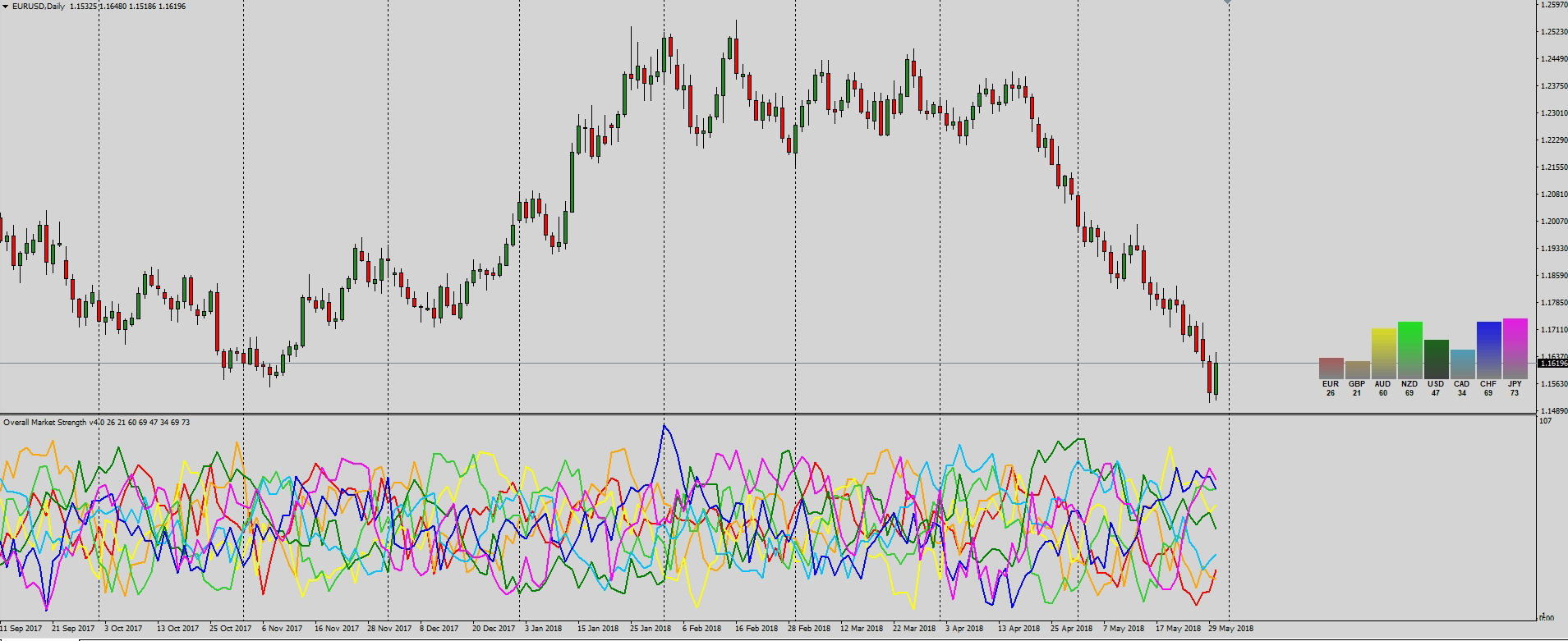
There are 4 bugs to fix
- Indicator applies to the chart fine but doesn't seem to run after initialization.
- Indicator only works on 1 hour charts and higher.
- Indicator "freezes" on start on new period.
- Graphic panel doesn't update to represent indicator value.
Examples of coding include the following
- Custom strength algo
   int   i,pos;

////---
   if(rates_total<=1)
      return(0);

////--- preliminary calculation
   if(prev_calculated>1) pos=prev_calculated-1;
   else  pos=1;

   for(i=pos-1; i<rates_total; i++)
     {double eg = 50 + (((iClose("EURGBP",0,i)-iClose("EURGBP",0,(i+Delta)))/(iHigh("EURGBP",0,(iHighest("EURGBP",0,MODE_HIGH,Delta,i)))-iLow("EURGBP",0,(iLowest("EURGBP",0,MODE_LOW,Delta,i)))))*100)/2;
      double ea = 50 + (((iClose("EURAUD",0,i)-iClose("EURAUD",0,(i+Delta)))/(iHigh("EURAUD",0,(iHighest("EURAUD",0,MODE_HIGH,Delta,i)))-iLow("EURAUD",0,(iLowest("EURAUD",0,MODE_LOW,Delta,i)))))*100)/2;
      double en = 50 + (((iClose("EURNZD",0,i)-iClose("EURNZD",0,(i+Delta)))/(iHigh("EURNZD",0,(iHighest("EURNZD",0,MODE_HIGH,Delta,i)))-iLow("EURNZD",0,(iLowest("EURNZD",0,MODE_LOW,Delta,i)))))*100)/2;
      double eu = 50 + (((iClose("EURUSD",0,i)-iClose("EURUSD",0,(i+Delta)))/(iHigh("EURUSD",0,(iHighest("EURUSD",0,MODE_HIGH,Delta,i)))-iLow("EURUSD",0,(iLowest("EURUSD",0,MODE_LOW,Delta,i)))))*100)/2;
      double ec = 50 + (((iClose("EURCAD",0,i)-iClose("EURCAD",0,(i+Delta)))/(iHigh("EURCAD",0,(iHighest("EURCAD",0,MODE_HIGH,Delta,i)))-iLow("EURCAD",0,(iLowest("EURCAD",0,MODE_LOW,Delta,i)))))*100)/2;
      double eh = 50 + (((iClose("EURCHF",0,i)-iClose("EURCHF",0,(i+Delta)))/(iHigh("EURCHF",0,(iHighest("EURGBP",0,MODE_HIGH,Delta,i)))-iLow("EURCHF",0,(iLowest("EURCHF",0,MODE_LOW,Delta,i)))))*100)/2;
      double ej = 50 + (((iClose("EURJPY",0,i)-iClose("EURJPY",0,(i+Delta)))/(iHigh("EURJPY",0,(iHighest("EURJPY",0,MODE_HIGH,Delta,i)))-iLow("EURJPY",0,(iLowest("EURJPY",0,MODE_LOW,Delta,i)))))*100)/2;


      EURBuffer[i] = (eg+ea+en+eu+ec+eh+ej)/7;

//--- and so
- graphic panel
//+------------------------------------------------------------------+
//|  Create Panel                                                    |
//+------------------------------------------------------------------+
void CreatePanel()
//+------------------------------------------------------------------+
  {
   string name="label_";

   for(int i=1;i<=24; i++)
     {
      string labelname=name+IntegerToString(i,3,'0');

      switch(i)
        {
         case   1:
            createBarGraph(labelname,264,43,30,2);
            break;
         case   2:
            createBarGraph(labelname,232,43,30,2);
            break;
         case   3:
            createBarGraph(labelname,200,43,30,2);
            break;
   //--- and so on
  }
//+------------------------------------------------------------------+

//+------------------------------------------------------------------+
//|  create Bar Graph                                                |
//+------------------------------------------------------------------+
void createBarGraph(string lname,int xdistance,int ydistance,int xsize,int ysize)
//+------------------------------------------------------------------+
  {
   int ypoint=ydistance;
   string name=lname+"_";

   for(int num=51; num>=1; num--)
     {
      createRectangleLabel(name+IntegerToString(num,2,'0'),xdistance,ypoint,xsize,ysize);
      ypoint+=2;
     }
  }
//+------------------------------------------------------------------+

//+------------------------------------------------------------------+
//|  Create Rectangle Label                                          |
//+------------------------------------------------------------------+
void createRectangleLabel(string name,int xdist,int ydist,int xsize,int ysize,)
  {
   ObjectCreate(name,OBJ_RECTANGLE_LABEL,0,0,0);
   //--- and so on
  }
//+------------------------------------------------------------------+

//+------------------------------------------------------------------+
//|  Create Edit                                                     |
//+------------------------------------------------------------------+
void createEdit(string name,int xdist,int ydist,int xsize,int ysize,string text,int fontsize,color clr)
//+------------------------------------------------------------------+
  {
   ObjectCreate(name,OBJ_EDIT,0,0,0);
   //--- and so on
  }
//+------------------------------------------------------------------+
- graphic panel update
      objectSetBlank("label_001");
      objectSetGraph("label_001_",EURBuffer[0],C'128,128,128',C'134,121,121',C'140,115,115',C'147,108,108',C'153,102,102',C'159,96,96',C'166,89,89',C'172,83,83',C'179,77,77',C'185,70,70',C'191,64,64',C'198,57,57',C'204,51,51',C'210,45,45',C'217,38,38',C'223,32,32',C'230,25,25',C'236,19,19',C'242,13,13',C'249,6,6',C'255,0,0');
      ObjectSetString(0,"label_017",OBJPROP_TEXT,DoubleToString(EURBuffer[0],0));
- Set graph
//+------------------------------------------------------------------+
//|  object Set Graph                                                |
//+------------------------------------------------------------------+
void objectSetGraph(string name,double value,color a,color b,color c,color d,color e,color f,color g,color h,color i,color j,color k,color l,color m,color n,color o,color p,color q,color r,color s,color t,color u)
  {
//---
   ObjectSet(name+"51",OBJPROP_COLOR,a);
   if(value > 2.0) ObjectSet(name + "50", OBJPROP_COLOR, a);
   if(value > 4.0) ObjectSet(name + "49", OBJPROP_COLOR, b);
   if(value > 6.0) ObjectSet(name + "48", OBJPROP_COLOR, b);
   if(value > 8.0) ObjectSet(name + "47", OBJPROP_COLOR, c);
   if(value > 10.0) ObjectSet(name + "46", OBJPROP_COLOR, c);
   if(value > 12.0) ObjectSet(name + "45", OBJPROP_COLOR, d);
   if(value > 14.0) ObjectSet(name + "44", OBJPROP_COLOR, d);
   if(value > 16.0) ObjectSet(name + "43", OBJPROP_COLOR, e);
   if(value > 18.0) ObjectSet(name + "42", OBJPROP_COLOR, e);
   if(value > 20.0) ObjectSet(name + "41", OBJPROP_COLOR, f);
   if(value > 22.0) ObjectSet(name + "40", OBJPROP_COLOR, f);

//--- and so on
The full code is 440 lines and will be provided upon expression of interest.
Thank you for your time
Bob
Respondido
1
Classificação
Projetos
507
40%
Arbitragem
159
17%
/
74%
Expirado
99
20%
Carregado
2
Classificação
Projetos
210
40%
Arbitragem
90
20%
/
43%
Expirado
85
40%
Livre
3
Classificação
Projetos
744
56%
Arbitragem
48
31%
/
31%
Expirado
120
16%
Livre
Publicou: 1 código
4
Classificação
Projetos
93
34%
Arbitragem
10
40%
/
30%
Expirado
5
5%
Livre
Pedidos semelhantes
GALAXYGOLD EA
30 - 36 USD
I am looking for a developer to build an Expert Advisor (EA) with strict performance and delivery standards. The EA must demonstrate at least 85%+ win rate in backtests or demo runs. Delivery must be completed within the agreed timeframe (the days we set together). If you cannot meet these requirements, please do not apply. If you foresee delays, you must inform me beforehand — not after deadlines have passed. The EA
I need an experienced trading-data specialist who can help me obtain 3–4 years of historical market data compatible with NinjaTrader 8 . The data will be used for trading strategy development, backtesting, and analysis
I am looking for an experienced MQL5 developer to develop a custom Expert Advisor (EA) for MetaTrader 5, primarily for XAUUSD (Gold) . The EA will be based on a proprietary price-action trading strategy that I have already defined. The objective is to translate this strategy into a fully automated, precise and reliable trading system without modifying its underlying logic. The strategy involves specific
Need aggressive M1 gold scalper rewrite of Dev3 + 8 strategies. INPUTS: RiskPercent=3, TP=400, SL=300, MaxTrades=6, Mode=BOTH, DailyProfit 15%, DailyLoss -10% LOT = Balance * RiskPercent / 1000 - works for Cent R350 and $1000. 8 STRATEGIES any true = open instantly, check 1 sec: 1 EMA8/21 cross 2 RSI14 30/70 + engulf 3 Engulfing candle 4 BB 20,2 breakout 5 FVG grab M1 6 M5 trend + M1 entry 7 Wick rejection >2 8
I need an experienced MQL5 developer to build a prototype MT5 Expert Advisor called RiskLock. The software should enforce user-defined trading risk rules before trades are executed. It should support risk percentage or fixed monetary risk, calculate position size using account equity, entry price, stop loss, tick value and contract specifications, block or reduce oversized trades, and include daily loss limits
I am looking for an experienced MQL5 Expert Advisor (EA) developer to analyze an existing trading setup and develop a similar automated trading robot. Project Overview I have access to a demo trading account where trades are being executed automatically. The trading results look very promising, but I do not know exactly what strategy, logic, indicators, or trade-management rules are being used. I will provide access
Most of the expert is already coded . Create a panel to show the Ratio for the Range . Trigger is based on ratio . Show Distribution / project starts after we clear Distribution
Expert Advisors
300+ USD
double CRiskManager::CalculateLotSize(double slPoints) { double balance = AccountInfoDouble(ACCOUNT_BALANCE); double riskMoney = balance * (m_riskPercent / 100.0); double tickValue = SymbolInfoDouble(_Symbol, SYMBOL_TRADE_TICK_VALUE); double tickSize = SymbolInfoDouble(_Symbol, SYMBOL_TRADE_TICK_SIZE); double pointValue = tickValue / tickSize; double lot = riskMoney / (slPoints * pointValue);
Trading Bot for MT5
30+ USD
i share my strategy i need a bot trending bot fo mt5 . i attached the photo with this it help to make bot. it basicly 1 hours time frame base. i try but failed to make it
Title: Simple background trading bot for my Oanda account (v20 REST API) Overview Hi, I need a simple, lightweight event based standalone trading bot that connects directly to my Oanda account using broker’s standard REST API (V20 account) via VPS The bot just needs to look at group of 5 currency pairs (manually selectable and adjustable) in different 4 baskets, do some basic percentage math every period, and place
Informações sobre o projeto
Orçamento
30+ USD