Tideline Core

Currency strength of the 8 major currencies on one timeframe, with an open formula.

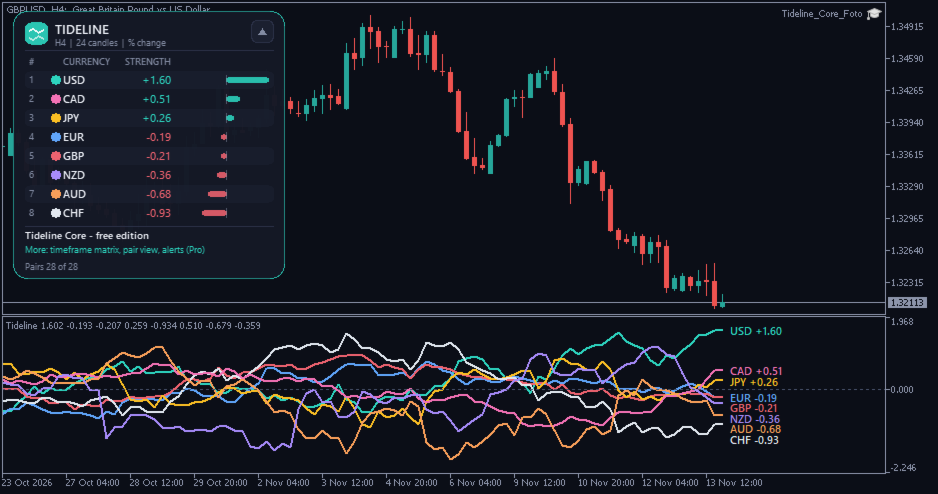
Tideline Core calculates the strength of USD, EUR, GBP, JPY, CHF, CAD, AUD and NZD from the 28 major and cross pairs and draws one line per currency in a sub-window. A panel ranks the eight currencies and shows a bar for each strength value.

It is an analysis tool. It does not open trades and it does not give buy or sell signals.

What you see

  • One line per currency in the sub-window, each with its own colour. A label at the right edge shows rank, currency and value; labels move apart so they do not cover each other.
  • Ranking panel: rank 1 (strongest) to 8 (weakest), the value and a bar for every currency. It can be collapsed and drawn at 90 to 150 % size. Light or dark colours follow your chart.
  • Broker symbols are found automatically, including prefixes and suffixes such as EURUSD.r, EURUSDm or #EURUSD. If a pair is missing at your broker, it is skipped and the panel names the missing pairs.

How it is calculated

For every pair BASE/QUOTE the percent change over the lookback of L candles (default 24) is measured: p = (Close now / Close L candles ago - 1) x 100. The base currency receives +p and the quote currency receives -p. The strength of a currency is the average of these values over all of its pairs (seven pairs when all 28 are available). A currency is therefore strong when it rises against most others. The values are relative: they show how the currencies moved against each other.

No repaint

The value of a closed candle depends only on prices up to that candle (its close and the close L candles before). It is never recalculated afterwards, unless the broker changes its price history. On the running candle the line stays flat at the last closed value. Other symbols are lined up on the time axis of the first available pair, using the last known close.

Quick start

Attach it to any chart of any symbol; the chart only supplies the timeframe. The first start loads the history of up to 28 pairs, so the panel may show "loading history" for a few seconds. Change the lookback in the inputs to make the lines faster or slower.

Editions

This free edition shows 8 currencies on one timeframe. Tideline Currency Strength (Pro) adds a volatility-normalised method, a live candle option, a ranking matrix over four timeframes, a strongest-versus-weakest pair view and alerts for rank changes, crossings and thresholds.

Use in Expert Advisors and other indicators

Buffers 0 to 7 hold the strength of USD, EUR, GBP, JPY, CHF, CAD, AUD, NZD (in this order). Buffers 8 to 15 hold the rank of the same currencies (1 = strongest, 8 = weakest). Empty values mean "no data".

Strategy Tester

The indicator reads other symbols. In the tester the history of those symbols must be available; the tester downloads it on the first run, which can take time, and values may start later. Visual mode draws lines and panel.

FAQ

Why does the panel say "Pairs 24 of 28"? Your broker does not offer all pairs or names them differently. Set prefix and suffix in the inputs if the automatic detection does not find them.

Why do the lines start later than the chart? The number of candles to calculate is an input (default 1,500) and the lookback needs candles before the first value.

Resources: all pairs are read once per new candle, no DLL, no web requests.

Important

An analysis tool, not a signal service. Currency strength describes past price movement and does not predict it. No result is promised. Trading leveraged products carries a high risk of loss.

Input parameters

General: language, candles to calculate (1500), colour theme, label font size (8). Calculation: lookback in candles (24), broker prefix and suffix (empty = automatic). Lines: line width (2), labels on / off. Panel: on / off, start position X / Y, size. Colours: one colour per currency.

Pro edition: Tideline Currency Strength
제작자의 제품 더 보기
Zonecraft Structure
Markus Hentschel
Clear structure. Clean gaps. No repaint. Zonecraft Structure is the free edition of Zonecraft SMC Suite. It draws market structure (BOS and CHoCH on swing and internal level), fair value gaps and trading sessions on your MetaTrader 5 chart and adds a small dashboard with the trend on four timeframes and the status of the latest order blocks. Everything is calculated from closed candles only and drawn as soft, semi-transparent zones with small labels that do not cover each other. It is an analysi
FREE
Daymark Session Timer combines three small tools in one light indicator: a countdown to the candle close, the Sydney, Tokyo, London and New York sessions as soft boxes on the chart, and the previous day high and low. A small panel shows the countdown, which session is open, the spread and the server time. The indicator never trades. Two problems it solves 1. Session boxes in the wrong place. Brokers use different GMT offsets and change them with daylight saving, and the cities change on other da
FREE
Magic Atlas Snapshot reads the closed positions of your account and shows net profit, win rate, profit factor, maximum drawdown and expectancy for each EA. It covers the three magic numbers with the most closed positions. It only reads history and places no orders on a live account. Magic Atlas Snapshot is the reduced version of Magic Atlas Journal. Same source, with the extra views and reports removed. Three problems it solves 1. Several EAs on one account and no idea which one earns. 2. Broker
FREE
Fleetdeck Account Overview is the reduced version of Fleetdeck Multi Account Monitor. It shows up to three MetaTrader 5 accounts that run on your computer in one panel on one chart: total equity, profit of the day and week, open profit and a traffic light for each account. It only reads and never opens, closes or changes a trade. Problems it solves You run several terminals and have to switch windows to see how they are doing. An account goes offline or Algo Trading is off after a restart, and y
FREE
Lotwise Risk Console works out the lot size from the risk you choose and the stop loss line you drag on the chart. You click Buy or Sell, and the manager can then look after the open position: break-even, partial closes, trailing, time exit. It never opens a trade by itself. It takes the lot calculation off your hands for every order. Example on a 10,000 USD account: 1 % risk and a stop of 191 points give 0.51 lot on EURUSD. The panel shows the money at risk (97.41 USD) and the possible gain at
Limitline Prop Monitor shows the limits of a funded or challenge account in one foldable panel on the chart and warns you before a limit is reached. If you enable the trade brake or the emergency stop, it can also close trades and delete orders that would break a limit. It does not open trades by itself. The reason I built it: the daily loss limit usually resets at the firm's own time, not at broker midnight, and open stops and pending orders count too. The panel does that arithmetic for you. In
Event Window Manager reads the economic calendar that is already built into your terminal and opens a protection window around important events. Inside the window it can warn you, block new trades, delete and later restore pending orders, and close positions or move them to break-even. Your other EAs can ask for its state through global variables. It needs no DLL, no WebRequest and no website. The calendar comes through your broker connection. One instance on one chart covers the whole account,
Magic Atlas Journal reads the closed positions of your account and sorts them by magic number, symbol, calendar day, weekday and entry hour. You see profit factor, win rate, drawdown and expectancy for each EA without a spreadsheet. It only reads history and places no orders on a live account. I use it when several EAs run on one account and the broker statement only gives one total. A profitable account can hide one EA that has been losing for weeks, and a flat account can hide one that works.
Twinlane Copier copies positions and pending orders from one MetaTrader 5 terminal to one or more other terminals that run on the same PC or VPS. The same EA works as Master or as Slave, and the terminals exchange a small snapshot file in the shared common folder. No DLL, no web request, no account passwords. It is built so that a copied trade is never opened twice: every copy carries the master ticket in its comment, the slave checks open positions and orders before it sends anything, and a sta
Fleetdeck shows the state of every MetaTrader 5 account that runs on your computer in one panel on one chart. You see total equity, profit of the day and week, open risk and the health of each account at a glance, and you get an alert when something is wrong. Fleetdeck only reads. It never opens, closes or changes a trade. Problems it solves You run several terminals (own accounts, funded accounts, demo) and have to switch windows to see how they are doing. An account goes offline, or Algo Tradi
Magic Brake
Markus Hentschel
Magic Brake watches every EA on your account, one row per magic number. It scores each EA from 0 to 100, tells you why, and, if you want it to, brakes only the EA that misbehaves: it closes its new trades, closes all of its trades, or sets the stop loss it forgot. Default mode is warn only. Problems it solves 1. You run five or ten EAs on one account. One of them starts doubling its lot after every loss or piles up a grid, and you only see it when the account equity has already dropped. 2. Some
Twinlane Copier One copies positions from one MetaTrader 5 terminal to one other terminal on the same PC or VPS. The same EA works as Master or as Slave. The terminals exchange a small snapshot file in the shared common folder. No DLL, no web request, no passwords. Twinlane Copier One is the reduced version of Twinlane Copier. It has no time limit. It is limited in these points: One slave account (the master binds itself to the first slave that answers). Lot mode: master lot multiplied by a fact
FREE
Daymark Chart Companion puts the timing of your trading day on the chart: a candle countdown on five timeframes, the four trading sessions with their average range, the levels of the previous day, week and month, today's range against the daily ATR and your own event times. Everything sits in one calm panel and every part can be switched off. The indicator never trades. It is built for traders who plan entries around session opens, candle closes and key levels. Example from the screenshots: GBPU
Zonecraft SMC Suite
Markus Hentschel
Clear structure. Clean zones. No repaint. Zonecraft SMC Suite 2.0 draws market structure, order blocks, fair value gaps, liquidity, sessions and premium / discount zones on your MetaTrader 5 chart. Every element follows a written rule, is calculated from closed candles only and is drawn as a soft, semi-transparent zone with a small label that does not cover other labels. A dashboard shows the trend on four timeframes, the nearest zones with their status and the reasons behind them, the running s
Anchored VWAP from structure, time and your own click. Anchorline Anchored VWAP draws up to eight volume weighted average price lines at the same time. Each line starts at a point you choose: the last swing high or low, the last BOS or CHoCH, the start of the day, week or month, the London or New York session start, or a candle you click. Standard deviation bands (+/-1 and +/-2) show how far price has moved away from each average. A compact panel lists every anchor with the distance from price i
Currency strength with an open formula: see which of the 8 major currencies leads and which lags. Tideline Currency Strength calculates the strength of USD, EUR, GBP, JPY, CHF, CAD, AUD and NZD from the 28 major and cross pairs and draws one line per currency in a sub-window. A panel ranks the eight currencies, shows a bar for each strength value and compares the rank on four timeframes (default M15, H1, H4, D1). It also names the pair that combines the strongest and the weakest currency, as a d
Anchorline One
Markus Hentschel
One anchor. One band. A clear view. Anchorline One draws one anchored VWAP (volume weighted average price) on your MetaTrader 5 chart and a +/-1 standard deviation band around it. Choose the anchor: start of the day, week or month, or the last swing high or low. A small panel shows the VWAP, whether price is above or below it, and the distance in points and in ATR. It is an analysis tool. It does not open trades and it does not give buy or sell signals. What you see One anchored VWAP line with a
FREE
(Free edition: Pilotdeck One - same panel, risk calculator, one-click trading with drag lines and break-even.) Plan the trade on the chart, see the risk before you click, and let the panel handle the exits. Pilotdeck is a manual trade manager for MetaTrader 5. You drag Entry, Stop Loss and Take Profit lines on the chart; Pilotdeck calculates the lot size from your risk, shows money, percent, R:R and distance live next to each line, and sends the order with one click. After the entry it manages t
Pilotdeck One
Markus Hentschel
Plan the trade on the chart and see the risk before you click. Free. Pilotdeck One is the free edition of the Pilotdeck Trade Manager for MetaTrader 5. You drag Entry, Stop Loss and Take Profit lines on the chart; Pilotdeck One calculates the lot size from your risk, shows money, percent, R:R and distance live next to each line, and sends the order with one click. It only executes what you click or drag. No automatic entry strategy, no grid, no martingale. What you get Modern panel on the chart
FREE
(Free edition: Relaywire Notify - MT5 -> Telegram notifications only, no signal copying.) Read trade signals from Telegram, turn them into orders with your own risk, and get every trade event back on your phone. Relaywire is an Expert Advisor for MetaTrader 5 that connects the terminal with Telegram in both directions: Telegram -> MT5: it reads signal messages, understands BUY / SELL, entry or entry zone, SL, up to 5 targets and management messages ("close half", "SL to entry", "close all", "can
Your MT5 trade events in your own Telegram chat. Relaywire Notify is a free Expert Advisor for MetaTrader 5 that sends trade events of your account to Telegram through your own bot. It does not open, change or close trades on your charts; it only reports. What It Sends Trade opened (direction, lot, symbol, price, SL, TP, ticket, magic, comment). Trade closed with result, distance and reason: take profit hit, stop loss hit, manual, EA, stop out. Partial close. SL / TP modified (bundled per positi
FREE
필터:
리뷰 없음
리뷰 답변