Limitline Prop Monitor
- 유틸리티
- 버전: 1.11
- 활성화: 10

Limitline Prop Monitor shows the limits of a funded or challenge account in one foldable panel on the chart and warns you before a limit is reached. If you enable the trade brake or the emergency stop, it can also close trades and delete orders that would break a limit. It does not open trades by itself.
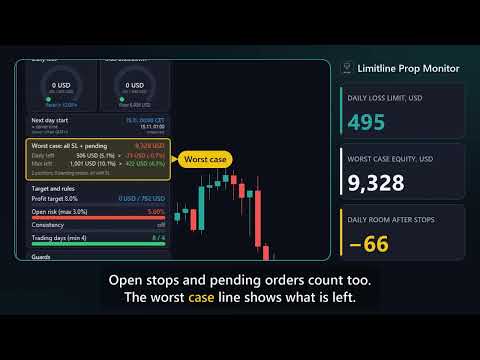
The reason I built it: the daily loss limit usually resets at the firm's own time, not at broker midnight, and open stops and pending orders count too. The panel does that arithmetic for you. In the screenshot the account is 9,895 USD on a 2-Step 5/10 preset. The worst case of all stops would exceed the daily room by 73 USD, so the badge says CAUTION and tells you why.
Three problems it solves
1. Wrong reset time. The daily reset follows your firm's time zone (Europe/Prague, New York, UTC, broker style or a manual server hour), including daylight saving. The panel shows the next day start in firm time and in server time with a countdown.
2. Risk you cannot see. Equity can look fine while all stops and pending orders together would break the limit. The worst-case line counts them all and shows the room left, now and after.
3. Late reaction. Alerts at 50 % of a limit, an optional trade brake for new trades that would break a limit, and an emergency stop at a percentage you choose.
What the panel shows
Header: preset name, account size and a status badge. LOCKED (red) when the emergency stop is active. CAUTION (yellow) if a limit is 50 % or more used, the worst case would break the daily or maximum limit, open risk is above your maximum, or a position has no stop loss. Otherwise SAFE (green). A short reason is shown under the badge. The badge is informational only.
Gauges: daily loss and maximum drawdown, in account currency and as percent of the limit. Green below 50 %, yellow from 50 %, red from 80 %.
Next day start: firm time and server time, with the measured server offset.
Worst case: equity if every stop loss is hit and every pending order fills and runs to its stop. Remaining daily and maximum room in money and percent. Positions or orders without a stop are flagged as UNLIMITED.
Target and rules: profit target, open risk against your maximum, consistency (best day as share of total profit, can be switched off), trading days against the minimum.
Guards: news warning (built-in MQL5 calendar, display only), weekend close, emergency stop and trade brake status, last brake action.
Functions
1. Presets: Custom, 2-Step 5/10, 2-Step 4/8, 1-Step 3/6 (trailing, locks at start balance), 1-Step 4/6, Instant 3/5. With Custom you enter your own values.
2. Daily loss from the firm's day start. Base: balance at day start, or the higher of balance and equity. The limit is a percent of the initial account size.
3. Drawdown types: static, trailing from highest equity, trailing from highest balance, or trailing equity that stops at the initial balance.
4. Profit target, minimum trading days, consistency check, open risk check.
5. Trade brake (on by default): a new position or pending order whose worst case would push the account below the remaining limit, minus a safety buffer, is closed or deleted and reported. It does not check later changes of an existing stop. Items without a stop cannot be rated by it. For those there is an option to close positions without SL after N seconds (off by default).
6. Alerts at 50 % of a limit and when open risk is above your maximum: alert window with sound and push to the MetaTrader app. Identical messages are not repeated within 10 minutes.
7. Emergency stop: at your chosen percentage of the daily or maximum limit (default 80) all positions are closed and pending orders deleted. New trades are then closed again. A lock from the daily limit ends at the next day start. A lock from the maximum drawdown stays until you clear it with an input.
8. Optional Friday close at a server time.
9. State is stored per account in terminal global variables and survives a restart.
10. English or German, panel corner and offset, scale 0.6 to 1.6, foldable.
Quick start
1. Attach the EA to one chart and allow algo trading (needed for brake and emergency stop).
2. Choose the preset closest to your firm. Set the initial account size, or leave 0 to use the balance seen at first start.
3. Choose the time zone and the reset hour of your firm and compare the shown server time with its rules.
4. For push messages enter your MetaQuotes ID in the terminal options.
5. Optional: set a challenge start date, so only later deals count for trading days and consistency.
FAQ
Is it tied to a prop firm?
No. Presets are approximations of common rule sets. Every firm defines daily loss base, drawdown type, reset time, news and weekend rules differently. Check your firm's exact rules and use the custom values where needed. The product is not affiliated with any firm.
Does it guarantee that I keep within the rules?
No. Gaps, slippage, a lost connection or a closed market can still break a limit. The worst case assumes stops are filled at their price.
Does it watch trades of other EAs?
Yes, the whole account, including manual trades. One instance per account is enough.
Does it work in the Strategy Tester?
The panel is shown. News is not available there. For the automatic Market check the tester version opens and closes one minimal test trade. That never happens on a demo or live chart.
Is the server offset reliable?
It is measured from the terminal clock and the server clock and re-checked every minute. If your PC clock is wrong the panel says so.
Trading conditions
Works on any symbol and timeframe. Protection runs while the EA is attached and algo trading is on. Closing needs a connection and an open market.
Important
Helper tool. Trading carries a high risk of loss. Values on screen are no promise of results.
Input parameters
Rules: rule preset, initial account size, custom daily loss %, custom daily base, custom drawdown %, custom drawdown type, profit target % (0 = none), minimum trading days, consistency best-day maximum % (0 = off), maximum open risk % (3.0), challenge start. A preset overrides the custom daily loss, base, drawdown and type.
Day start: firm time zone, daily reset hour (0 to 23).
Trade brake and worst case: trade brake on or off, safety buffer % (0.5), close positions without SL after N seconds (0 = off).
Protection: emergency stop on or off, trigger % (80), close new trades after stop, clear existing lock, Friday close with hour and minute in server time, news warning and window in minutes (30).
Display: language, panel corner, X and Y distance, scale, start folded, push notification, alert window and sound.