Margin Level Relief Guard
- 유틸리티
-
AL MOOSAWI ABDULLAH JAFFER BAQER
 To trade successfully we need to go through the proven path that others had gone and reached!
Here are 17 quotes from such successful investors:
1- Limit your size in any position so that fear does not become the prevailing instinct guiding your judgment.
Joe Vidich - 버전: 1.0
- 활성화: 5
Run it free first: open Margin Level Relief Guard in the Strategy Tester with visual mode on. Its demo trades push the margin level under the action level on purpose, and you can watch each planned slice appear on the panel, then the slice itself, then the level climbing back.
THE BROKER'S STOP-OUT DOES NOT ASK WHICH POSITION YOU WOULD GIVE UP. THIS GUARD DOES.
Margin Level Relief Guard is a utility Expert Advisor for MetaTrader 5. It places no entries of its own on a real account. It reads your account margin level, and when that level sinks to the point you set, it reduces margin in small steps, by your rule, and stops when the level is back at your target. The alternative is leaving the job to a stop-out engine that closes positions by its own logic at the worst moment of the day.
In short
• Three levels you set: warning, action, target.
• Two modes: close slices, or alert only as a full preview.
• You choose who goes first: worst loser, largest margin or largest volume.
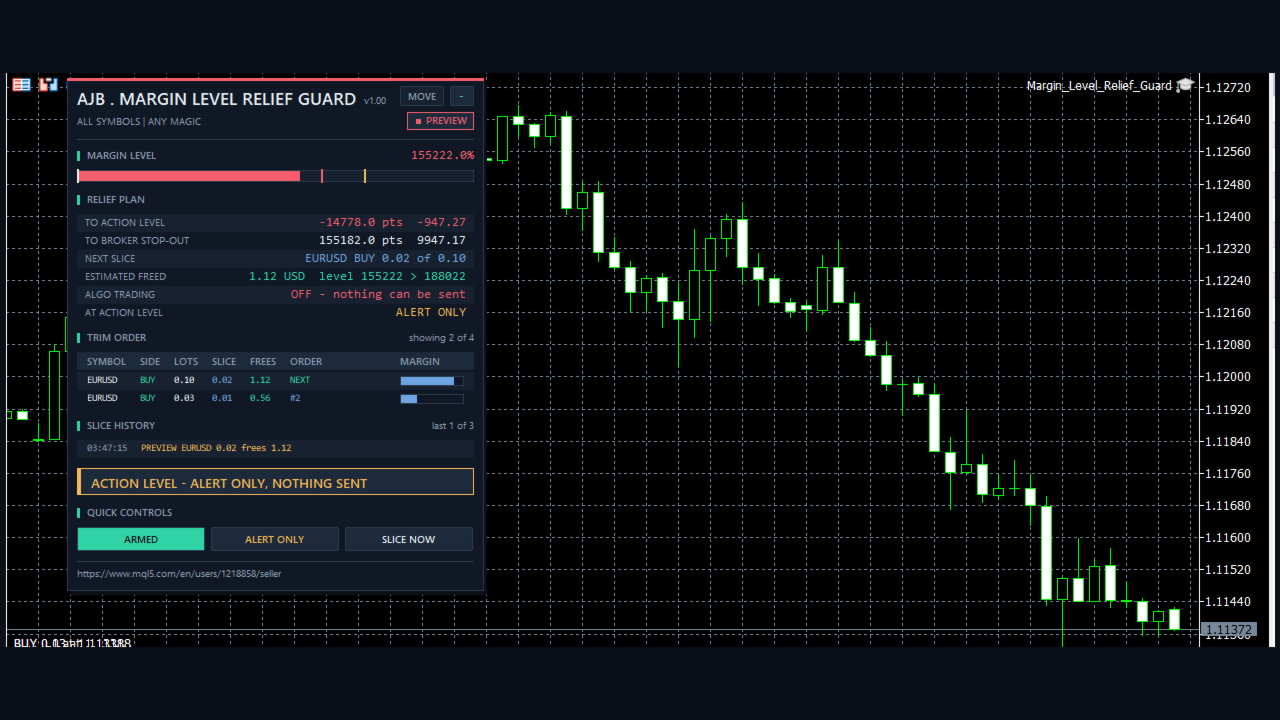
• The exact next slice and its estimated freed margin are on the panel before anything happens.
• The panel also shows your distance to the action level and to the broker's own stop-out, in level points and in account currency.
• Winners can be protected, hedge legs that would not lower the margin are skipped, and no position is ever left below the minimum volume.
• Not a grid, no martingale, no averaging, no DLLs, no web requests, no extra files.
START HERE
Attach it to one chart, for example EURUSD H1. One copy covers all symbols of the account by default. First set it to Alert only (preview) and turn on Algo Trading. Now look up your broker's stop-out on the panel and pick levels that make sense for how you trade: the defaults are warning 300, action 200, target 260. Watch the RELIEF PLAN block for a few sessions. When the planned slices look like what you would do yourself, press the mode button so it reads CLOSE SLICES.
Why slices and not one big exit
A margin call rarely feels dramatic while it builds. Several positions drift, free margin thins out, and the level slides from comfortable to tight while you are away. By the time you look, the choices are bad: close something large in a hurry, or hope. A stop-out removes the hurry and also the choice. A small reduction taken early costs less decision than a big one taken late, and because each slice takes effect before the next is planned, the guard stops as soon as enough has been done rather than guessing an amount up front.
What one episode looks like
Warning. The level touches your warning value. You get an alert once, and the next slice is already planned on the panel. Nothing is closed.
Action. The level reaches your action value. An episode begins. The first slice goes out immediately if a position qualifies.
Pause. The guard waits your chosen seconds, reads the account again, and plans fresh from what is true now.
Repeat. Slice after slice, always the first position in your priority order that can really be reduced.
Target. Once the level is back at the target, trimming ends and the history records it. The next episode needs the level to fall to the action value again.
The preview, in detail
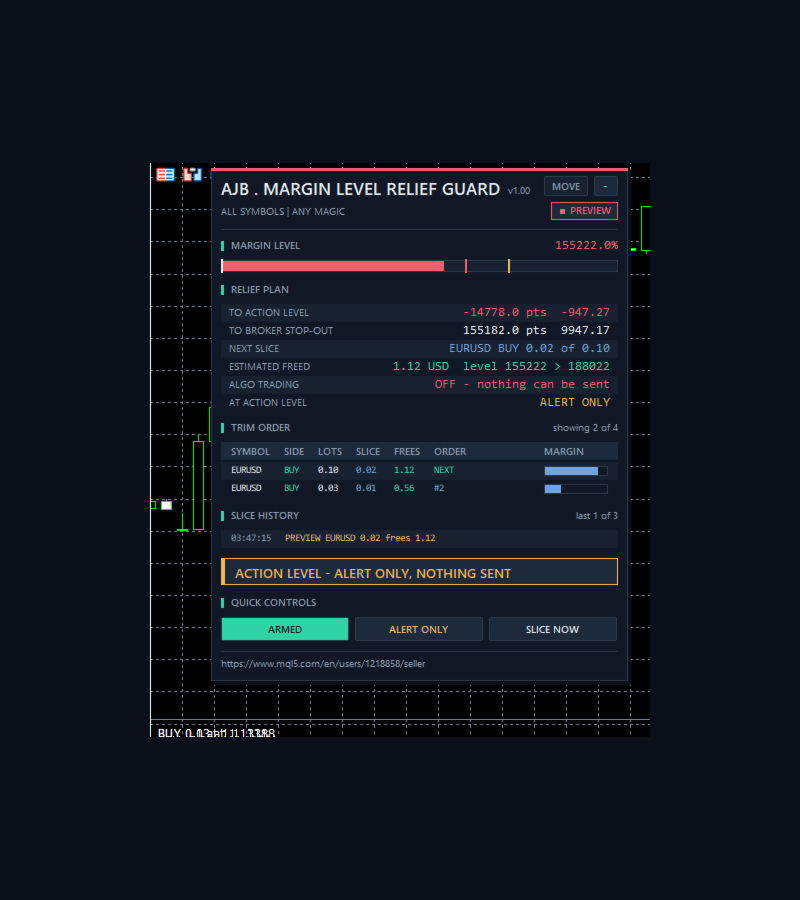
On every pass, once a second and whenever the book changes, the guard works out the slice volume for each position in scope and the margin that slice should release. It uses OrderCalcMargin for the whole book of that symbol, before and after, so the hedged part is priced the way the symbol defines it. The panel then shows NEXT SLICE, ESTIMATED FREED and the level expected afterwards. In alert-only mode this is the whole product: you see precisely what would have been done, and nothing is sent.
In our tester runs the estimate tracked what really happened closely. On EURUSD at 10000, 192 slices were estimated to free 76866.79 and really freed 76867.32. On XAUUSD at 10000, 277 slices were estimated at 106073.96 and really freed 106076.27. That is one tester, on one symbol setup. A broker with volume-based margin tiers, pending orders holding margin, or a maintenance margin that differs from initial margin can move the real number away from the estimate.
Inputs, every one explained
MARGIN LEVELS
InpWarnLevel = 300. Margin level in percent where you are warned once. Must not be below the action level.
InpActionLevel = 200. Level where trimming starts. Keep it well above your broker's stop-out, because a fast market can cross a small gap between two passes. The guard warns you if it is not above the stop-out.
InpTargetLevel = 260. Level where trimming stops. Must be above the action level. The gap between the two keeps the guard from starting and stopping repeatedly.
InpMode = Close slices of positions. Alert only (preview) changes nothing and reports the slice it would have made.
SLICES
InpSlicePercent = 25. Slice size as a percent of the position's current volume, rounded down to the volume step. Each slice is therefore a share of what is left, and 100 means closing the whole position.
InpSliceGapSec = 30. Seconds between slices, from 1 to 3600. Longer gives the level time to settle, shorter acts harder.
InpPriority = Worst loser first. Ranks by profit plus swap. Largest margin first releases the most per slice across different symbols. Largest volume first ranks by lots.
InpProtectWinners = true. A position in profit, counting swap, is never sliced. If only winners remain the panel says nothing can be sliced, and you decide.
InpCloseWholeAtMin = false. A position at or near the minimum volume cannot be cut without leaving less than the minimum. With false it is skipped and marked AT MIN. With true it is closed whole.
InpMaxSlices = 20. Most slices in one episode, so a misjudged setting cannot trim an entire book without you noticing. 0 removes the limit. Once reached, the panel says so, and the guard waits until the level reaches the target.
InpSlippagePoints = 30. Maximum slippage accepted on a slice.
FILTER - WHICH POSITIONS MAY BE SLICED
InpSymbolScope = All symbols. Chart symbol only slices the chart symbol alone. The margin level itself is always the whole account.
InpMagicFilter = Any magic. Only manual trades means magic 0. Only the magic number limits slicing to one Expert Advisor.
InpMagic = 0. The number for that last choice.
ALERTS
InpAlertPopup = true. Pop-up alert in the terminal.
InpAlertPush = false. Push notification to the MetaTrader app, which must be enabled in the terminal options.
InpFailAlertAt = 3. Alert once after a position has failed this many attempts.
PANEL
ShowPanel = true. Show or hide the panel. The guard works either way.
PanelX = 12, PanelY = 15. Offset from the top left corner. The MOVE button lets you drag it.
PanelFontSize = 9. Base font size.
MaxTableRows = 5, MaxHistoryRows = 4. Rows in the trim order table and the slice history. On a short chart the panel drops its least important rows first.
STRATEGY TESTER DEMO
InpTesterDemo = true. In the Strategy Tester only: demo positions sized to take the margin level just under your action level, so the slicing really runs. Every order needs its margin times 1.5 in free margin. Every third cycle adds a small opposite leg to show the hedge check. Positions are closed after 30 minutes, and no new cycle starts once the balance is 20 percent down. On a deposit too small for the minimum volume, no demo trades open: at leverage 100 this happened at 10 on EURUSD, while 20 still produced trades. This code never runs on a real or demo account chart.
The panel
MARGIN LEVEL shows the live level with a bar, marked in red for your action level, amber for the warning and white for the broker's stop-out. RELIEF PLAN lists the distance to the action level and to the stop-out, the next slice, the estimated freed margin with the level expected after it, Algo Trading on or off, the mode, failed sends, totals, your levels and slice rule, equity and margin, positions in scope and how winners are treated. TRIM ORDER shows each position in the order it would be cut: lots, slice, margin freed, its place or a state, and its share of the margin in use. States are AT MIN, WINNER, HEDGE LEG, MARKET SHUT, TRADE OFF, FROZEN, NO DATA and RETRY. SLICE HISTORY keeps warnings, actions, slices and target hits with server time. QUICK CONTROLS: ARMED or PAUSED, the mode button, and SLICE NOW, which sends one planned slice by hand once the level is at or under the warning. The right side of the chart stays clear.
What it cannot do
This is a reduction tool, and it has real limits. Please read them.
Gaps and fast markets can beat it. The guard reads the account about once a second and sends one slice at a time with a pause between. If price jumps, the level can go from above your action value to the stop-out before enough has been sliced, or without a single slice. A stop-out can still happen.
Closing is real. A slice turns part of a floating loss into a booked loss. Even if the market then returns, that part does not come back. Slices can also pay spread and commission, which adds up with very small gaps.
A slice does not stop further losses on what stays open. It reduces margin use and exposure, and the rest keeps moving.
It can run out of options. If everything left is a protected winner, at minimum volume or a hedge leg, nothing is sent, and the panel tells you so.
It only works while it runs. With the terminal off, Algo Trading off, a closed market or a disabled symbol, it sends nothing. Keep the terminal running, for example on a VPS. Without account data it decides nothing at all.
Its memory is short. History, totals, PAUSED and a mode changed by button live in memory and reset on restart. If the terminal restarts while the level sits between action and target, the guard stays idle until the level is at the action value again.
The margin estimate is an estimate. See the preview section above.
What was and was not tested
Tested in the Strategy Tester on a hedging account, on EURUSD H1 and XAUUSD H1 from 1 to 20 June 2026, with deposits from 10 to 10000 and leverage 100: slices, alert-only mode, all three priorities, protecting winners on and off, the minimum volume skip, closing whole at minimum, a 100 percent slice, the slice limit, a magic filter, and a lower action level. The hedge leg skip occurred in those runs and on a chart. No send failed in any run. Everything in that list happened in a simulation, with the tester's prices and fills.
Not tested at the time of writing: a real slice on a live or demo broker, a netting account, a stop-out in a real fast market, retry after a broker refusal, a filling mode refusal, chart symbol scope excluding another symbol, FROZEN and TRADE OFF states, pop-up and push alerts, the panel buttons, and a terminal restart. These paths exist in the code and are described by design. Please try them on a demo account with your own broker before you rely on them.
Try it in the Strategy Tester
Choose Margin Level Relief Guard, EURUSD or XAUUSD, H1, a deposit of a few hundred or more, visual mode, and press Start. Then change the priority, or set alert only, and compare what the panel planned with what it did.
If the guard changed how you handle a tight account, or you see something it should do better, an honest review on the product page helps other traders decide and shows me what to improve next.