Pivot Quarter Grid
- Experts
- 버전: 1.61
- 활성화: 5

Pivot Quarter Grid – daily pivot level trading system for MetaTrader 5
Pivot Quarter Grid places pending limit orders at daily pivot support and resistance levels on forex pairs. The name refers to the quarter-step levels between the main pivot levels. Each order has a take profit and a stop loss from the start. With the default settings it trades one support and one resistance level per day with a fixed lot. Additional levels can be enabled; they use a lot progression, described below together with its risk.
How it works
1. Daily levels. From 01:00 server time (adjustable) the EA reads the previous daily bar and calculates the pivot point, four support and four resistance levels. Five formulas are available: Classic, Traditional, Fibonacci, Woodie and Camarilla. Intermediate levels at quarter, half and three-quarter distances between the main levels are available as well.
2. Range filter. The day is skipped if the previous day's range is below or above the configured percentage of price (0.3 % to 3.0 % by default).
3. Order placement. Buy Limit orders are placed at the enabled support levels and Sell Limit orders at the enabled resistance levels. The take profit of each order is two grid steps towards the pivot point: for S1 and R1 this is half-way to the pivot point, the two levels nearest to the pivot target the pivot point itself. The stop loss is common to all orders of one side and lies beyond the outermost grid level (below S4-0.25 for buys, above R4+0.25 for sells). Its distance can be scaled with SLMultiplier.
4. Daily packages. The orders of one day form a package. Open positions are kept until their take profit or stop loss is reached. This can take several days and positions can stay open over the weekend. At the cleanup time (22:00 server time by default) the pending orders of the current day are deleted on the side that has no open position.
5. Exit on take profit. When a position reaches its take profit, the other open positions of the same day's package are closed as well (basket exit). The remaining pending orders of the package are deleted if the take profit occurred beyond the level set by TPThresholdLevel or after the cleanup time. With CloseAllOnTP enabled, only the side where the take profit occurred is closed and its pending orders are deleted immediately.
Default settings
- Enabled levels: S1 (Buy Limit) and R1 (Sell Limit) only. At most two pending orders per day, no lot progression.
- BaseLot 0.01. The lot of S1 and R1 is twice the BaseLot, 0.02 lot at the default.
- UseSL true, SLMultiplier 1.0, CloseAllOnTP false, DeleteUnaffordablePending true.
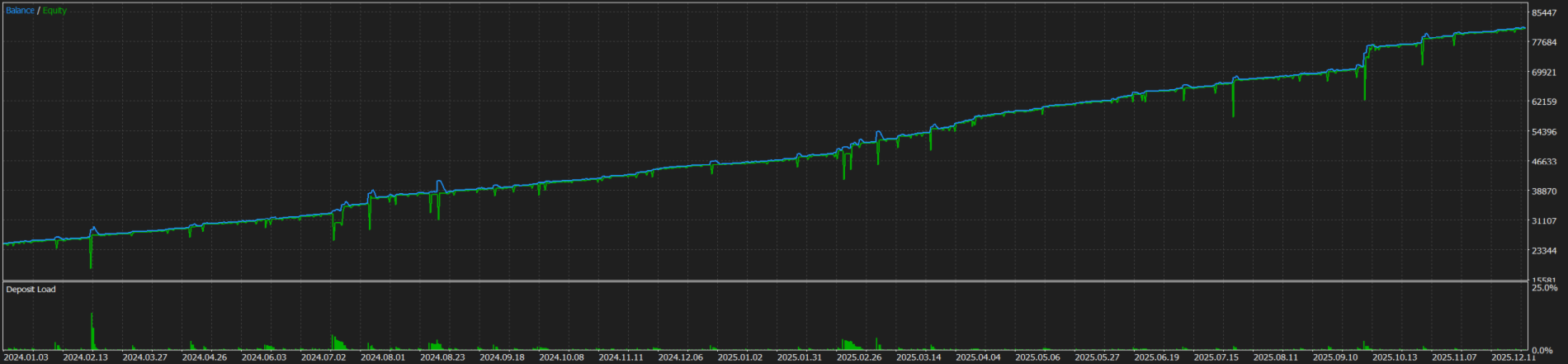
- These are the settings validated for the Market and they can be tested in the demo version without changes.
Optional extended grid and its risk
Up to 16 levels per side can be enabled: the main levels S1 to S4 and R1 to R4, their quarter, half and three-quarter steps, and S4-0.25 / R4+0.25. Each main level deeper doubles the lot: S1 2x BaseLot, S1-0.5 4x, S2 8x, S2-0.5 16x, S3 32x, S3-0.5 64x, S4 128x. Intermediate quarter levels use QuarterLotMultiplier (0.5 by default) of the neighbouring level. This is a martingale type lot progression. If the price moves through the whole grid, all levels are filled against the move and the common stop loss closes them together. With all levels enabled at BaseLot 0.01 the open volume of one side is about 3.8 lots and the loss at the stop loss on EURUSD is in the order of 1,000 to 2,000 USD, depending on the daily range (indicative value). Enable additional levels only with a deposit and leverage sized for this and test the configuration in the Strategy Tester first.
Built-in controls
- Stop loss on every order, common per side, adjustable with SLMultiplier.
- Daily range filter.
- Before each order the EA checks the symbol's volume limits, the minimum stop distance, the allowed number of pending orders and whether the free margin covers the new order together with the pending orders already placed on the same side. Orders that do not pass are skipped and logged.
- DeleteUnaffordablePending: pending orders whose activation could no longer be covered by the free margin are deleted.
- RequireCloseToTrade: no new orders while positions from previous days are open.
- Chart panel with today's result and the expected result at the nearest take profit, and a STOP ALL button that closes all positions and deletes all pending orders of the chart symbol.
These controls prevent order errors and margin problems. They do not remove market risk: a stop loss event with the extended grid is a large loss by design.
Recommendations
- Symbols: forex majors and crosses. Not intended for metals, indices or crypto; the level distances and the lot progression are sized for forex volatility.
- Chart timeframe: any. The EA uses M1 and D1 data internally.
- Account type: hedging recommended. On netting accounts the positions of one symbol are merged and the take profit and stop loss of the last filled order apply to the whole net position.
- Deposit per symbol and per 0.01 BaseLot: default settings from 1,000 USD, extended grid from 10,000 USD. Several correlated symbols add up; size the account for the sum.
- Leverage: default settings 1:100 or higher, extended grid 1:500 or higher.
- ECN account with low spread, VPS for continuous operation.
- The levels depend on the broker's daily bars. Results differ between brokers with different server time and quotes.
- Strategy Tester: use "Every tick based on real ticks" or "1 minute OHLC". "Open prices only" does not model the intraday order fills.
Inputs
- Trading time: PivotCalculationHour, TradeStartHour, TradeStartMinute, TradeEndHour, TradeEndMinute, CleanupHour, CleanupMinute
- PivotType: Classic, Traditional, Fibonacci, Woodie, Camarilla
- BaseLot, QuarterLotMultiplier, DeleteUnaffordablePending
- UseRangeFilter, MinRangePercent, MaxRangePercent
- UseSL, SLMultiplier, TPThresholdLevel, RequireCloseToTrade, LevelAdjustmentPoints, CloseAllOnTP
- UseS1 ... UseR5_Quarter: 32 switches for the individual levels
- Panel: ShowProfitDisplay, corner, colours, ExpectedCalcMode
Testing
The demo version works in the Strategy Tester. [Monthly rental is available.]
Risk notice
This is a counter-trend system. It sells at resistance and buys at support and holds the positions until the take profit or the stop loss. In a strong trend it accumulates losing positions until the stop loss is reached. Backtest results are not real trading results and do not predict future performance. Trade only with money whose loss you can afford.
Support is provided through the product comments and the mql5.com messaging system.