TWR Gold Intelligence Pro MT5
- 지표
- 버전: 10.213
- 업데이트됨: 17 9월 2026
- 활성화: 5

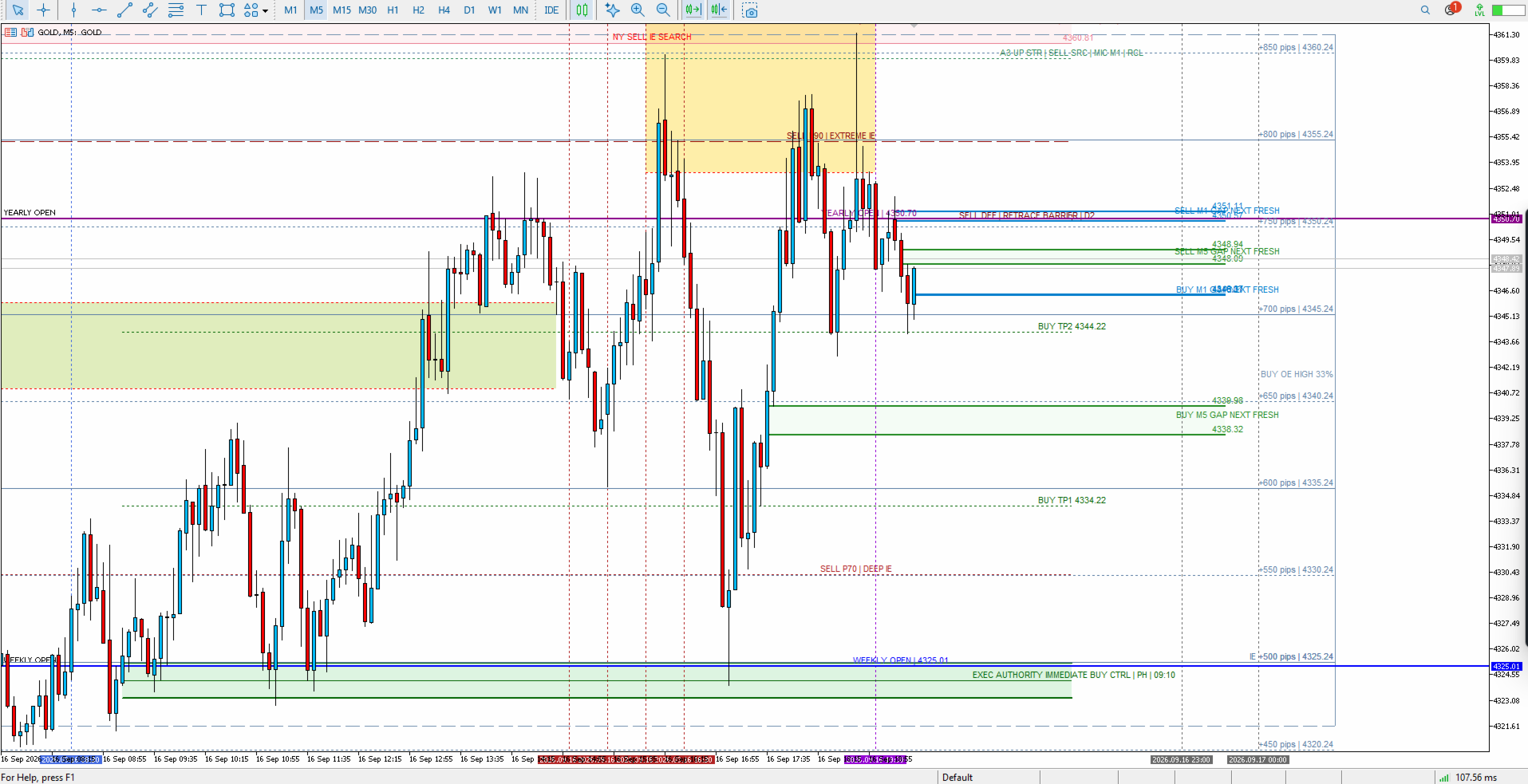
TWR Gold Intelligence Pro is an XAUUSD chart-analysis indicator for traders who want a structured view of how the Gold trading day is developing.
The indicator combines daily-open context, Initial Extreme state tracking, structure and reclaim information, defence zones, delivery ladders, session timing and chart-based trade-action labels in one workspace.
The purpose of the product is analytical. It does not guarantee market direction or profitability, and it does not place trades automatically.
Main functions
- Daily Open and weekly context.
- Initial Extreme search, provisional state and hard-lock state.
- Structure, sweep and reclaim context.
- Buy-side and sell-side defence zones.
- IE-anchored delivery ladder and 500/1000-pip milestone levels.
- Session and timing references for the Gold trading day.
- OHLC/OLHC path watch and unresolved/conflict states.
- Immediate and reclaim chart signals after a qualified IE + defence setup.
- Entry and stop-loss lines for visual planning.
- Historical BackDays review for studying prior trading days.
- MT4/MT5 editions with the same core analytical workflow.
Signal behavior
A signal is not generated simply because price reaches a level. The indicator waits for its existing IE and defence logic to produce a qualified context. Depending on the state, the chart can display an Immediate Buy/Sell or Reclaim Buy/Sell label together with an Entry line and a Stop Loss line.
The signal layer is a visual decision-support tool only. Orders are not opened automatically.
Recommended use
The product is designed primarily for XAUUSD intraday analysis. It is best used on charts where sufficient M1 history is available because several internal states use lower-timeframe information even when the indicator is attached to a higher chart timeframe.
Installation
1. Install the Market product through the MetaTrader terminal.
2. Open an XAUUSD chart.
3. Attach TWR Gold Intelligence Pro to the chart.
4. Allow the indicator to load the required history.
5. Keep the default settings for the first run.
6. Use the input groups only when you understand the related display or research function.
Important
The indicator is a market-analysis tool. It does not guarantee future prices, trading results or profit. All trading decisions and risk management remain the user's responsibility.
The indicator combines daily-open context, Initial Extreme state tracking, structure and reclaim information, defence zones, delivery ladders, session timing and chart-based trade-action labels in one workspace.
The purpose of the product is analytical. It does not guarantee market direction or profitability, and it does not place trades automatically.
Main functions
- Daily Open and weekly context.
- Initial Extreme search, provisional state and hard-lock state.
- Structure, sweep and reclaim context.
- Buy-side and sell-side defence zones.
- IE-anchored delivery ladder and 500/1000-pip milestone levels.
- Session and timing references for the Gold trading day.
- OHLC/OLHC path watch and unresolved/conflict states.
- Immediate and reclaim chart signals after a qualified IE + defence setup.
- Entry and stop-loss lines for visual planning.
- Historical BackDays review for studying prior trading days.
- MT4/MT5 editions with the same core analytical workflow.
Signal behavior
A signal is not generated simply because price reaches a level. The indicator waits for its existing IE and defence logic to produce a qualified context. Depending on the state, the chart can display an Immediate Buy/Sell or Reclaim Buy/Sell label together with an Entry line and a Stop Loss line.
The signal layer is a visual decision-support tool only. Orders are not opened automatically.
Recommended use
The product is designed primarily for XAUUSD intraday analysis. It is best used on charts where sufficient M1 history is available because several internal states use lower-timeframe information even when the indicator is attached to a higher chart timeframe.
Installation
1. Install the Market product through the MetaTrader terminal.
2. Open an XAUUSD chart.
3. Attach TWR Gold Intelligence Pro to the chart.
4. Allow the indicator to load the required history.
5. Keep the default settings for the first run.
6. Use the input groups only when you understand the related display or research function.
Important
The indicator is a market-analysis tool. It does not guarantee future prices, trading results or profit. All trading decisions and risk management remain the user's responsibility.