Kalman Compass
- Experts
- 버전: 1.55
- 업데이트됨: 22 10월 2026
- 활성화: 10

Kalman Compass — A rule-based trend-following EA
Kalman Compass is not a "black box" and not a gimmick. It uses no martingale, no grid, no averaging-down, and no hidden risk multiplication. It is simply the automation of a transparent, repeatable, discretionary method — a set of rules a disciplined trader could in principle follow by hand. Every entry and exit follows the same logic every time.
How it works
Kalman Compass combines two well-established concepts into one self-contained system (no external indicators required):
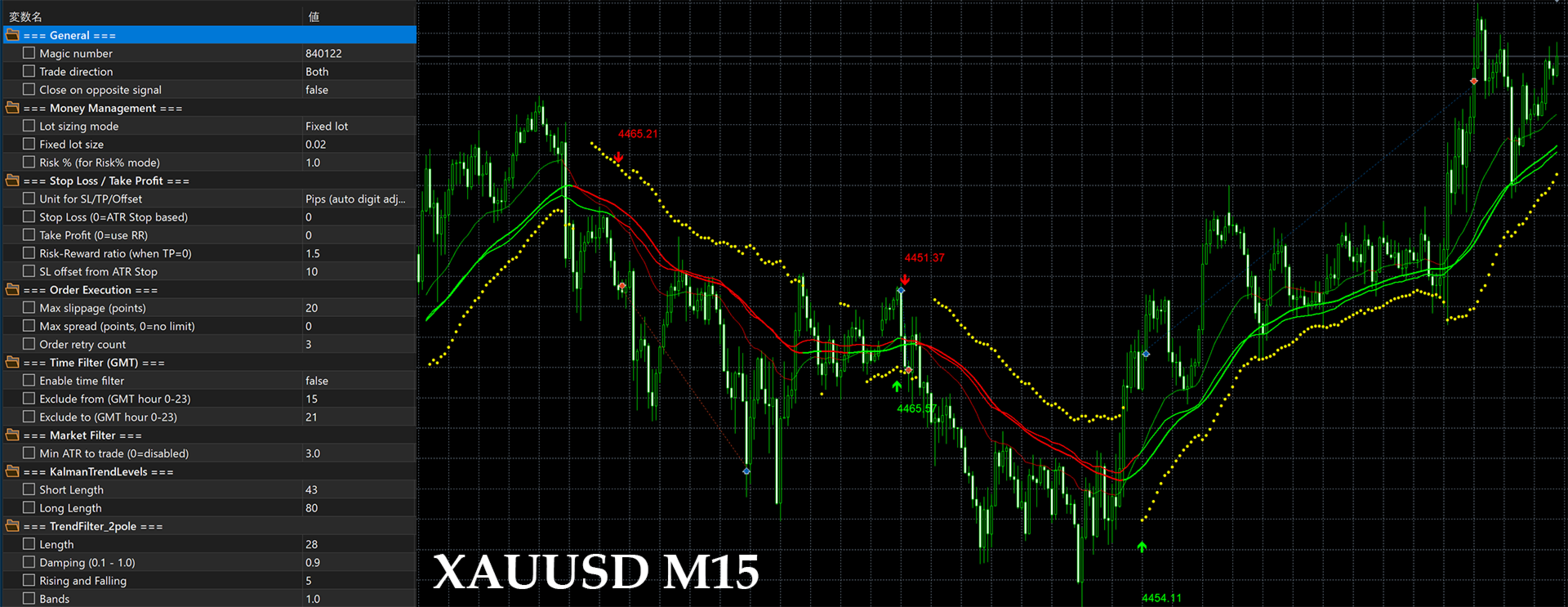
- Dual Kalman trend lines. A fast and a slow Kalman filter are applied to price. The Kalman filter is a proven mathematical smoothing technique (used in aerospace and navigation) that tracks the underlying trend while suppressing noise. A crossover of the fast line over the slow line signals a potential trend shift.
- Two-pole trend filter confirmation. Each crossover must be confirmed by an independent two-pole filter that classifies the market as rising or falling. A long is taken only when the fast line crosses above the slow line and the trend filter is bullish; a short is the mirror image. This dual confirmation is designed to reduce false signals.
- ATR-based stops. Stop-loss placement is derived from an ATR "stop" level — a volatility-based reference — rather than a fixed distance, so risk adapts to current market conditions. Take-profit can be set by a risk-reward ratio or fixed distance.
Built for trending, volatile markets
Kalman Compass is a trend-following system. Like all trend-following approaches, it performs best when the market actually trends and when volatility is sufficient to sustain those moves. It is not designed to scalp quiet ranges.
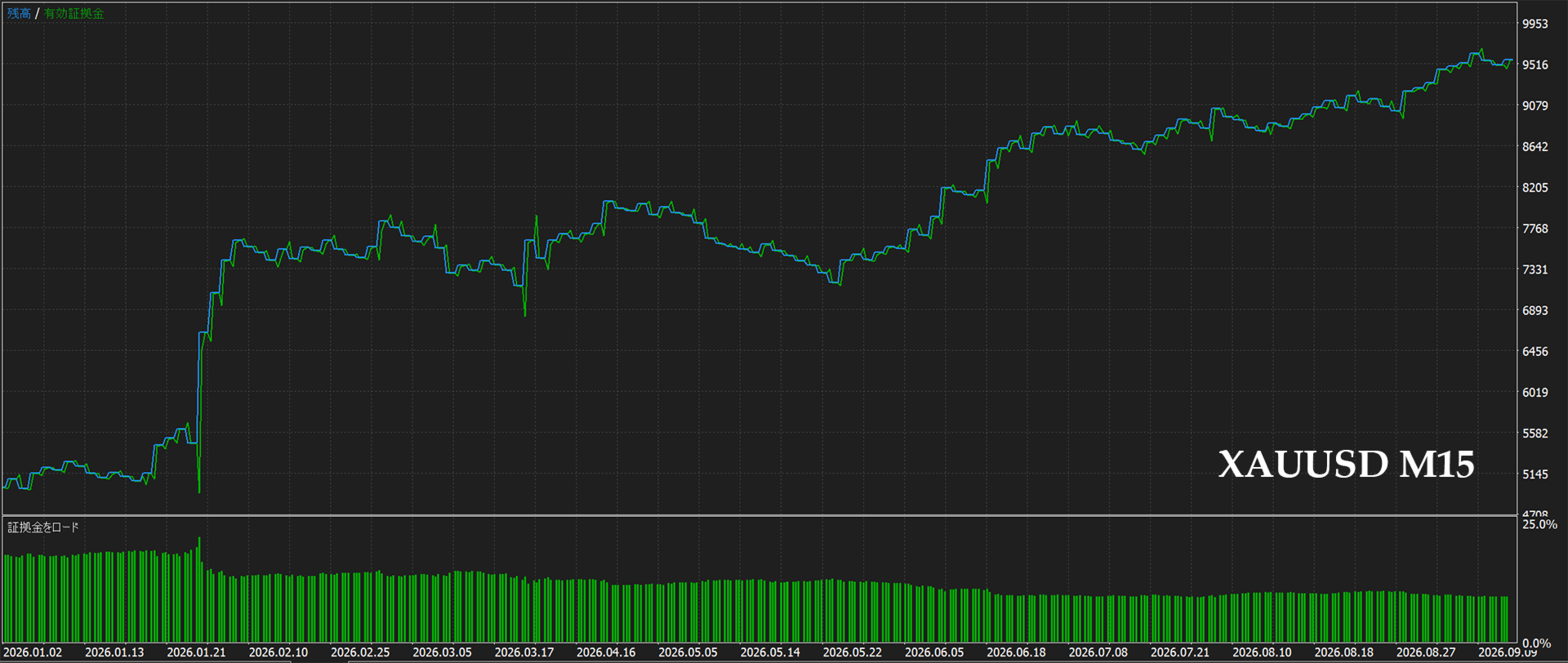
Because of this, instruments and periods with strong directional movement suit it well. XAU/USD (Gold) M15, with its pronounced trends and high volatility, is a natural fit — and the strong trending conditions seen in Gold during 2026 are exactly the environment the strategy is built for.
The ATR market filter
Trend-following strategies typically struggle in low-volatility, choppy ranges. Kalman Compass includes an ATR-based market filter that suppresses entries when volatility falls below a configurable threshold. This helps the EA stand aside during sideways, low-energy conditions and focus on the environments where its edge is strongest — improving the consistency and risk profile of the results rather than chasing every signal.
Suitable for prop-firm style trading
Kalman Compass is not built to "swing for the fences" with one oversized trade. It aims for consistency: a steady, rule-based process with volatility-adaptive risk control and a market filter that avoids poor conditions. This disciplined, drawdown-conscious character makes it well suited to proprietary-trading (prop firm) evaluations and funded accounts, where demonstrating a consistent, controlled trading process matters as much as raw return.
Key features
- Fully self-contained — the two indicators are built into the EA; no extra files to install
- Works on any broker: automatic digit/pip detection and stop-level compliance
- Money management: fixed lot or risk-percentage sizing, with a built-in margin check
- GMT-based time filter (broker-independent) and ATR market filter
- Optional reverse-signal close (flip on opposite signal)
- Fully configurable Kalman and trend-filter parameters
- Clean on-chart visualization of the internal lines and levels
Main settings
- Trade direction Both / Buy / Sell
- Close on opposite signal false / true When the opposite signal is issued, close the current position and enter the opposite entry (reverse entry).
- Lot sizing mode Fixed lot / Risk % of balance
- Fixed lot size Lot size when the Lot sizing mode is Fixed lot
- Risk % Risk % when the Lot sizing mode is "Risk % of balance"
- Unit for SL/TP/Offset Pips / Points Setting unit for SL/TP/SL offset width
- SL Setting this to 0 will result in an SL setting based on ATR Stop.
- TP Setting this to 0 makes it dependent on the SL width and RR settings.
- Risk - Reward Ratio When TP is 0, the TP is determined by multiplying the distance to the SL by this value.
- SL offset from ATR Stop SL offset width from ATR Stop
- Enable time filter false / true
- Exclude from The start time (GMT) of the period during which no entries are made, when "Enable time filter" is set to true.
- Exclude to The end time (GMT) of the period during which no entries are made, when "Enable time filter" is set to true.
- Min ATR to trade No entry is made when the value is below the ATR value set here (set to 0 to disable).
- Write trade log to CSV false / true If set to true, transaction data is saved as a CSV file.
※Save directory Terminal \ Common \ Files
Important notice
Trading foreign exchange and CFDs carries a high level of risk. Past performance and backtest results are not indicative of future results. Test thoroughly on a demo account and use risk settings appropriate to your capital.