SNR Aurora
- Experts
- 버전: 1.0
- 활성화: 5

SNR AURORA is a MetaTrader 5 Expert Advisor based on higher-timeframe Support and Resistance structure, breakout confirmation, directional trade bias, and a controlled Stop Loss Recovery system.
The Expert Advisor automatically analyzes swing structures, groups nearby price levels into Support and Resistance zones, evaluates the strength of each zone by the number of price interactions, and waits for a confirmed breakout before opening a position.
The strategy can operate using either direct breakout confirmation or breakout-and-retest entry logic.
SNR AURORA manages each trading sequence as an independent cycle. If the initial trade is closed by Stop Loss, the EA can automatically open a recovery trade in the opposite direction using a configurable lot multiplier. Previous realized losses are tracked internally so that the recovery target, break-even level, and profit protection are calculated using the result of the complete trading cycle rather than only the currently open position.
Trading Logic
Support and Resistance Structure
SNR AURORA scans a configurable higher timeframe and identifies swing highs and swing lows.
Nearby swing levels are clustered into Support and Resistance zones using a configurable price tolerance.
Each zone is evaluated by the number of price interactions. Only zones that meet the required minimum number of touches are retained.
Main structure parameters include:
-
SNR Timeframe
-
Number of historical bars
-
Swing Left
-
Swing Right
-
Zone Tolerance
-
Minimum Zone Touches
-
Maximum Active Zones
The default configuration uses the M5 timeframe for Support and Resistance structure detection.
Entry signals are evaluated on the timeframe of the chart where the EA is attached.
Breakout Detection
The EA waits for a completed candle to break a detected Support or Resistance level.
A configurable Break Buffer can be used to reduce signals caused by small temporary penetrations of the level.
When price confirms a breakout above resistance, the EA creates a BUY directional bias.
When price confirms a breakout below support, the EA creates a SELL directional bias.
The directional lock prevents the EA from opening an initial trade against the detected breakout direction.
Entry Modes
SNR AURORA provides two entry methods.
Break Close
The EA enters after a completed candle confirms the breakout beyond the selected SNR level and Break Buffer.
Retest
After a valid breakout, the EA waits for price to return toward the broken level.
The retest must occur within the configured Retest Tolerance and Retest Maximum Bars.
For a bullish breakout, price must retest the level and close back above it.
For a bearish breakout, price must retest the level and close back below it.
If no valid retest occurs within the specified number of bars, the signal is cancelled.
Stop Loss Recovery System
Every initial trade uses a real Stop Loss.
If the position is closed by Stop Loss, SNR AURORA records the realized result of the trade and prepares a recovery position in the opposite direction.
Example with a 2.0 recovery multiplier:
Initial trade:
0.01 lot
Recovery Step 1:
0.02 lot
Recovery Step 2:
0.04 lot
Recovery Step 3:
0.08 lot
The actual sequence depends on the selected Start Lot, Lot Multiplier, Maximum Lot, and Maximum Recovery Steps.
The EA does not require simultaneous BUY and SELL positions for its recovery logic. The system operates sequentially and manages one recovery direction after the previous position has been closed.
Recovery exposure is limited using configurable controls:
-
Start Lot
-
Lot Multiplier
-
Maximum Lot
-
Maximum Recovery Steps
-
Recovery Limit Action
When the maximum recovery step is reached, the EA can either:
-
Close the cycle and reset the system, or
-
Close the cycle and halt the Expert Advisor for manual intervention.
The recovery mechanism uses increasing trade volume and can therefore increase financial exposure rapidly. Users should evaluate the selected lot multiplier and recovery depth carefully before live trading.
Cycle-Based Profit Calculation
The recovery system does not evaluate the current position in isolation.
SNR AURORA maintains the realized profit or loss generated by previous trades inside the active recovery cycle.
The cycle result is calculated from:
Current Floating P/L + Previous Realized Cycle P/L
A recovery cycle is therefore considered complete only when the configured net cycle target has been reached.
Two target calculation modes are available:
Target by Pips
The target is calculated using a configurable number of pips referenced to the initial lot size.
Target by Money
A fixed account-currency target can be specified for the complete cycle.
The user can also select whether the EA should immediately close the cycle when the target is reached or allow the remaining position to continue under profit-protection management.
Cycle-Aware Break Even
Standard recovery systems may move a recovering trade to break-even based only on the current position's entry price.
SNR AURORA uses a different calculation.
When previous trades in the active cycle have generated a realized loss, the EA calculates the price required for the current recovery position to compensate for that accumulated loss.
This creates a Cycle Break-Even Price.
Break-even protection can then be applied relative to the break-even level of the complete cycle instead of only the entry price of the current position.
Parameters include:
-
Break Even Enable
-
Break Even Trigger
-
Break Even Plus
Trailing Stop
SNR AURORA includes an adjustable trailing stop system.
The trailing mechanism is also evaluated relative to the cycle break-even reference during a recovery sequence.
Parameters include:
-
Trailing Enable
-
Trailing Start
-
Trailing Distance
-
Trailing Step
The EA only moves the Stop Loss in the direction of profit protection. It does not intentionally move an existing Stop Loss backward to increase the original risk.
Spread Filter
A Maximum Spread parameter is available for initial entries.
When the current spread exceeds the configured value, the EA postpones the initial entry.
The spread filter applies to new initial entries and does not intentionally prevent an already active recovery sequence from being managed.
Trading Time Filter
An optional trading time filter can restrict new initial entries to a selected server-time trading window.
Parameters:
-
Time Filter Enable
-
Start Hour
-
End Hour
The filter uses broker server time.
Equity Protection
SNR AURORA includes an account-level Equity Guard.
The EA continuously compares current equity with account balance.
If the calculated equity drawdown reaches the configured Equity Stop percentage, positions managed by the EA are closed and the Expert Advisor enters a halted state.
This protection is intended as an emergency exposure limit and does not guarantee that the exact percentage will always be respected during gaps, extreme volatility, slippage, execution delays, or abnormal market conditions.
Persistent Recovery State
Important recovery information is stored using MetaTrader Global Variables.
This includes information such as:
-
Accumulated cycle result
-
Current recovery step
-
Last recovery lot
-
Current directional bias
This allows the EA to restore relevant cycle information after certain terminal restarts or EA reinitializations.
Users should nevertheless avoid manually modifying positions belonging to an active recovery cycle.
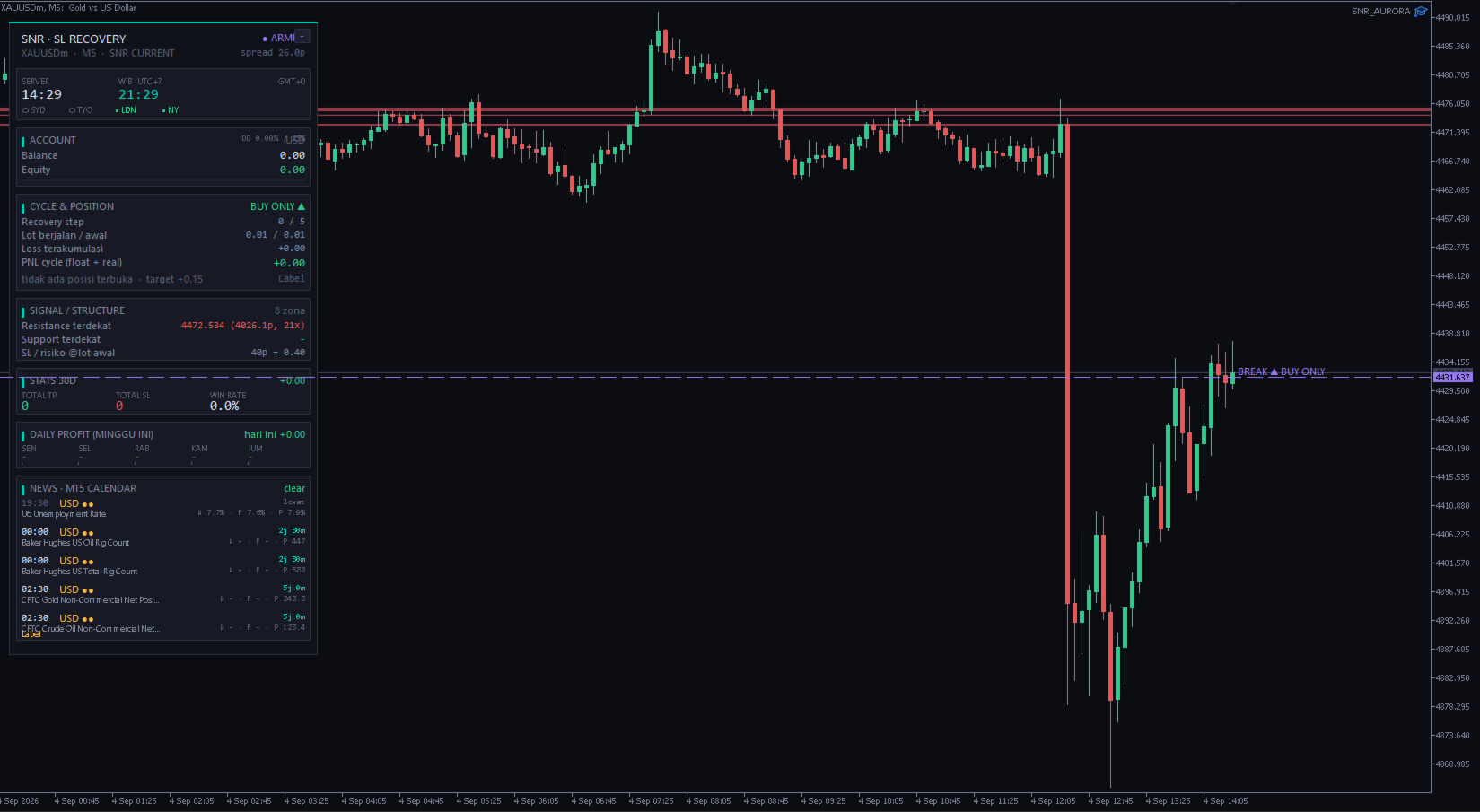
Integrated Dashboard
SNR AURORA includes an integrated chart dashboard designed to provide information about the current strategy state.
The dashboard can display:
-
EA operating status
-
Current symbol and timeframe
-
SNR analysis timeframe
-
Current spread
-
Broker server time
-
Configurable local time
-
Market session information
-
Account balance
-
Account equity
-
Current drawdown
-
Directional bias
-
Current recovery step
-
Initial and active lot size
-
Accumulated cycle result
-
Current cycle P/L
-
Current position information
-
Cycle break-even information
-
Historical trading statistics
-
Daily profit/loss statistics
-
MT5 Economic Calendar information
The dashboard can also be collapsed directly from the chart.
Strategy Visualization
The EA can draw its internal strategy information directly on the chart.
Optional visualization includes:
-
Support and Resistance zones
-
Breakout level
-
Trade entry level
-
Stop Loss level
-
Cycle break-even level
-
Target information
-
Recovery sequence information
The displayed SNR structure is derived from the same internal strategy state used by the Expert Advisor.
Economic Calendar Display
SNR AURORA can read economic-event information from the built-in MetaTrader 5 Economic Calendar and display upcoming events on the dashboard.
The dashboard can highlight a configurable warning window around high-impact events.
The economic-calendar component in the current version is an informational dashboard feature. It should not be interpreted as an automatic news-based entry filter.
Calendar information depends on data availability in the MetaTrader terminal.
Position Identification
SNR AURORA uses a configurable Magic Number to identify positions belonging to the Expert Advisor.
Users should use a unique Magic Number when running multiple instances of the EA.
On netting accounts, avoid combining SNR AURORA with another Expert Advisor or manual strategy on the same symbol, because positions on netting accounts are consolidated by the trading platform.
Main Parameters
General
Magic Number
Trade Comment
Maximum Slippage
SNR Structure
SNR Timeframe
SNR Historical Bars
Swing Left
Swing Right
Zone Tolerance
Minimum Touches
Maximum Zones
Entry
Entry Mode
Break Buffer
Retest Tolerance
Retest Maximum Bars
Lot and Recovery
Start Lot
Lot Multiplier
Maximum Lot
Maximum Recovery Steps
Recovery Limit Action
Stop Loss and Cycle Target
Stop Loss
Cycle Target Mode
Cycle Target in Pips
Cycle Target in Money
Recovery Let Run
Profit Protection
Break Even Enable
Break Even Trigger
Break Even Plus
Trailing Enable
Trailing Start
Trailing Distance
Trailing Step
Trading Protection
Maximum Spread
Time Filter
Start Hour
End Hour
Equity Stop Percentage
Points Per Pip
Dashboard
Dashboard Enable
Chart Theme
Dashboard Position
Panel Width
Statistics Display
Daily Results Display
Market Sessions Display
Economic Calendar Display
Strategy Visualization
Pip Configuration
Symbol specifications can differ significantly between brokers.
For instruments such as Gold, indices, CFDs, and symbols using non-standard digit configurations, users should verify the Points Per Pip calculation before live trading.
SNR AURORA provides a manual Points Per Pip parameter for this purpose.
Always confirm the pip conversion, Stop Loss distance, and monetary exposure in Strategy Tester or on a demo account before using the EA on a live account.
Suggested Initial Testing
Before using the Expert Advisor on a live account:
-
Run the EA in the MetaTrader 5 Strategy Tester.
-
Verify the Points Per Pip value for the selected broker and symbol.
-
Verify Stop Loss distance.
-
Check spread characteristics.
-
Evaluate recovery exposure using the selected Lot Multiplier.
-
Test the maximum recovery sequence.
-
Confirm margin requirements.
-
Perform forward testing on a demo account.
Historical testing does not guarantee future trading results.
Important Risk Information
SNR AURORA uses a recovery system that may increase position size after a losing trade.
Increasing position size can significantly increase margin requirements and account drawdown during consecutive losing trades or rapidly changing market conditions.
The Maximum Lot, Maximum Recovery Steps, and Equity Guard are risk-control mechanisms, but they do not eliminate trading risk.
Slippage, gaps, spread expansion, broker execution, insufficient liquidity, symbol specifications and unusual market conditions can cause actual results to differ from theoretical calculations or historical tests.
Use appropriate position sizing and test all settings before live operation.
Platform
Platform: MetaTrader 5
Product Type: Expert Advisor
Execution: Automatic Trading
SNR Analysis: Configurable Higher Timeframe
Entry Timeframe: Current Chart Timeframe
Default SNR Timeframe: M5
Entry Modes: Break Close / Retest
Recovery Method: Opposite-Direction Stop Loss Recovery
Recovery Lot: Configurable Multiplier
Maximum Recovery Depth: Configurable
Hard Stop Loss: Yes
Cycle-Based Target: Yes
Cycle-Aware Break Even: Yes
Trailing Stop: Yes
Spread Filter: Yes
Trading Time Filter: Yes
Equity Guard: Yes
Persistent Cycle State: Yes
Built-in Dashboard: Yes
SNR Visualization: Yes
MT5 Economic Calendar Display: Yes
External DLL Required: No