MagicalTouch Any Angle Line Break Alert Automated
- 지표
-
Shin Kojima
 MT4 indicator developer with 10+ years of live trading experience.
Specializing in alert tools and scanners for ICT-based traders.
Zero complaints. Reliable tools. Real support.
MQL4 / MQL5 Development Services
• Custom Indicator Modifications - 버전: 1.0
- 활성화: 5
MagicalTouch for MT4
Draw a line. Wait for the alert.
MagicalTouch monitors lines you draw on MT4 and fires an alert the instant price touches them.
What it does
-
Horizontal lines: Alerts when price hits the specified level.
-
Vertical lines: Alerts when a candle reaches the specified time.
-
Trendlines: Alerts on touch (a unique feature MT4 cannot do natively).
-
Alert Types: Supports Popup, Sound, Email, and Mobile Push Notifications.
Quick Start (3 Steps)
-
Apply: Drag MagicalTouch onto any chart.
-
Draw: Draw a line (Horizontal, Vertical, or Trendline).
-
Rename: Right-click the line -> Properties -> Name, and change it to MT1 (or MT2, MT3 ... MT50).
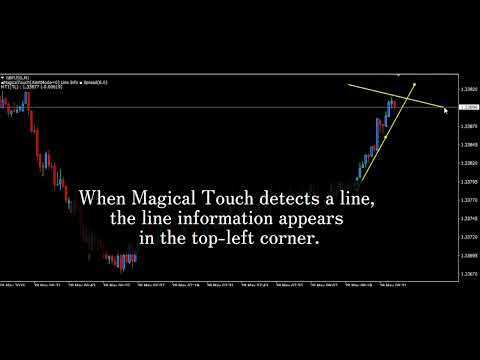
Note: Once the line name is recognized, the information below will appear in the top-left corner of the chart:
MT1(TL) : 1.27270 (0.00470) (Line Name : Line Price / Difference from current price)
-
Tip: Lines are never deleted after an alert. Drag them to a new level to reuse for your next trade.
Key Usage Notes
-
Trendline Accuracy: For diagonal trendlines, place the second anchor point as close to the current candle as possible. If accuracy drops, a warning appears in the top-left corner.
-
Timeframe Changes: Please re-adjust your drawn lines when switching between different chart timeframes.