LTT Volume Bot
- Experts
- Grigori Shukowski
- 버전: 1.0
- 활성화: 5
================================================================================
LTT VOLUME CLUSTER PROFILE EA - PRODUCT DESCRIPTION
================================================================================
OVERVIEW
LTT Volume Cluster Profile EA is an advanced automated trading system that combines institutional volume analysis with market structure recognition. The Expert Advisor uses Volume-by-Price analysis enhanced with Gaussian distribution algorithms to identify high-probability trading zones and execute precise entry and exit strategies.
This EA is designed for traders who understand the importance of volume analysis and market profile concepts in modern trading.
================================================================================
TRADING STRATEGY
The LTT Volume Cluster Profile EA implements a sophisticated multi-layer approach:
1. VOLUME HISTOGRAM ANALYSIS
- Builds volume-by-price histograms over configurable lookback periods
- Identifies dominant volume clusters using peak detection algorithms
- Applies Gaussian enhancement to spread volume data across price levels
2. POINT OF CONTROL (POC) IDENTIFICATION
- Automatically calculates the price level with highest trading volume
- Tracks POC evolution across different market segments
- Uses POC as a key reference point for trade entries
3. VALUE AREA ANALYSIS
- Computes Value Area High (VAH) and Value Area Low (VAL)
- Identifies 70% of total volume concentration zones
- Detects Low Volume Zones (LV) outside the value area
4. SWING PROFILE SEGMENTATION
- Recognizes swing high and swing low pivot points
- Creates historical volume profiles for each swing segment
- Projects extension levels from recent swing profiles
5. TRADING SIGNALS
- Breakout Mode: Enters when price breaks above VAH or below VAL
- Retest Mode: Enters on pullbacks to extension levels
- Combined Mode: Uses both breakout and retest opportunities
================================================================================
RISK MANAGEMENT
The EA includes comprehensive risk management features:
POSITION SIZING
- Fixed lot size for consistent position sizing
- Configurable stop loss in points
- Configurable take profit in points
TRAILING STOP
- ATR-based dynamic trailing stop
- Points-based fixed trailing stop
- Activation threshold to protect profits
- Adjustable trail distance for optimal profit protection
TRADE MANAGEMENT
- Single Trade Mode: Maximum one position at a time
- Close opposite positions on counter-signals
- Session-based position closure options
================================================================================
SESSION MANAGEMENT
Three independent trading sessions with full customization:
- Session 1, 2, and 3 with individual start/end times
- Enable/disable each session independently
- Optional automatic position closure at session end
- Overnight session support with time wraparound
================================================================================
KEY FEATURES
VOLUME ANALYSIS
- Configurable lookback period (default: 200 bars)
- Adjustable price bin resolution (default: 100 bins)
- Cluster spread control via Gaussian sigma parameter
- Multiple cluster center detection
SIGNAL GENERATION
- Three signal modes: Breakout, Retest, or Combined
- Adjustable retest tolerance based on ATR
- Separate long and short signal activation
- Magic number support for multi-strategy operation
VISUALIZATION
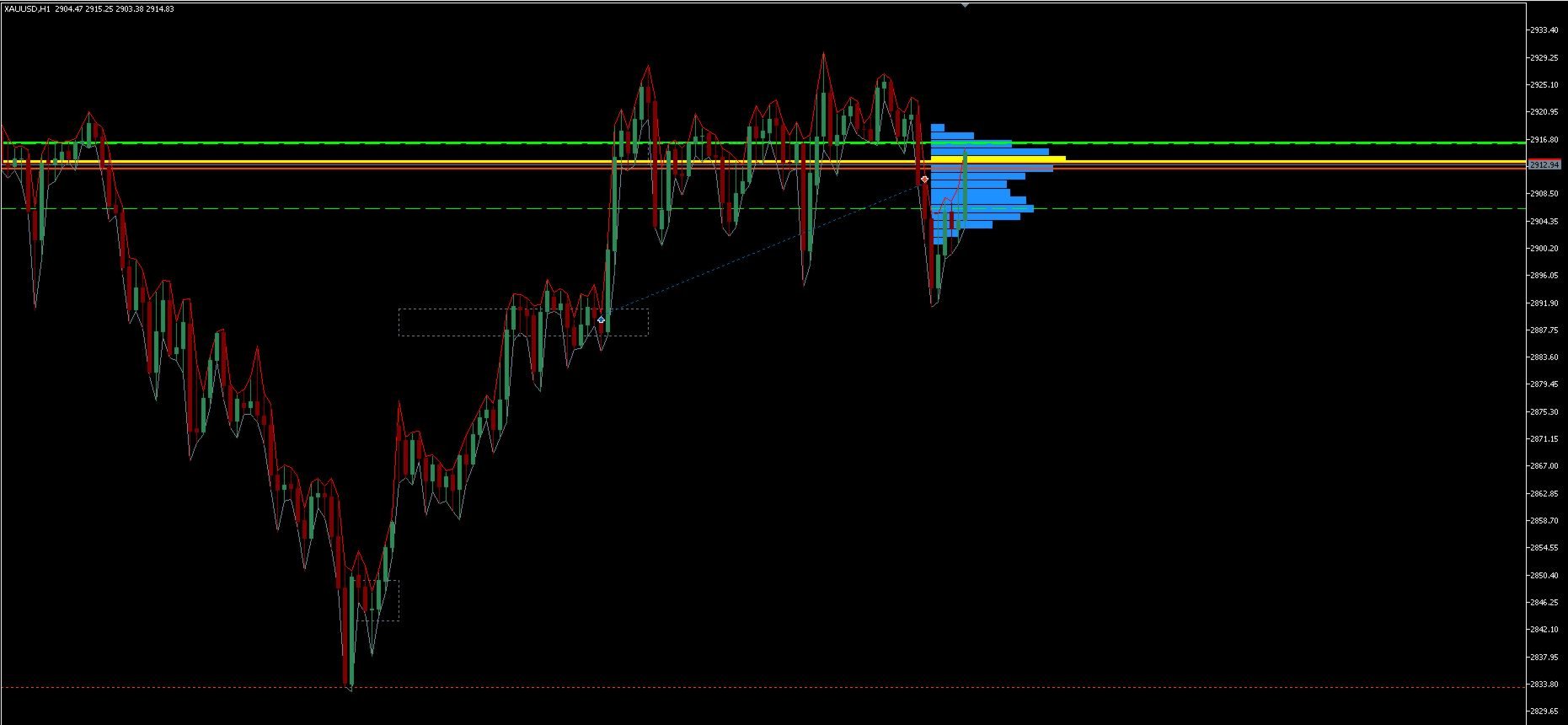
- Real-time volume profile rendering on chart
- POC, Value Area High/Low, and LV Zone lines
- Historical swing profile boxes
- Customizable colors and styles
- Extension level projection from swing profiles
TECHNICAL SPECIFICATIONS
- Persistent ATR handle for performance optimization
- New bar detection to minimize calculations
- Efficient array management and memory usage
- Compatible with all timeframes and symbols
================================================================================
INPUT PARAMETERS
PROFILE SETTINGS
- Lookback Bars: Number of bars for current profile calculation
- Price Bins: Resolution of volume histogram
- Cluster Spread: Gaussian sigma for volume enhancement
- Max Clusters: Maximum number of cluster centers to detect
SWING PROFILE SETTINGS
- Pivot Length: Sensitivity for swing high/low detection
- Max Profiles: Number of historical segments to maintain
SIGNAL SETTINGS
- Use Long Signals: Enable/disable long trades
- Use Short Signals: Enable/disable short trades
- Signal Mode: Breakout (0), Retest (1), or Both (2)
- Retest Tolerance: Percentage of ATR for retest validation
TRADE SETTINGS
- Lot Size: Fixed position size
- Stop Loss Points: Distance to stop loss
- Take Profit Points: Distance to take profit
- Close Opposite: Close counter-positions on new signals
- Magic Number: Unique identifier for EA trades
TRAILING STOP SETTINGS
- Trail Enabled: Activate trailing stop functionality
- Trail Mode: ATR-based or Points-based
- ATR Period: Period for ATR calculation
- ATR Multiplier: Trail distance as ATR multiple
- ATR Activation: Profit threshold to start trailing
- Trail Points: Fixed point distance (Points mode)
- Activation Points: Profit threshold in points
SESSION SETTINGS
- Three independent sessions with start/end times
- Close on Session End: Automatic position closure option
DISPLAY SETTINGS
- Draw Profile: Show volume histogram on chart
- Draw Swings: Display historical swing profiles
- Customizable colors for all visual elements
- Profile Width: Horizontal extent of volume bars
================================================================================
SYSTEM REQUIREMENTS
- MetaTrader 5 platform
- Minimum account balance: Recommended based on lot size and symbol
- VPS recommended for 24/7 operation
- Sufficient historical data for volume analysis
================================================================================
RECOMMENDED USAGE
TIMEFRAMES
- Works on all timeframes
- H1 and H4 recommended for swing trading
- M15 and M30 suitable for intraday trading
SYMBOLS
- Best performance on liquid markets with reliable volume data
- Forex majors, indices, and commodities supported
- Backtest on your specific symbol before live trading
OPTIMIZATION
- Test different lookback periods for your market
- Adjust pivot length based on market volatility
- Optimize session times for your trading timezone
- Calibrate trailing stop parameters for market conditions
================================================================================
IMPORTANT NOTES
1. This EA analyzes volume data and market structure. Performance depends on
the quality of volume data provided by your broker.
2. Past performance does not guarantee future results. Always backtest the EA
on your specific symbol and timeframe before using real money.
3. Start with a demo account to understand the EA's behavior and optimize
parameters for your trading style.
4. Risk management is crucial. Never risk more than you can afford to lose.
5. The EA does not guarantee profits. Trading carries substantial risk of loss.
6. For tick volume (if real volume unavailable), results may vary by broker.
7. Monitor the EA regularly and adjust parameters based on changing market
conditions.
================================================================================
VERSION HISTORY
Version 1.00 - Initial Release
- Volume Cluster Profile analysis with Gaussian enhancement
- POC, Value Area, and Low Volume Zone calculation
- Swing-based historical profile segmentation
- Breakout and Retest signal generation
- ATR and Points-based trailing stop
- Three independent trading sessions
- Comprehensive visualization tools
================================================================================
DISCLAIMER
Trading foreign exchange, commodities, indices, and other leveraged products
carries a high level of risk and may not be suitable for all investors. Before
deciding to trade, you should carefully consider your investment objectives,
level of experience, and risk appetite. There is a possibility that you may
sustain a loss of some or all of your investment. You should only trade with
money you can afford to lose.
This Expert Advisor is a tool to assist in trading decisions. The developer
is not responsible for any losses incurred through the use of this software.

================================================================================
LTT VOLUME CLUSTER PROFILE EA - PRODUCT DESCRIPTION
================================================================================
OVERVIEW
LTT Volume Cluster Profile EA is an advanced automated trading system that combines institutional volume analysis with market structure recognition. The Expert Advisor uses Volume-by-Price analysis enhanced with Gaussian distribution algorithms to identify high-probability trading zones and execute precise entry and exit strategies.
This EA is designed for traders who understand the importance of volume analysis and market profile concepts in modern trading.
================================================================================
TRADING STRATEGY
The LTT Volume Cluster Profile EA implements a sophisticated multi-layer approach:
1. VOLUME HISTOGRAM ANALYSIS
- Builds volume-by-price histograms over configurable lookback periods
- Identifies dominant volume clusters using peak detection algorithms
- Applies Gaussian enhancement to spread volume data across price levels
2. POINT OF CONTROL (POC) IDENTIFICATION
- Automatically calculates the price level with highest trading volume
- Tracks POC evolution across different market segments
- Uses POC as a key reference point for trade entries
3. VALUE AREA ANALYSIS
- Computes Value Area High (VAH) and Value Area Low (VAL)
- Identifies 70% of total volume concentration zones
- Detects Low Volume Zones (LV) outside the value area
4. SWING PROFILE SEGMENTATION
- Recognizes swing high and swing low pivot points
- Creates historical volume profiles for each swing segment
- Projects extension levels from recent swing profiles
5. TRADING SIGNALS
- Breakout Mode: Enters when price breaks above VAH or below VAL
- Retest Mode: Enters on pullbacks to extension levels
- Combined Mode: Uses both breakout and retest opportunities
================================================================================
RISK MANAGEMENT
The EA includes comprehensive risk management features:
POSITION SIZING
- Fixed lot size for consistent position sizing
- Configurable stop loss in points
- Configurable take profit in points
TRAILING STOP
- ATR-based dynamic trailing stop
- Points-based fixed trailing stop
- Activation threshold to protect profits
- Adjustable trail distance for optimal profit protection
TRADE MANAGEMENT
- Single Trade Mode: Maximum one position at a time
- Close opposite positions on counter-signals
- Session-based position closure options
================================================================================
SESSION MANAGEMENT
Three independent trading sessions with full customization:
- Session 1, 2, and 3 with individual start/end times
- Enable/disable each session independently
- Optional automatic position closure at session end
- Overnight session support with time wraparound
================================================================================
KEY FEATURES
VOLUME ANALYSIS
- Configurable lookback period (default: 200 bars)
- Adjustable price bin resolution (default: 100 bins)
- Cluster spread control via Gaussian sigma parameter
- Multiple cluster center detection
SIGNAL GENERATION
- Three signal modes: Breakout, Retest, or Combined
- Adjustable retest tolerance based on ATR
- Separate long and short signal activation
- Magic number support for multi-strategy operation
VISUALIZATION
- Real-time volume profile rendering on chart
- POC, Value Area High/Low, and LV Zone lines
- Historical swing profile boxes
- Customizable colors and styles
- Extension level projection from swing profiles
TECHNICAL SPECIFICATIONS
- Persistent ATR handle for performance optimization
- New bar detection to minimize calculations
- Efficient array management and memory usage
- Compatible with all timeframes and symbols
================================================================================
INPUT PARAMETERS
PROFILE SETTINGS
- Lookback Bars: Number of bars for current profile calculation
- Price Bins: Resolution of volume histogram
- Cluster Spread: Gaussian sigma for volume enhancement
- Max Clusters: Maximum number of cluster centers to detect
SWING PROFILE SETTINGS
- Pivot Length: Sensitivity for swing high/low detection
- Max Profiles: Number of historical segments to maintain
SIGNAL SETTINGS
- Use Long Signals: Enable/disable long trades
- Use Short Signals: Enable/disable short trades
- Signal Mode: Breakout (0), Retest (1), or Both (2)
- Retest Tolerance: Percentage of ATR for retest validation
TRADE SETTINGS
- Lot Size: Fixed position size
- Stop Loss Points: Distance to stop loss
- Take Profit Points: Distance to take profit
- Close Opposite: Close counter-positions on new signals
- Magic Number: Unique identifier for EA trades
TRAILING STOP SETTINGS
- Trail Enabled: Activate trailing stop functionality
- Trail Mode: ATR-based or Points-based
- ATR Period: Period for ATR calculation
- ATR Multiplier: Trail distance as ATR multiple
- ATR Activation: Profit threshold to start trailing
- Trail Points: Fixed point distance (Points mode)
- Activation Points: Profit threshold in points
SESSION SETTINGS
- Three independent sessions with start/end times
- Close on Session End: Automatic position closure option
DISPLAY SETTINGS
- Draw Profile: Show volume histogram on chart
- Draw Swings: Display historical swing profiles
- Customizable colors for all visual elements
- Profile Width: Horizontal extent of volume bars
================================================================================
SYSTEM REQUIREMENTS
- MetaTrader 5 platform
- Minimum account balance: Recommended based on lot size and symbol
- VPS recommended for 24/7 operation
- Sufficient historical data for volume analysis
================================================================================
RECOMMENDED USAGE
TIMEFRAMES
- Works on all timeframes
- H1 and H4 recommended for swing trading
- M15 and M30 suitable for intraday trading
SYMBOLS
- Best performance on liquid markets with reliable volume data
- Forex majors, indices, and commodities supported
- Backtest on your specific symbol before live trading
OPTIMIZATION
- Test different lookback periods for your market
- Adjust pivot length based on market volatility
- Optimize session times for your trading timezone
- Calibrate trailing stop parameters for market conditions
================================================================================
IMPORTANT NOTES
1. This EA analyzes volume data and market structure. Performance depends on
the quality of volume data provided by your broker.
2. Past performance does not guarantee future results. Always backtest the EA
on your specific symbol and timeframe before using real money.
3. Start with a demo account to understand the EA's behavior and optimize
parameters for your trading style.
4. Risk management is crucial. Never risk more than you can afford to lose.
5. The EA does not guarantee profits. Trading carries substantial risk of loss.
6. For tick volume (if real volume unavailable), results may vary by broker.
7. Monitor the EA regularly and adjust parameters based on changing market
conditions.
================================================================================
VERSION HISTORY
Version 1.00 - Initial Release
- Volume Cluster Profile analysis with Gaussian enhancement
- POC, Value Area, and Low Volume Zone calculation
- Swing-based historical profile segmentation
- Breakout and Retest signal generation
- ATR and Points-based trailing stop
- Three independent trading sessions
- Comprehensive visualization tools
================================================================================
DISCLAIMER
Trading foreign exchange, commodities, indices, and other leveraged products
carries a high level of risk and may not be suitable for all investors. Before
deciding to trade, you should carefully consider your investment objectives,
level of experience, and risk appetite. There is a possibility that you may
sustain a loss of some or all of your investment. You should only trade with
money you can afford to lose.
This Expert Advisor is a tool to assist in trading decisions. The developer
is not responsible for any losses incurred through the use of this software.
================================================================================