Trade Manager Pro Position Control MT4

Link for MT5 version: https://www.mql5.com/en/market/product/211604?source=Site

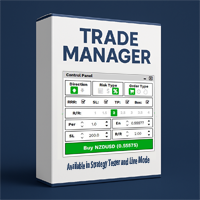
Trade Manager Pro — Manage chart-symbol trades from one compact chart panel. Place market and range-based pending orders, close positions in batches, apply configurable trailing stops, and move profitable trades to a break-even offset with one click.


 Take control of trade management from your chart


Trade Manager Pro brings the order and position controls many traders use throughout the trading day into one on-chart panel. Instead of switching between chart controls and the Trade tab to carry out routine actions, you can place entries, manage positions, and remove pending orders directly from the chart.


The EA is designed for traders who already make their own trading decisions and want a faster, more consistent way to execute and manage them. It is a trade-management utility, not a signal service or an automated strategy: it does not decide when you should trade.


 Why use Trade Manager Pro?


- Reduce repetitive steps. Open a market trade, close selected positions, close all managed positions, or delete pending orders from dedicated chart buttons.

- Act on multiple positions quickly. Batch close buttons submit close requests for all matching positions without requiring you to close them individually.

- Use consistent order sizing. Set the lot size in the panel; the EA adjusts it to the symbol’s permitted volume limits and step.

- Manage stops with defined point distances. Configure trailing start, stop distance, step, and break-even offset in points.

- Keep the controls with the chart. The compact panel can be collapsed and expanded, and offers four layout presets for different display sizes.

- Keep your working values. Lot size, trailing values, break-even offset, and sound preference are saved by account, symbol, and EA magic number, so they persist through timeframe changes and EA reinitialization.


Panel functions


1. BUY and SELL open a market position on the chart symbol using the lot size shown in the center field.

2. BUY STOP, SELL STOP, BUY LIMIT, and SELL LIMIT place pending orders from the recent chart range. The default range is the highest high and lowest low of the previous 35 closed candles (bars 1–35), with a 30-point offset:


- Buy Stop: highest high plus the offset

- Sell Stop: lowest low minus the offset

- Buy Limit: lowest low plus the offset

- Sell Limit: highest high minus the offset


The lookback candle count and offset can be changed in the EA Inputs. A pending order may be rejected if its calculated price is on the wrong side of the market or too close under the broker’s minimum-distance rules.


3. CLOSE BUYS and CLOSE SELLS submit close requests for matching buy or sell positions on the chart symbol. CLOSE ALL POSITIONS submits close requests for all matching open positions on that symbol. These actions do not remove pending orders.


4. DELETE PENDING ORDERS submits removal requests for matching pending orders on the chart symbol. It does not close open positions.


Trailing stop


Turn trailing management on or off with the TRAIL ON/OFF button. The default settings are:


- Start: 300 points of favorable movement from the position’s entry

- Stop: 250 points between the live market price and the stop loss

- Step: 10 points of minimum improvement before the EA advances an existing stop


For buy positions, favorable movement and trailing distance are measured using Bid. For sell positions, they are measured using Ask. After the start threshold is reached, the EA places or advances the stop according to the configured distance and step. Broker stop and freeze levels apply; a stop modification can be rejected if it violates those limits.


Break-even control


Set the BE value and click BREAK EVEN to move the stop loss beyond the entry price by that many points: above entry for a profitable buy, and below entry for a profitable sell. The default offset is 50 points. The EA only processes positions that are currently in profit; an existing stop already at or beyond the requested level is left in place. Broker stop and freeze limits can prevent a modification.


Trade scope and settings


By default, management buttons apply to manual and EA positions and pending orders on the chart’s current symbol. Set Manage manual and EA trades on this chart symbol to `false` in the EA Inputs to limit management to orders with this EA’s magic number. Positions on other symbols are not managed by the panel.


New orders use magic number `26012501` by default. Maximum entry/close deviation is 20 points by default. Panel X and Panel Y set its chart-corner offset; the panel is anchored to the top-left. There are Panel Size presets Panel 1, Panel 2, Panel 3 (default), Panel 4.


The panel’s sound control is on by default. Button clicks use `ok.wav`; the trailing, sound, and collapse/expand controls use `tick.wav`. These files must be available in the terminal’s `Sounds` folder for click sounds to play.


Important


Trade Manager Pro helps execute and manage actions you choose. It does not provide trade signals, guarantee execution, or guarantee profits. Trading involves risk. Test the EA on a demo account and confirm your broker’s symbol specifications, volume limits, point size, and stop-distance rules before using it on a live account.


추천 제품
NRP Risk Manager Pro Institutional-Grade Trade Management & Prop Firm Protection Get the MetaTrader 4 Version Here: https://www.mql5.com/en/market/product/179888 Get the MetaTrader 5 Version Here: https://www.mql5.com/en/market/product/179885 Trading isn't just about finding the right entry; it is about flawlessly executing your edge while fiercely protecting your capital. NRP Risk Manager Pro is not an automated trading robot—it is a comprehensive, institutional-grade trade terminal d
Virtual Collider Manual   is a trading assistant with a built-in panel for manual trading. It automatically moves a position opened by a trader in profit using innovative adaptive grid algorithm of averaging and adaptive pyramiding Know-how of the grid algorithm of averaging and pyramiding of the   Virtual Collider Manual   trading robot is based on fully automatic adaptation of all characteristics of dynamically build order grid and pyramid with actual price movement with no need for adjusting
Rhino Backtest Manager - 실거래와 전략 테스터를 위한 거래 관리 패널 Rhino Backtest Manager는 실거래와 MetaTrader 4 전략 테스터에서 모두 작동하는 거래 관리 패널입니다. 실계좌에서 쓰는 것과 같은 인터페이스로 테스터 안에서 직접 주문을 내고 관리할 수 있으므로, 과거 데이터로 전략을 확인한 뒤 도구를 바꾸지 않고 그대로 거래할 수 있습니다. 패널은 설정한 리스크 조건으로 주문 수량을 계산하고, 주문을 보내기 전에 각 손절과 익절의 금액을 표시하며, 일간·주간·월간 및 계좌 전체 기간의 결과를 기록합니다. 사용 설명서: 제품 사용 방법 무료 데모 버전: 데모 내려받기 MetaTrader 5 버전: Rhino Backtest Manager MT5 버전 처음 실행하기 전에 설명서 페이지에서 제공하는 폰트를 설치해야 합니다. 폰트가 없으면 패널이 정상적으로 표시되지 않습니다. 기능 두 가지 모드. 같은 패널이 실거래와 전략 테스터 모드에서
Manual Trading and Market Analysis Utility for MetaTrader 4 TigerFX Academy Trading Panel PRO brings discretionary trade execution, market analysis, conditional trading playbooks and position management into one customizable on-chart workspace. Designed for traders who prefer to remain in control of their entries, the panel provides tools to review market conditions, prepare orders and manage existing positions. Main Features Manual Trading: Buy/Sell controls, risk-based position sizing, fixed l
Utility, which draws buy or sell trendlines, which can also become support or resistances able to close any position on the screen Algorithm that calculates the gain of the position, at the touch closure of the line.   The benefits you get: Works on forex and CFD, timeframe from M1 to Weekly. Easy to use screen control panel. Audible warning messages at the touch of the line. Easy to use.
Verdure Lot Calculator
Olawale Adenagbe
5 (1)
Overview Money management is an all-important aspect of trading that many traders often overlook. It is very possible that even with a winning strategy, bad money management can often result in huge loses. Verdure Lot Calculator aims to help traders minimize risk and exposure in the Forex market. Verdure Forex Calculators implements Lot (Trade or Contract Size) Calculator as an indicator on MT4 platform. Lot Calculator (trade or contract size) A lot refers to a bundle of units in trade. In Fore
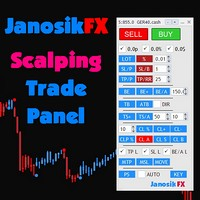
The Best One Scalping Trade Panel functional manual trade panel with risk reward, auto SL by candle ( original solution), lot size calculation, one-click trading, scale in and out of trades (partial close),  Works with all symbols not just currency pairs, perfect works on DAX, NASDAQ, GOLD, ...... I earn every day during live stream on ZakopiecFX - join Me Risk by lot Risk by percent SL by points SL by Candle, Renko, RangeBar ( original solution) TP by point TP by Risk/Reward Auto Trailing by P
It is so very disappointing when the price does not have enough points to achieve Take Profit and makes a reversal. This EA sets virtual levels near the TakeProfit levels. This EA sets virtual levels next to TakeProfit orders. If these levels are reached by price, breakeven or trailing stop is applied for an order. Features This EA does not set new orders. The aim of this EA is to manage stop losses of existing orders that are set by another EA or manually (magic number equals 0). For correct w
VN Trade Panel II
Vyacheslav Nekipelov
4 (1)
The new version of the trading panel, which now has the ability to separately close Buy and Sell orders, display targets for all orders on the chart, as well as the ability to use the panel to trade with brokers working on the FIFO rule. Also, the new version adds option buttons for separate management of open orders. It has a convenient visualized interface and intuitive control without a lot of additional tabs to which traders have to be distracted and switch their attention. Thanks to this,
如果产品有任何问题或者您需要在此产品上添加功能,请联系我 Contact/message me if you encounter any issue using the product or need extra feature to add on the base version. There is Demo version of this panel Dashboard Extreme TMA System Demo in my product list, please try it out to get familiar with all functionalities free, LINK . This system basically utilizes 4 TMA (Triangular Moving Average) slope indicators on 4 time-frame and TMA Band as the core indicators to generate trading signal mainly on time-frame M15. The sig
Trade Manager MT4 DaneTrades
Levi Dane Benjamin
4.09 (11)
거래 관리자는 위험을 자동으로 계산하는 동시에 거래를 빠르게 시작하고 종료하는 데 도움을 줍니다. 과잉 거래, 복수 거래 및 감정 거래를 방지하는 데 도움이 되는 기능이 포함되어 있습니다. 거래를 자동으로 관리할 수 있으며 계정 성과 지표를 그래프로 시각화할 수 있습니다. 이러한 기능은 이 패널을 모든 수동 거래자에게 이상적으로 만들고 MetaTrader 4 플랫폼을 향상시키는 데 도움이 됩니다. 다중 언어 지원. MT5 버전  |  사용자 가이드 + 데모 트레이드 매니저는 전략 테스터에서 작동하지 않습니다. 데모를 보려면 사용자 가이드로 이동하세요. 위기 관리 % 또는 $를 기준으로 위험 자동 조정 고정 로트 크기 또는 거래량과 핍을 기반으로 한 자동 로트 크기 계산을 사용하는 옵션 RR, Pips 또는 Price를 사용한 손익분기점 손실 설정 추적 중지 손실 설정 목표 달성 시 모든 거래를 자동으로 마감하는 최대 일일 손실률(%)입니다. 과도한 손실로부터 계정을 보호하고 과도한
URGENCY “Limited launch pricing” “Price increases after version 2.0” FX Momentum Matrix Pro (current price is introductory) Advanced Multi-Timeframe ROC Dashboard & Smart Signals for Forex & Gold Overview FX Momentum Matrix Pro is a professional forex dashboard and currency strength meter designed for traders who need a powerful forex heatmap, trading panel, and smart forex signals for MT5, including gold trading (XAUUSD) using advanced momentum and ROC (Rate of Change) analysis . This
BreakEven Grid Utility for MT4 BreakEven Grid is a powerful utility for manual trade management on the MetaTrader 4 platform. It provides a convenient on-screen panel with buttons to help you manage your open positions with a single click.  Features: Set BE+Profit: Automatically sets Take Profit to breakeven + desired profit in pips or money. Close BUY/SELL: Instantly close all Buy or Sell orders for the current symbol. Close +$/-$/Old/New: Close only profitable, losing, oldest or newest tra
GGP Trade Copier MT4
Mohammadmahmood Pirayeh
GGP Trade Copier  EA is an automatic trading bot that can help traders automatically replicate the trading strategies and operations from one trading terminal to others by experiencing exceptionally fast trade copying system. Its easy-to-use setup allows you to copy trades between multiple MetaTrader terminals on the same Windows computer or Windows VPS with lightning-fast copying speeds of under 0.5 seconds. The software supports multiple trading varieties, including Forex, commodities, stocks,
很多交易者亏钱,不是因为判断方向错了。 是因为行情动的时候手慢了。是因为手滑点错了手数。是因为新闻数据一出来, 三笔盈利的单子还没来得及平,全部回吐了。 Apex Trade Manager Pro 就是为了解决这些问题而做的。 这是一款适用于 MetaTrader 4 和 MetaTrader 5 的可视化交易面板。它挂在 图表上,把所有常用操作——平仓、减仓、设止损、开单——都变成一个按键的 事情。不用翻菜单,不用等弹窗,不会手忙脚乱。 --- 功能说明 一键全平 一个按钮关掉当前品种所有持仓。按钮上实时显示总浮动盈亏,让你在按下去 之前就知道自己在什么位置。 分批减仓 直接从面板关掉每笔持仓的50%或80%仓位。想落袋一部分利润但不想完全出场 的时候,这个比去终端一笔一笔操作快得多。 按类型分开平仓 只平多单、只平空单、只平盈利的、只平亏损的,各有独立按键。不用在终端 里翻找,不用逐笔选择。 一键移至保本 行情往你方向走了,按一下保本键,所有盈利持仓的止损立刻移到各自的开仓 价。亏损的单子不受影响。 批量修改止损止盈 输入点数,按键,所有持仓同时更新。也可以
Trade panel manual is a multifunctional trading assistant. It allows you to open market and pending orders in one click. Value is set via button menu edit or deleted by specific buttons pending orders and the value of take profit and stop loss in one click. Through the edit menu of the button, a value is set that can be easily changed by simply moving level_tp lines for take profit or stop loss levels and for pending orders. It is possible to select orders and determine for them and set the leve
Grid Trading
Waseem Raza
5 (3)
Grid Trading EA is a semi-automated one-click trading EA for both Normal Trading and Grid/Martingale Trading . Normal Trading Simply click Buy or Sell directly from the chart. The EA will automatically manage trades by: Setting Stop Loss and Take Profit Managing Trailing Stop Grid / Martingale Trading When Grid Trading mode is enabled, the EA will automatically open additional grid orders at specified distances while increasing the lot size based on your settings. Inputs & Settings Lots — Initia
FREE UNTIL FEBRUARY 14, 2023 SPEND MORE TIME WITH YOUR FAMILY. ENJOY LIFE… DO NOTHING. This version is only auto set of Takeprofit and StopLoss Main Version  of  TropangFX:   MT4 Version  |  MT5 Version Recommended timeframe:   H1 Supported currency pairs:  GBPUSD, EURUSD, EURCHF ,   USDCAD, USDCHF ,  AUDCAD, EURCAD, EURAUD and many more... Requirements The EA requires good brokerage conditions:   low spread   and   slippage   during the rollover time. I advise using a really   good ECN brok
FREE
The "Lot Size" button toggles between fixed and auto lot size modes. Fixed mode uses a predetermined lot size, while auto mode calculates lot size based on a customizable percentage of the account balance, displayed at the bottom. The "Trailing Stop" button enables the activation or deactivation of the trailing stop feature. Initially set to "No Trailing," clicking the button changes it to "Trailing ON" when the trailing stop is active, and "Trailing OFF" when it is inactive. Below the button,
Smart Watermark
Alexander Martinez
Smart Watermark는 자동으로 크기를 조정하고 중앙에 맞추는 동안 기호와 기간을 표시합니다. 또한 차트를 다른 사람과 공유하기 위한 사용자 지정 서명을 설정할 수 있습니다. 매개변수: 매개변수 설명 폰트 워터마크를 표시하는 데 사용되는 글꼴 유형 글꼴 색상 워터마크를 표시하는 데 사용되는 글꼴 색상 글꼴 스타일 글꼴의 스타일입니다. 없음, 기울임꼴, 밑줄 또는 취소선 중에서 선택합니다. 기본값은 없음입니다. 글꼴 두께 글꼴의 무게입니다. 옵션은 Thin에서 Black까지 다양합니다. 기본값은 보통입니다. 글꼴 비율 백분율(0 - 100) 차트 너비를 기준으로 글꼴 크기를 조정해야 하는 백분율입니다. 기본값은 10입니다. 최소 글꼴 크기 차트가 너무 작으면 워터마크를 읽을 수 없습니다. 이렇게 하면 워터마크를 항상 읽을 수 있도록 최소 글꼴 크기를 설정할 수 있습니다. 기본값은 47입니다. 투명도(0 - 255) 워터마크의 투명도. 0은 완전히 투명합니다. 기본값은 25
This script is designed to automatically open charts for all available forex pairs on the MetaTrader 4 platform, as well as the gold (XAUUSD) chart. The script iterates through all symbols available on the platform, determines which of them are forex pairs, and opens their charts on the M1 (one minute) timeframe. Key Features: Gold Chart Opening: The script automatically opens the XAUUSD (gold/dollar) chart if this symbol is available from your broker. If the gold symbol is not found, an error m
Fund Shield – 트레이딩 사이클 관리자 ( 가격이 3,000달러에서 30달러로 변경되었습니다. ) 개요 Fund Shield는 MetaTrader 4용 리스크 모니터링 및 트레이딩 사이클 관리 Expert Advisor입니다. 계좌 에쿼티 모니터링, 일일 드로다운 추적, 각 트레이딩 사이클의 목표 수익과 최대 드로다운 한도 설정, 완료된 사이클 기록을 지원합니다. 이 EA는 수동 매매 또는 다른 트레이딩 시스템과 함께 사용하도록 설계되었습니다. 진입 신호를 생성하거나 새로운 포지션을 개설하지 않습니다. 주요 기능 트레이딩 사이클 관리 각 사이클에 사용자 지정 이름, 목표 수익, 최대 드로다운을 설정할 수 있습니다. Fund Shield는 사이클 시작 시점의 기준 에쿼티와 현재 에쿼티를 비교하고, 목표 수익 달성 여부 또는 드로다운 한도 도달 여부를 기록합니다. 일일 드로다운 모니터링 거래일 시작 시 기록된 에쿼티를 기준으로 에쿼티 변화를 모니터링합니다. 일일 드로다운 임계값
GoldenShield MT4
Aleksandr Bezverkhikh
Golden Shield – Account Protection Utility Golden Shield   is a professional risk management utility that automatically closes   ALL open positions   when your account equity falls below a critical level. It works as a "circuit breaker" for your trading account.   Key Features Feature Description Equity Protection Closes all positions when Equity ≤ STOP level Instant Monitoring Checks equity every 50 milliseconds – immediate reaction Interactive Panel Gainsboro panel with Teal ON / Red O
Overview Money management is an all-important aspect of trading that many traders often overlook. It is very possible that even with a winning strategy, bad money management can often result in huge loses. Verdure Forex Calculators aims to help traders minimize risk and exposure in the Forex market. Verdure Forex Calculators implements 4 calculators in one single indicator. It is the first of it's kind on MT4 platform. Calculators implemented are: Lot (Trade or Contract Size) Calculator. Margin
This tool will perform Trailing stop loss and Break even management for orders. Helps you limit or reduce the time spend watching orders on the screen, especially when you need to go to sleep. Just add this EA to 1 chart, you can manage all pairs. You can filter orders by comment, magic number, symbol, and order ticket number. When Breakeven it can add shift/offset pips (to cover the commission...). You can try in strategy tester before purchase. The EA will add Buy and Sell alternately, so yo
Risk Manager Panel A trading panel for MetaTrader 4 that automatically calculates lot size based on risk and manages trades with one click. What the Panel Does Automatic lot calculation Set risk as % of balance (or a fixed $ amount) — the panel calculates position size for the specified Stop Loss. It accounts for tick value and your broker's lot step. Manual field editing On the panel you can change: Lot — position size. Stop Loss — in points. Take Profit — in points. When SL changes, the lot
SmartLot MT4
Nikita Chernyshov
데모 계정 무료 버전   |   MT4   버전 SmartLot   MT4  는 차트에서 직접 로트를 빠르게 계산하고, 보류 중 주문 및 시장가 주문을 설정할 수 있는 대화형 및 간단한 패널입니다. 전략 테스터에서는 작동하지 않습니다 . 유틸리티를 테스트하려면 데모 계정용 무료 버전을 다운로드하십시오. 지침과 파일은 설명 상단에 있습니다. 기능: 그래픽 인터페이스:   수익 및 손실 구역을 색상으로 표시한 대화형 진입, SL, TP 라인. 실시간 계산:   SL/TP 수준을 변경할 때 패널이 위험/이익 값(통화 / 핍 / %)을 자동으로 재계산합니다. 실행:   그래픽 라인의 버튼을 클릭하여 주문을 엽니다. 주요 주문 유형 지원. 위험 관리:   동적 로트(예금 비율) 또는 고정 볼륨 작업을 위한 내장 모듈. 개별 매직:   각 주문에 대해 개별적으로 매직 넘버를 지정할 수 있는 기능.
Risk Commander
Adisorn Soodkanueng
Product Name: Risk Commander: Trade Assistant & Strategy Simulator Risk Commander is more than just a trade panel—it is a complete Manual Trading Ecosystem . It serves two powerful purposes: Live Assistant: Helps you execute trades with speed, precision, and perfect risk management in real-time markets. Training Simulator: Fully compatible with the Strategy Tester (Visual Mode) , allowing you to practice manual trading on historical data without risking a cent. NEW! Built-in Simulator Mode Stop
Smart Key Trade Manager
Stephen Sanjeeve Sahayam
대부분의 소매 거래자는 위험을 관리하고 과도한 위험을 감수하거나 과도한 거래로 계정을 날릴 수 없습니다. 이 도구는 드로다운 및 위험 관리를 완전히 자동화하여 트레이더가 항목에만 집중할 수 있도록 합니다. 가격이 거래에 반대할 때 부분 포지션을 자동으로 청산하는 Aggressive Risk Control 기능과 함께 가격 조치를 사용하는 최초이자 유일한 거래 관리자입니다. 이렇게 하면 손실이 항상 승리보다 작게 유지됩니다. 모든 입력 방법 및 거래 스타일과 함께 사용할 수 있습니다. 스캘핑, 일중 또는 스윙 거래. 특징: 모든 주문 유형에 사용하십시오. 시장가 주문, 중지 주문 및 지정가 주문. 경고가 있는 Aggressive Risk Control(ARC) - 가격이 거래에 반하는 경우 손실을 줄입니다. 당신이 취하는 거래의 수를 제한합니다 - 과잉 거래를 줄입니다. 자동 로트 크기 계산. 자동 또는 수동으로 손절매 및 여러 이익실현 수준을 설정합니다. 자동 또는 수동으로
Noize Absorption Index MT4
Ekaterina Saltykova
5 (1)
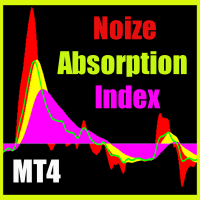
Noize Absorption Index - is the manual trading system that measures the difference of pressure between bears forces and bulls forces. Green line - is a noize free index that showing curent situation. Zero value of index shows totally choppy/flat market.Values above zero level shows how powerfull bullish wave is and values below zero measures bearish forces.Up arrow appears on bearish market when it's ready to reverse, dn arrow appears on weak bullish market, as a result of reverse expectation. S
이 제품의 구매자들이 또한 구매함
Trade Indicator Assistant is a powerful MT4 utility designed to turn indicators into automated trading systems. Its main feature is the ability to automatically detect an indicator’s   BUY and SELL signal buffers , without requiring you to know the buffer numbers, search through indicator settings, or modify the indicator source code. Bonus Indicator: After purchasing Trade Indicator Assistant, contact me to receive Trade Signal Pro completely free as a bonus indicator. [Download Demo Version]
The Price Action Dashboard is an innovative tool to help the trader to control a large number of financial instruments. This tool is designed to automatically suggest signals and price conditions. The Dashboard analyzes all major Time Frame suggesting price action conditions with graphic elements. The Dashboard can suggest you the strength of the trend identifying directional movement, it is an indispensable tool for those who want to open position themselves using market trends identifiers. The
Riskless Pyramid
Snapdragon Systems Ltd
5 (1)
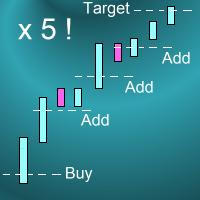
Introduction This powerful MT4 trade mangement EA offers a way potentially to aggressively multiply trade profits in a riskfree manner. Once a trade has been entered with a defined stoploss and take profit target then the EA will add three pyramid add-on trades in order to increase the overall level of profit. The user sets the total combined profit target to be gained if everything works out. This can be specified either as a multiple of the original trade profit or as a total dollar amount. Fo
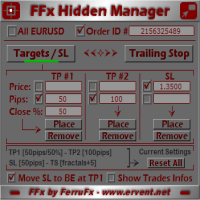
The FFx Hidden Manager panel will help you to manage easily your orders directly on the chart. Below all features described: TP, SL and TrailingStop are hidden Each order has its own lines on chart Drag & Drop any line to change the TP/SL as per your need Option to move automatically the SL line at breakeven when TP #1 is reached Option to choose the TP/SL type (by pips or price) Option to choose the TrailingStop type (by pips, MA, Fractals, PSAR or ATR) Define which order(s) you want to manage
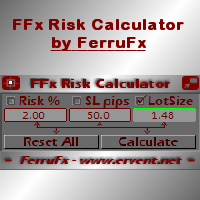
FFx Risk Calculator panel will help you to calculate very easily your trades size, SL or the risk directly on the chart. All features are described below: Option to select which parameter to calculate: Risk, Stop Loss or Lot Size The panel will show if the lot size is allowed according to the current account free margin Button to maximize/minimize the panel Drag and Drop the panel anywhere on the chart How to use it? Select the parameter you want to be calculated. It will be based on the 2 other
Trade Copier Pro
Vu Trung Kien
4.29 (14)
Trade Copier Pro is a tool to copy trade remotely to MT4, MT5 and cTrader accounts at different computers/locations over internet. This is an ideal solution for you if you are a signal provider and want to copy your trades to other receivers globally on your own rules. One provider can copy trades to multiple receivers and one receiver can get trade from multiple providers as well. The provider can even set the subscription expiry for each receiver, so that receiver will not be able to receive t
News Trader Pro
Vu Trung Kien
4.38 (16)
News Trader Pro is a unique robot that allows you to trade the news by your predefined strategy. It loads every piece of news from several popular Forex websites. You can choose any news and preset the strategy to trade it, and then News Trader Pro will trade that news by selected strategy automatically when the news comes. News release gives opportunity to have pips since the price usually has big move at that time. Now, with this tool, trading news becomes easier, more flexible and more exciti
FFx Watcher PRO
Eric Venturi-Bloxs
The FFx Watcher PRO is a dashboard displaying on a single chart the current direction of up to 15 standard indicators and up to 9 timeframes. It has 2 different modes: 1. Watcher mode: Multi Indicators User is able to select up to 15 indicators to be displayed User is able to select up to 9 timeframes to be displayed 2. Watcher mode: Multi Pairs User is able to select any number of pairs/symbols User is able to select up to 9 timeframes to be displayed This mode uses one of the standard indicat
NickZ Tool
Nicolas Zouein
This is a must have tool for a serious trader. It saves your precious time spent for opening/closing trades, creating pending trades and modifying your TP/SL in bulk according to either pips or price. If you need to quickly open several pending orders (Buy Stop, Sell Stop) at a certain distance from each other, this script will do all the routine for you! The first time you use this handy tool, you will realize it has already paid for itself. Instructions: Drag and drop this script onto a chart.
The product combines a manual trade panel with the ability to perform actions automatically in a highly configurable way. Actions include capturing indicator values and then based on those values raising alerts, open/close or partially close trades, scale-in, setting up pending orders, adjusting stop loss, take profit and more. On-chart controls can be configured, such as tick boxes and buttons, so can be fully interactive. The EA also handles money management, news events, hidden stop loss, tak
Binary Options Copier Remote is an EA that allows to copy binary options trades between MT4 accounts at different computers. This is an ideal solution for signal provider, who want to share his trade with the others globally on his own rules. Provider can give free bonus license to 10 receivers. That means those 10 receivers can copy from provider by using Binary Options Receiver Free (no cost). From 11th one, receiver have to buy Binary Options Receiver Pro (paid version) in order to copy from
This panel is very simple to use and it is a very ally to manage your positions and orders. Also you can modify your risk, writing in fields directly on Panel. One click on buttons and the operation on market is done! Operations possible: BUY/SELL Break Even Split (close 50% all orders) Close All positions Hedging (opens reverse positions to cover) Close only BUY positions Close only SELL positions Close All pending orders Reverse all positions Please watch the video to verify the very simple u
Slow Pips OCO Trade Panel is an advanced trading panel for placing pending orders. Traders can use this panel to place two pending orders at once. One pending order would be of buy entry type and the other one would be of sell entry type. Both orders will have Stop Loss and Take Profit parameters. Since two pending orders are placed at the same time, the pending order for which the price hits first gets converted into a market order and the other pending order gets deleted (one order cancels the
This indicator changes the timeframe and chart profile for multiple charts. If you dispatched many charts (10~20 or more) in single MetaTrader terminal, it is very boring and difficult work to manage the timeframe and chart profile individually. If the indicators you use in a chart are numerous and the setting values are different from the default one, you might give up adding all the indicators to all charts. The changing of timeframes on multiple charts has the same problem, too. Whenever you
Elliott Wave Counter는 Elliott 파동의 빠르고 사용자 친화적인 수동 마크업을 위한 패널입니다. 색상과 마크 수준을 선택할 수 있습니다. 도구에서 만든 마지막 마크업과 전체 마크업을 제거하는 기능도 있습니다. 한 번의 클릭으로 마크업이 이루어집니다. 5번 클릭 - 5개의 웨이브가 있습니다! Elliott Wave Counter는 Elliott 파동의 초보자와 전문 분석가 모두에게 훌륭한 도구가 될 것입니다. Elliott Wave Counter 설치 및 입력 가이드 당신이 얻고 싶다면       EA 추가 URL(   http://autofxhub.com   ) MT5 터미널에 대한   알림   (스크린샷 참조). MT4 버전   https://www.mql5.com/en/market/product/14016 MT5 버전   https://www.mql5.com/en/market/product/15081 일반 입력: 웨이브 유형 버튼:   이 버튼을 사용하면 차트
If you wish to draw Support and Resistance lines, view: daily market opening, classical pivot levels, Fibonacci pivot levels, trend lines, Fibonacci levels, the remaining time to candle closing, and current spread. If you seek to place your orders with the exact lot that meets your desired stop loss risk. If you wish to do all this and more with just one click, then this is the perfect tool to use. This tool will allow you to feel more relaxed when deciding to open orders, as well as predicting
원 클릭 분석 도구는       키보드 단축키 기반 객체 생성       MetaTrader용 복사 도구입니다. 클릭 한 번으로 MetaTrader의 분석 도구를 쉽게 사용할 수 있습니다. 당사의 도구를 사용하면 지지 및 저항 수준, 피보나치 수준, 도형, 채널, 추세선 및 기타 모든 개체를 차트에 빠르게 그릴 수 있습니다. 버튼을 클릭하고 마우스를 움직이면 One Click Analysis Tool이 나머지 작업을 수행합니다. 이를 통해 시간을 절약하고 차트 분석을 보다 효율적으로 수행할 수 있으므로 분석을 기반으로 정보에 입각한 거래 결정을 내리는 데 집중할 수 있습니다. 개체 생성 외에도 One Click Analysis Tool에는 다음이 포함됩니다.       개체 복사기(   차트   동기화)를   사용하면 한 차트에서 다른 차트로 개체를 쉽게 복사할 수 있습니다. 이는 여러 차트가 열려 있고 차트 간에 개체를 복제해야 하는 경우에 특히 유용할 수 있습니다. 원 클릭 분석
Partial Close Expert는   여러 기능을 하나의 자동화 시스템으로 결합한 도구입니다. 이 EA는 위험 관리 및 잠재 수익 극대화를 위한 다양한 옵션을 제공하여 트레이더가 포지션을 더욱 효과적으로 관리할 수 있도록 지원합니다. Partial Close Expert를 사용하면 거래자는 다음을 설정할 수 있습니다.       부분 폐쇄       이익을 확보하기 위한 수준       트레일링 스톱       이익을 보호하고 손실을 제한하는 수준       손익분기점       가격이 불리하게 변동하더라도 거래가 손익분기점을 넘지 않도록 보장하는 수준과 여러 가지 다른 기능이 있습니다. 이 올인원 EA를 사용하면 트레이더는 거래를 지속적으로 모니터링할 필요가 없으므로 시간과 노력을 절약할 수 있습니다. EA는 시장 상황에 따라 미리 설정된 지시를 실행하여 트레이더에게 거래에 대한 유연성과 통제력을 제공합니다. 부분 닫기 전문가 첨부,       키보드의 "p"를 누르고  
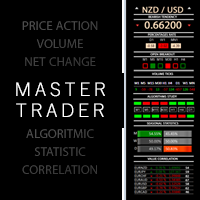
Master Trend Dashboard is a new generation indicator, compact, light and efficient. Each element of this Dashboard is designed to return specific signals as: Price Action, Breakout, Net Change (performance of the instrument), algorithmic studies, correlations and statistical calculations. This tool will change your way of trading allowing you to receive important information. See the Graphic Signals to understand every single signal below: Graphic Signals Symbol name and arrow color Green = Cur
Trade Copier Agent는 여러 MetaTrader(4/5) 계정/터미널 간에 거래를 복사하도록 설계되었습니다. 이 도구를 사용하면 제공자(소스) 또는 수신자(대상) 역할을 할 수 있습니다. 모든 거래 행위는 지연 없이 제공자에서 수신자로 복사됩니다. 이 도구를 사용하면 0.5초 미만의 매우 빠른 복사 속도로 동일한 컴퓨터의 여러 MetaTrader 터미널 간에 거래를 복사할 수 있습니다. 무역 복사기 에이전트 설치 및 입력 가이드 복사를 시작하기 전이나 주문이 없을 때 공급자 계정의 설정을 적용하십시오! 주문이 있는 동안 모든 변경 사항은 수신자 계정에 영향을 미칩니다. 예: 공급자 계정이 구매 주문을 적용한 다음 구매를 비활성화하면 수신자 계정의 모든 구매 주문이 닫힙니다. EA에 대한 알림을 받으려면 URL(   http://autofxhub.com   ) MT4 터미널을 추가하십시오(스크린샷 참조). MT5 버전   https://www.mql5.com/en/m
Unlimited Trade Copier Pro is a tool to copy trade remotely to multiple MT4, MT5 and cTrader accounts at different computers/locations over internet. This is an ideal solution for you if you are a signal provider and want to copy your trades to other receivers globally on your own rules. One provider can copy trades to multiple receivers and one receiver can get trade from multiple providers as well. The provider can even set the subscription expiry for each receiver, so that receiver will not b
Unlimited Binary Options Copier Remote is a powerful tool to copy binary options trades remotely between multiple accounts at different locations over internet. This is an ideal solution for signal provider, who want to share his binary options trades with the others globally on his own rules. One provider can copy trades to unlimited receivers and one receiver can get trade from unlimited providers as well. The provider can set the subscription expiry for each receiver, so that receiver will no
This is an Expert Adviser use for manual trading as a background EA or combine with external EA to open orders. Loss Recovery Trading is one of your options to handle the lose positions instead of using stop loss by setting a zone recovery area and target to exit the turn rounds sequence. How It Work? If the market goes against your first positions direction at the specific of losing points, the EA will open an opposite direction position with calculated larger lot size and also keep the first
如果产品有任何问题或者您需要在此产品上添加功能,请联系我 Contact/message me if you encounter any issue using the product or need extra feature to add on the base version. Dashboard Super Candle is an intuitive, and handy graphic tool to help you to: Have 28 pairs under control with one dashboard. Monitor candle direction, identify possible price movement and trend. Provide trading signals based on the candle direction selected by you. Automatically manage order once signal are generated. Have the ability to select which p
如果产品有任何问题或者您需要在此产品上添加功能,请联系我 Contact/message me if you encounter any issue using the product or need extra feature to add on the base version. There is Demo version of this panel Dashboard Super MA RSI CCI Demo in my product list, pls try it out to get familiar with all functionalities free . Dashboard Super MA RSI CCI is an intuitive, and handy graphic tool to help you to: Have 28 pairs under control with one dashboard Monitor price movement, identify possible trend based on MA, RSI, and CCI i
如果产品有任何问题或者您需要在此产品上添加功能,请联系我 Contact/message me if you encounter any issue using the product or need extra feature to add on the base version. Dashboard Super Currency Strength is an intuitive, and handy graphic tool to help you to: Have 28 pairs under control with one dashboard. Monitor price movement, identify possible trend based on currency strength gap of two currency on 3 timeframe. Provide trading signals based on the CSM (currency Strength Meter) selected. Manage order automatically onc
Dax Scalping Bracket is a new generation Expert Advisor Panel. This a very professional tool for SCALPING. The usability makes this tool an excellent ally for FAST operations of SCALPING on Index instruments and Forex market. The main feature of this EA is the ability to open multiple operations with a single click. Each position is autonomous and you can set different take profit and stop loss for each position. Special functionalities: STOP MOVE to manage your stop chasing the price BREAK EVEN
Great for scalper/intraday weapon for your ease daily trading. Scalper weapon will suit's you for any trading condition, whether it's intraday / scalper this tool is important for you which providing the missing function on the native MT4 platform. You have to check Allow Auto Trading by pressing Ctrl+O, going to Expert Advisors tab, and checking " Allow automated trading" . also to ensure the " auto trading " is green. Input Parameters _MINIMIZED_AT_START: to chose whether the panel is minimiz
Manager
Petr Plechac
A new way of managing your trades – efficiently, automatically and with no emotions. Control various markets and manage many different trades at one moment. Grasp your competitive advantage and ultimately find out what profitable trading looks like! Trademanager is a piece of software developed for MT4 platforms. This tool enables you to completely set up all parameters for many different trades on many different markets – at one time and with no emotions as psychological obstacles. Must-need to
Market Pressure Dashboard is a new generation utility. Its main function is to assist you and give you operational ideas optimizing your analytical work. Using this utility you could monitor a lots of financial instruments (max 28 symbols FOREX) in a very simple way. The Market Pressure indicator allows you to customize the internal list of the symbols to be monitored. The opening function and position management with this panel will be much more comfortable and navigation charts very powerful.
제작자의 제품 더 보기
Trade Manager Pro Position Control
Christian Abel Armada Betasolo
Link for MT4 version: https://www.mql5.com/en/market/product/211643?source=Site Trade Manager Pro — Manage chart-symbol trades from one compact chart panel. Place market and range-based pending orders, close positions in batches, apply configurable trailing stops, and move profitable trades to a break-even offset with one click.   Take control of trade management from your chart Trade Manager Pro brings the order and position controls many traders use throughout the trading day into one on-
Trend Flow System
Christian Abel Armada Betasolo
Trend Flow waits for multiple conditions to align before displaying a trend signal. It combines overbought and oversold reversal cues, three trend horizons, volatility boundaries, and Heiken Ashi candles to help you assess possible entries and exits. Overbought and oversold arrows White arrows mark potential reversal setups: Oversold Arrow: marks a potential upward reversal after price moves below the lower boundary and a later candle reverses upward. Overbought Arrow: marks a potential downwar
필터:
리뷰 없음
리뷰 답변