Guys, I recommend using this expert advisor on accounts with a narrow spread. If you don't know which account type will be best, then choose one of the recommended brokers:
If you are from the USand they do not want to register you on the two previous links, then you can definitely registerhere
If you want to use a fixed lot size
Attention. By default, the automatic calculation mode of the trading lot size is set in the set files. If you want to use a fixed lot, then set the value of the desired trading lot size for the corresponding variable in the manual settings of the adviser.
What is the Lot size recommendation? and how is the auto Lot size (1-10) calculated?
By default, the SWING MASTER EA use automated money management.
According to which the EA trades with a lot size of 0.01 for every 1000 units of your trading account.
If you want to increase the size of the automated trading lot, you need to change the value of the “N-Deposit units to increase” variable.
If you want to increase risk, you need to decrease the calculated value of this variable. If you want to reduce risk, you need to increase the calculated value of this variable.
For example, set the value to “500” and the trading lot size will increase every time your deposit increases by 500 units. That is, the profitability of the advisor will increase, but the trading drawdown will also increase.
If you set the value to “3000”, then the profitability will decrease and the trading drawdown will decrease.
I am a user who used Algo pumping before and I am very happy to be able to access Swing master.
I expect good profits.
I have two questions.
Is it okay to use EA by dividing M15 settings and H1 into two charts in one MT5 and applying them separately?
The second question is, you said that Algo pumping needs to change the settings periodically.
(Of course, there was almost no need to change it.)
So, do you plan to change the settings of Swing master periodically as well?
Hey, bro! Glad to see you among Swing Master EA users! 🎉😎
So, I don't advise you to use M15 and H1 portfolios on one account because they are slightly correlated and you will get both higher profit and higher trading drawdown on one account. So I advise you to use these set-files on different trading accounts.
As for optimization, of course, from time to time you need to adjust the settings of the Expert Advisor. I just recently made set files for each currency pair. These set-files will be relevant for another 5 months. In the future I will optimize every 6 months and publish new settings on the manual page.
What else do I want to tell you?! Of course I want to wish you great trading results, bro!!
I found the SL set very interesting. It's very far. Just want to know any reason to set like it. Do you recommend decreasing the SL? I just purchased the EA. So, I'm not familiar with the EA yet.
I found the SL set very interesting. It's very far. Just want to know any reason to set like it. Do you recommend decreasing the SL? I just purchased the EA. So, I'm not familiar with the EA yet.
Hey, bro! This Expert Advisor uses 2 types of Stop Loss at the same time:
1. Physical type of Stop Loss which saves trades only from market crashes. It is located at a long distance. Quotes should not touch it during normal asset quoting. Only emergency closes during market collapses. This Stop Loss is triggered quite rarely.
2. Virtual Stop Loss that closes trades during a price pullback on the reverse indicator signal. This is the main Stop Loss that closes losing trades much earlier than they touch the physical Stop Loss level.
So, don't be confused by the increased distance for physical stop loss orders. They perform the function of emergency closing and are located at such a distance so that volatile price jumps within the day do not bring us losses. In standard cases, trades are closed with a virtual stop loss at a short distance.
Hi my friend! I finally made my decision and chose your Expert Advisor! I trust I made the right choice :D Could you please send me the settings or anything related to the bot? One question — does the bot have a news filter? Also, I want to set my lot size to 0.05. How should I do that? It's not entirely clear to me — do I need to change the USD amount that appears? Thank you!!!
engeldorg #: Hi my friend! I finally made my decision and chose your Expert Advisor! I trust I made the right choice :D Could you please send me the settings or anything related to the bot? One question — does the bot have a news filter? Also, I want to set my lot size to 0.05. How should I do that? It's not entirely clear to me — do I need to change the USD amount that appears? Thank you!!!
Hey, bro!
All the settings (set files) for this Expert Advisor can be found here (find links to download the set files on this page): https://www.mql5.com/en/blogs/post/762129
I advise you to use the default settings. This is the best option to make your deposit feel good during trading drawdowns (when there are extreme price movements in the market).
In the next post, I will add a small tutorial on how to trade fixed lot if you are all so determined to reach for the stars in a few days!))
Hey, bro! This Expert Advisor uses 2 types of Stop Loss at the same time:
1. Physical type of Stop Loss which saves trades only from market crashes. It is located at a long distance. Quotes should not touch it during normal asset quoting. Only emergency closes during market collapses. This Stop Loss is triggered quite rarely.
2. Virtual Stop Loss that closes trades during a price pullback on the reverse indicator signal. This is the main Stop Loss that closes losing trades much earlier than they touch the physical Stop Loss level.
So, don't be confused by the increased distance for physical stop loss orders. They perform the function of emergency closing and are located at such a distance so that volatile price jumps within the day do not bring us losses. In standard cases, trades are closed with a virtual stop loss at a short distance.
Thank you for your reply. Also, I’d like to know that the TP Set to zero. Should I change it or there is Intrinsic TP.

Hi Ihor,
Can you please share all the setfiles?
Thanks
Ron
Hi Ihor,
Can you please share all the setfiles?
Thanks
Ron
Hi bro! All settings and set files are located here - https://www.mql5.com/en/blogs/post/762129
This is a step-by-step video tutorial on how to install and use SWING MASTER EA
These are the SET-FILES for setting up SWING MASTER EA - click to download
Guys, I recommend using this expert advisor on accounts with a narrow spread. If you don't know which account type will be best, then choose one of the recommended brokers:
This is the first recommended broker
This is the second recommended broker
If you are from the US and they do not want to register you on the two previous links, then you can definitely register here
If you want to use a fixed lot size
Attention. By default, the automatic calculation mode of the trading lot size is set in the set files. If you want to use a fixed lot, then set the value of the desired trading lot size for the corresponding variable in the manual settings of the adviser.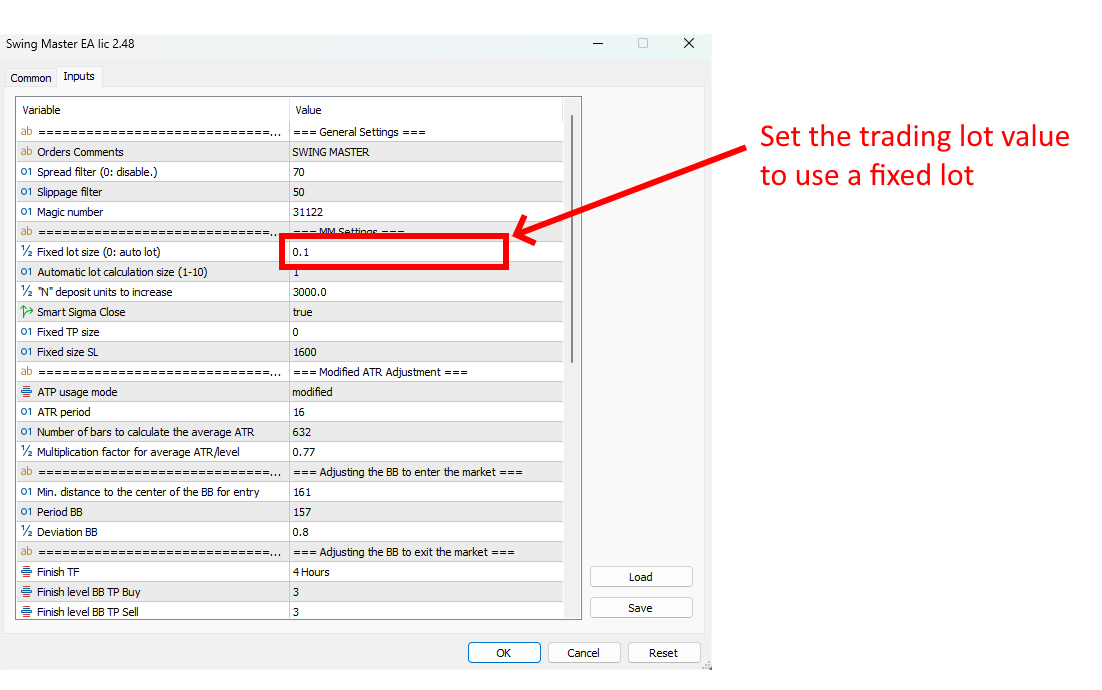
found, thanks
Hi Ihor,
What is the Lot size recommendation? and how is the auto Lot size (1-10) calculated?
Hi Ihor,
What is the Lot size recommendation? and how is the auto Lot size (1-10) calculated?
By default, the SWING MASTER EA use automated money management.
According to which the EA trades with a lot size of 0.01 for every 1000 units of your trading account.
If you want to increase the size of the automated trading lot, you need to change the value of the “N-Deposit units to increase” variable.
If you want to increase risk, you need to decrease the calculated value of this variable. If you want to reduce risk, you need to increase the calculated value of this variable.
For example, set the value to “500” and the trading lot size will increase every time your deposit increases by 500 units. That is, the profitability of the advisor will increase, but the trading drawdown will also increase.
If you set the value to “3000”, then the profitability will decrease and the trading drawdown will decrease.
This is the main portfolio of set-files (M15) SWING MASTER EA - click to download
This is an additional portfolio of set files (H1) SWING MASTER EA - click to download
Hi Ihor,
Do we leave the Fridays trades open (over the weekend)?
Thanks
Ron
Hi Ihor,
Do we leave the Fridays trades open (over the weekend)?
Thanks
Ron
Yes trades are left open Friday through the weekend. According to historical data - it has more positive effect than negative.
(Of course, there was almost no need to change it.)
So, do you plan to change the settings of Swing master periodically as well?
(Of course, there was almost no need to change it.)
So, do you plan to change the settings of Swing master periodically as well?
Hey, bro! Glad to see you among Swing Master EA users! 🎉😎
So, I don't advise you to use M15 and H1 portfolios on one account because they are slightly correlated and you will get both higher profit and higher trading drawdown on one account. So I advise you to use these set-files on different trading accounts.
As for optimization, of course, from time to time you need to adjust the settings of the Expert Advisor. I just recently made set files for each currency pair. These set-files will be relevant for another 5 months. In the future I will optimize every 6 months and publish new settings on the manual page.
What else do I want to tell you?! Of course I want to wish you great trading results, bro!!
Who hasn't seen my new video, here's a clip I made recently! 📽️
Hi Ihor,
I found the SL set very interesting. It's very far. Just want to know any reason to set like it.
Do you recommend decreasing the SL?
I just purchased the EA. So, I'm not familiar with the EA yet.
Hi Ihor,
I found the SL set very interesting. It's very far. Just want to know any reason to set like it.
Do you recommend decreasing the SL?
I just purchased the EA. So, I'm not familiar with the EA yet.
Hey, bro! This Expert Advisor uses 2 types of Stop Loss at the same time:
1. Physical type of Stop Loss which saves trades only from market crashes. It is located at a long distance. Quotes should not touch it during normal asset quoting. Only emergency closes during market collapses. This Stop Loss is triggered quite rarely.
2. Virtual Stop Loss that closes trades during a price pullback on the reverse indicator signal. This is the main Stop Loss that closes losing trades much earlier than they touch the physical Stop Loss level.
So, don't be confused by the increased distance for physical stop loss orders. They perform the function of emergency closing and are located at such a distance so that volatile price jumps within the day do not bring us losses. In standard cases, trades are closed with a virtual stop loss at a short distance.
Hi my friend! I finally made my decision and chose your Expert Advisor! I trust I made the right choice :D Could you please send me the settings or anything related to the bot? One question — does the bot have a news filter? Also, I want to set my lot size to 0.05. How should I do that? It's not entirely clear to me — do I need to change the USD amount that appears? Thank you!!!
Hey, bro!
All the settings (set files) for this Expert Advisor can be found here (find links to download the set files on this page): https://www.mql5.com/en/blogs/post/762129
I advise you to use the default settings. This is the best option to make your deposit feel good during trading drawdowns (when there are extreme price movements in the market).
In the next post, I will add a small tutorial on how to trade fixed lot if you are all so determined to reach for the stars in a few days!))
So, if you want to trade a fixed lot of 0.05 for example, set this value for the fixed lot size variable (see how it looks in my picture below):
Hey, bro! This Expert Advisor uses 2 types of Stop Loss at the same time:
1. Physical type of Stop Loss which saves trades only from market crashes. It is located at a long distance. Quotes should not touch it during normal asset quoting. Only emergency closes during market collapses. This Stop Loss is triggered quite rarely.
2. Virtual Stop Loss that closes trades during a price pullback on the reverse indicator signal. This is the main Stop Loss that closes losing trades much earlier than they touch the physical Stop Loss level.
So, don't be confused by the increased distance for physical stop loss orders. They perform the function of emergency closing and are located at such a distance so that volatile price jumps within the day do not bring us losses. In standard cases, trades are closed with a virtual stop loss at a short distance.
Thank you for your reply. Also, I’d like to know that the TP Set to zero. Should I change it or there is Intrinsic TP.
The advisor fixes profit according to the indicator signals. nothing needs to be changed!