 MetaTrader 5
 Experts
 지표
지표
 스크립트
스크립트
 라이브러리
라이브러리
 보관함
보관함
당사 팬 페이지에 가입하십시오

Universal Breakout Study - MetaTrader 5용 expert

저는 Sergey Yermolov이며, 15년 이상 트레이딩 시스템과 알고리즘을 개발해 왔습니다.
저의 트레이딩 접근 방식은 “성배”를 찾거나 단기간 수익을 약속하는 것이 아닙니다.
저는 “자동으로 돈을 벌어주는 로봇”을 판매하지 않습니다.
저는 모든 행동에 논리, 제약, 그리고 리스크 관리가 포함된 시스템을 구축합니다.
제가 만든 도구는 “버튼 하나로 수익을 내는” 것이 아니라, 다음을 위한 것입니다:
— 트레이딩에서의 불확실성과 혼란을 줄이고
— 감정의 영향을 최소화하며
- 조회수:
- 71
- 평가:
- 게시됨:
- 업데이트됨:
-
 이 코드를 기반으로 한 로봇이나 지표가 필요하신가요? 프리랜스로 주문하세요
프리랜스로 이동
이 코드를 기반으로 한 로봇이나 지표가 필요하신가요? 프리랜스로 주문하세요
프리랜스로 이동

Universal Breakout Study는 브레이크아웃 거래 전략을 연구하고 테스트하기 위해 설계된 전문가 자문가(EA)입니다.
전략 설명
이 EA는 지정된 수의 H1 캔들을 사용하여 가격 범위(박스)를 구축하고, 범위가 완성되면 박스 경계 외부에 매수 스탑 및 매도 스탑 대기 주문을 설정합니다.
브레이크아웃이 발생하면 해당 주문이 실행됩니다. 포지션이 개설된 후에는 손절매(Stop Loss), 익절(Take Profit), 손익분기점(Breakeven), 추적 손절( Trailing Stop) 및 기타 거래 관리 기법을 사용하여 포지션을 관리할 수 있습니다.
범위는 GMT 기준 시간을 사용하여모든 거래 세션에 대해 구축할 수 있습니다. 이를 통해 트레이더는 소스 코드를 수정하지 않고도 아시아, 런던, 뉴욕 또는 사용자 지정 거래 세션 동안의 브레이크아웃을 연구할 수 있습니다.
이 EA는 손절매(Stop Loss ) 및 익절(Take Profit)을 계산하는 다양한 방법을 지원합니다. 보호 주문은 비활성화하거나, 고정값으로 지정하거나, 박스 크기의 계수로 계산할 수 있습니다. 포지션 규모는 선택한 위험 수준에 따라 자동으로 계산됩니다.
사용 가능한 거래 관리 기능:
- 브레이크이븐 — 손절매(Stop Loss)를 손익분기점으로 이동합니다.
- 트레일링 스톱 — 동적 포지션 관리.
- 시간 종료 — 지정된 시간이 경과한 후 포지션을 청산합니다.
- 만료 — 보류 주문의 유효 기간 제어.
- 요일 필터 — 특정 요일에 거래를 활성화하거나 비활성화합니다.
각 요일별로 거래를 개별적으로 활성화하거나 비활성화할 수 있으므로, 이 EA는 브레이크아웃 연구뿐만 아니라 달력 기반의 시장 효과 연구에도 적합합니다.
소스 코드는 완전히 공개되어 있으며, 이를 사용하여 맞춤형 브레이크아웃 전략을 개발하고, 새로운 필터를 추가하며, 거래 가설을 테스트할 수 있습니다.
매개 변수
박스 설정
- GMT — 세션 계산 및 박스 구성에 사용되는 GMT 오프셋.
- StartHourBox — GMT 시간 기준 박스 시작 시간.
- TotalBarBox — 박스 구축에 사용되는 H1 캔들 수.
Example:
StartHourBox = 8
TotalBarBox = 24
이 EA는 GMT 기준 08:00부터 시작하는 24개의 시간별 캔들을 사용하여 박스를 구성합니다.
설정 열기
- Shift — 보류 주문을 배치하기 전에 박스 경계에서 추가되는 거리.
- Expiration_Minute — 미결제 주문의 만료 시간(분 단위).
값이 0이면 주문 만료가 비활성화됩니다.
예시:
박스 고점 = 1.1000,
, Shift = 10 포인트
매수 스탑 주문은 1.1010에 체결됩니다.
손절매 설정
- StopLoss_Type — 손절매 계산 방식.
사용 가능한 모드:
- Null — 손절매 비활성화.
- Fixed — 포인트 단위의 고정 손절매.
- 박스 기준 계수 — 박스 크기의 비율로 손절매 계산.
- StopLoss — 포인트 단위의 고정 스톱로스 값.
- k_StopLoss — 박스 크기에 대한 상대적 손절매 계수.
예시:
박스 크기 = 100 포인트
k_StopLoss = 0.62
손절매 = 62 포인트.
익절 설정
- TakeProfit_Type — 테이크 프로핏 계산 방식.
사용 가능한 모드:
- Null — 테이크 프로핏 비활성화.
- Fixed — 포인트 단위의 고정 테이크 프로핏.
- 박스 기준 계수 — 박스 크기의 비율로 테이크프로핏을 계산합니다.
- TakeProfit — 포인트 단위의 고정 테이크 프로핏 값.
- k_TakeProfit — 박스 크기에 대한 상대적 테이크 프로핏 계수.
예시:
박스 크기 = 100 포인트
k_TakeProfit = 0.30
익절 가격 = 30 포인트.
손익분기점
- Paritet_Type — 손익분기점 기능을 활성화하거나 비활성화합니다.
- 통화쌍 — 손절매를 손익분기점으로 이동하기 전에 필요한 포인트 단위의 이익.
- 핍 — 스톱 로스를 이동한 후 확보되는 추가 수익.
예시:
Paritet = 20
Pips = 5
20포인트의 수익에 도달하면, 손절매가 진입 가격 +5포인트로 이동합니다.
클래식 트레일링 스톱
- OnTraillingStop — 트레일링 스톱 활성화 또는 비활성화.
- TraillingStop — 현재 가격과 손절매 가격 간의 거리.
- TraillingStep — 최소 손절매 조정 단계.
- TraillingStart — 트레일링 스톱이 활성화되기 전에 필요한 추가 이익.
예시:
TraillingStop = 20
TraillingStart = 10
포지션의 이익이 30포인트에 도달한 후에야 트레일링 스톱이 활성화됩니다.
그 시점에서 손절매 수준이 10포인트의 이익을 확보할 수 있도록 조정됩니다. 그 후, 손절매 수준은 20포인트 간격을 유지하며 가격 변동에 따라 계속 추적됩니다.
시간 기반 청산
- Close_Type — 시간 기반 청산을 활성화하거나 비활성화합니다.
- Market_Minute — 포지션의 최대 유지 시간(분).
- Close_Level — 포지션을 청산하기 전에 필요한 최소 이익.
예시:
Market_Minute = 70
Close_Level = 10
거래가 70분 이상 유지되고 이익이 10포인트를 초과하면 포지션이 청산됩니다.
거래일
- 월요일 — 월요일에 거래를 활성화합니다.
- 화요일 — 화요일에 거래를 활성화합니다.
- 수요일 — 수요일 거래를 활성화합니다.
- 목요일 — 목요일에 거래를 활성화합니다.
- 금요일 — 금요일에 거래를 활성화합니다.
이 필터를 사용하면 요일별로 돌파 패턴을 별도로 테스트할 수 있습니다.
거래 설정
- RiskPercent — 계좌 잔액의 백분율로 표시된 거래당 위험도.
중요 사항
- 이 EA는 H1 시간대에서만 작동합니다.
- 박스(box)는 브로커의 서버 시간과 무관하게 GMT 조정 시간을 사용하여 구축됩니다.
- 박스 크기는 H1 캔들 수로 정의되므로, 모든 거래 세션이나 사용자 지정 시간 간격을 조사할 수 있습니다.
- 박스가 완성되면 매수 스탑 및 매도 스탑 주문이 자동으로 체결됩니다.
- Expiration_Minute 매개변수를 사용하여 보류 주문을 자동으로 만료시킬 수 있습니다.
- 손절매(Stop Loss) 및 익절(Take Profit)은 비활성화하거나, 고정값으로 지정하거나, 박스 크기의 계수로 계산할 수 있습니다.
- 브레이크이븐, 트레일링 스톱 및 타임 익스트는 독립적으로 또는 동시에 사용할 수 있습니다.
- 트레일링 스탑은 수익이 TraillingStop + TraillingStart에 도달한 후에만 활성화됩니다. 첫 번째 스탑 이동은 최소 TraillingStart 포인트의 수익을 확보합니다.
- 시간 종료는 지정된 수익 수준에 도달한 포지션만 청산합니다.
- 거래는 요일별로 개별적으로 활성화하거나 비활성화할 수 있습니다.
- 포지션 크기는 선택한 위험 수준에 따라 자동으로 계산됩니다.
- 위험 기반 포지션 크기 조정이 사용될 경우, 위험은 현재 잔고나 순자산이 아닌 EA가 시작되는 시점의 계좌 잔고를 기준으로 계산됩니다.
- 이 EA는 브레이크아웃 전략을 연구하기 위해 제작되었으며, 추가적인 검증 및 아웃오브샘플 테스트 없이는 즉시 거래에 사용할 수 있는 시스템으로 간주되어서는 안 됩니다.
연구 예시
이 Expert Advisor의 사용 예시로, 완전한 레인지 브레이크아웃 전략에 대한 연구가 수행되었습니다.
다음 구성 요소들을 순차적으로 분석했습니다:
- 범위 형성 매개변수;
- 손절매(Stop Loss) 및 익절(Take Profit) 설정;
- 손익분기점 관리;
- 트레일링 스톱 매개변수;
- 시간 기반 청산 필터;
- 평일 필터.
가장 유망한 구성들을 선정한 후, 최종 모델을 도출하였으며, 이후 포워드 테스트 기간을 통해 검증했습니다.
아래 그림은 선정된 구성 중 하나의 최적화 결과와 포워드 테스트 성과를 보여줍니다.
최적화 결과
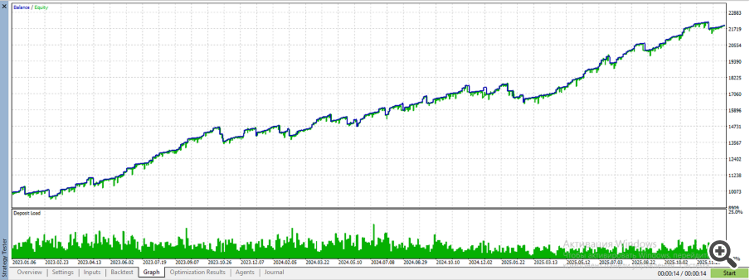
전방 테스트 결과

이 예시는 오직 시연 목적으로만 제공됩니다. 이는 특정 매개변수 세트를 사용하라는 권장 사항이나 향후 성과를 보장하는 것으로 해석되어서는 안 됩니다.
이 예시는 단순히 Universal Breakout Study가 거래 아이디어를 개발, 테스트 및 검증하기 위한 연구 도구로 어떻게 사용될 수 있는지를 보여주기 위한 것입니다.
MetaQuotes Ltd에서 영어로 번역함.
원본 코드: https://www.mql5.com/en/code/73711
 Chart Navigator MT5 Light
Chart Navigator MT5 Light — 차트 내에서 빠르게 이동하고, 차트 상의 표시 위치로 즉시 이동할 수 있는 미니 차트
Institutional Ornstein-Uhlenbeck Equilibrium Matrix
오른스타인-울렌베크 확률 과정을 활용하여 자산의 진정한 드리프트 없는 균형점과 평균 회귀 속도를 수학적으로 추정하는 계량경제학적 가격-공간 지표.
Geometric signal validation for indicator signals
표시등 신호에 대한 기하학적 신호 유효성 검증을 제공하는 상태 엔진
Multi Forex Scanner MT5
각 거래 쌍을 일일이 분석할 필요 없이, 자신의 기준에 따라 가장 유망한 거래 쌍이 무엇인지 한눈에 파악할 수 있습니다.