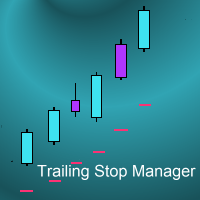
Trailing Stop Manager

Introduction

This is a trade manager EA. It will detect an open trade and apply a number of different user selected trailing stops to the position simultaneously, always using the tightest stop loss out of all the different methods that have been turned on. The various different choices of trail are:

  • X bar trail to break-even: e.g. adjust the stop loss up towards break-even at the lowest low of the last X bars until break-even is reached.
  • Risk-reward trail to break-even: e.g. move the stop loss to break-even once the market reaches a multiple of (e.g. 1.5 times) the initial risk
  • X bar trail: e.g. trail the stop loss at the lowest low of the last X bars until stopped-out.
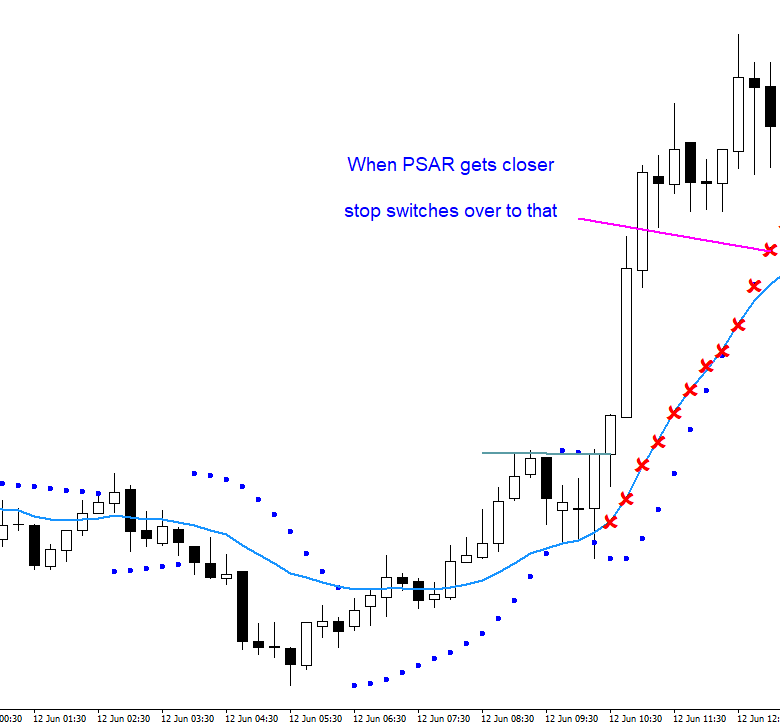
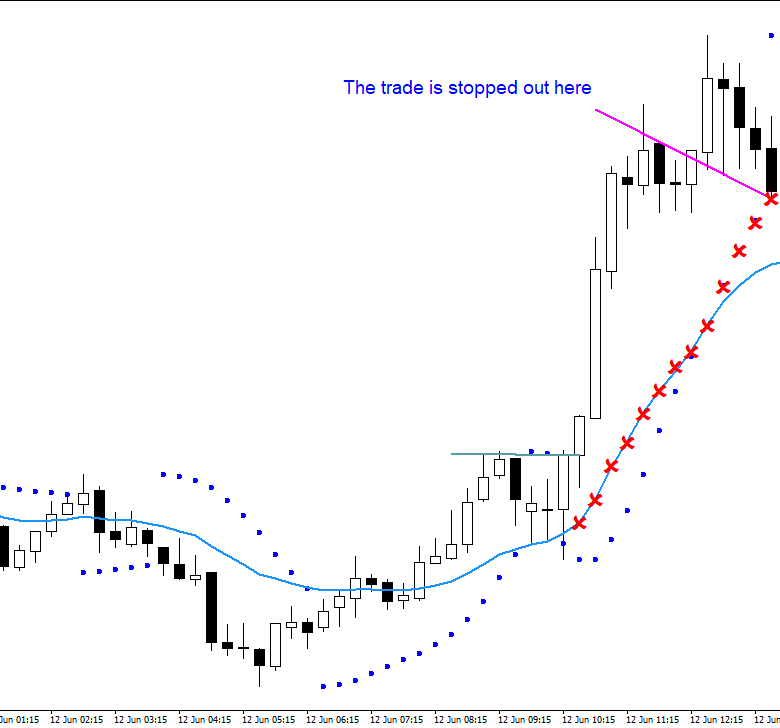
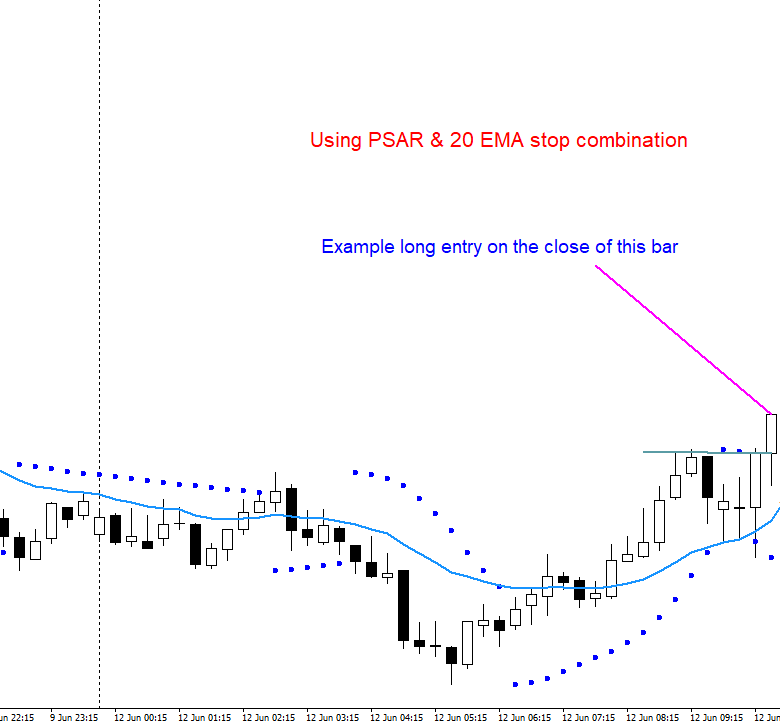
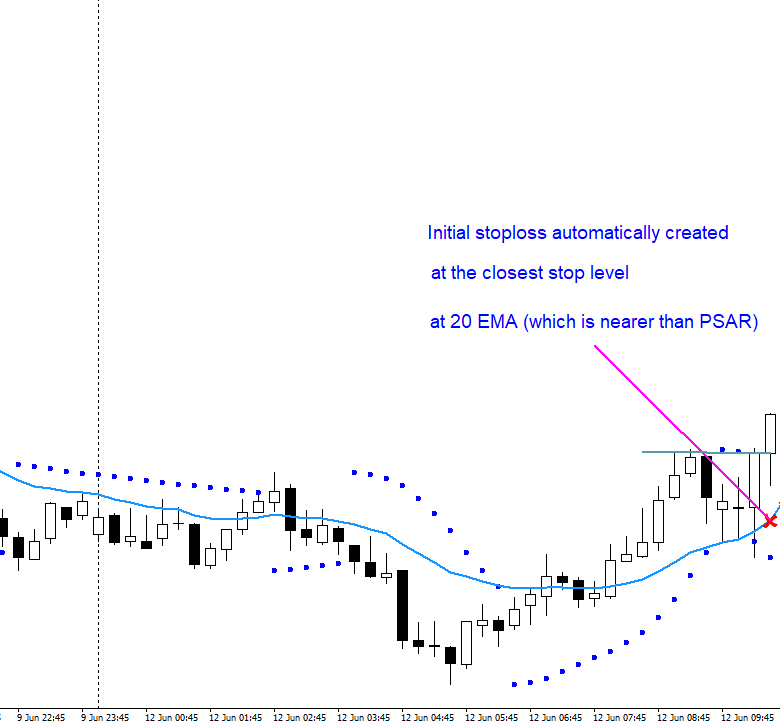
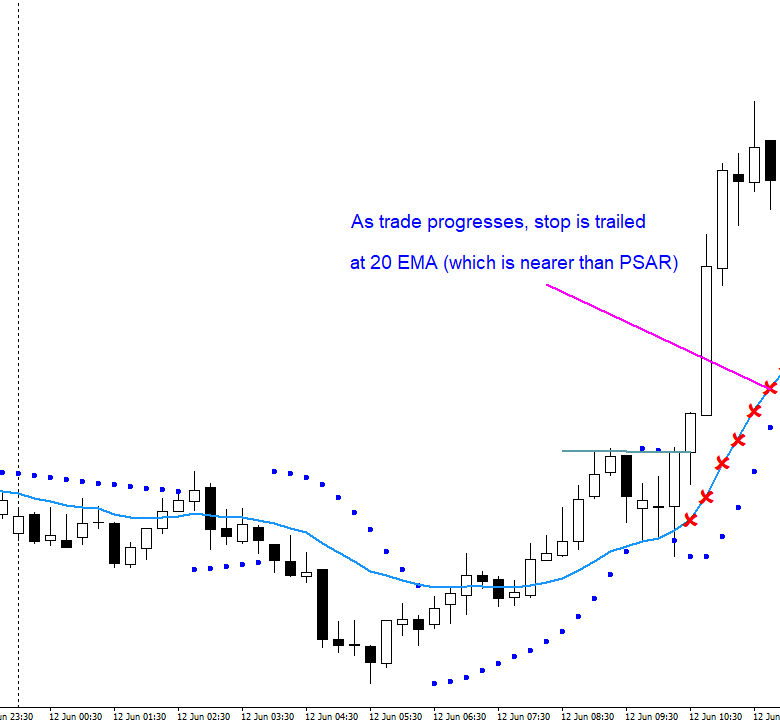
  • Parabolic Stop & Reverse (PSAR) trail: trail the stop loss at the PSAR indicator reversal point
  • Moving average trail: trail the stop loss at the moving average value


How to Use This EA

The EA is applied to the chart where it will remain dormant until it detects a trade for whatever symbol the EA has been applied to. At this point it will start to manage the position, working a trailing stop order for it until the position is closed out.

Inputs Overview
For each stop loss type there is a separate section. Each type has a true/false switch for turning that stop loss on. In addition the required input parameters for each stop loss are given.

For all stop types apart from the PSAR and the Risk-reward Trail to Break-even, there is a buffer or cushion input as well. This is a buffer amount to adjust the stop beyond the technical level so for e.g. the XBarTrail for a long position the stop would be adjusted below the X bar low by the cushion amount. The Cushion can be specified either in pips or in ATR multiples.

Note that for the break-even stops, there is an additional cushion,  specified by the BEProfitCushionType and BEProfitCushionValue inputs, which is the amount of profit to lock in beyond break-even. So if this is set to e.g. 1 pip then the break-even stop-loss will actually lock in 1 pip of profit.

Inputs

XBar Trail to Brk Even Section

XBarTrlBE_ON: true/false to turn the X Bar trail to break-even on/off.

XBarTrlBE_NBars: the number of bars back to trail the stop

XBarTrlBE_CushionType: specify the cushion type for the XBar Trail to Break-even stop

XBarTrlBE_CushionValue: specify the cushion size for the XBar Trail to Break-even stop

Risk Reward to Brk Even Section

RRwdBE_ON: true/false to turn the risk/reward to break-even on/off

RRwdBE_Level: the risk/reward profit level (i.e.the profit multiple of the initial risk)

Brk Even Cushion Settings

BEProfitCushionType:   specify the break-even profit lock in cushion type

BEProfitCushionValue:   specify the break-even profit lock in amount

XBar Trail Section

XBarTrail_ON: true/false to turn on or off the X bar trail of the lowest N bars (for longs) or highest N bars (for shorts)

XBarTrail_NBars:  the lookback length for the trail

XBarTrail_CushionType:  the cushion type for the XBar Trail

XBarTrail_CushionValue:  the cushion size to be added to the lowest low/highest high to define the stop level


PSAR Trail Section

PSarTrail_ON: true/false to turn the parabolic stop & reverse trail on or off

PSarTrail_Step: the PSAR step input

PSarTrail_Max:  the PSAR max input


General Info Section


InstantSLCreation: if set to true then as soon as the EA detects a new position without a stop loss, it will create one based on the current trailing stop loss parameters

SpreadPnts: the bid/ask spread size, expressed in points, to be added to the stop loss for short positions

ATRLength: the ATR Length parameter to use for calculating the ATR cushion values

MyMagicNumber: If this is a positive number then the EA will only operate on tickets with this magic number. If it's negative then it will work on all positions for the symbol to which the EA has been applied
おすすめのプロダクト
EasyTradePad
Sergey Batudayev
5 (5)
EasyTradePad – MetaTrader 4用取引パネル EasyTradePadは 、手動および半自動取引のためのツールです。パネルでは、注文とポジションを迅速に管理できるほか、リスク管理の計算もワンクリックで行えます。 パネルの機能: 事前に定義されたリスク(%または預金通貨)で取引を開始および終了します SLとTPをポイント、パーセンテージ、または金額で設定します リスクと報酬の比率を自動計算 損切りを損益分岐点に移動する 部分的なポジションのクローズ トレーリングストップ(ポイントまたはローソク足の影による) ポジションの平均化とピラミッディング アクティブな取引のパラメータを変更する [   デモ ] [   説明 ] 追加機能: ピラミッド化 価格がテイクプロフィットに近づくにつれて、段階的に取引を追加します。新規取引ごとのリスクを軽減できます。追加する取引数は簡単に設定できます。 平均化 チャート上のカスタムレベルで追加注文を出すことができます。ポジションは平均エントリー価格で決済されます。 損益分岐点移転 価格が指定された利益幅に達した後、ストップロ
This tool will perform Trailing stop loss and Break even management for orders. Helps you limit or reduce the time spend watching orders on the screen, especially when you need to go to sleep. Just add this EA to 1 chart, you can manage all pairs. You can filter orders by comment, magic number, symbol, and order ticket number. When Breakeven it can add shift/offset pips (to cover the commission...). You can try in strategy tester before purchase. The EA will add Buy and Sell alternately, so yo
Expert Advisor for MT4 Useful utility MUST have for all traders.  With 1 click button, you're able to close all your open positions. Its come with a warning pop up notification when you click to close all your trades, to avoid an accident press the button. Just press 'Yes' to confirm or 'No' to cancel it. The expert will close all your open positions no matter what pairs you currently open or directions. Just attach the expert on 1 of your chart, and you're good to go.
MT4用NAS100 Auto SL and TP Makerをご紹介します: MetaTrader4でナスダック100市場をナビゲートするトレーダーにとって不可欠なアシスタントであるNAS100オートSLおよびTPメーカーで、ストップロスおよびテイクプロフィットの設定をもう見逃すことはありません。このツールは、ストップロスとテイクプロフィットのレベル管理を自動化するシームレスなソリューションを求める方々のために設計されています。 主な特徴 簡単な自動化: ストップロスやテイクプロフィットのないナスダック100取引を自動的に監視します。 ユーザーが構成した設定に基づいてレベルを動的に調整します。 注文タイプの多様性: Nasdaq100の成行注文と未決済注文の両方に対応。 MetaTrader 4で利用可能な様々な注文タイプをサポートします。 カスタマイズされた設定: ユーザーフレンドリーなパラメータ設定により、トラッキング設定とストップロス/テイクプロフィットレベルのカスタマイズが可能です。 柔軟な範囲: 実行する特定のNAS100商品、または取引されるすべての商品に対してStop
FREE
Trade Manager は、リスクを自動的に計算しながら、取引を迅速に開始および終了するのに役立ちます。 過剰取引、復讐取引、感情的な取引を防止する機能が含まれています。 取引は自動的に管理され、アカウントのパフォーマンス指標はグラフで視覚化できます。 これらの機能により、このパネルはすべてのマニュアル トレーダーにとって理想的なものとなり、MetaTrader 4 プラットフォームの強化に役立ちます。多言語サポート。 MT5バージョン  |  ユーザーガイド + デモ Trade Manager はストラテジー テスターでは機能しません。 デモについてはユーザーガイドをご覧ください。 危機管理 % または $ に基づくリスクの自動調整 固定ロットサイズを使用するか、ボリュームとピップに基づいた自動ロットサイズ計算を使用するオプション RR、Pips、または価格を使用した損益分岐点ストップロス設定 トレーリングストップロス設定 目標に達したときにすべての取引を自動的に終了するための 1 日あたりの最大損失 (%)。 過度のドローダウンからアカウントを保護し、オーバートレードを防ぎま
This product is a multi-functional MT4 indicator and is an indispensable tool for account information statistics, strategy analysis and risk assessment. Functions: 1. Statistical account basic information of profit and loss . 2. Statistics and display the account profit and loss fund curve. 3. Display the order's track on chart ,so that we can analys the strategy and risk of the account. 4 .List account's trade pairs and order totals ,we also can see the profits of each pair. If you have any qu
SwiftEdge Scalper 完全な手動制御を備えたプロフェッショナルティックスキャルピングEA スキャルピングには瞬時の判断、正確なリスク管理、シームレスな注文執行が求められます。価格動向を見ながらブレイクイーブン計算、トレーリングストップ、複数ポジションを管理することは、適切なツールなしでは圧倒されます。 SwiftEdge Scalperは、アクティブなスキャルパーとデイトレーダー向けに設計されたプロフェッショナルなトレーディングアシスタントです。ワンクリックまたはキーボードショートカットで取引を実行し、EAが自動的にブレイクイーブン、トレーリングストップ、ポジション管理を処理します。これは自動売買ロボットではありません — あなたが決定した時のみ取引します。 詳細はこちら:   完全な設定ガイドとドキュメント (English) 期間限定オファー:   最初の50ダウンロードは無料!その後、この製品は有料になります。今すぐダウンロードして無料コピーを確保してください。 主な機能 ワンクリック取引:   パネルボタンまたはカスタマイズ可能なキーボードショートカット(B/S/
ほとんどの個人トレーダーはリスクを管理できず、過剰なリスクや過剰な取引によって口座を破綻させます。このツールはドローダウンとリスク管理を完全に自動化し、トレーダーはエントリーだけに集中できます。これは、Aggressive Risk Control 機能を備えた価格アクションを使用して、価格が取引に反する場合に部分的なポジションを自動的に決済する最初で唯一のトレード マネージャーです。これにより、損失が常に勝ちよりも小さく抑えられます。 あらゆるエントリー方法およびあらゆる取引スタイルで使用できます。スキャルピング、日中取引、またはスイング取引。 特徴: すべての注文タイプで使用します。成行注文、逆指値注文、指値注文。 アラート付きの Aggressive Risk Control (ARC) - 価格が取引に反する場合のドローダウンを削減します。 取引の回数を制限し、過剰取引を減らします。 ロットサイズの自動計算。 自動または手動でストップロスと複数のテイクプロフィットレベルを設定します。 自動または手動でストップロスを損益分岐点に移動します。 利益が出ている場合は、部分的
The Position Control is an intuitive yet powerful trading tool that facilitates risk management from entry to exit.  It includes automatic lot sizing, fixed stop loss and take profit features, or determines them using the ATR indicator. After opening a position, you can set automatic break-even points, trailing stops, and choose from three types of partial closures. Moreover, if you open a 0.01 lot position from your phone, the expert will automatically close it and open a risk-managed position
Overview Money management is an all-important aspect of trading that many traders often overlook. It is very possible that even with a winning strategy, bad money management can often result in huge loses. Verdure Forex Calculators aims to help traders minimize risk and exposure in the Forex market. Verdure Forex Calculators implements 4 calculators in one single indicator. It is the first of it's kind on MT4 platform. Calculators implemented are: Lot (Trade or Contract Size) Calculator. Margin
Scalping One MT4 free バージョンです。 1ポジションを1つのボタンで表示します。リアルタイムで損益、  Lot、  Pointを表示。チャート通貨のみと全通貨ペアのポジションの表示を切り替え可能。(free版は3ポジションのみ) 日本語、英語に自動識別対応(設定タブは英語のみですが http://www.emkyuradias.shop/emkyuradias.shop/instruction.html にて日本語Helpを用意) 口座通貨表記はドル、ユーロ、ポンド、円に対応(自動識別) タイムラインの描画機能は、ローカルタイム(PC時間)、カレントタイム、東京、ニューヨーク、ロンドン、シドニー時間を選択可能な時計表示と連動可能、サマータイム対応。 ラウンドナンバー、日、週、月、年の安値、高値ライン表示、非表示がワンクリックで可能、高値安値は時間表示上のデータ表示部分にて個別に表示も可能です。
FREE
How to Use the Features       MT5 VERSION   TRADE COPIER Select Role: On the account sending trades, choose Sender (Master Account) . On the account receiving trades, choose Copier (Receiver Account) . Lot Size Mode: Same Lot Size as Master: Ignores multipliers, copies exactly what the Master has. Multiply Master Lot Size: Uses the "Lot Multiplier" field (e.g., Master 0.10, Multiplier 2.0 = Copier 0.20). Use Fixed Lot Size: Ignores Master's volume entirely, uses the "Fixed Lot Size" field for ev
このインジケーターは世界の取引所の営業時間を表示します。現在どの市場が最も活発かを確認するのに役立ちます 私の  #1 Pro  Utility : 66+ 機能、このツールを含む  |   お問い合わせ  ご質問があれば 現在最もボラティリティの高い銘柄を選択するのに役立ちます; デイトレーダーに特に有用です; 1) 1H以下の時間足 で使用する場合:線はチャート上のバーの実際の位置に対応し、チャートを移動すると、取引セッションの線 はチャートと一緒に移動します 。 2) 4H以上の時間足 で使用する場合:取引セッションの 静的なチャート が表示され、垂直線 は一日中移動し 、現在どの市場が活発かを示します。(スケールのため)。 インジケーターをインストールした後、グリッドを無効にし(CTRL+G)、オブジェクトの説明を無効にする(F8>共通>オブジェクトの説明を表示)ことをお勧めします。 入力設定: 重要:   インジケーターを正しく動作させるには、初期設定で   ブローカー時間とグリニッジ標準時との時差を設定する必要があります: ブローカー時間は「MarketWatch」セ
With this software you can test your Forex strategies live. Compatible with Meta Trader 4. Extra features are available. You can trade through the panel. You can put signs with Fish Hook. In addition, your strategy test is saved to the file folder in csv format. You can review these reports with CSV Quick Viewer. One Lot can do with Scalp. Your account also determines the lot based on the amount of money found. It gives you information about the transaction before you open the transaction. You c
VR カラー レベルは、トレンドライン、四角形、テキストなどの要素を使用してテクニカル分析を適用する人にとって便利なツールです。グラフにテキストを直接追加したり、スクリーンショットを撮ったりすることができます。 設定、設定ファイル、デモ版、説明書、問題解決方法は、以下から入手できます。 [ブログ] レビューを読んだり書いたりすることができます。 [リンク] のバージョン [MetaTrader 5] インジケーターの操作は ワンクリック で実行できます。これを行うには、線の付いたボタンをクリックすると、カーソルの下に傾向線が表示されます。次に、カーソルを移動して 線の位置 を選択し、もう一度クリックして修正します。 インジケーター の特徴は、スタイルと色のすべての変更が自動的に保存され、その後すべての 新しく作成された グラフィック オブジェクトに適用されることです。 このインジケーターには、異なるスタイルのトレンド ラインを設定するための 2 つの独立したボタン、異なるスタイルの 2 つの独立した四角形、独自のスタイルを持つ 1 つのテキスト フィールド、およびスクリーンショット
FREE
Awesome Oscillator by Bill Williams with the ability to fine-tune and replace the averaging algorithms of the indicator, which significantly expands the possibilities of using this oscillator in algorithmic trading and brings it closer in its properties to such an indicator as the MACD. To reduce price noise, the final indicator is processed with an additional Smooth averaging. The indicator has the ability to give alerts, send mail messages and push signals when the direction of movement of th
ProEngulfing
Ashkan Hazegh Nikrou
4.5 (2)
ProEngulfingをご紹介いたします - あなたのMT4用プロフェッショナルエングルフパターンインディケーター 精度の力を解放しましょう。ProEngulfingは、外国為替市場での資格のあるエングルフパターンを識別し強調するために設計された先進的なインジケーターです。MetaTrader 4向けに開発されたProEngulfingは、エングルフパターンの認識に対する緻密なアプローチを提供し、取引の決定に対して最も信頼性のあるシグナルのみを受け取ることを保証します。 ProEngulfingの動作方法: ProEngulfingはエングルフパターンを分析するために洗練されたアルゴリズムを使用し、パターンの単なる認識を超えて、これらが真に資格を持っていることを確認します。以下がその動作方法です: 資格基準:インジケーターは本体の割合をキャンドル全体のサイズに対して評価し、影の割合をキャンドルサイズと比較します。この注意深い評価により、高い確率のエングルフパターンのみが注目されることを保証します。 連続の確認:ProEngulfingはエングルフパターンの前に十分な数の連続したリバ
Overview Money management is an all-important aspect of trading that many traders often overlook. It is very possible that even with a winning strategy, bad money management can often result in huge loses. Verdure Lot Calculator aims to help traders minimize risk and exposure in the Forex market. Verdure Forex Calculators implements Lot (Trade or Contract Size) Calculator as an indicator on MT4 platform. Lot Calculator (trade or contract size) A lot refers to a bundle of units in trade. In Fore
Product Name: Risk Commander: Trade Assistant & Strategy Simulator Risk Commander is more than just a trade panel—it is a complete Manual Trading Ecosystem . It serves two powerful purposes: Live Assistant: Helps you execute trades with speed, precision, and perfect risk management in real-time markets. Training Simulator: Fully compatible with the Strategy Tester (Visual Mode) , allowing you to practice manual trading on historical data without risking a cent. NEW! Built-in Simulator Mode Stop
Expert Advisor to Automatically Trade Moving Averages price breakouts & retests .  ​ Complete trading solution with automated Entry , Take Profit , partial profit , Stoploss and also auto breakeven where SL is moved to Entry once tp1 / first target is reached , Moving averages are used to identify trends and confirm reversals ,  They are effective in all time frames . from 1 min scalping to 4hr or Daily charts swings ,  ​ With MA Trade Panel EA we can automatically buy / sell when price breaks
Equity Safe V1
Luis Carlos Lucero Hernandez
EquitySafe V1.0   is a   powerful risk management tool   designed for   MetaTrader 4 . It enables traders to effectively manage their risk by setting   maximum loss limits   based on custom time frames. With this tool, you have the flexibility to   define your own time   intervals and   allocate specific risk   thresholds accordingly. This helps you   maintain control   over your trading account and   minimize potential losses.   By utilizing EquitySafe, you can ensure that your trading strategy
IceFX’s TradeInfo is an utility indicator which displays the most important information of the current account and position. Displayed information: Information about the current account (Balance, Equity, Free Margin). Current spread, current drawdown (DD), planned profit, expected losses, etc. Number of open position(s), volume (LOT), profit. Today’s and yesterday’s range. Remaining time to the next candle. Last day profit information (with integrated IceFX ProfitInfo indicator). Risk-based LOT
FREE
自動決済:時間指定、または利益/損失トリガー このユーティリティを使用すると、特定の条件で取引を自動的に決済できます。 多機能ユーティリティ : 66+ 機能、このツールを含む  |   質問がある場合は連絡してください   |   MT5版 自動決済を有効にするには、次のパラメータを設定する必要があります(パネル上): 1. シンボル   機能が適用される: 特定の   [Symbol]   / または   [ALL]   すべてのシンボル。 2.   条件、   決済タイミング: [if total] / [if single] / [at time]:   このパラメータに応じて、  利益/損失達成時 に決済するか、  指定時間 に決済するかのオプションが表示されます。 [close at Profit / Loss] オプションの設定: 1. [if total] / [if single]:   P/L計算方法:すべての  選択された取引を  まとめて、  または各取引を  個別に計算; 2. [Floating] / [Potential]:  浮動P/L  (未決済取引
SMC Venom Model BPR インジケーターは、スマート マネー (SMC) コンセプトで取引するトレーダー向けのプロフェッショナル ツールです。価格チャート上の 2 つの主要なパターンを自動的に識別します。 FVG   (フェアバリューギャップ) は、3 本のローソク足の組み合わせで、最初のローソク足と 3 番目のローソク足の間にギャップがあります。ボリュームサポートのないレベル間のゾーンを形成し、価格修正につながることがよくあります。 BPR   (バランス価格範囲) は、2 つの FVG パターンの組み合わせで、「ブリッジ」を形成します。これは、価格がボリュームアクティビティの少ない動きで動くときに、ブレイクアウトしてレベルに戻るゾーンで、ローソク足の間にギャップを作成します。 これらのパターンは、大規模な市場プレーヤーと一般参加者の相互作用が発生するチャート上のボリュームと価格動向の分析に基づいて、トレーダーが主要なサポート/レジスタンス レベル、ブレイクアウト ゾーン、エントリ ポイントを識別するのに役立ちます。 インジケーターは、長方形と矢印の形でパターンを視
Program Overview: This program is a trading tool designed to monitor and analyze the 7 major currency pairs. It is a variant of a similar program used for tracking stock indices, but this version focuses on the seven major currency pairs. The program helps in identifying and calculating significant price movements (gaps) between the high and low prices of these currency pairs over a specified time frame. It then provides insights through comments and alerts based on the calculated gaps. Major Cu


This is a simple and very effective utility for closing orders with one click. You will need it if you have a number of open orders on your balance and it takes too long to close them manually, which might lead to an extra loss of money on the account. The utility consists of an external panel with two buttons " Close by Filter"   and " Close ALL" , which is convenient to move around the graph. You can set the Close ALL utility so that orders are closed as soon as the specified profit or loss v
Candle Pattern Finder Candle Pattern Finder is a powerful MT4 indicator designed to help traders easily detect key candlestick patterns in real-time. Whether you're trading trends, reversals, or consolidations, this tool highlights important price action signals directly on the chart — helping you make faster and more confident trading decisions. Detects popular candlestick patterns: Bullish/Bearish Engulfing Hammer & Inverted Hammer Shooting Star & Hanging Man Three White Soldiers Three Black
FREE
Basket Trades Panel
Opengates Success International
Basket trading is very interesting for those who are familiar with it. It is also very profitable if you know your way round BUT can be very destructive to anyone’s account if care is not taken. However, there are Basket traders all around making good incomes with it with ease. What it can do: This utility is created for them to remove the stress of opening trade on each of the currency symbol group. At just a click, it opens the symbol’s entire group of currency pair ORDERS in any of the direct
Trade panel manual is a multifunctional trading assistant. It allows you to open market and pending orders in one click. Value is set via button menu edit or deleted by specific buttons pending orders and the value of take profit and stop loss in one click. Through the edit menu of the button, a value is set that can be easily changed by simply moving level_tp lines for take profit or stop loss levels and for pending orders. It is possible to select orders and determine for them and set the leve
️ QDB Guardian EA — Intelligent Equity Protection for Serious Traders Protect your hard-earned profits with precision. QDB Guardian EA monitors your account’s total equity in real time and automatically secures gains once your target profit is reached. Built for traders who value capital preservation as much as growth, it acts as a global equity manager , ensuring your trading account never gives back more than you intend. Key Features Equity-Based Protection — QDB Guardian works at the ac
このプロダクトを購入した人は以下も購入しています
The product will copy all telegram signal to MT4   ( which you are member  ) , also it can work as remote copier.  Easy to set up, copy order instant, can work with almost signal formats, image signal, s upport to translate other language to English Work with all type of channel or group, even channel have "Restrict Saving Content", work with  multi channel, multi MT5 Work as remote copier: with signal have ticket number, it will copy exactly via ticket number. Support to backtest signal. How to
THIS EA IS A SEMI-AUTO EA, IT NEEDS USER INPUT. Manual & Test Version Please TEST this product before   BUYING  and watch my video about it. Contact me for user support or bug reports, or if you want the MT5 version! MT5 Version I do not guarantee any profits or financial success using this EA. With this Expert Advisor, you can: Implement your own   Zone Recovery   strategy to capitalize on trending markets. Create   Grid   trading strategies, to profit from ranging markets. Place orders easil
Ultimate Extractor - Professional Trading Analytics for MT4 Ultimate Extractor transforms your MetaTrader 4 trading history into actionable insights with comprehensive analytics, interactive charts, and real-time performance tracking. Ability to combine multiple accounts and MT4 and MT5 into a single dashboard. What It Does Automatically analyzes your MT4 trading history across all Expert Advisors and generates detailed HTML reports with interactive visualizations. Tracks live performance metric
The product will copy all  Discord  signal   to MT4   ( which you are member  ) , also it can work as remote copier.  Easy to set up. Work with almost signal formats, support to translate other language to English Work with multi channel, multi MT4. Work with Image signal. Copy order instant, auto detect symbol. Work as remote copier: with signal have ticket number, it will copy exactly via ticket number. How to setup and guide: Let read all details about setup and download Discord To MetaTrader
Crystal Trade Manager PRO – MT4向け 高度リスク管理・トレードコントロールシステム 無料版: https://www.mql5.com/en/market/product/150632 概要 Crystal Trade Manager PRO(CTM)は、MetaTrader 4 のために設計された、プロフェッショナル向けのリスク管理および取引管理ユーティリティです。 厳密な執行、強力な資金保護、高度な自動化を必要とするトレーダーのために構築されています。 本システムは、リスク管理、エクイティ保護、日次制限、SL/TP の自動設定を行い、プロレベルの高速ワンクリック取引パネルを提供します。 Prop Firm チャレンジ、デイトレード、スキャルピング、資金運用者に最適です。 MT5版も利用可能です。 主な特徴 1. 高度なリスク・ドローダウン保護 日次ドローダウン上限を 1%〜70% の範囲で設定可能。 上限超過時、 全てのポジションを即時クローズ 。 オプションで 全ての保留注文(Pending Orders)を自動削除 。 日次ロックアウトモード:翌日
Unlimited Trade Copier Pro is a tool to copy trade remotely to multiple MT4, MT5 and cTrader accounts at different computers/locations over internet. This is an ideal solution for you if you are a signal provider and want to copy your trades to other receivers globally on your own rules. One provider can copy trades to multiple receivers and one receiver can get trade from multiple providers as well. The provider can even set the subscription expiry for each receiver, so that receiver will not b
--------------Welcome to use [MQL5 Signal Analyze Master]------------------  Function: Draw order tracks of MQL5 MT4 and MT5 signal on MT4 chart. [Using guide] 1.Use it as Experts. 2.Download history record from MQL5 signal(MT4 signal or MT5 signal).  3.Paste history record file below "MQL4/Files/" 4.Load [Signal Analyze Master] on the symbol chart what you want to analyze. 5.Paste the history record file name to parameter 'FileName' 6.Select  SignalType  match the history you download on MT4
EASY Insight AIO – スマートで手間いらずな取引のオールインワンソリューション 概要 数秒で市場全体——FX、ゴールド、暗号資産、指数、さらには株式まで——を、手作業のチャート確認や複雑なセットアップ・インジケーター導入なしにスキャンできたらどうでしょうか? EASY Insight AIO はAIトレードのための究極のプラグ&プレイ型エクスポートツールです。市場全体のスナップショットを、クリーンなCSVファイルで一括出力。ChatGPT、Claude、Gemini、Perplexityなど、さまざまなAIプラットフォームで即座に解析できます。 ウィンドウの切り替えやグラフのごちゃごちゃしたオーバーレイはもう不要。自動エクスポートされる純粋で構造化されたインサイトだけで、無駄なチャート監視に悩まされず、スマートなデータ主導の判断に集中できます。 なぜEASY Insight AIOなのか? 本当のオールインワン • セットアップ不要、インジケーターのインストール不要、チャートへのオーバーレイ不要。インストールして起動し、エクスポートするだけです。 マルチアセット対
Strategy Builder offers an incredible amount of functionality. It combines a trade panel with configurable automation (covert indicators into an EA), real-time statistics (profit & draw down) plus automatic optimization of SL, TP/exit, trading hours, indicator inputs. Multiple indicators can be combined into an single alert/trade signal and can include custom indicators, even if just have ex4 file or purchased from Market. The system is easily configured via a CONFIG button and associated pop-up
Dashboard.mq4 - シンプルなトレーディングマネージャー 手動取引を好み、取引の管理を簡素化するツールを求めているトレーダー向けに設計された、この強力なMQL4ユーティリティは、取引の効率を高め、リアルタイムのダッシュボードを提供して取引を管理します。MetaTraderにシームレスに統合され、ロットサイズの計算やリスク指標の追跡を簡単に行えます。 主な機能: リスク&マージン表示 : リアルタイムでロットサイズ、必要マージン、勝率を計算し、正確な取引判断をサポートします。 取引管理ボタン : 1クリックで購入/売却の注文を出し、すべての取引(利益のあるもの、損失のあるもの)を閉じ、テイクプロフィットやストップロスのキャンセルなど、注文の修正が可能です。 カスタマイズ可能な勝率追跡 : 現在の月、最後の取引、または全履歴など、さまざまな期間で取引のパフォーマンスを分析できます。 インタラクティブで直感的なUI : 素早い操作が可能なカスタマイズ可能なボタンを備えた、明確で使いやすいダッシュボード。 正確な計算 : 口座残高とリスク率に基づいたロットサイズ計算機が内蔵されてい
Time saving and fast execution Whether you’re traveling or sleeping, always know that Telegram To Mt4 performs the trades for you. In other words, Our   Telegram MT4 Signal Trader  will analyze the trading signals you receive on your selected Telegram channels and execute them to your Telegram to MT4 account. Reduce The Risk Telegram To Mt4   defines the whole experience of copying signals from   Telegram signal copier to mt4 platforms. Users not only can follow all instructions from the signa
Smart Channel M4
Vahidreza Heidar Gholami
The trend in the market can be predicted using trend lines but the problem is you don’t know where exactly the price is going to touch the trend line where you can put your pending orders on. Smart Channel Expert Advisor makes it possible to put an advanced channel around the price data, which can be configured to handle placing orders, opening and closing positions, managing risk per trade, spread, slippage, and trailing stop-loss and take-profit automatically. Features Money Management (Calcul
Live Forex Signals サイト信号での取引用に設計されています   https://live-forex-signals.com/en   と https://foresignal.com/en . Live Forex Signals for MetaTrader 5  https://www.mql5.com/ru/market/product/81448 パラメータ サイトへのサブスクリプションを持っている場合は、ユーザー名とパスワードlive-forex-signals.com/foresignal.com サブスクリプションがない場合は、フィールドを空のままにします; オープンされているお得な情報へのコメント リスクリスクは、取引のための預金の割合として、リスク=0の場合、値ロットが使用されます 取引のためのロット固定ボリューム UseTakeProfitは、サイトから利益を取る使用します 当サイトからのご利用停止のご案内 F r e c h encysignalupdateinminute顧問のサイトへの訪問頻度を指定します MaximumSpreadFo
Custom Alerts AIO:マルチマーケット監視を一括で実現 — 設定不要ですぐに使えるインテリジェントツール 概要 Custom Alerts AIO は、追加のインジケーター設定が不要で、インストール後すぐに利用できる高機能マーケットスキャナーです。FX Power、FX Volume、FX Dynamic、FX Levels、IX Power を内部にすべて統合し、主要なすべての資産クラス(為替、金属、指数、暗号資産)を一括監視できます。MetaTrader の仕様により、株式は個別のシンボルとして追加可能ですが、一般的には利用頻度は低めです。 1. なぜ Custom Alerts AIO を選ぶべきか 追加ライセンス不要 • 必要なすべての Stein Investments インジケーターが内蔵されており、すぐに使用可能です。 • チャートに表示されるグラフィックは省略されており、アラート生成に特化した構成です。 市場を広範囲にカバー • 為替、金属、暗号資産、株価指数に対応(株式は手動追加可能)。 • シンボル名を入力する必要はなく、プロパティで資産クラス
あなたがメンバーである任意のチャンネル(プライベートおよび制限されたチャンネルを含む)からのシグナルを、直接あなたのMT4にコピーします。 このツールは、ユーザーを念頭に置いて設計されており、取引を管理および監視するために必要な多くの機能を提供しています。 この製品は、使いやすく視覚的に魅力的なグラフィカルインターフェースで提供されています。設定をカスタマイズして、数分で製品を使用開始できます! ユーザーガイド + デモ  | MT5版 | Discord版 デモを試したい場合は、ユーザーガイドを参照してください。 Telegram To MT5レシーバーは、ストラテジーテスターでは機能しません! Telegram To MT4の特長 一度に複数のチャンネルからシグナルをコピー プライベートおよび制限されたチャンネルからシグナルをコピー BotトークンやチャットIDは不要です(必要な場合は引き続き使用できます) リスク%または固定ロットを使用して取引 特定のシンボルを除外 すべてのシグナルをコピーするか、コピーするシグナルをカスタマイズするかを選択 すべてのシグナルを認識するため
The FFx Hidden Manager panel will help you to manage easily your orders directly on the chart. Below all features described: TP, SL and TrailingStop are hidden Each order has its own lines on chart Drag & Drop any line to change the TP/SL as per your need Option to move automatically the SL line at breakeven when TP #1 is reached Option to choose the TP/SL type (by pips or price) Option to choose the TrailingStop type (by pips, MA, Fractals, PSAR or ATR) Define which order(s) you want to manage
FFx Risk Calculator panel will help you to calculate very easily your trades size, SL or the risk directly on the chart. All features are described below: Option to select which parameter to calculate: Risk, Stop Loss or Lot Size The panel will show if the lot size is allowed according to the current account free margin Button to maximize/minimize the panel Drag and Drop the panel anywhere on the chart How to use it? Select the parameter you want to be calculated. It will be based on the 2 other
Trade Copier Pro is a tool to copy trade remotely to MT4, MT5 and cTrader accounts at different computers/locations over internet. This is an ideal solution for you if you are a signal provider and want to copy your trades to other receivers globally on your own rules. One provider can copy trades to multiple receivers and one receiver can get trade from multiple providers as well. The provider can even set the subscription expiry for each receiver, so that receiver will not be able to receive t
News Trader Pro is a unique robot that allows you to trade the news by your predefined strategy. It loads every piece of news from several popular Forex websites. You can choose any news and preset the strategy to trade it, and then News Trader Pro will trade that news by selected strategy automatically when the news comes. News release gives opportunity to have pips since the price usually has big move at that time. Now, with this tool, trading news becomes easier, more flexible and more exciti
The FFx Watcher PRO is a dashboard displaying on a single chart the current direction of up to 15 standard indicators and up to 9 timeframes. It has 2 different modes: 1. Watcher mode: Multi Indicators User is able to select up to 15 indicators to be displayed User is able to select up to 9 timeframes to be displayed 2. Watcher mode: Multi Pairs User is able to select any number of pairs/symbols User is able to select up to 9 timeframes to be displayed This mode uses one of the standard indicat
Copies transactions between MT4 terminals. Possibilities: quick copy start minimum processor load direct and reverse (reverse) copying. copying Take Profit and Stop Loss levels copying deferred and their changes copy transactions one to many copy trades many to one local copy only Attention: The product is designed for copying trades only within a single computer or VPS with access to the desktop. The product will not work on the built-in Virtual Hosting of the terminal. We will help you set up
The product combines a manual trade panel with the ability to perform actions automatically in a highly configurable way. Actions include capturing indicator values and then based on those values raising alerts, open/close or partially close trades, scale-in, setting up pending orders, adjusting stop loss, take profit and more. On-chart controls can be configured, such as tick boxes and buttons, so can be fully interactive. The EA also handles money management, news events, hidden stop loss, tak
Binary Options Copier Remote is an EA that allows to copy binary options trades between MT4 accounts at different computers. This is an ideal solution for signal provider, who want to share his trade with the others globally on his own rules. Provider can give free bonus license to 10 receivers. That means those 10 receivers can copy from provider by using Binary Options Receiver Free (no cost). From 11th one, receiver have to buy Binary Options Receiver Pro (paid version) in order to copy from
The Price Action Dashboard is an innovative tool to help the trader to control a large number of financial instruments. This tool is designed to automatically suggest signals and price conditions. The Dashboard analyzes all major Time Frame suggesting price action conditions with graphic elements. The Dashboard can suggest you the strength of the trend identifying directional movement, it is an indispensable tool for those who want to open position themselves using market trends identifiers. The
エリオット波動カウンターは、エリオット波動を迅速かつユーザーフレンドリーに手動でマークアップするためのパネルです。マークの色とレベルを選択できます。最後のマークアップとツールによって作成されたマークアップ全体を削除する機能もあります。マークアップはワンクリックで作成されます。 5 回クリック - 5 つの波があります。エリオット波動カウンターは、エリオット波動の初心者にもプロのアナリストにも最適なツールです。 エリオット波動カウンターのインストールと入力ガイド 取得したい場合     EA 追加 URL (  http://autofxhub.com   ) MT5 端末に関する 通知 (スクリーンショットを参照)。 MT4 バージョン https://www.mql5.com/en/market/product/14016 MT5 バージョン https://www.mql5.com/en/market/product/15081 一般的な入力: 波の種類ボタン: このボタンを使用すると、ユーザーはチャートで強調表示する波のパターンの種類を選択できます。使用可能なオプションには、イン
If you wish to draw Support and Resistance lines, view: daily market opening, classical pivot levels, Fibonacci pivot levels, trend lines, Fibonacci levels, the remaining time to candle closing, and current spread. If you seek to place your orders with the exact lot that meets your desired stop loss risk. If you wish to do all this and more with just one click, then this is the perfect tool to use. This tool will allow you to feel more relaxed when deciding to open orders, as well as predicting
Partial Close Expertは 、多くの機能を1つの自動化システムに統合したツールです。このEAは、リスク管理と潜在的な利益の最大化のための複数のオプションを提供することで、トレーダーがポジションをより効果的に管理するのに役立ちます。 パーシャルクローズエキスパートを使用すると、トレーダーは   部分的な閉鎖   利益を確定するためのレベル、     トレーリングストップ   利益を守り損失を制限するレベル、     とんとん   価格が反対方向に動いた場合でも取引が損益ゼロになることを保証するレベル、およびその他のいくつかの機能。 このオールインワンのエキスパートアドバイザーを使用することで、トレーダーは取引を常に監視する必要がなく、時間と労力を節約できます。EAは市場の状況に基づいて事前に設定された指示を実行するため、トレーダーはより柔軟に取引をコントロールできます。 部分クローズエキスパートを添付し、     キーボードの「p」を押して 設定を変更すれば準備完了です。 部分クローズエキスパート   インストールと入力ガイド EA に関する通知を受け取りたい場合は、U
Master Trend Dashboard is a new generation indicator, compact, light and efficient. Each element of this Dashboard is designed to return specific signals as: Price Action, Breakout, Net Change (performance of the instrument), algorithmic studies, correlations and statistical calculations. This tool will change your way of trading allowing you to receive important information. See the Graphic Signals to understand every single signal below: Graphic Signals Symbol name and arrow color Green = Cur
Trade Copier Agent は、複数の MetaTrader(4/5) アカウント/端末間で取引をコピーするように設計されています。 このツールを使用すると、プロバイダー (ソース) または受信者 (宛先) として機能できます。すべての取引アクションは、遅延なくプロバイダーからレシーバーにコピーされます。 このツールを使用すると、0.5 秒未満の超高速のコピー速度で、同じコンピューター上の複数の MetaTrader ターミナル間で取引をコピーできます。 Trade Copier Agent インストール & 入力ガイド コピーを開始する前、または注文がないうちに、プロバイダー アカウントで設定を適用してください。 注文中の変更は、受取人のアカウントに影響します。 例: プロバイダー アカウントが買い注文を適用し、その後、受信者アカウントのすべての買い注文を無効にすると、決済されます。 EA追加URL(   http://autofxhub.com   )MT4端末(スクリーンショット参照) に関する通知を受け取りたい場合 。 MT5 バージョン https://www
Unlimited Binary Options Copier Remote is a powerful tool to copy binary options trades remotely between multiple accounts at different locations over internet. This is an ideal solution for signal provider, who want to share his binary options trades with the others globally on his own rules. One provider can copy trades to unlimited receivers and one receiver can get trade from unlimited providers as well. The provider can set the subscription expiry for each receiver, so that receiver will no
作者のその他のプロダクト
Riskless Pyramid
Snapdragon Systems Ltd
5 (1)
Introduction This powerful MT4 trade mangement EA offers a way potentially to aggressively multiply trade profits in a riskfree manner. Once a trade has been entered with a defined stoploss and take profit target then the EA will add three pyramid add-on trades in order to increase the overall level of profit. The user sets the total combined profit target to be gained if everything works out. This can be specified either as a multiple of the original trade profit or as a total dollar amount. Fo
Introduction The SDS_TradeManager EA is a powerful EA designed to manage your positions once you have been filled. It basically works a break-even stop and also a trailing stop where the trigger levels and trail levels are all specified in "R's", that is to say multiples of the initial trade risk. Many successful professional traders think about all their trades and profit taking in terms of multiples of the initial risk R. So for example, if your initial risk on your trade is 50 pips and you wa
Pin Bar Alerts
Snapdragon Systems Ltd
5 (1)
Introduction This indicator marks Pin Bars (bars with an unusually long upper or lower candle wick) on your chart. It will also send alerts when one forms, including via e-mail or push notification to your phone . It's ideal for when you want to be notified of a Pin Bar set-up but don't want to have to sit in front of your chart all day. You can configure all the settings including: What proportion of the bar should be made up of the wick How big or small the total size of the Pin Bar has to
This indicator marks Engulfing Bars (bars with a higher high and a lower low than the previous bar) on your chart. It will also send alerts when one forms, including via e-mail or push notification to your phone . It's ideal for when you want to be notified of an engulfing/outside bar set-up but don't want to have to sit in front of your chart all day. You can configure all the settings including: Whether it should be "range engulfing" (so high is higher than previous bar and low is lower than
RSI Levels Alert
Snapdragon Systems Ltd
5 (1)
Our custom RSI indicator uses the standard RSI calculation, but it adds a few super-useful upgrades. In our opinion this is the RSI indicator that should come standard with MT4! Have a look and decide for yourself! Our indicator has the following benefits: Never miss another RSI set-up when you are away from your computer A colored RSI line makes it easy to see when price is overbought or oversold Get alerts when price moves into overbought/oversold, out of overbought/oversold, or both Customiz
This indicator marks Inside Bars (bars with a lower high and a higher low than the previous bar) on your chart. It will also send alerts when one forms, including via e-mail or push notification to your phone . It's ideal for when you want to be notified of an inside bar set-up but don't want to have to sit in front of your chart all day. You can configure all the settings including: What symbol (if any) is plotted to highlight an inside bar Whether the symbol is plotted above the bar or below t
R Levels Trade Manager
Snapdragon Systems Ltd
5 (1)
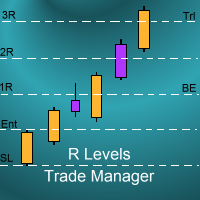
Introduction The SDS_TradeManager EA is a powerful EA designed to manage your positions once you have been filled. It basically works a break-even stop and also a trailing stop where the trigger levels and trail levels are all specified in "R's", that is to say multiples of the initial trade risk. Many successful professional traders think about all their trades and profit taking in terms of multiples of the initial risk R. So for example, if your initial risk on your trade is 50 pips and you wa
Introduction This indicator alerts you when certain price levels are reached. The alert can be on an intrabar basis or on a closing price basis. It will also send alerts when one forms, including via e-mail or push notification to your phone . It's ideal for when you want to be notified of a price level being reached but don't want to have to sit in front of your chart all day. Input Parameters DoAlert: if set to true a desktop pop-up alert will appear from your MetaTrader terminal when the
Riskless Pyramid Mt5
Snapdragon Systems Ltd
3.5 (2)
Introduction This powerful MT4 trade mangement EA offers a way potentially to aggressively multiply trade profits in a riskfree manner. Once a trade has been entered with a defined stoploss and take profit target then the EA will add three pyramid add-on trades in order to increase the overall level of profit. The user sets the total combined profit target to be gained if everything works out. This can be specified either as a multiple of the original trade profit or as a total dollar amount. Fo
フィルタ:
レビューなし
レビューに返信