Rapidfire News Execution EA
- エキスパート
-
Hendra Pri Raditya
 Hello! I am an independent Expert Advisor (EA) developer from Indonesia.
My journey in automated trading development is still growing. I consider myself a learner in this field, and I believe that developing a good trading system requires continuous learning, testing, evaluation, and improvement. - バージョン: 1.75
- アクティベーション: 5
Automated High-Impact News Execution for MetaTrader 5
RAPIDFIRE is an extremely speculative, event-driven Expert Advisor designed for automated trading around scheduled high-impact USD economic news releases.
It monitors the built-in MetaTrader 5 Economic Calendar, evaluates Forecast and Previous values, calculates a directional bias, and attempts to submit multiple market orders at the scheduled news release time.
RAPIDFIRE is intended for traders who deliberately seek aggressive exposure during major economic announcements. This is a high-risk, gambling-style trading approach, not a conventional low-risk trading system.
1. PRODUCT OVERVIEW
RAPIDFIRE automates news monitoring and market-order execution around scheduled USD economic announcements.
Its operating process includes:
-
Automatic economic calendar monitoring.
-
High-impact USD event filtering.
-
Forecast and Previous value analysis.
-
Automatic BUY or SELL directional selection.
-
Countdown to scheduled news releases.
-
Rapid market-order execution.
-
Emergency CLOSE ALL control.
The EA trades the symbol of the chart where it is attached. XAUUSD is the primary recommended instrument.
2. BUILT-IN ECONOMIC CALENDAR
RAPIDFIRE retrieves economic event information directly from the built-in MetaTrader 5 Economic Calendar.
It monitors:
-
USD-related economic events.
-
High-importance announcements.
-
Scheduled release times.
-
Forecast values.
-
Previous values.
-
Actual values when available.
The calendar is refreshed automatically, and upcoming events are displayed on the chart panel.
No external news website, WebRequest whitelist, API key, or separate news subscription is required.
The MetaTrader 5 terminal must remain connected to the internet and have access to its built-in Economic Calendar.
3. AUTOMATIC DIRECTIONAL ANALYSIS
Before a scheduled news release, RAPIDFIRE evaluates the available Forecast and Previous values.
The internal directional calculation considers the difference between these values, event-related polarity, and assigned event weights.
When multiple relevant events share the same scheduled release time, their directional contributions are combined.
The resulting calculation determines whether RAPIDFIRE prepares a BUY or SELL execution.
If the available information does not produce a directional bias, the EA does not arm an entry for that event.
This is a predefined rule-based directional calculation. It does not guarantee that the actual news result or subsequent market movement will follow the selected direction.
4. SCHEDULED NEWS EXECUTION
When a valid direction has been prepared, RAPIDFIRE displays the selected news event and a countdown to its scheduled release.
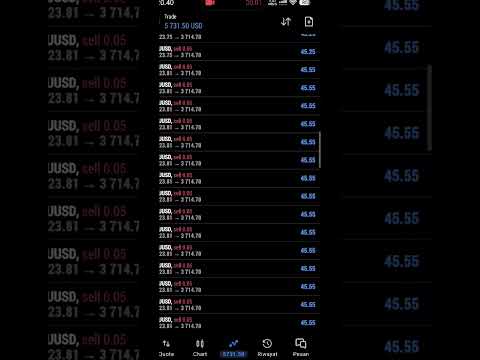
At the scheduled release second, the EA attempts to submit repeated market-order requests in the selected direction.
The execution process includes:
-
Execution triggered by the scheduled news release time.
-
Repeated asynchronous market-order requests.
-
An internal one-second execution safety limit.
-
Protection against executing the same calendar event more than once.
-
A cooldown period after the execution session.
The execution burst stops when the server-time second changes or the internal one-second safety timeout is reached.
The actual number of submitted and filled orders depends on terminal performance, broker execution, available margin, liquidity, and server responses.
The EA does not guarantee a specific number of orders or an exact execution price.
5. LOT SIZE SETTINGS
RAPIDFIRE provides one adjustable input:
InpLotSize
Default value: 0.01 lots.
The selected lot size applies to each individual market-order request, not to the total exposure of an execution session.
Because multiple requests may be submitted during the same execution window, the combined position volume can become considerably larger than the configured volume of one request.
Users should select a lot size appropriate for their account balance, leverage, broker conditions, and risk tolerance.
6. MECHA CONTROL PANEL
RAPIDFIRE features a dedicated dark-themed MECHA control panel.
The panel displays:
-
Calendar connection status.
-
Current news event.
-
Upcoming news events.
-
Forecast and Previous values.
-
Actual values when available.
-
Selected BUY or SELL direction.
-
Countdown to the scheduled release.
-
Current execution status.
-
Emergency CLOSE ALL button.
Scheduled event times are displayed in WIB (UTC+7). Execution is based on the MetaTrader trade-server calendar time.
7. EMERGENCY CLOSE ALL
RAPIDFIRE includes a CLOSE ALL button for emergency position management.
When activated, the EA attempts to close positions associated with its own magic number and the active chart symbol.
The closing process uses repeated batches and checks whether the EA's positions have been cleared.
Manual positions and positions belonging to other Expert Advisors are not targeted.
Actual closing results depend on market liquidity, broker execution, terminal connectivity, and server responses.
CLOSE ALL is an emergency control and cannot guarantee immediate closure under every market condition.
8. EXECUTION LOGGING
RAPIDFIRE records execution-session information in a CSV file.
The log includes:
-
Execution time.
-
News event.
-
Selected direction.
-
Number of submitted requests.
-
Number of detected filled positions.
-
Configured lot size.
-
Execution stop reason.
-
Elapsed execution time.
This information allows users to review the EA's execution activity after a news event.
9. INSTALLATION AND SETUP
RAPIDFIRE uses the built-in MetaTrader 5 Economic Calendar.
No website needs to be entered in the WebRequest URL list.
No external news website or API configuration is required.
Follow these steps:
Step 1 — Connect MetaTrader 5
Open MetaTrader 5 and make sure the terminal is connected to your trading account and the internet.
Step 2 — Open the Trading Chart
Open the chart of your intended trading instrument. XAUUSD is the primary recommended instrument.
Step 3 — Attach RAPIDFIRE
Find RAPIDFIRE in the Navigator under Expert Advisors and attach it to the chart.
Step 4 — Configure Lot Size
Set the desired value under:
InpLotSize
The default value is 0.01 lots per market-order request.
Step 5 — Enable Automated Trading
Make sure the Algo Trading button is enabled and that automated trading permission is allowed in the EA's Common settings.
Step 6 — Confirm Calendar Connection
Check the RAPIDFIRE panel. The calendar status should indicate that the calendar data is available and current.
Keep the terminal running and connected so the EA can monitor upcoming scheduled events.
A hedging account is recommended when users want individual executions to appear as separate positions. On netting accounts, multiple executions on the same symbol may be combined into one net position.
10. TESTING LIMITATIONS AND RISK DISCLOSURE
RAPIDFIRE relies on the built-in MetaTrader 5 Economic Calendar.
The standard Strategy Tester does not provide access to the live economic calendar functions. Therefore, the live calendar-driven execution process cannot be reproduced as a conventional historical Strategy Tester backtest in this version.
Demo-account testing during actual scheduled news releases is recommended before live use.
RAPIDFIRE is an extremely speculative news-execution tool. It is not designed for capital preservation or low-drawdown trading.
Important risks include:
-
Sudden market gaps.
-
Extreme price volatility.
-
Spread widening.
-
Slippage.
-
Delayed or rejected orders.
-
Insufficient free margin.
-
Rapid accumulation of multiple positions.
-
Significant floating losses.
This version does not automatically place Stop Loss or Take Profit orders.
It does not include an automatic equity drawdown limit or a fixed maximum number of orders per execution session.
Multiple accepted market-order requests can create substantial combined exposure within a very short period.
The CLOSE ALL function is an emergency control, not a substitute for an independent risk-management plan.
Only use funds you can afford to lose. Demo testing and independent risk assessment are strongly recommended.
FINAL NOTE
RAPIDFIRE is an aggressive, event-driven news execution Expert Advisor.
Its purpose is to automate directional preparation and rapid market-order submission around scheduled high-impact USD economic announcements.
It is a speculative trading tool, not a conventional trend-following or technical-indicator system.
It does not guarantee order execution at a particular price, successful acceptance of every request, or profitable trading results.
Trading during major economic releases involves substantial financial risk.