Scalper Nasdaq
- エキスパート
- バージョン: 1.5
- アクティベーション: 10

Scalper Nasdaq is an intraday Expert Advisor built for the NASDAQ 100 index (US100, NAS100, USTEC and similar broker names) on the M1 chart.
Tested on REAL TICK DATA - not on generated ticks
- Every backtest shown here uses the MetaTrader 5 mode "Every tick based on real ticks": the broker's actual recorded price ticks, not ticks generated from M1 bars.
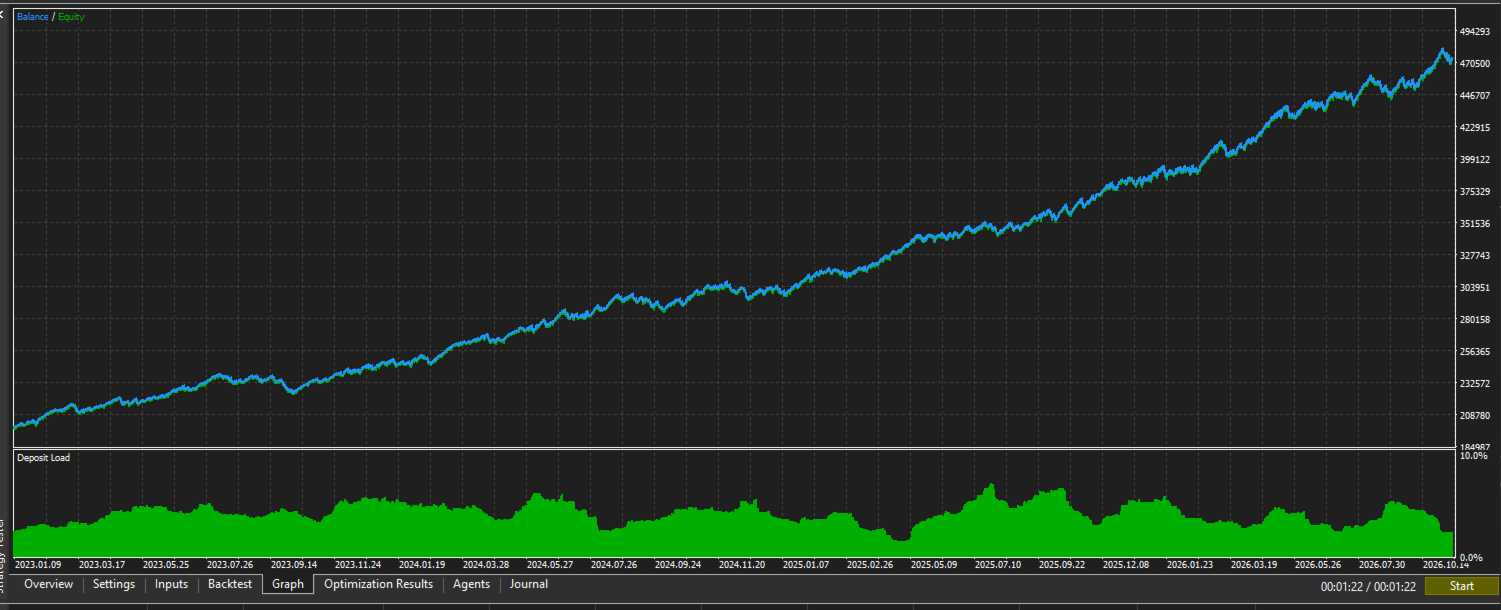
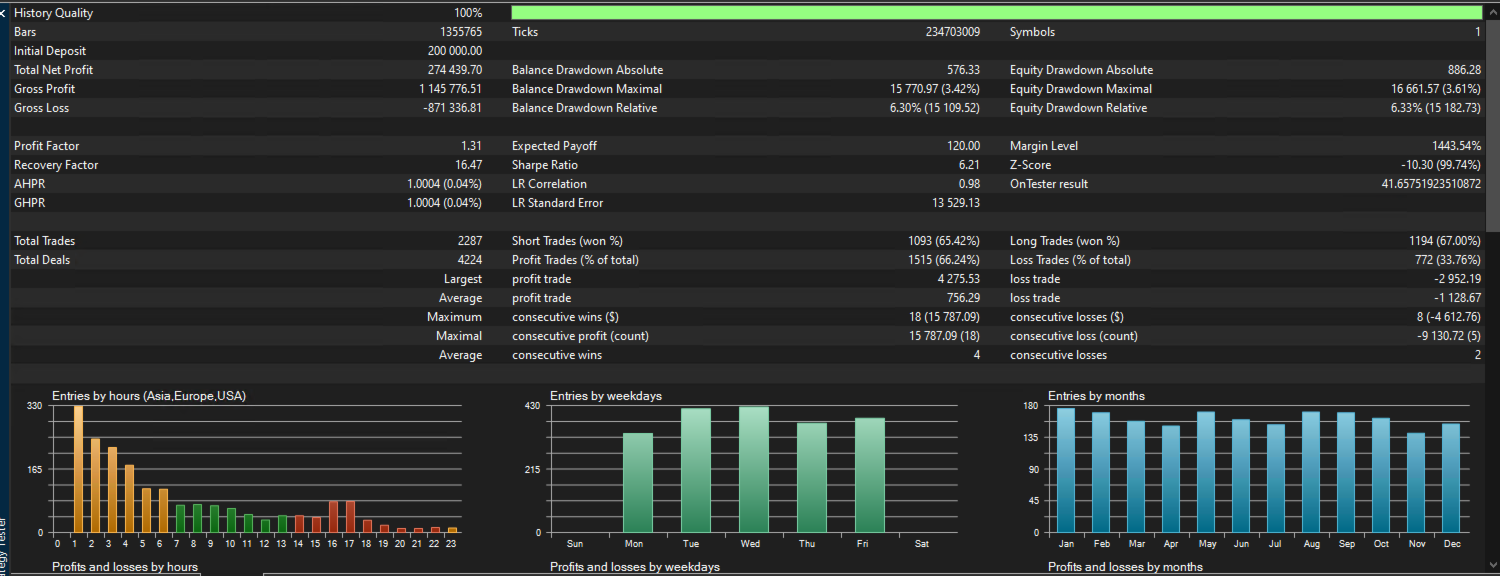
- 234,703,009 real ticks and 1,355,765 M1 bars, 2023.01.01 to 2026.11.15, 100% real-tick history quality.
- Real ticks include the true spread and every price move inside each minute. That matters for a scalper, because generated-tick tests often look better than real trading.
- Default inputs, 200,000 USD deposit: 2,287 trades, profit factor 1.31, maximum equity drawdown 6.33%.
How it trades
- Entry: a Heiken Ashi colour flip on M15 together with three moving-average crosses (M20 5/50, M5 13/30, M30 8/100). A majority of these signals must agree before a trade opens.
- Three "don't" filters block trades that go against the higher-timeframe direction.
- Every trade gets a stop loss the moment it opens. The stop is 18% of the average daily range (20 days), so it adapts to volatility.
- Exits: 50% of the position closes at 0.8x the stop distance, the rest at 2.0x. The stop then trails in 0.25R steps.
- When the signal flips, the open trade closes and the EA can reverse.
- No martingale, no grid, no averaging down.
Risk control (all adjustable)
- Risk per trade: 0.6% of the balance, sized from the stop distance and rounded down to the broker's lot step.
- Daily profit target: +0.18% of the day's starting balance. After it is reached, no new trades until the next day.
- Weekly limits: +5% target, -3% loss limit.
- The day stops after 4 losses in a row, or after a 3% drop from the day's high.
- The spread filter skips entries when the spread is too wide.
- Weekend flat: positions close on Friday at 23:30 server time.
- Optional news filter: closes trades and pauses around high-impact news and bank holidays, using the built-in MetaTrader economic calendar.
Built for prop firm accounts
The default setup was built around the rules prop firm challenges use:
- Daily loss rule: the day drop guard closes everything and stops at -3% from the day's high, inside the common 5% daily limit
- Maximum loss rule: the largest equity drawdown in the four-year real tick test was 6.33%, inside the common 10% limit
- Stop loss on every trade from the moment it opens, 0.6% risk each
- No weekend holding: all trades close on Friday at 23:30 server time
- No martingale, no grid, no averaging down, which many firms forbid
- News pause available for firms that restrict trading around high-impact news
- Small, steady daily target (+0.18%), so the account grows step by step instead of through a few large trades
Check your firm's exact limits and set the daily and weekly limits to match them before you start.
Recommended setup
- Symbol: your broker's NASDAQ 100 CFD. Timeframe: M1.
- Hedging or netting account. On netting accounts the EA keeps one position at a time.
- The default inputs were made for the NASDAQ 100. The EA runs on other symbols too, but you should test and adjust the inputs there first.
- On-chart dashboard: day and week targets, open trade, last actions.
Backtest shown in the screenshots
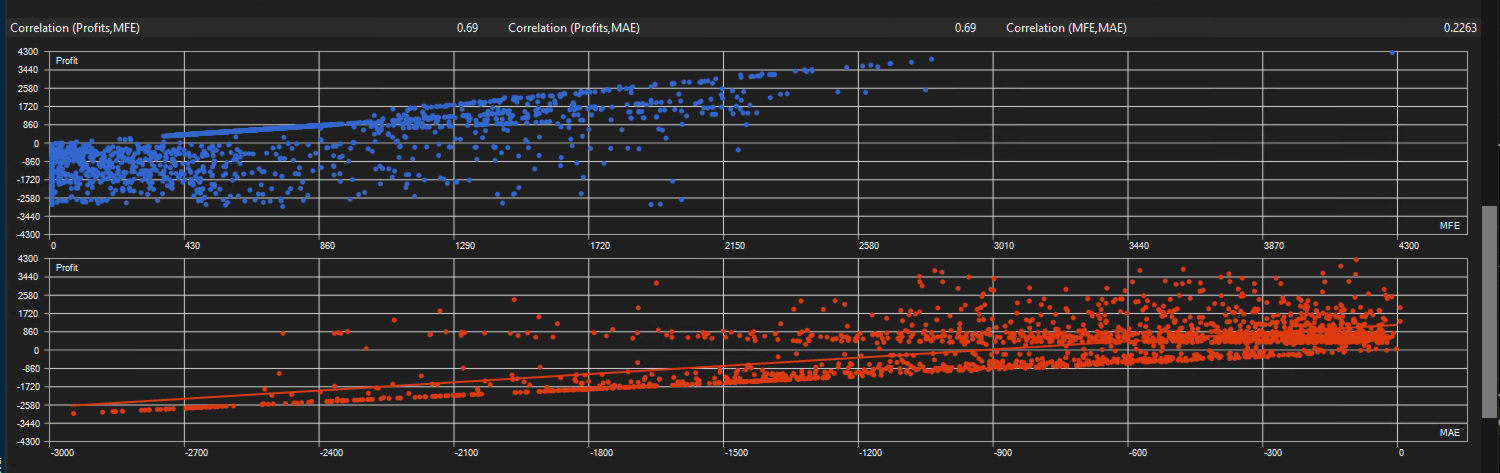
- US100.cash, M1, 2023.01.01 to 2026.11.15, "Every tick based on real ticks", zero-latency execution, 200,000 USD deposit, 1:100 leverage, default inputs.
- Backtest results come from historical data. They do not guarantee future results. Live results depend on your broker's spread, commission, slippage and execution. Test the EA on a demo account first.
Inputs are grouped into: Quick setup, When to trade, Risk and limits, Signal, Exits, Extra orders, Screen and logs, News, and Advanced.