記事「初級から中級まで:インジケーター(III)」についてのディスカッション
iBandをベースにカスタムインジケーターを作ろうとしています。
いろいろ検索した結果、ここに投稿することにしました。どなたか助けてくれるかもしれません。
これが完全なインジケーターです。
問題1は:
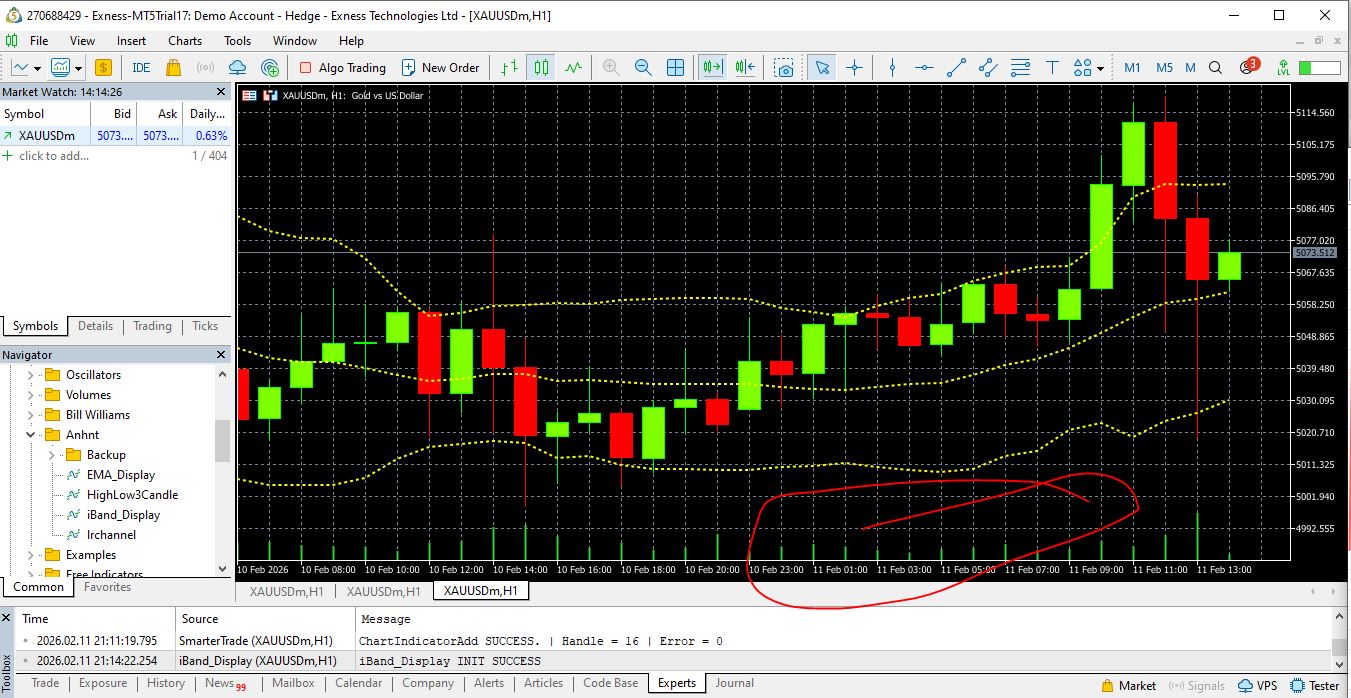
添付の画像でわかると思いますが、なぜチャートの下に緑があるのかわかりません。
いろいろ検索した結果、ここに投稿することにしました。どなたか助けてくれるかもしれません。
これが完全なインジケーターです。
//これはMQL5Indicatorsです。 #property indicator_chart_window #property indicator_buffers 3 #property indicator_plots 3 //--- プロット・ミドル #property indicator_label1 "Middle" #property indicator_type1 DRAW_LINE //--- プロット・アッパー #property indicator_label2 "Upper" #property indicator_type2 DRAW_LINE //--- プロット 下 #property indicator_label3 "Lower" #property indicator_type3 DRAW_LINE //================================================== // 入力パラメータ //================================================== input int InpBBPeriod = 14; input ENUM_APPLIED_PRICE inp_Applied_Price = PRICE_MEDIAN; input double InpBBDeviation = 2.0; input int InpBBShift = 0; input color InpMiddleColor = clrYellow; input color InpUpperColor = clrYellow; input color InpLowerColor = clrYellow; input int InpMiddleWidth = 2; input int InpUpperWidth = 2; input int InpLowerWidth = 2; input bool inp_BB_Show_Upper = true; input bool inp_BB_Show_Middle = true; input bool inp_BB_Show_Lower = true; input ENUM_LINE_STYLE InpMiddleStyle = STYLE_DOT; input ENUM_LINE_STYLE InpUpperStyle = STYLE_DOT; input ENUM_LINE_STYLE InpLowerStyle = STYLE_DOT; //================================================== #include <Anhnt/Configuration/NamingConfiguration.mqh> //================================================== // インジケータ・バッファ //================================================== double MiddleBuffer[]; double UpperBuffer[]; double LowerBuffer[]; //================================================== // グローバル変数 //================================================== int g_bb_handle = INVALID_HANDLE; //https://www.mql5.com/ja/docs/indicators/ibands //--- ボリンジャー・バンド・インディケータの値の数を保持する。 //+------------------------------------------------------------------+ int OnInit() { //================================================== // バッファを設定する //================================================== SetIndexBuffer(BASE_LINE, MiddleBuffer, INDICATOR_DATA); SetIndexBuffer(UPPER_BAND, UpperBuffer, INDICATOR_DATA); SetIndexBuffer(LOWER_BAND, LowerBuffer, INDICATOR_DATA); ArraySetAsSeries(MiddleBuffer, true); ArraySetAsSeries(UpperBuffer, true); ArraySetAsSeries(LowerBuffer, true); //================================================== // INPUT値をプロットに適用する(実行時に安全な方法) //================================================== PlotIndexSetInteger(BASE_LINE, PLOT_LINE_COLOR, InpMiddleColor); PlotIndexSetInteger(UPPER_BAND, PLOT_LINE_COLOR, InpUpperColor); PlotIndexSetInteger(LOWER_BAND, PLOT_LINE_COLOR, InpLowerColor); PlotIndexSetInteger(BASE_LINE, PLOT_LINE_STYLE, InpMiddleStyle); PlotIndexSetInteger(UPPER_BAND, PLOT_LINE_STYLE, InpUpperStyle); PlotIndexSetInteger(LOWER_BAND, PLOT_LINE_STYLE, InpLowerStyle); PlotIndexSetInteger(BASE_LINE, PLOT_LINE_WIDTH, InpMiddleWidth); PlotIndexSetInteger(UPPER_BAND, PLOT_LINE_WIDTH, InpUpperWidth); PlotIndexSetInteger(LOWER_BAND, PLOT_LINE_WIDTH, InpLowerWidth); PlotIndexSetInteger( BASE_LINE, PLOT_DRAW_TYPE, inp_BB_Show_Middle ? DRAW_LINE : DRAW_NONE ); PlotIndexSetInteger( UPPER_BAND, PLOT_DRAW_TYPE, inp_BB_Show_Upper ? DRAW_LINE : DRAW_NONE ); PlotIndexSetInteger( LOWER_BAND, PLOT_DRAW_TYPE, inp_BB_Show_Lower ? DRAW_LINE : DRAW_NONE ); string name = SMT_PREFIX + SMT_BB_NAME + "(" + (string)InpBBPeriod + "," + DoubleToString(InpBBDeviation, 1) + ")"; IndicatorSetString(INDICATOR_SHORTNAME, name); //================================================== // iBands ハンドルの作成 //================================================== g_bb_handle = iBands( _Symbol, _Period, InpBBPeriod, InpBBShift, InpBBDeviation, inp_Applied_Price ); if(g_bb_handle == INVALID_HANDLE) { Print("iBand_Display INIT FAILED. Unable to create iBands handle. GetLastError = ", GetLastError()); return INIT_FAILED; } Print("iBand_Display INIT SUCCESS"); return INIT_SUCCEEDED; } //+------------------------------------------------------------------+ int OnCalculate( const int rates_total, const int prev_calculated, const datetime &time[], const double &open[], const double &high[], const double &low[], const double &close[], const long &tick_volume[], const long &volume[], const int &spread[] ) { //https://www.mql5.com/ja/docs/indicators/ibands&nbsp; //--- iBandsの準備ができるまで待つ int calculated = BarsCalculated(g_bb_handle); if(calculated <= InpBBPeriod) return 0; // Print("DEBUG from OnCalculate After Waiting BarsCalculated | Symbol=", _Symbol、 // " | Period=", _Period、 // " | BarsCalculated(iBands)=", calculated); //--- このブロックは、インジケータが最初にチャートにアタッチされたときに実行されます。 if(prev_calculated == 0) { ArrayInitialize(MiddleBuffer, EMPTY_VALUE); ArrayInitialize(UpperBuffer, EMPTY_VALUE); ArrayInitialize(LowerBuffer, EMPTY_VALUE); int to_copy = MathMin(calculated, rates_total); // 利用可能なすべてのデータを一度にコピーする CopyBuffer(g_bb_handle, BASE_LINE, 0, to_copy, MiddleBuffer); CopyBuffer(g_bb_handle, UPPER_BAND, 0, to_copy, UpperBuffer); CopyBuffer(g_bb_handle, LOWER_BAND, 0, to_copy, LowerBuffer); // Print("DEBUG from OnCalculate First Initial | Symbol=", _Symbol、 // " | Period=", _Period、 // " | BarsCalculated(iBands)=", calculated); return rates_total; } //--- このブロックは、新しいバーが開くたびに実行される。 if(prev_calculated != rates_total && prev_calculated != 0) { //================================================== // NEXT RUNS: // 最新のバー (インデックス 0) のみを更新します。 // 配列を手動でシフトしないでください(シリーズが処理します)。 //================================================== double tmp[1]; if(CopyBuffer(g_bb_handle, BASE_LINE, 0, 1, tmp) > 0) MiddleBuffer[0] = tmp[0]; if(CopyBuffer(g_bb_handle, UPPER_BAND, 0, 1, tmp) > 0) UpperBuffer[0] = tmp[0]; if(CopyBuffer(g_bb_handle, LOWER_BAND, 0, 1, tmp) > 0) LowerBuffer[0] = tmp[0]; return rates_total; } return rates_total; } //+------------------------------------------------------------------+ bool FillArraysFromBuffers( double &base_values [], // ミドルバッファ double &upper_values [], // アッパーバッファ double &lower_values [], // ロワーバッファ int shift, // シフト = 0 → リアルタイム int ind_handle, int amount ) { // 注意: // 現在は使用されていない。 // 将来のヘルパー/EAロジックのために、予定通り保持する。 ResetLastError(); if(CopyBuffer(ind_handle, BASE_LINE, -shift, amount, base_values) < 0) return false; if(CopyBuffer(ind_handle, UPPER_BAND, -shift, amount, upper_values) < 0) return false; if(CopyBuffer(ind_handle, LOWER_BAND, -shift, amount, lower_values) < 0) return false; return true; }BASE_LINE,UPPER_BAND,LOWER_BAND などの個々のラインの表示・ 非表示と、Custom Color のみを有効にしたいだけ です。
問題1は:
添付の画像でわかると思いますが、なぜチャートの下に緑があるのかわかりません。
ファイル:
Problem_1.jpg
217 kb
Nguyen Tuấn Anh # :
ありがとうございます。
iBandをベースとしたパーソナルなインジケーターを作ろうと思っています。
いろいろ調べた結果、ここに投稿することにしました。
これが完全版です。 非常にシンプルですが、ユーザが ベースライン、上バンド、下バンドといった 個別のラインを表示したり選択したりできるようにしたいだけです。
問題1は
添付の画像にあるように、画面上に緑色の領域があることがわかりません。
この緑の線は音量インジケーターです。これを無効にするには、チャートのプロパティを開き、ボリューム・インジケータをオフにする必要があります。または、ボリューム・カラーをCL_NONEに設定するだけで、緑色の線は消えます。
ありがとうございます。
iBandをベースとしたパーソナルなインジケーターを作ろうと思っています。
いろいろ調べた結果、ここに投稿することにしました。
これが完全版です。 非常にシンプルですが、ユーザが ベースライン、上バンド、下バンドといった 個別のラインを表示したり選択したりできるようにしたいだけです。
問題1は
添付の画像にあるように、画面上に緑色の領域があることがわかりません。

取引の機会を逃しています。
- 無料取引アプリ
- 8千を超えるシグナルをコピー
- 金融ニュースで金融マーケットを探索
新しい記事「初級から中級まで:インジケーター(III)」はパブリッシュされました:
前回の「初級から中級まで:インジケーター(II)」では、非常に基本的で実践的かつ完全に機能する移動平均の実装方法を紹介しました。しかし、あの記事で示した内容はMQL5プログラミングの世界への簡単な導入に過ぎません。素材自体は基本的でシンプルかつストレートフォワードな内容です。 しかし、私たちにはもっと多くのことができるのです。
ここで提示する概念を理解するよう努めてください。コードをただコピーするだけではなく、自分で理解することが重要です。自分にできないからといって、他の誰にもできないわけではありません。概念を理解することは、コードを理解することよりも重要です。コードは書き手によって変わりますが、概念は常に不変だからです。今回は非常にシンプルな内容から始めます。というのも、ここで学ぶことは特定の機能を追加すると非常に複雑になる可能性があるからです。
作者: CODE X