
139 USD
Versione demo scaricata:
6 403
Pubblicato:
20 agosto 2020
Versione attuale:
8.36
Non hai trovato un robot adatto?
Ordina il tuo
su Freelance
Vai alla sezione Freelance
Ordina il tuo
su Freelance
Come acquistare un Robot di Trading o un indicatore
Esegui il tuo EA
hosting virtuale
hosting virtuale
Prova un indicatore/robot di trading prima di acquistarlo
Vuoi guadagnare nel Market?
Come presentare un prodotto per venderlo con successo

Ti stai perdendo delle opportunità di trading:
- App di trading gratuite
- Oltre 8.000 segnali per il copy trading
- Notizie economiche per esplorare i mercati finanziari
Registrazione
Accedi
Accetti la politica del sito e le condizioni d’uso
Se non hai un account, registrati
Hi Farruquito. Thanks for choosing my products.
According to the Market rules, you need to install MetaTrader 4 terminal with connection to MQL5 Market on your other computer. After that, download the indicator and activate it on your computer.
Please read more about this process in this official Market instruction:
https://www.mql5.com/en/articles/498#activation
---
🍀 Good Luck & Big Profits
Thank you for the detailed explanation. Your work makes sense and it is clear that you are skilled and do your best! Keep up the good work.
Talking about support and resistance at the 5M TF.. a signal can be occur after some candles and the same time near/close to a support of resistance level. Now I mostly wont take the trade because of the wall of volume and the change of changing direction. On the other hand the S&R on the 5M TF are now that tough as on the for example 1H TF and can penetrate more easy
How do you handle this?
Working with levels is a rather complicated question which cannot be answered easily and there is no exact algorithmic answer, unfortunately. I wrote down in my notebook plans to do some articles on this theme. I will try to consider the basic principles. To begin with, of course, levels have different priority: a strong level, which price touched many times during the movement on the higher timeframe (an hour and above) will be much stronger than some level on M5. But at the same time, these levels may coincide because M5 is more approximate (as under the microscope) movement on H1 for example. On H1 we see, for example, 10 candles that visually build an upward movement, and on M5 we will see price fluctuations both up and down.
For example, hourly candle on M5 time frame:
That is why if we want to be more exact with levels, it is better to look for them on higher timeframes to avoid (smooth) price fluctuations on the M5 time frame and not react to price noise.
In this case, the importance of the level is determined by how many times the price touched it during the movement, and for how long it occurred. If the price touches the level several times, comes back to it again, does it for several days (for example), then this level becomes visible to the naked eye and we – traders – need to be attentive when the price approaches this level next time.
The reason is that the level is important, but equally important is the behavior of the price near the level. I think it is even more essential because it is the behavior of the price near the level that determines whether we decide to open a position or not.
---
Let's take a closer look at price behavior near the level:
1) The price broke through the level and consolidated under it.
2) The bulls are attempting to break through the resistance level – we see a candle with a large spread (VSA). But... Look at the shadows of the candlesticks and how the body of the candlesticks was formed – they closed almost at the level and the next candlestick could not close above the level – the bears won this time. Would I consider buying after a bearish candle? Definitely not. I would wait for events to happen or immediately open a Sell position, if there is a corresponding indicator signal.
3) Here already (also a fairly strong candle with an above-average spread) is confidently closing above the level. And then we see the growth and fixation of the price above the level – resistance has become support. Would I expect a buy signal after such a consolidation? Definitely yes! And to sell in such a situation? Very risky.
Another example of a candle with an extremely large spread:
It's a news candle, and it overlapped the entire immediate range of price movement. After the close of such a candle, you can attempt to set a pending Sell Stop order, waiting for a further downward movement. But often it just ends with the price movement where it was headed before the news release. Watch the price action!
---
Now go back to the current situation on the M5:
As we can see, the level of 1.0940 is in the way of the price, but even before that we could take our profit at the level of Sell TP3. I did not trade that position, but looking at it now, I understand that I would close profit at the Sell TP3 level and would not wait for the price to reach (even if it is close enough) the level of 1.0940.
There are at least three reasons for this:
1 - This is our TP3 target level
2 - The price behavior near the level
3 - The end of the trading session before the weekend.
As a result, try to build strong levels on higher time frames and remember that the strength of the level depends on how many times and how long the price touched this level because it indicates the accumulation of strong players around the level, who psychologically expect the price to reach this level (if we are talking about targets), or its breakout, but then we should expect a consolidation behind the level, because often it will just a puncture level. If a candlestick has pierced the level, but closed above (or below) it, then the current move is not strong enough to rapidly take the level and may roll back to gain strength and make further attempts to break it. On strong news the price can break several strong levels at once, but if too much “big money” is waiting for the price to go in the opposite direction, it will go back where it needs to go, and our job as traders is simply to follow the price. That is, if you see some furious movement at nothing, and if you are in the market, then it is better to close the current positions, or to move them to Breakeven, if your current position's margin of safety allows it. And it is also important, do not always try to be right in all deals. It's impossible! That is why public trading often spoils statistics, as you begin to receive a lot of "advice" why it is not necessary, but it is necessary, etc. As a result, 50% of viewers advise you to buy, and 50% scold you for not selling. Although visually it may look like: you have 5 positions closed in minus 5-10 points while you were testing the level or opening additional positions at the best price, and then one position of 150 pips, which covers losses and gives profit. This is what you need to strive for - profit at a distance.
Use strong levels not only for analysis when opening a position, but also when closing a profit. The main thing is to do it without fanaticism, not being afraid to open a position at all because of it. I want to make a level indicator that would work the way I want it to, but there are numerous algorithmic limitations for graphical constructions. And what we see with the naked eye is not so easy to “explain” in the language of algorithms, in order not to get countless unnecessary levels on the screen. I already have several modules on this subject, I go back to them from time to time to make it fully automated, that is, useful not only for me, but for everyone. I think over some time this will be implemented and become much easier.
---
🍀 Good Luck & Big Profits
Hello my friends!
I have good news about the future line of development of our Scalper Inside PRO indicator. I wanted to make a surprise, but since the idea is not very simple, and it takes time to create, I decided to share my plans with you. Well, and show you a prototype of my powerful idea, which I am (to be honest) really excited about. I hope everything works out great.
No specific name yet, but code-name is Scalper Inside PRO Auto Optimizer.
The idea in general is even larger for the future than the first working models will be. At first, I wanted to embed this functionality in the indicator itself, but I realized that this would make it very heavy because there are so many calculations, and they are not needed constantly. The problem is that in MT4, no matter how powerful your computer is, the terminal still only uses 1 core, which greatly limits the developer in creating complex calculation models. That is why it will be a separate indicator that will be installed on the required trading symbol together with the Scalper Inside PRO indicator and start "hard" testing the Scalper Inside PRO indicator according to the algorithms that I have specified. After that, we get a number of settings that are transferred to the Scalper Inside PRO indicator. I think I have already figured out how to make the parameter transfer in such a way that it would be maximum easy and convenient, and, if necessary, compatible with automated trading strategies. By the way, speaking about automated EA’s, the integration is not very easy yet because of the many complex parameters, but I am working on that too and eventually, we will figure it out in future versions as well.
As a result, Scalper Inside PRO Auto Optimizer finishes its work and outputs a parameter string for the Scalper Inside PRO indicator. After that, we get something like automatic optimization for the trading symbol we need. In the future, this will allow already in the process of such testing to discard some symbols as not having an optimal solution at the moment. I also have such an idea, and it is possible and will be implemented in subsequent versions of Scalper Inside PRO Auto Optimizer. Of course, Scalper Inside PRO Auto Optimizer will be free for all Scalper Inside PRO buyers.
Here are some examples of how the Scalper Inside Pro Auto Optimizer prototype works.
Default Settings:
Scalper Inside Pro Auto Optimization Algorythm:
---
Default Settings:
Scalper Inside Pro Auto Optimization Algorythm:
---
Default Settings:
Scalper Inside Pro Auto Optimization Algorythm:
---
Default Settings:
Scalper Inside Pro Auto Optimization Algorythm:
---
I also want to note that this optimizer is only an assistant. You can use the indicator and trade successfully without it! I regularly show many examples that even with the default settings, the indicator shows good results. I would recommend using this at the initial stage, while you are getting acquainted with the indicator, and the settings are not completely clear to you.
Meanwhile, this is another step towards the grail, to which we are gradually and quite successfully moving. I really want to achieve the most convenient tool that will be easy to use for almost anyone with minimal experience. As for the timing, I want to launch the first prototype and a new version of the indicator to interact with it this or next week. Please follow the news!
---
🍀 Good Luck & Big Profits
Hi,
i bought the product today and i'm currently using it on demo, initially i was confused on how it works, but after few clicks i'm getting it,
one question; on what time frame does the scalper works best?
may you please assist,
the indicator has pass many trading opportunity on an up trend, and now is not giving any trading alerts,
what could be the reason
There you will find a lot of useful information.
I also sent you a message, please check.
Regarding your question about an uptrend, yes, it is possible. The indicator calculates targets using a variety of built-in algorithms and does it in advance, so if a situation arises that the price behaves unusually for a given trading symbol on a given time frame (as in your example), then the indicator does not yet see an opportunity for a sell and waits for a new signal. The indicator attempts to capture the maximum possible range for a profit, but it is not always possible. For example:
If you switch to the H4 time frame on the USDJPY, you will see the following picture:
If such an unusual growth without a reversal will continue, then on the H4 time frame may also form such a situation.
🍀 Good Luck & Big Profits
There you will find a lot of useful information.
I also sent you a message, please check.
Regarding your question about an uptrend, yes, it is possible. The indicator calculates targets using a variety of built-in algorithms and does it in advance, so if a situation arises that the price behaves unusually for a given trading symbol on a given time frame (as in your example), then the indicator does not yet see an opportunity for a sell and waits for a new signal. The indicator attempts to capture the maximum possible range for a profit, but it is not always possible. For example:
If you switch to the H4 time frame on the USDJPY, you will see the following picture:
If such an unusual growth without a reversal will continue, then on the H4 time frame may also form such a situation.
🍀 Good Luck & Big Profits
I'm developed the Scalper Inside PRO indicator for working with different trading instruments and time frames.
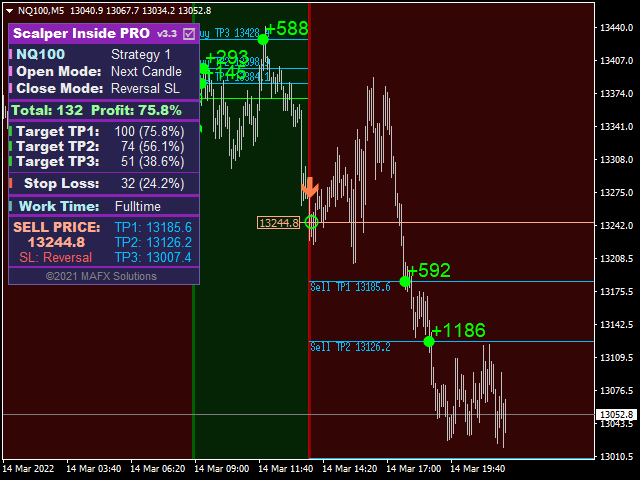
You can choose trading symbols that suit your trading style and interests. I sent you links to detailed examples of how to use the indicator earlier.A display error when switching timeframes may occur if there is not enough historical data for the calculation. You need to download more historical data.
Я разработал индикатор Scalper Inside PRO для работы с разными торговыми инструментами и таймфреймами.
Вы можете выбрать торговые символы, которые соответствуют вашему стилю торговли и интересам. Ранее я отправлял вам ссылки на подробные примеры использования индикатора.Ошибка отображения при переключении таймфреймов может возникнуть, если для расчета недостаточно исторических данных. Вам нужно загрузить больше исторических данных.
Привет надеюсь успел до отключения РФ от интернета что бы вы могли ответить
есть ли наиболее удачные пресеты для разных тестируемых вами пар? индексов и тд?
Приветствую. О пресетах. В настройках индикатора вы можете найти опцию 'Strategy 1-2 Sensitivity', где вы можете увидеть предустановки для основных валютных пар:
Но в большинстве случаев меня устраивают настройки по умолчанию, в сочетании с сильными уровнями. Вот здесь подробнее об этом: https://www.mql5.com/en/blogs/post/746201
Hello. About Presets. In the indicator settings you can find the 'Strategy 1-2 Sensitivity' option where you can see the presets for the major currency pairs.
But in most cases I'm satisfied with the default setting, combined with strong levels. Here's more about that: https://www.mql5.com/en/blogs/post/746201
---
🍀 Good Luck & Big Profits
Do you have this for mt5? I accidentally bought mt4 :( I don't have mt4 terminal on my computer just on my phone
Hi Coltlen.
Not yet, but the MT5 version is already being made. I am now making a new version for MT4 with auto-optimizer and then in a bit little time the version for MT5 will be released.
---
🍀 Good Luck & Big Profits
🔺🔻🔺🔻🔺🔻🔺🔻🔺🔻🔺🔻🔺🔻🔺🔻🔺🔻🔺🔻🔺🔻🔺🔻🔺🔻🔺🔻🔺🔻🔺🔻🔺🔻🔺🔻🔺🔻
I bought the indicator I have version 3.3 , but it doesn't work anymore.
And it won't let me download the new version, what's going on...
Hi farruquito. Strange, usually the update goes without problems. Sent you a private message. Please check.
Version 3.4 works fine - the problem with zero levels has been fixed:
Meanwhile, version 3.5 is almost done. Sorry for the slight delay, as it requires quite a big change in the code because of the auto-optimizer. But it's solvable, everything will be ready soon.
---
🍀 Good Luck & Big Profits
Hello my friends.
I would like to remind you that you can update to the current version directly from the terminal where the indicator is installed.
Quote: “To receive updates, check the “Purchased” tab in your terminal. A notification about a new version of the products and/or of its demo version is displayed in the product line. Click "Update"/"Update Demo", and a new application file will be downloaded instead of the old one.”
Read more here:
https://www.mql5.com/en/articles/498#update
---
🍀 Good Luck & Big Profits
Hello good day I bought your indicator Can we set alarms for mobile and email for the indicator?