Trade Zone Planner
- Indicatori
- Versione: 1.0
- Attivazioni: 5

Plan your trades visually, right on the chart.
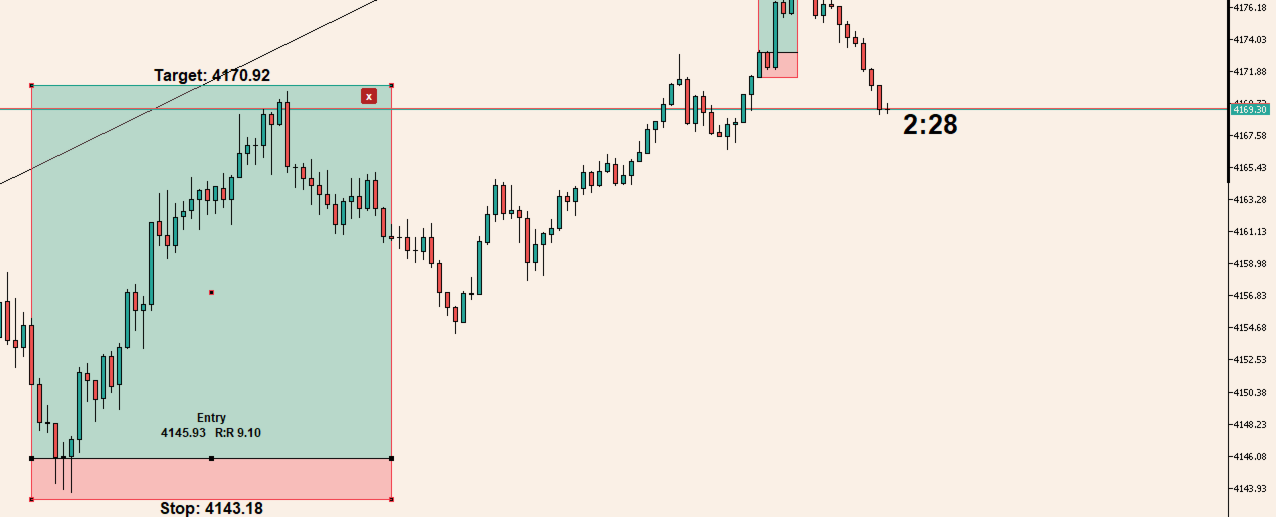
This indicator adds a clean risk/reward box to MetaTrader 5. Click, drag, and you get entry, stop loss and take profit levels with the R:R ratio calculated for you. It is a drawing tool only. It does not place, modify or close orders.
How to use
- Press ACTIVATE R:R.
- Click on the chart and drag. The box follows your mouse, and dragging sideways sets its width.
- Release the mouse. The box is created with your default R:R ratio.
- Drag the entry, target or stop line to adjust it. The R:R updates instantly.
Features
- Click-and-drag drawing, with width set by the drag
- Works for both long and short setups (drag up or down)
- Automatic R:R calculation that updates as you move any level
- Entry, target and stop prices shown directly on the chart
- Several boxes on one chart, each managed independently
- Move the whole box, resize it, or move individual levels
- Labels and the delete button appear only when you hover over a box, so the chart stays clean
- Boxes select automatically on hover
- One-click delete (x) button on each box
- HIDE R:R / SHOW R:R button to hide all boxes quickly
- ESC cancels drawing
- Boxes stay on the chart after you change timeframe or restart the terminal
- Works on any symbol and timeframe
- Adjustable colors, transparency and font sizes
Input parameters
- ButtonCorner: chart corner for the buttons
- ButtonX / ButtonY: button offset from the corner
- ButtonWidth / ButtonHeight: button size
- DefaultRR: R:R ratio applied to new boxes (default 2.0)
- BoxWidthBars: default box width in bars, used when you don't drag sideways
- ProfitColor: color of the target zone
- StopColor: color of the stop zone
- ZoneOpacity: strength of the zone fill, lower is fainter
- LabelFontSize: font size of the target and stop labels
- EntryLabelFontSize: font size of the entry and R:R label
Notes
- Risk/reward boxes are a planning aid and do not guarantee any trading result.
- For best clarity, keep the chart set to display candles in the foreground (the indicator does this automatically).
Check these before you submit:
- Boxes after a restart: the "stay after a restart" line relies on the recovery code in the indicator. Test it once so the description is accurate.
- Foreground setting: the last note matches what the code does, since it sets the chart foreground on load and restores it on removal.
- Other languages: the form has Russian and Chinese boxes too. MQL5 staff can translate an English description for Russian, but I haven't checked that rule for the other languages.