Lightning Bow
- Experts
- Versione: 1.5
- Attivazioni: 10

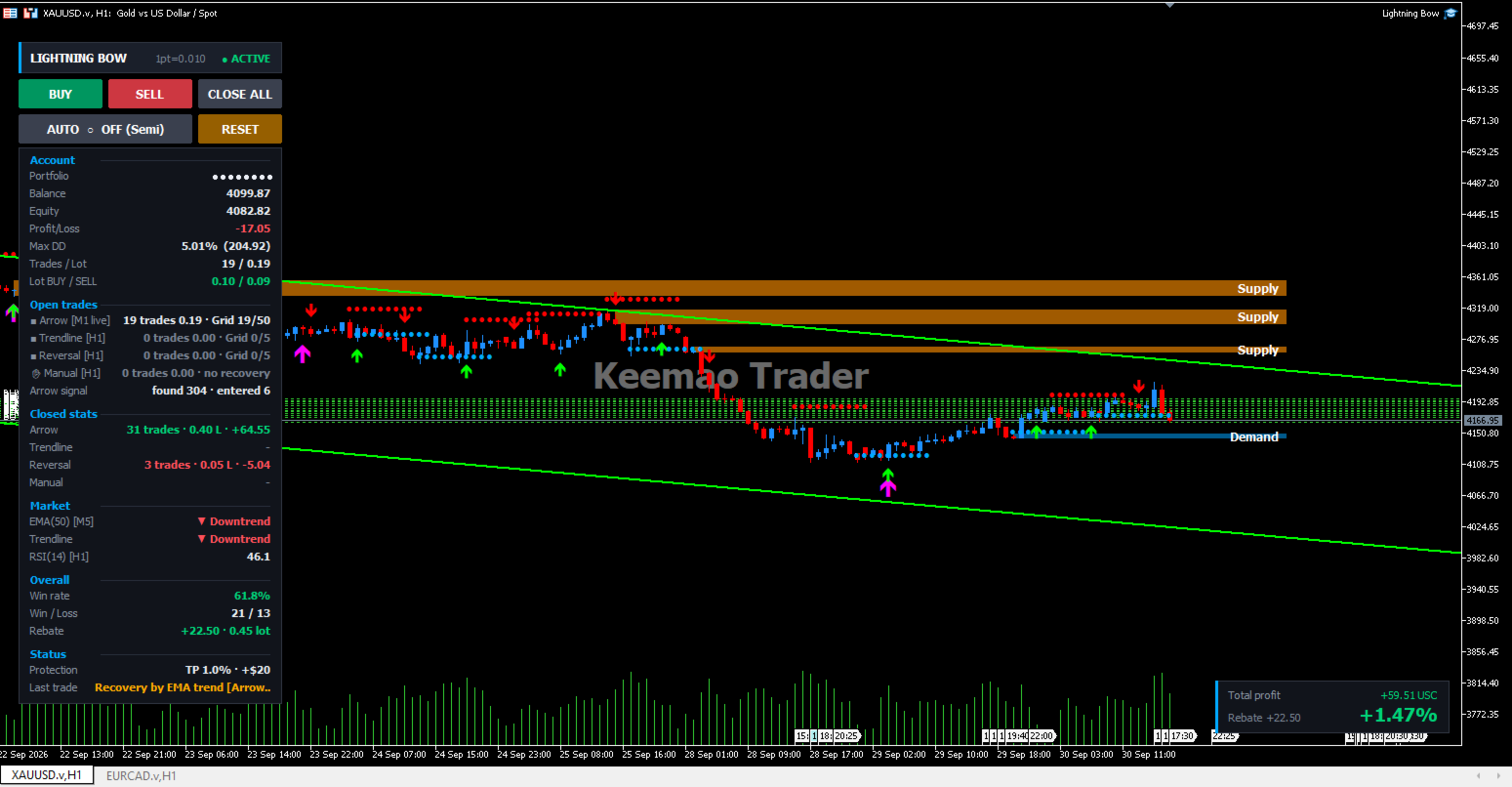
Lightning Bow is a semi-automatic trading assistant for MetaTrader 5. It runs four independent trading groups in one Expert Advisor, each with its own timeframe, lot size, stop loss, take profit, break-even, trailing stop and recovery logic - plus manual BUY/SELL buttons and a live dashboard on the chart.
FOUR INDEPENDENT TRADING GROUPS
1. Arrow group - support and resistance
Builds support and resistance levels from confirmed swing highs and lows, then looks for a rejection candle at a level: a bullish candle that wicks into support and closes above it, or a bearish candle that wicks into resistance and closes below it. Entry can be taken on the closed bar or live inside the current bar.
2. Trendline group
Fits a price channel over a configurable lookback and reacts when price reaches the upper or lower boundary, with RSI confirmation before an entry is taken.
3. Reversal group
Detects pin bars and engulfing candles that form at a level, filtered by RSI. Reversal points are drawn on the chart with their pattern name and RSI value, so they can also be used as a visual study tool.
4. Manual group
BUY, SELL and CLOSE ALL buttons directly on the chart. Trades opened by hand are picked up by the EA and managed with the same stop loss, take profit, break-even, trailing and recovery rules.
Each group keeps its own settings, its own magic number and its own basket, so activity in one group never interferes with another. Any group can be switched off independently while the others keep running.
TRADE MANAGEMENT
Stop loss and take profit per trade, set in points
Break-even: move the stop to entry plus an offset after a set profit
Trailing stop: independent start distance and step
All distances use an automatic point unit, so the same settings behave consistently on 2, 3, 4 and 5 digit symbols
RECOVERY ENGINE
When a position moves against the entry, the recovery engine can add trades at a fixed grid distance and close the whole basket together.
Lot progression by multiplier, with a lot cap: once the next lot would exceed the cap, the sequence restarts from the group starting lot
Maximum number of recovery trades per group
Two independent basket exits: a target in points from the basket average price, and a target in account currency
EMA hedge mode: instead of averaging the same direction, the EA can open the opposite side while the trend runs against the basket, and an RSI guard stops hedging once the market reaches an extreme and returns to averaging the original direction
Individual take profits are cancelled once a basket forms, so the basket always closes as one unit
ACCOUNT PROTECTION
Close everything at a target equity growth in percent
Close everything at a target floating profit in account currency
Emergency close at a maximum drawdown percentage
Emergency close at a maximum floating loss
Optionally switch AUTO mode off as soon as protection fires
Deposits and withdrawals are detected and excluded, so adding funds does not distort the drawdown figure or trigger a close
ON-CHART DISPLAY
Support and resistance levels drawn as dotted markers at swing points
Supply and demand zones
Trend channel with touch markers
Signal arrows, with an option to show only the trades currently open
Live dashboard: balance, equity, floating profit, maximum drawdown, open trades and lots per side, per-group open and closed statistics, win rate, rebate, market trend readout and protection status
Summary popup on the chart when a basket closes
Statistics start when the EA is attached, not from old history, and a RESET button starts a fresh round at any time
NOTIFICATIONS
Sound and on-screen alerts for arrow signals, trendline touches, reversal signals, entries and closes - each can be switched on or off separately. Telegram messages are also supported for signals, entries, recovery trades, closes and protection events. Signals are reported even when AUTO mode is off, so the EA can be used purely as an assistant while trading manually.
REQUIREMENTS
MetaTrader 5, hedging account
Works on any symbol and timeframe; developed primarily on XAUUSD
A VPS is recommended for uninterrupted operation
For Telegram, add the Telegram API address to the allowed URL list in Tools - Options - Expert Advisors
GETTING STARTED
1. Attach the EA to a chart and leave AUTO off at first. The dashboard and the signal arrows work without opening any trade, so the logic can be observed before it is allowed to trade.
2. Set the lot size and the stop loss and take profit for the group you want to use, and switch the other groups off.
3. Turn the recovery engine on only after the single-trade settings behave the way you expect, and always set a basket exit target.
4. Set the account protection limits before running on a live account.
5. Press AUTO to let the EA open trades, or keep it off and use the BUY and SELL buttons yourself.
RISK NOTICE
The recovery engine uses grid and hedge averaging. Averaging increases exposure while a position is losing and can lead to a large loss. Set the maximum number of recovery trades, the lot cap and the account protection limits according to your own account size and risk tolerance. Test on a demo account before using real funds. Past performance does not indicate future results.