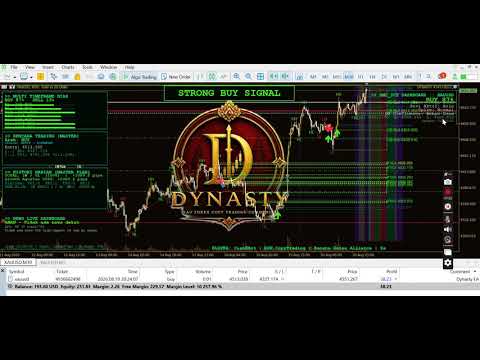
Dynasty V3 Pro EA for XAUUSD
- Experts
- Versione: 3.0

⚠ Requires: Dynasty V3 Pro for XAUUSD (indicator) attached to the same chart. This EA does not generate its own trading signals. It reads completed trade plans published by the Dynasty V3 Pro indicator and executes and manages them. Without that indicator running on the same symbol and timeframe, this EA will not open any new trades.
Overview
Dynasty EA is the execution and trade-management engine built to work together with the Dynasty V3 Pro for XAUUSD indicator. The indicator does the market analysis and builds a trade plan; Dynasty EA is the part that actually sends the order to your broker, sizes it by risk, and manages it in real time — partial take-profits, break-even, all of it — without needing you at the screen.
This is a real-money-executing Expert Advisor: once enabled, it places live market orders on your account. It ships disabled by default and must be turned on manually.
How It Works
- Dynasty V3 Pro (indicator) builds a trade plan — entry, stop loss, up to three take-profit levels, and direction — and publishes it the moment a new plan goes active.
- Dynasty EA picks up that plan a single time, sizes the position from your risk settings, and opens the trade.
- From there, Dynasty EA manages the position independently by watching live price — it doesn't need the indicator again until the trade is closed and a new plan appears. If the indicator is removed from the chart mid-trade, Dynasty EA will still finish managing the open position; it simply won't receive any new plans until the indicator is reattached.
Key Features
- Risk-based position sizing — lot size is calculated from account balance, a chosen risk percentage, and the plan's stop-loss distance, with a hard risk ceiling that can never be exceeded regardless of how the risk input is set, plus a fixed-lot fallback if symbol data is ever unavailable.
- Three-level partial take-profit — closes a configurable percentage of the position at TP1, a configurable percentage of what remains at TP2, and the rest at the plan's final target — something a single broker-side take-profit order cannot do on its own.
- Automatic break-even — the stop loss moves to the entry price the moment TP1 is hit, making the rest of the trade risk-free.
- Duplicate-plan protection — every plan carries an ID; Dynasty EA acts on each plan exactly once and will not re-enter the same setup twice.
- Position recovery after restart — if MetaTrader restarts while a trade is open, Dynasty EA re-identifies its own position by symbol and magic number and resumes managing it from where it left off.
- Manual arm switch — disabled out of the box, so there is no risk of it trading unattended the moment it's attached; you turn it on only when you're ready.
- Live on-chart status panel — shows whether the EA is active, which position (if any) it's currently managing, and the live status of each TP level.
- Magic number and slippage controls for clean order tagging and execution.
Full List of Input Parameters
Main Switch
| Parameter | Description | Default |
|---|---|---|
| EA Enabled | Master on/off switch. Off by default so the EA never trades until you deliberately enable it. | False |
Risk & Lot Size
| Parameter | Description | Default |
|---|---|---|
| Risk % | Risk per trade, as a percentage of account balance | 1.0 |
| Max Risk % | Hard ceiling — Risk % can never be set above this | 5.0 |
| Fixed Lot Fallback | Used only if the risk-based lot calculation fails (e.g. missing symbol data) | 0.01 |
Take-Profit Management
| Parameter | Description | Default |
|---|---|---|
| TP1 Close % | Percentage of the position closed when TP1 is hit | 40% |
| TP2 Close % | Percentage of the remaining position closed when TP2 is hit | 50% |
Other
| Parameter | Description | Default |
|---|---|---|
| Magic Number | Identifier tag for this EA's orders | 20260817 |
| Slippage (points) | Maximum allowed price deviation on execution | 30 |
| Show Status Text | Display the live status panel in the chart corner | On |
Requirements
- MetaTrader 5
- Dynasty V3 Pro for XAUUSD indicator, attached to the same chart (same symbol and timeframe) so it can publish new trade plans for this EA to read
- A broker/symbol that supports partial position closing
- Recommended: run on a demo account for several weeks before any live use, and continue to monitor it actively — especially during the first weeks on a real account
Disclaimer
Dynasty EA places and manages real orders with real money once enabled. No automated trading system is risk-free. Past performance of any signal or strategy does not guarantee future results. This product is not financial advice — test thoroughly on a demo account first, monitor it actively, and never risk more than you can afford to lose.