ATS Quad Strategy EA
- Experts
- Versione: 1.9
- Aggiornato: 14 agosto 2026
- Attivazioni: 5

ATS Quad Strategy EA
This Expert Advisor runs four independent trading methods simultaneously on one chart: a
Wyckoff Spring/UTAD accumulation-distribution system, a Livermore pivotal-point breakout
system, a Smart Money Concepts (SMC) order-block system, and an ICT Silver Bullet
liquidity-sweep/FVG system. Each method keeps its own detection logic, stop loss, and
take-profit management; they are combined here for traders who want to run all four on a
single instrument without managing four separate EA instances.
How it works:
- Each of the four strategies runs its own 3-timeframe analysis (higher-timeframe bias,
mid-timeframe structural detection, lower-timeframe entry confirmation) exactly as in the
standalone versions of each method.
- All four strategies can hold independent positions on the same symbol at once,
distinguished internally by a unique identifier per strategy — this requires a Hedging
account; the EA refuses to initialize on a Netting account rather than risk merging
positions incorrectly.
- A shared portfolio-level risk gate (optional, configurable) enforces a maximum combined
position count and blocks new entries when strategies would stack same-direction exposure
on the same symbol, in addition to each strategy's own independent risk controls.
- No order from any of the four strategies is sent without a stop loss attached.
Trade management (per strategy):
- Three take-profit levels with partial position closes and stop-loss moved to breakeven
progressively.
- Position size calculated with a half-Kelly formula based on that strategy's own recent
trade history on the traded symbol, bounded between configurable minimum and maximum risk
percentages.
- Independent news filter and spread filter per strategy.
Configuration:
- Each of the four strategies can be individually enabled/disabled.
- All timeframes, detection thresholds, Kelly risk bounds, and take-profit levels are
adjustable inputs for each strategy separately — no hardcoded symbol or account
restrictions.
- Works on any symbol/account (Hedging required); parameters should be tuned and tested per
instrument before live use.
This product does not guarantee profits. Past performance of any trading system does not
indicate future results. Test on a demo account before live deployment and use position
sizing appropriate to your risk tolerance.
HOW TO USE AND ENTER PARAMETERS
Setup:
1. Attach to one chart, one symbol — this EA runs all four strategies on that single
symbol/account. It requires a Hedging account and will refuse to initialize on a Netting
account, since the four strategies can hold independent positions on the same symbol at
once.
2. Enable/disable individual strategies with InpEnableWyckoff / InpEnableLivermore /
InpEnableSMC / InpEnableICTSB (all true by default) if you only want a subset running.
3. InpUsePortfolioGate (default true) enforces a combined position-count limit and blocks
new same-direction entries when the four strategies would otherwise stack exposure on the
same symbol, on top of each strategy's own independent risk controls. In the MQL5 Market
Strategy Tester this gate uses built-in conservative defaults automatically, since the
Tester does not deploy custom configuration files.
4. Each strategy keeps its own timeframes, detection thresholds, Kelly risk range
(Base/Min/Max risk %, per-strategy input groups prefixed Wyk_/Liv_/Smc_/Ict_), take-profit
levels, and news filter — review each strategy's group before going live, same as the
standalone single-strategy EAs in this series.
5. Each strategy group also carries its own "L0 Safety Gate" inputs, and their defaults differ
from the standalone EAs on purpose:
- Inp<Strat>_EODHour defaults to 23 with Inp<Strat>_EODWeekendOnly true, i.e. flatten on
Friday from 23:00 BROKER SERVER time (the Market Watch clock, not UTC). The cutoff moves
earlier automatically when the symbol's own trading session for that day ends sooner, so
where your broker publishes a session calendar for the symbol it runs before that
session's last tick. Where the broker publishes no session for that weekday the hour
applies exactly as configured — set it from the published session end. Set it to 0 to
disable.
- Inp<Strat>_MaxATRMult defaults to 3.0 (blocks entries on a spike bar).
- Inp<Strat>_FTMOTotalDD defaults to 10%, measured from the highest account equity the EA
has seen; that peak is remembered across restarts. After a deposit or withdrawal, create
an empty file named reset_portfolio_equity_high.flag in MQL5/Files/ATS_v4/ to rebase it —
the EA deletes the file and logs the new value. One file covers all four strategies,
because this EA keeps one account-wide peak rather than one per strategy.
- Inp<Strat>_FTMODailyDD defaults to 0 (off) on purpose: the portfolio gate in point 3
already applies a single account-level daily drawdown budget (5%) across all four
strategies at once, so a per-strategy copy would be the same account number four times,
not four independent limits. Raise it only if you set InpUsePortfolioGate=false.
- Inp<Strat>_MaxDailyLossPct and Inp<Strat>_MaxSpreadPoints use 0 to disable their gates;
spread limits are in broker points and are symbol-specific, so set them per symbol after
checking the symbol's digits.
6. InpTimerMs (default 1000) controls how often the EA re-checks all four strategies;
detection itself is deduplicated per new bar, so lowering this further mainly affects how
quickly a filled order's trade management (breakeven, partial closes) reacts, not signal
frequency.
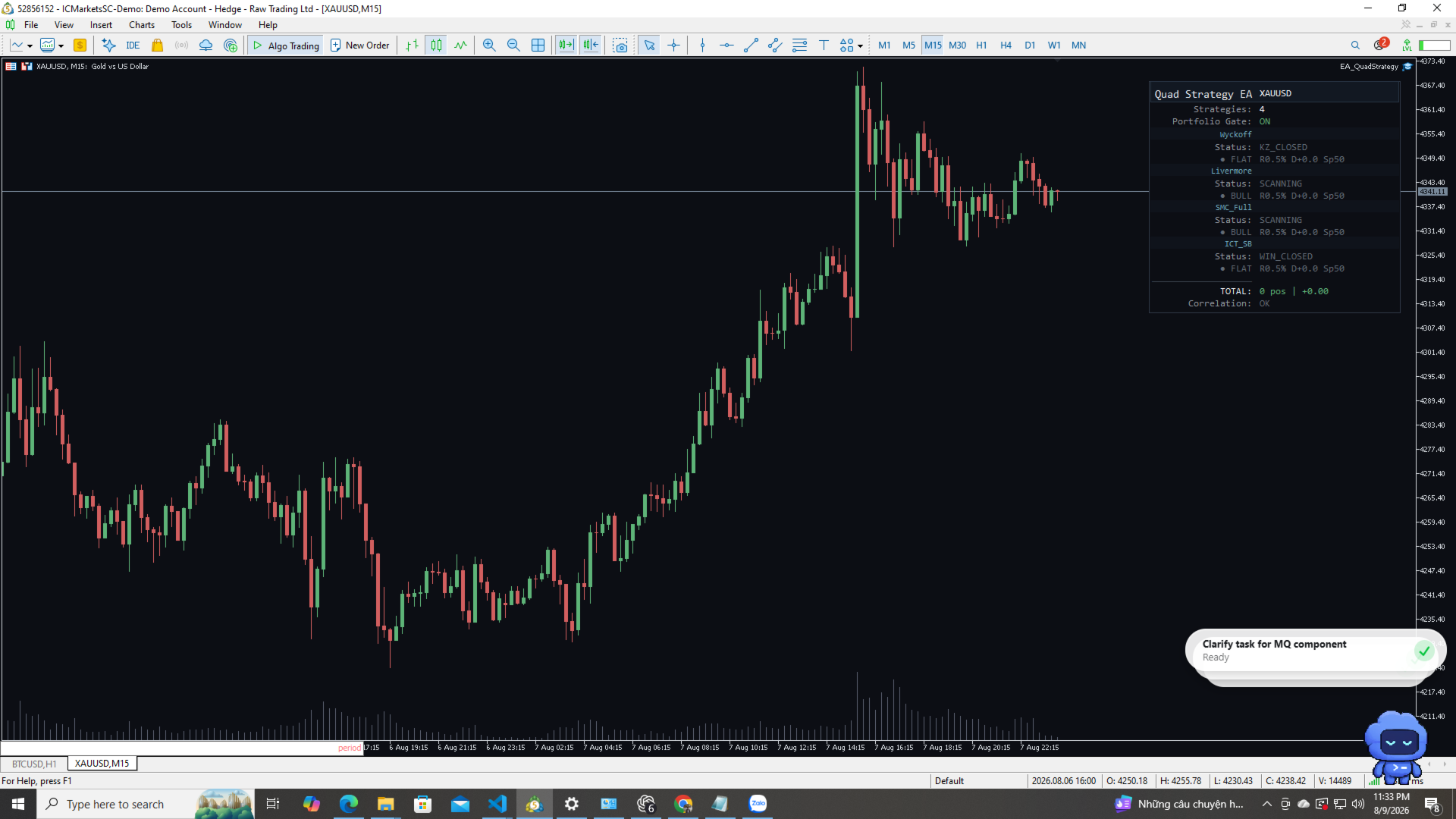
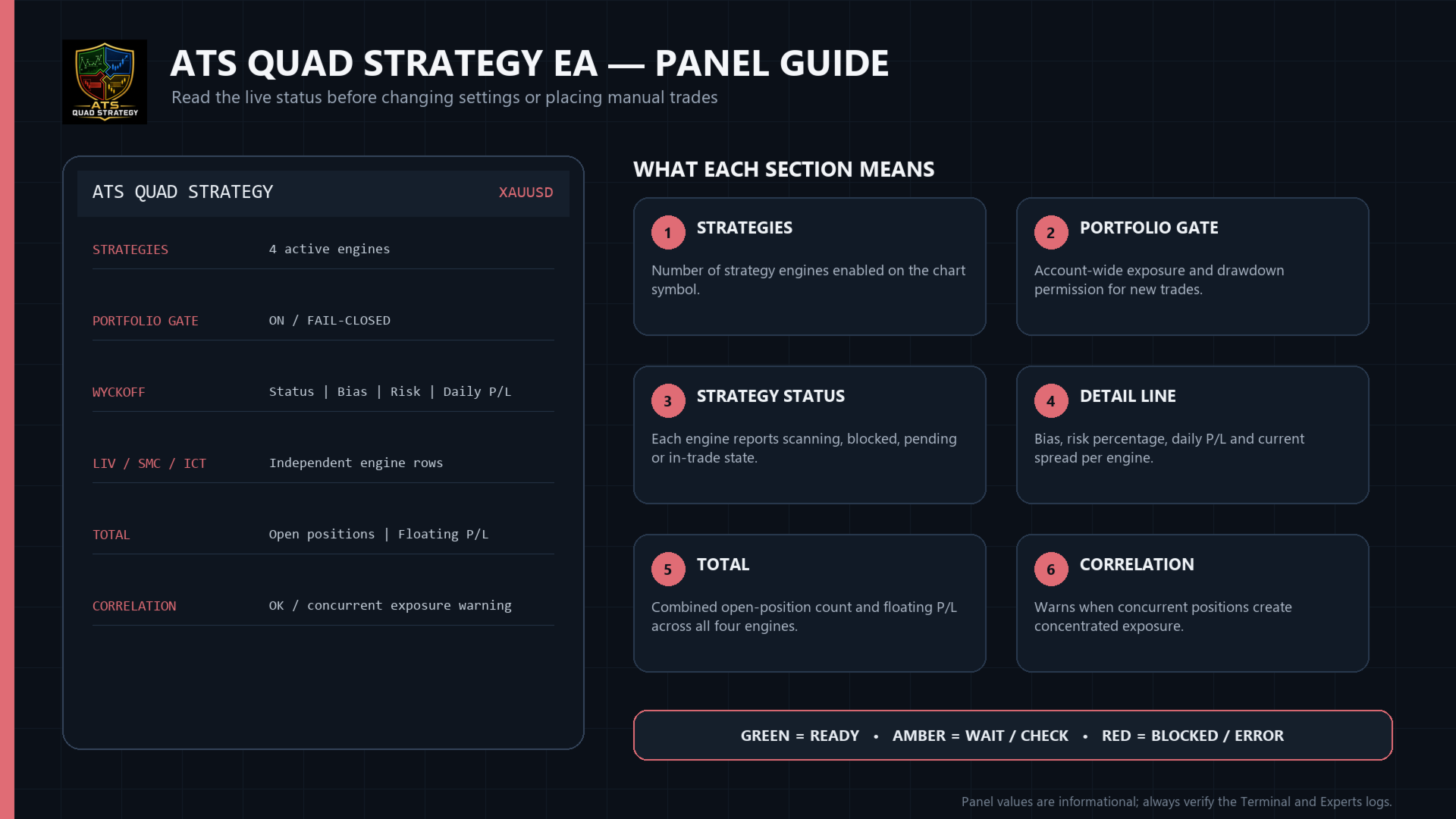
7. The on-chart panel (InpShowPanel) shows the status of all four strategies at once;
disable it or reposition with InpPanelX/InpPanelY if it overlaps other chart objects.
InpApplyChartLayout (default true) applies the same dark chart theme used across this
series on load.
8. This product does not call any external service directly (no Telegram WebRequest); if
InpLogTrades/InpLogSignals are enabled it only writes CSV files under Files/ATS_v4/ for
your own external tooling to read, if you have any — otherwise these can be left on or
off with no effect on trading.
Input entry checklist:
- First choose the enabled engines. For a conservative first demo, enable one strategy at a
time, verify its signals, then add the others. Every strategy keeps its own risk budget.
- Keep InpUsePortfolioGate=true. Review the combined position limit and drawdown controls
before increasing any Wyk_/Liv_/Smc_/Ict_ risk input.
- Each prefixed group mirrors the standalone EA: timeframe and detection inputs define setup
quality; Base/Min/Max risk define sizing bounds; TP inputs are R multiples and partial-close
percentages. Change one group at a time and save a named .set file per symbol.
- InpTimerMs=1000 is the normal operating value. Lower values increase management checks but
do not create more signals because detection is deduplicated on new bars.
- A Hedging account is mandatory. Confirm this in MT5 before attaching the EA; Netting would
merge independent strategy positions and is therefore rejected during initialization.
As with any automated strategy, test on a demo account first and use position sizing
appropriate to your own risk tolerance before trading a live account.