IchiBandPro
- Experts
-
Rudi Rupian
 I started my trading journey in 2008 — not chasing quick profits, but building the discipline to understand how markets truly work. Over the years, I have developed a calm, long-term approach to trading: focused, systematic, and always probability-driven.
 - Versione: 1.1
- Attivazioni: 9
ENGLISH DESCRIPTION — MQL5 MARKET COMPLIANT
IchiBand Pro | Rudi Rupian | camptrader.web.id
====================================================
IchiBand Pro is an automated Expert Advisor for MetaTrader 5 that combines two widely respected technical analysis tools — Ichimoku Kinko Hyo and Bollinger Bands — into a single structured trading system. The EA manages positions using a systematic averaging approach with configurable cycle control, margin protection, and real-time chart panel.
— WHY ICHIMOKU KINKO HYO —
Ichimoku Kinko Hyo was selected as the primary trend analysis tool because it provides a comprehensive view of market structure without relying on a single line or value. Unlike simple moving averages, Ichimoku presents trend direction, momentum, and dynamic support and resistance simultaneously through its Cloud, Tenkan-Sen, and Kijun-Sen components.
The Cloud defines the broader trend environment. When price is clearly positioned above or below the Cloud on higher timeframes such as H4 or Daily, the market is displaying a more reliable directional bias than what shorter timeframes alone can provide. Using higher timeframe cloud analysis as a structural filter significantly reduces the occurrence of signals that appear valid on lower timeframes but contradict the dominant market direction.
The relationship between Tenkan-Sen and Kijun-Sen adds a momentum layer. These two lines interact in a way that reflects short-term and medium-term price equilibrium, providing a secondary confirmation that is independent from the Cloud itself. This multi-component design makes Ichimoku effective as a trend filter across a wide range of market conditions and instruments.
— WHY BOLLINGER BANDS —
Bollinger Bands were selected as the secondary indicator because they measure volatility and the relative position of price within a statistically defined range. The upper and lower bands expand and contract based on market volatility, and the position of price relative to the midline and outer bands provides meaningful context about whether price is extended or returning toward its average.
In combination with Ichimoku, Bollinger Bands help identify conditions where price is moving in a confirmed trend direction while simultaneously showing whether it is near a statistically significant boundary. This layered approach — trend from Ichimoku, price position from Bollinger Bands — creates a dual-filter system where both tools must reflect compatible conditions before the EA considers any action.
Bollinger Bands also respond to changes in volatility in real time. During periods of low volatility, the bands narrow, and during active market phases, they widen. This dynamic behavior makes them a useful complement to the static structure provided by Ichimoku.
— HIGHER TIMEFRAME RECOMMENDATION —
For more reliable signals, it is strongly recommended to attach IchiBand Pro to H4 or Daily charts. Higher timeframes naturally filter out short-term noise and produce signals that reflect more sustained market conditions. Signals generated on M15 or H1 may appear frequently but are more susceptible to false breakouts and temporary volatility. Running the EA on H4 or Daily reduces signal frequency while improving the quality and consistency of the conditions being acted upon.
— FEATURES —
• Dual indicator system: Ichimoku Kinko Hyo + Bollinger Bands
• Signal Mode: NORMAL (trend-following) or REVERSE (counter-trend)
• Averaging Mode: BOTH WAY, ONE WAY, or TWO SIDE (simultaneous BUY and SELL)
• Candle-close execution only
• Weighted average TP recalculated after every new position
• Margin check and margin level protection before every order
• Maximum position limiter per cycle
• One cycle per day with floating position carry-over
• Manual trade recognition (magic number 0)
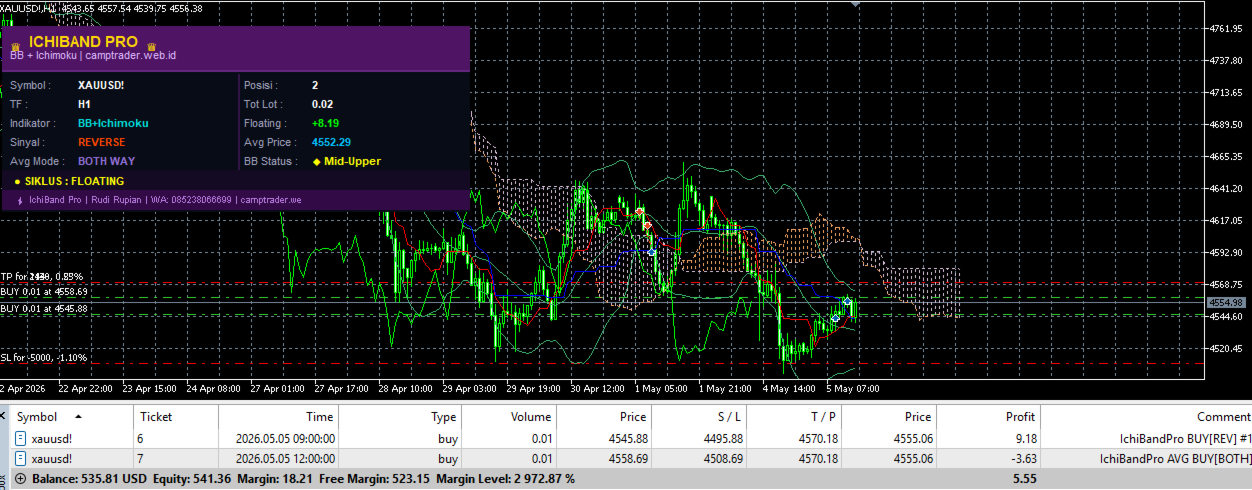
• Real-time two-column GUI panel
— RECOMMENDATION —
Test on a demo account for a minimum of one month before deploying on a live account. Observe how the EA behaves across different market conditions — trending, ranging, and volatile sessions — before making any decision to use real capital.
— STANDARD PARAMETER SETUP —
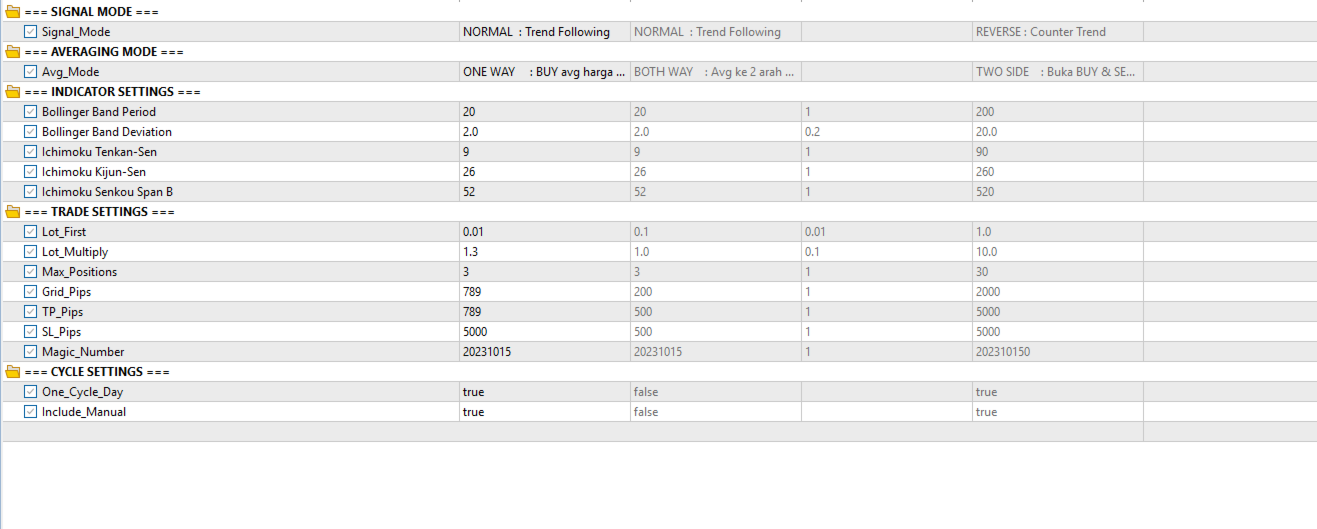
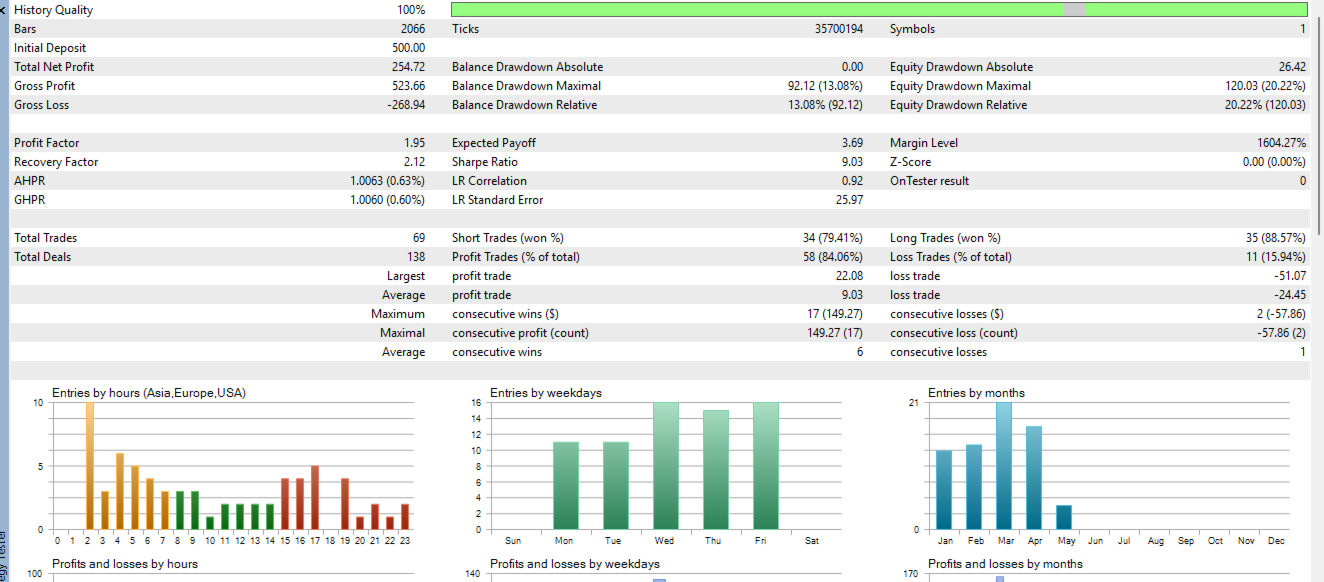
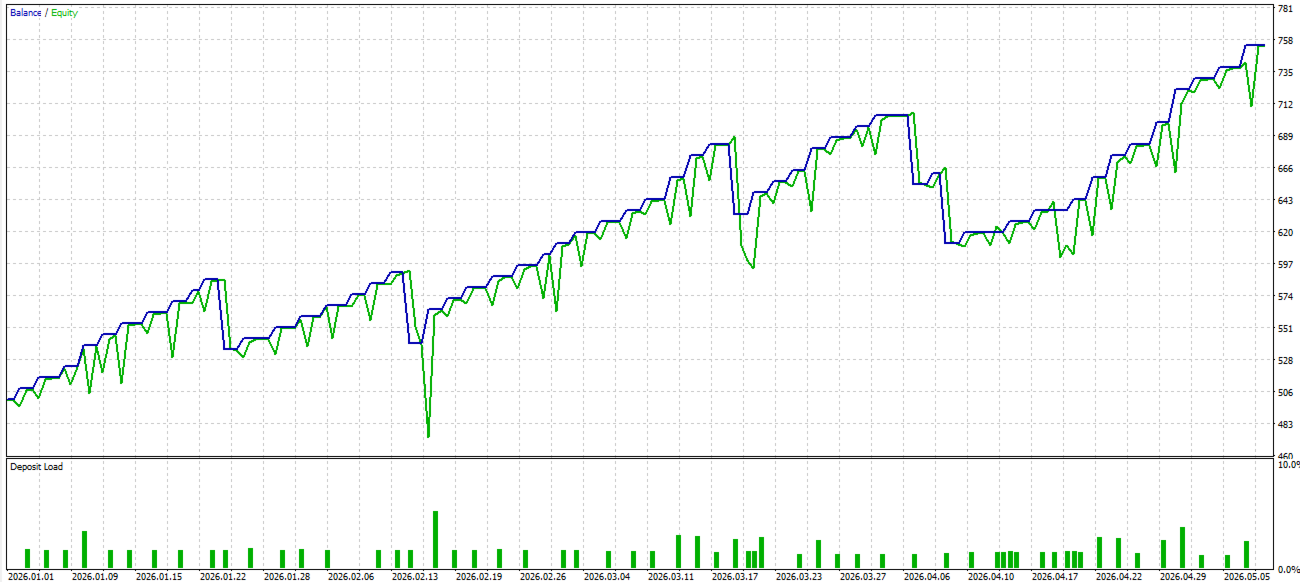
The product screenshots included on this page display the developer's personal standard parameter configuration. These settings represent the baseline setup used during internal testing and are provided as a practical reference for new users. Buyers are encouraged to review the screenshots carefully before configuring the EA for the first time. The displayed parameters cover indicator periods, lot sizing, grid distance, take profit, stop loss, averaging mode, and cycle settings. While these values serve as a recommended starting point, each trader should adjust them according to their account size, risk tolerance, and preferred trading instrument. Parameters that work well on one instrument or account balance may require adjustment when applied to a different setup.