MAK Grid Pro MT5
- Experts
- Versione: 1.11
- Aggiornato: 24 maggio 2026
- Attivazioni: 5

💎 PROFESSIONAL-GRADE GRID ENGINE
MAK Grid Pro was engineered from the ground up to provide traders with a highly adaptable and risk-aware grid trading environment capable of operating across multiple market conditions.
Traditional grid systems often suffer from rigid spacing, static risk assumptions, and poor adaptation to changing volatility. MAK Grid Pro addresses these limitations through an integrated framework that combines volatility-responsive grid deployment, trend-aware filtering, dynamic recovery logic, and account-level protection mechanisms.
The system continuously evaluates market conditions and adjusts its operational behavior accordingly, helping traders maintain consistency across both low-volatility consolidations and high-momentum market environments.
⚡ ADAPTIVE MARKET RESPONSE
Markets are constantly changing. A grid distance that works during quiet Asian sessions may become completely unsuitable during major economic events or periods of heightened volatility.
MAK Grid Pro solves this problem through ATR-driven adaptive calculations that automatically respond to changing market conditions.
Benefits include:
• Wider grid spacing during volatile market conditions.
• Tighter spacing during consolidation phases.
• More realistic profit targets based on current market activity.
• Reduced exposure to unnecessary overtrading.
• Improved basket efficiency across varying volatility regimes.
This adaptive approach allows the system to remain responsive rather than forcing the market into fixed parameters.
🎯 STRATEGY FLEXIBILITY
Every market environment behaves differently.
A ranging market requires different execution logic than a trending market, and a breakout environment requires different positioning than a consolidation phase.
To accommodate this reality, MAK Grid Pro includes four specialized grid deployment architectures:
✓ Basic Mean-Reversion Grid
Designed to capture movements outside established price ranges.
✓ Hedged Consolidation Grid
Maintains balanced exposure during periods of price oscillation.
✓ Bullish Trend Grid
Optimized for directional upward movement with continuation-based position stacking.
✓ Bearish Trend Grid
Designed for sustained downside market conditions with integrated recovery management.
This flexibility enables traders to align the system with their own market analysis and trading methodology.
🛡 ADVANCED CAPITAL PRESERVATION
Risk management is not treated as an afterthought.
MAK Grid Pro incorporates multiple layers of protection designed to help traders maintain control during adverse market conditions.
Protection features include:
• Equity Drawdown Monitoring
• Automated Emergency Liquidation
• Cooldown Protection Periods
• News Event Trading Suspension
• Margin Utilization Monitoring
• Maximum Order Controls
• Trade Duration Management
• Time-Based Session Exits
• Broker Validation Checks
These mechanisms work together to help prevent uncontrolled exposure and promote disciplined operation.
📊 COMPLETE OPERATIONAL TRANSPARENCY
Automation should never mean loss of visibility.
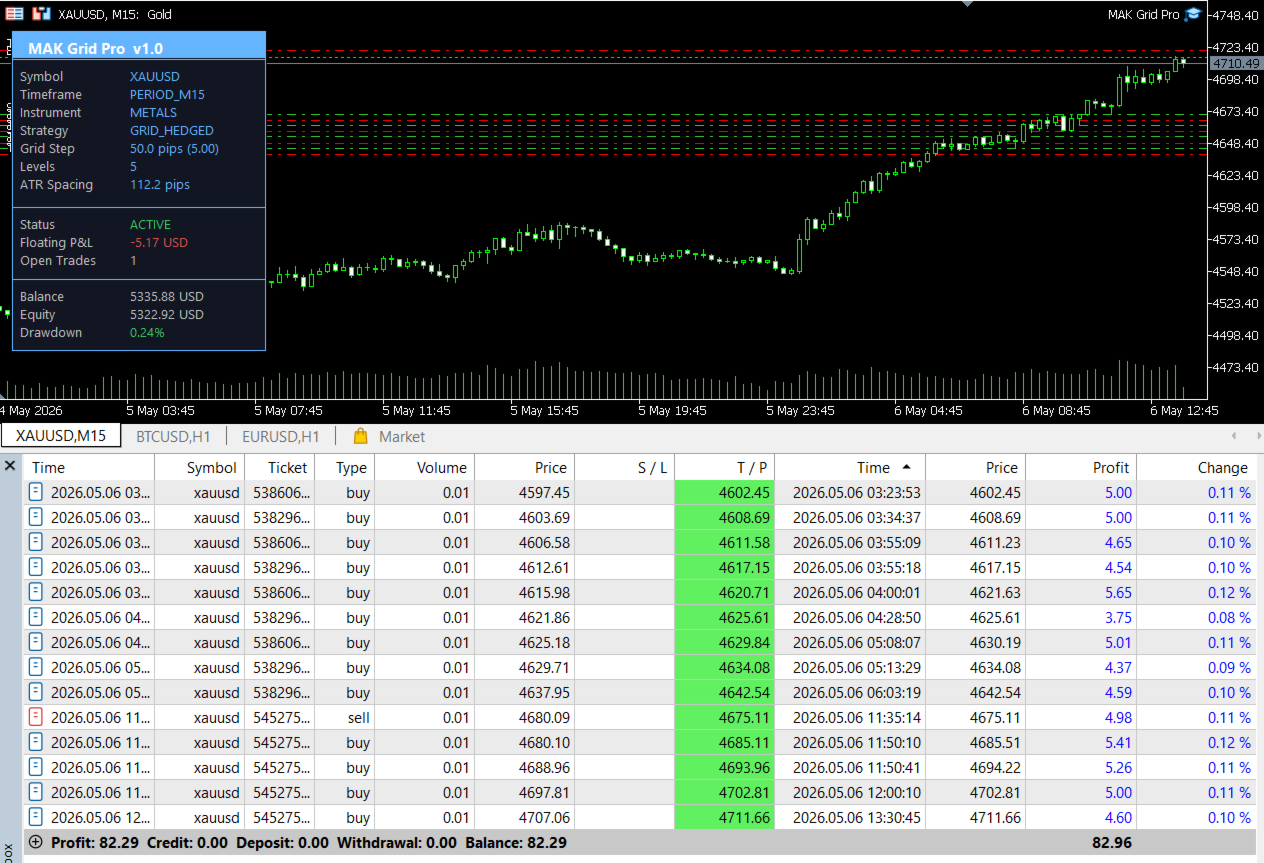
The integrated telemetry dashboard provides continuous insight into system activity, allowing traders to monitor performance and risk in real time.
Dashboard metrics include:
• Floating Profit & Loss
• Active Grid Levels
• Current Grid Spacing
• Distance to Basket Target
• Drawdown Percentage
• Margin Usage
• Recovery Status
• News Filter Status
• Trading Cooldowns
• System Activity State
This ensures traders always understand what the system is doing and why.
🌍 MULTI-ASSET DEPLOYMENT
MAK Grid Pro was designed with broad market compatibility in mind.
Supported asset classes include:
• Forex Pairs
• Precious Metals
• Energy Markets
• Stock Indices
• Commodities
• Cryptocurrencies
Automatic symbol calibration detects broker-specific pricing formats, tick sizes, volume increments, and trading restrictions to simplify deployment across different instruments.
📈 BUILT FOR SERIOUS TRADERS
Whether your objective is volatility harvesting, trend participation, basket trading, or advanced grid management, MAK Grid Pro provides a comprehensive framework capable of adapting to evolving market conditions.
Rather than relying on a single rigid methodology, the system offers multiple deployment models, intelligent volatility adaptation, advanced recovery options, and robust risk controls that can be configured to suit a wide range of trading styles.
⚠ RISK DISCLOSURE
Trading leveraged financial instruments carries substantial risk and may not be suitable for all investors.
Grid trading, averaging strategies, and recovery systems can experience significant drawdowns during prolonged adverse market conditions.
Past performance does not guarantee future results.
Traders should thoroughly test all settings using historical data and demo environments before deploying the system on a live account. Appropriate risk management and capital allocation remain essential components of long-term trading success.
MAK Grid Pro is a professional trading framework designed to assist traders in executing complex grid strategies. Responsibility for trade decisions and risk exposure remains solely with the user.