MangoFX Initial
- Experts
- Versione: 1.15
- Attivazioni: 5

MangoFX Initial – Smart Trend EA with Tesla‑Style Risk Management
MangoFX Initial is a fully automated Expert Advisor designed for traders who value disciplined risk control, flexible entry logic, and transparent performance monitoring. Whether you are a conservative swing trader or prefer a more aggressive delayed‑entry approach, this EA adapts to your style while protecting your capital with daily, yearly, and floating equity limits.
Key Advantages
· Two Trading Modes in One EA
· Standard Mode: Enters immediately when a high‑probability signal appears.
· Second Mode (Swing Delay): Waits for price to reach the last significant swing high/low before entering – ideal for traders who prefer confirmation before acting.
· Tesla‑Inspired Risk Management
· Set maximum daily profit / loss targets (closed positions only).
· Enforce a yearly profit ceiling – the EA stops trading after reaching the target.
· Optional floating equity protection that closes all positions if unrealised profit/loss would exceed your limits.
· Automatic Breakeven Protection
· Moves stop loss to entry price once the trade reaches a user‑defined profit percentage. Locks in gains without manual intervention.
· Smart Trade Flow Control
· WaitForTradeComplete: only one position open at a time.
· MaxOppositePositions: allows multiple positions in the same direction while limiting opposite ones.
· Cooldown mechanism prevents multiple entries on the same bar after a trade closes.
· Live On‑Chart Dashboard
· No complex objects – uses clean Comment() text.
· Shows trial days left, balance/equity, daily/yearly closed profit, active limits, open positions, and pending orders (Second Mode).
· Everything you need at a glance.
· Built‑in Trial Period (Seller Configurable)
· The EA includes a hardcoded trial (e.g., 30 days). After compilation, the trial setting is not visible in inputs – only shown on the chart.
Input Parameters:
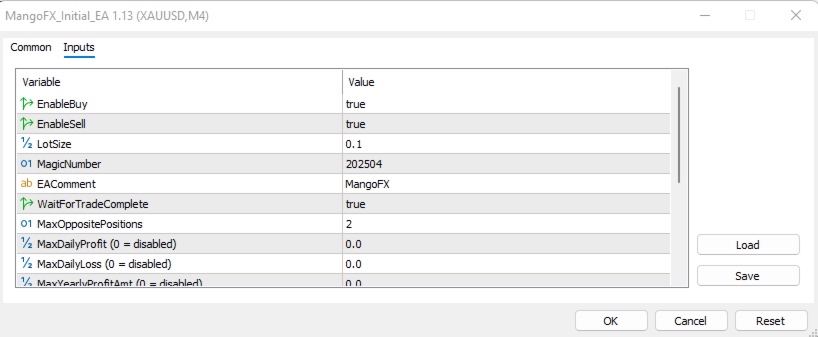
Parameter Description
EnableBuy - Allow the EA to take buy (long) trades.
EnableSell - Allow the EA to take sell (short) trades.
LotSize - Fixed trade volume (e.g., 0.1 = 0.1 lots).
MagicNumber - Unique identifier for EA’s positions. Change if running multiple copies.
EAComment - Custom comment attached to each order.
WaitForTradeComplete - If true, only one position can be open at a time. If false, the EA may open multiple positions (see next parameter).
MaxOppositePositions - Maximum number of positions in the opposite direction. For instance, if 1 and a buy position is open ten onl one sell position can be open at the sae time (ignored if WaitForTradeComplete = true).
MaxDailyProfit - Closed daily profit target (0 = disabled, any amount > 0 is the amount in account currency). When reached, no new trades are opened.
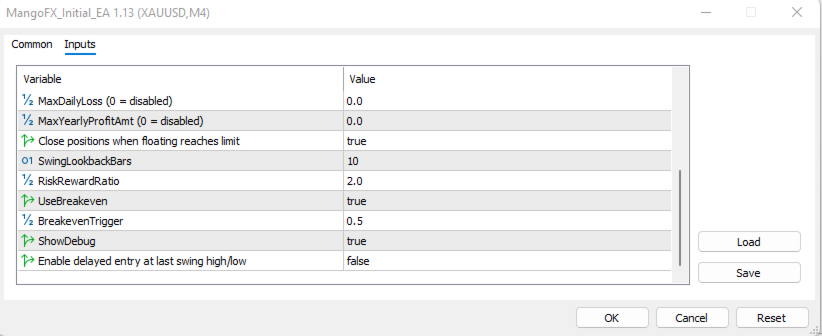
MaxDailyLoss - Closed daily loss limit (0 = disabled). Prevents further trading after hitting the loss.
MaxYearlyProfitAmt - Closed yearly profit target (0 = disabled). Stops trading for the rest of the year.
UseFloatingEquityProtection - If true, the EA monitors unrealised profit/loss and closes all positions when daily or yearly limits would be exceeded by floating P/L.
SwingLookbackBars - Number of bars used to detect recent swing highs/lows (only relevant for Second Mode).
RiskRewardRatio - Target profit expressed as multiple of risk (e.g., 2.0 means profit = 2 × risk).
UseBreakeven - Enable automatic breakeven stop loss.
BreakevenTrigger - Fraction of the profit target that triggers breakeven (e.g., 0.5 = move SL to entry when halfway to TP).
ShowDebug - Print detailed information in the Experts log (useful for testing).
UseSecondMode - Switch between Standard Mode (false) and Swing Delay Mode (true).
How It Works (Simplified)
1. Signal Detection – A proprietary algorithm analyses recent price action and identifies potential turning points.
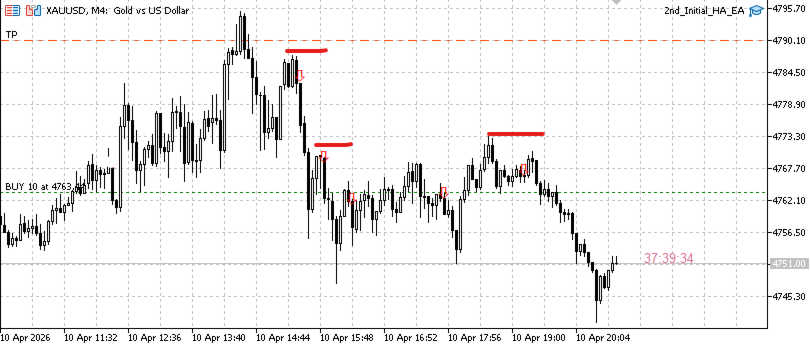
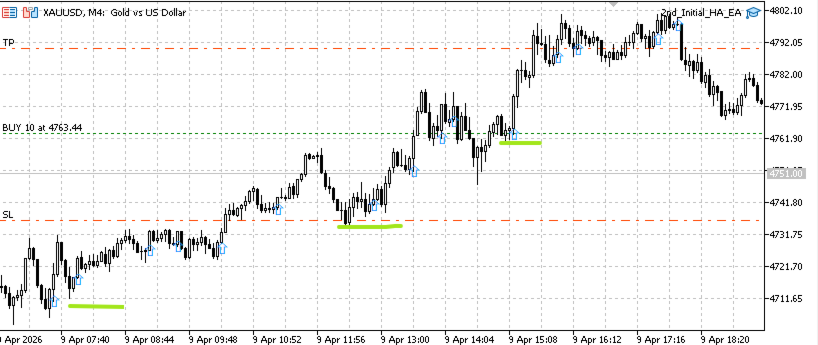
2. Entry Execution – Depending on the selected mode, the EA either enters immediately (Standard) or places a pending order at the last swing high/low (Second Mode).
3. Risk Filters – Before opening any trade, the EA checks daily/yearly closed profit/loss and floating equity limits.
4. Trade Management – Once in a trade, the EA applies a fixed Risk‑Reward take profit and optional breakeven.
5. Cooldown – After a trade closes, the EA waits for a fresh bar to avoid re‑entering on the same signal.
Ideal For
· Traders who want a set‑and‑forget system with strict capital protection.
· Those who like swing trading with defined risk/reward.
· Users who appreciate transparency – the chart display shows all important metrics.
· Traders on MQL5 Market looking for a subscription‑ready EA.
Technical Requirements
· Platform: MetaTrader 5
· Timeframe: Any (optimised for M4, 1H, 4H, Daily)
· Symbols: Forex, indices, commodities (test before live use).
· Account type: Hedge or Netting – both supported
Note: Best for XAUUSD(BUY and SELL) and Boom 1000 Index(SELL only).