Tevsys Automated Discipline Risk Panel for MT5
- Utilità
- Versione: 8.13
- Aggiornato: 30 agosto 2026
- Attivazioni: 10

You set the limits. TEVSYS applies them across your account.
Your risk rules are clear in your head. The hard part is executing them when the market speeds up, pressure rises, and the temptation for “one more” shows up. TEVSYS narrows the gap between what you decide and what happens in the terminal.
No signals. No profit promises. Documented close precision. Account-level protection. Evidence you can cross-check in MetaTrader 5.
What TEVSYS is
TEVSYS is an operational governance system within MetaTrader 5: a utility built for traders who want their risk limits enforced for real — not just on paper or in their head. It monitors the account, shows status on an on-chart panel, and when you activate protection it applies what you agreed to — measured closes, blocking new exposure, and a record of what happened.
It is not a signal robot or a promise to make money. It is verifiable operational discipline, documented close precision, and a serious layer of consistency alongside what MT5 already logs. It fits different profiles: those who need a brake under pressure, those who already control themselves and demand closes where they belong, and those who want evidence for themselves or for third parties.
This Market listing delivers the Advanced plan (fixed in the file). It is not Essential. tevsys has several plans (Essential, Advanced, Pro); other plans or licenses on tevsys.io. Guides, evidence, and Market installation: https://www.mql5.com/en/blogs/post/775054
Limits you configure (Advanced edition on this listing)
- Daily loss and profit limits, with rotation at day change per your settings.
- Full work-week setup: define Mon–Fri plan (limits and ON/OFF days) and leave it ready — mid-week or from a calm weekend (SAVE FOR MONDAY → SCHEDULED · MONDAY) so Monday starts with the week already defined.
- OFF days are part of the plan. It is not “turning the program off”; it is the protection you defined for those days. Do not confuse weekend scheduling with an operational OFF day.
- One chart is enough to install; protection looks at account result (symbols included in that calculation) and shows status on open charts.
When a limit is reached
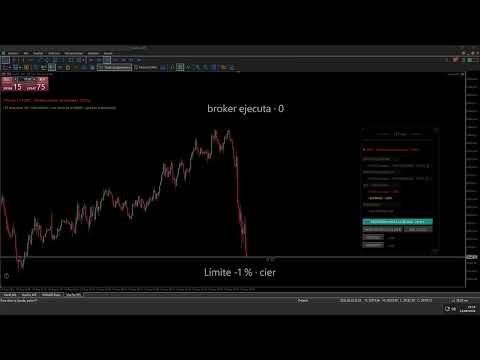
- Automatic close of open positions, with documented precision in real scenarios (MT5 reports and logs).
- On profit, a minimum margin of about 0.01% above your configured percentage avoids closes on a single tick or micro move. The close (and what you see on panel / STOP) may sit slightly above the input number: stability by design, not a “missed by a hair” failure.
- Block on new exposure while protection stays active.
- If you try “one more” with protection on, HyperClose closes that new exposure immediately and records the attempt (warning levels per published design).
- If the broker does not execute the close on the first attempt, tevsys retries automatically for up to 45 seconds, with progressive pauses. While retrying, it does not flood you with messages. Only if positions are still open after that window will you see a single on-screen notice (Incomplete close): what happened, that STOP stays active, and that you can close manually if needed. The notice is not repeated in a loop.
- New exposure only when reset or daily/weekly rotation applies per your settings.
Open trade crossing day or night (you stay protected)
If protection was active and an open trade crosses midnight, the weekend, or another calendar boundary, TEVSYS does not set you “free” just because the day changed. You keep the protection with the percentages you agreed while the trade continues and the program monitors. The panel shows operation in progress / you stay protected when applicable. That is different from scheduling Monday with no open trade (SAVE / SCHEDULED). The product goal here is that the calendar does not undo on its own what you already locked in.
Passive observation — respect for what is already open
If you load TEVSYS with trades already open and protection not yet active, we do not force the lock on top of that activity. You enter passive observation: we warn you and do not intervene as if you had already blocked. When you close those positions, you start clean. Existing trades and limits you just accepted are not mixed.
Cash movements — real capital rules
A broker withdrawal or deposit is not trading, but it changes capital. TEVSYS detects it, warns you, and does not let the panel percentage lie with an old reference: it asks you to re-agree risk on current capital. Different capital means a new agreement. Moving money in or out does not erase a trading limit you had already hit.
Documented precision — how to read it
- 116 documented operations with MT5 reports and logs.
- Under normal conditions, mean deviation ≈ 0.06% between your configured threshold and the executed close in that set. Not a guarantee of exact close in violent moves (gaps, liquidity, broker fill).
- Attribution: we separate TEVSYS’s decision (when it triggers close at your agreed limit) from broker execution in MT5. So “did not react” is not confused with “filled at another price”.
- Extreme cases (stress / volatility) are documented outside that mean — they are not in the 0.06%. Detail, demos, and reports: https://www.mql5.com/en/blogs/post/775054 (Precision and Evidence sections).
- Overnight swap example: close −1.51% vs limit −1.50%; deviation ≈ −0.01% (swap in day P&L).
Figures come from documented environments; yours may differ by broker and symbol. The product applies the limits and flow you configure.
Live monitoring and persistence — two sides
To monitor tick by tick and send closes, TEVSYS must be running (terminal or VPS with the program loaded). If the terminal drops or broker connectivity is lost, that monitoring pauses for that stretch. If you trade protected for real, a stable VPS — ideally near the broker server — is sensible.
That does not erase what you agreed. Limits you accepted and protection state persist: you can close MetaTrader, remove the EA from the chart, or reinstall; on reload the system reconnects with protection and agreed percentages. A gap without monitoring is not “lock erased”.
A broker server stop-loss and TEVSYS (account / day / week limit) are different layers: they complement each other. TEVSYS does not replace a server SL; a per-trade SL does not replace account-level control.
Your tevsys ID — support and traceability
Each MT5 account where you load tevsys has a unique identifier (TVS-… format), visible on the expanded panel. It is not your broker login: it is the fingerprint of that installation for support, audit, and linking what happened on that account to product logs. If you contact support or cross-check a report, that code identifies which account and session without mixing data.
TEVSYS logs what matters for discipline on that account: loads, active limits, closes at limit, blocks, HyperClose attempts, protected trades crossing calendar, cash movements, reconnects. That lives alongside MT5 history and official reports. You can cross-check what happened in the terminal with what the product applied — without blind faith. More material: https://www.mql5.com/en/blogs/post/775054
Video: real Nasdaq session (limit close, HyperClose, and report) — player in the screenshots section of this listing.
Pricing and license — two channels (do not mix them)
- MetaQuotes Market (this listing, USD): rent for 1, 3, or 6 months. Choose the period on the listing. Amounts: 69 USD (1 month), 189 USD (3 months), 349 USD (6 months). No 12-month rent on this listing. No auto-renewal. No lifetime. Limited activations per purchase per Market rules. Entry: from 69 USD/month. This listing is Advanced Market edition only.
- tevsys.io site (EUR, text): Essential €39/month · Advanced €79/month · Pro and above per site pricing page. Same product family; different channel, currency, and terms. Advanced on web = €79/month: do not compare that blindly to one Market month in USD. Links to pricing and guides: https://www.mql5.com/en/blogs/post/775054
- Market installation (no web key) and Advanced setup: https://www.mql5.com/en/blogs/post/775054 (Installation and Setup sections).
Technical resources and guides: https://www.mql5.com/en/blogs/post/775054
Requirements: MetaTrader 5 · symbols and accounts allowed by your broker.
Legal notice
This software does not provide investment advice, does not manage third-party funds, and does not guarantee results. Documented examples do not predict your account. You are responsible for your decisions and broker/jurisdiction compliance. TEVSYS does not remove market risk, slippage, or connection gaps.
Support: info@tevsys.io · tevsys.io site (text) · guides: https://www.mql5.com/en/blogs/post/775054