
75 USD
Versione demo scaricata:
6 985
Pubblicato:
2 febbraio 2012
Versione attuale:
26.326
Non hai trovato un robot adatto?
Ordina il tuo
su Freelance
Vai alla sezione Freelance
Ordina il tuo
su Freelance
Come acquistare un Robot di Trading o un indicatore
Esegui il tuo EA
hosting virtuale
hosting virtuale
Prova un indicatore/robot di trading prima di acquistarlo
Vuoi guadagnare nel Market?
Come presentare un prodotto per venderlo con successo

Ti stai perdendo delle opportunità di trading:
- App di trading gratuite
- Oltre 8.000 segnali per il copy trading
- Notizie economiche per esplorare i mercati finanziari
Registrazione
Accedi
Accetti la politica del sito e le condizioni d’uso
Se non hai un account, registrati
Comprei a ferramenta Virtual Trade Pad e, após um período de utilização, embora ativa, não está mais realizando a negociação de compra / venda. Quando posiciono o mouse nos botões do VTP, ele mostra os parâmetros no gráfico, mas não realiza as operações. Solicito ajuda. Glauco de Andrade Antunes (altopar@gmail.com).
Hello,
Hello,
I'm running into a problem when I use CLP to close all positions in loss and close terminal after all positions are closed. I'm using an EA to trade, and my EA will take new positions before CLP closes them all if there are many positions to close, leading to additional losses and not enabling CLP to close the terminal so that all trading will stop.
In your CLP manual, you explain the "ClosingCurrentTicketOnly" parameter, but you don't mention close in loss, only close in profit in the explanation. Does this parameter not work for closing loss?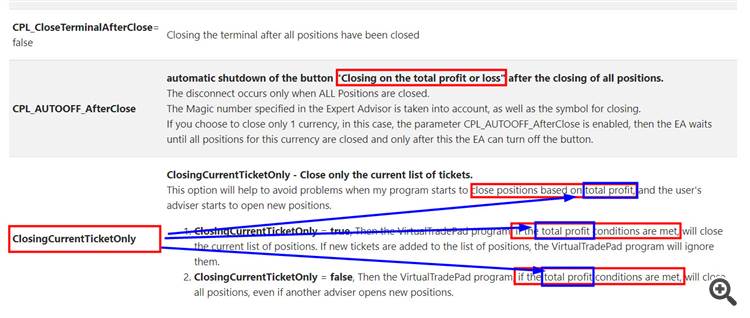
Hello,
I'm running into a problem when I use CLP to close all positions in loss and close terminal after all positions are closed. I'm using an EA to trade, and my EA will take new positions before CLP closes them all if there are many positions to close, leading to additional losses and not enabling CLP to close the terminal so that all trading will stop.
In your CLP manual, you explain the "ClosingCurrentTicketOnly" parameter, but you don't mention close in loss, only close in profit in the explanation. Does this parameter not work for closing loss?
I haven't tried setting this parameter yet. I was not aware of it until reading through your manual recently.
Just to clarify, if I set this "ClosingCurrentTicketOnly" = false, then all positions will be closed, even newly opened positions by the EA, and the terminal will close if set to "CloseTerminalAfterClose" = True?
I haven't tried setting this parameter yet. I was not aware of it until reading through your manual recently.
Just to clarify, if I set this "ClosingCurrentTicketOnly" = false, then all positions will be closed, even newly opened positions by the EA, and the terminal will close if set to "CloseTerminalAfterClose" = True?
Nope! It happens while in the chart mode, only VTP dashboard works when clicking on buy and sell and then after that keyboards key’s returning to works...
Attached the logs...
May I send you the logs privately ?
what you mean as the graph “out of focus”...?
the keyboard is the events of the graph. Therefore, buttons can only be processed when the graph window has focus. for example, you can click on Market Watch and the focus will be on the Market Watch. or you can click where you have trades and the focus will be there, but not on the chart.
Ok! No the keyboard stop working without leave or any click out of the chart...