SessionMA
- Indicatori
-
Denis Kislicyn
 I recently joined the MQL5 platform as a freelancer, so I have a few reviews and completed projects. On the other hand, I’m a skilled coder with 15+ years of experience in C#, C++, Python, JS, Pascal, Lua, MQL, Visual Basic, 1C, X++, ABAP, and other languages.
 - Versione: 1.0
Session MA
- Created by Denis Kislitsyn | denis@kislitsyn.me | [kislitsyn.me](https://kislitsyn.me/personal/algo)
- Version: 1.0
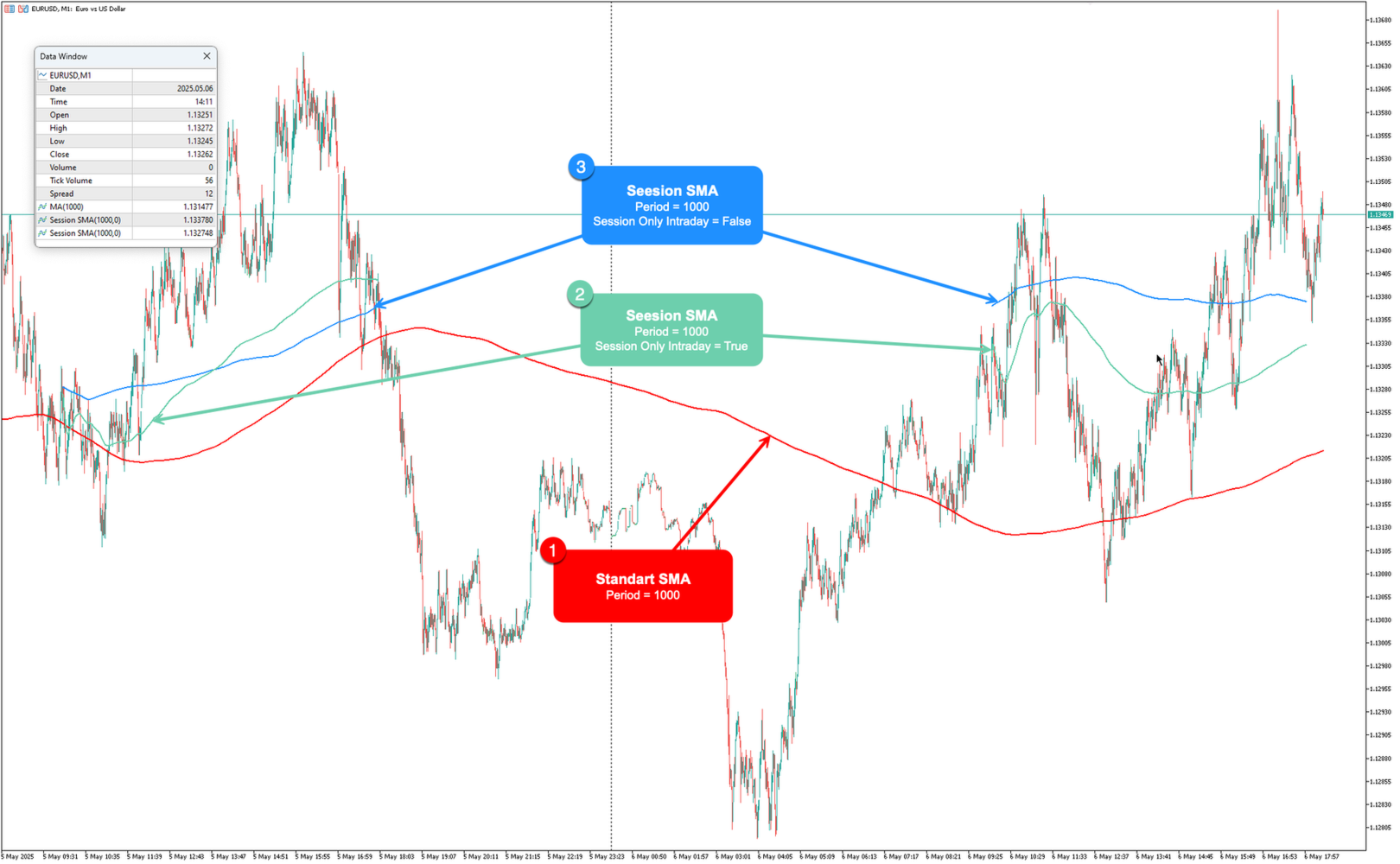
SessionMA is a specialized Moving Average (MA) indicator for MetaTrader 5 that calculates the MA only on bars that fall within a specified session time window. Unlike standard MA indicators that calculate across all available bars, SessionMA filters calculations to include only the data points that occur during your defined trading session.
This indicator is particularly useful for:
- Session-based trading strategies
- Analyzing market behavior during specific time periods
- Reducing noise from irrelevant trading hours
- Making calculations over long periods while focusing only on specific trading sessions
The indicator displays as a line on the chart, showing the MA value only during the specified session hours.
Key Features
Calculates MA only on bars within the specified session time window
Supports all standard MA methods (SMA, EMA, SMMA, LWMA)
- Configurable session start and end times
- Option to calculate MA only for intraday data within the session
- Customizable MA period, shift, and applied price
| Parameter Default | Default | Description |
|---|---|---|
| MA Period | 14 | Number of periods used in the MA calculation |
| MA Shift | 0 | Shifts the MA line forward (positive values) or backward (negative values) |
| MA Method | SMA | Method used for MA calculation: - SMA: Simple Moving Average - EMA: Exponential Moving Average - SMMA: Smoothed Moving Average - LWMA: Linear Weighted Moving Average |
| Applied Price | CLOSE | Price value used in calculations: - CLOSE: Closing price - OPEN: Opening price - HIGH: High price - LOW: Low price - MEDIAN: Median price (High+Low)/2 - TYPICAL: Typical price (High+Low+Close)/3 - WEIGHTED: Weighted price (High+Low+Close+Close)/4 |
| Session Start Hour | 10 | Hour when the session starts (0-23) |
| Session Start Min | 0 | Minute when the session starts (0-59) |
| Session End Hour | 18 | Hour when the session ends (0-23) |
| Session End Min | 0 | Minute when the session ends (0-59) |
| Session Only Intraday | false | When enabled (true), the indicator resets calculations at the start of each new day, ensuring that only intraday data within the session is used |
Usage Tips
- For trading specific market sessions (e.g., London, New York, Tokyo), set the session hours to match the official market hours
- When analyzing long-term trends within specific hours, set a larger MA period and disable the "Session Only Intraday" option
- For day trading strategies, enable the "Session Only Intraday" option to focus only on the current day's session data
- The indicator works best on timeframes that provide sufficient data points within your session window (e.g., M1-H1)