
Simple Stochastic MT5 EA
- Experts
- Versione: 4.0
- Aggiornato: 17 giugno 2026
- Attivazioni: 20

Simple Stochastic MT5 EA - Overbought and Oversold Based Expert Advisor
- This Expert Advisor (EA) is based on the Stochastic Oscillator.
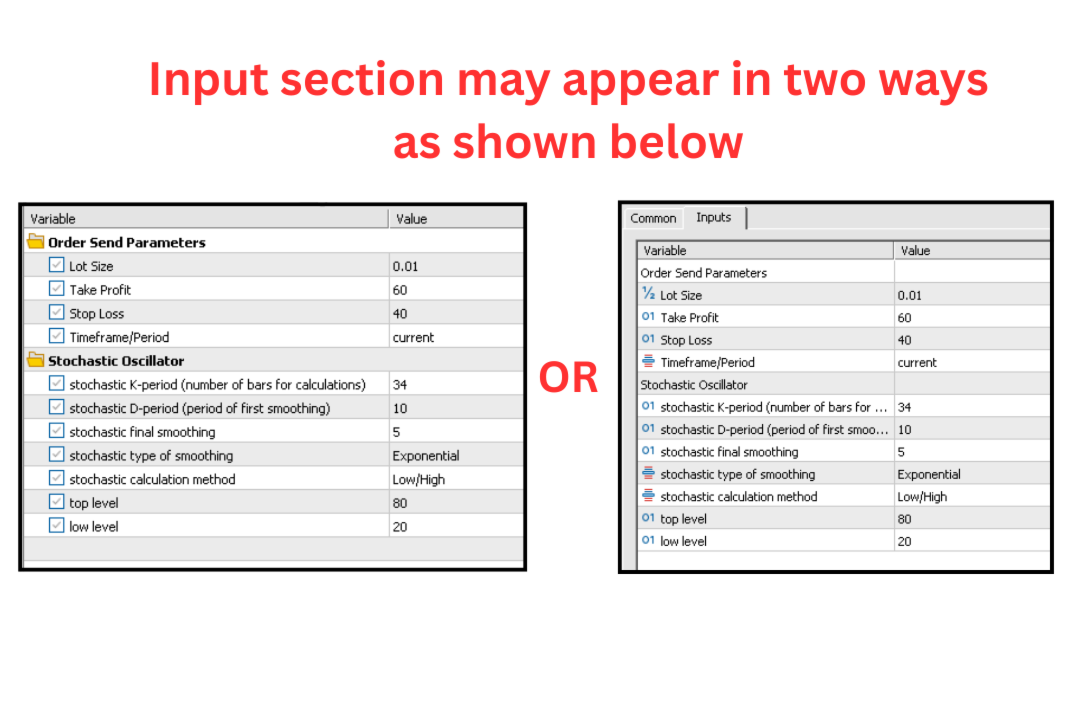
- Based on the pre-set settings (as shown in the attached screenshots) the EA will place trades:
Simply explained;
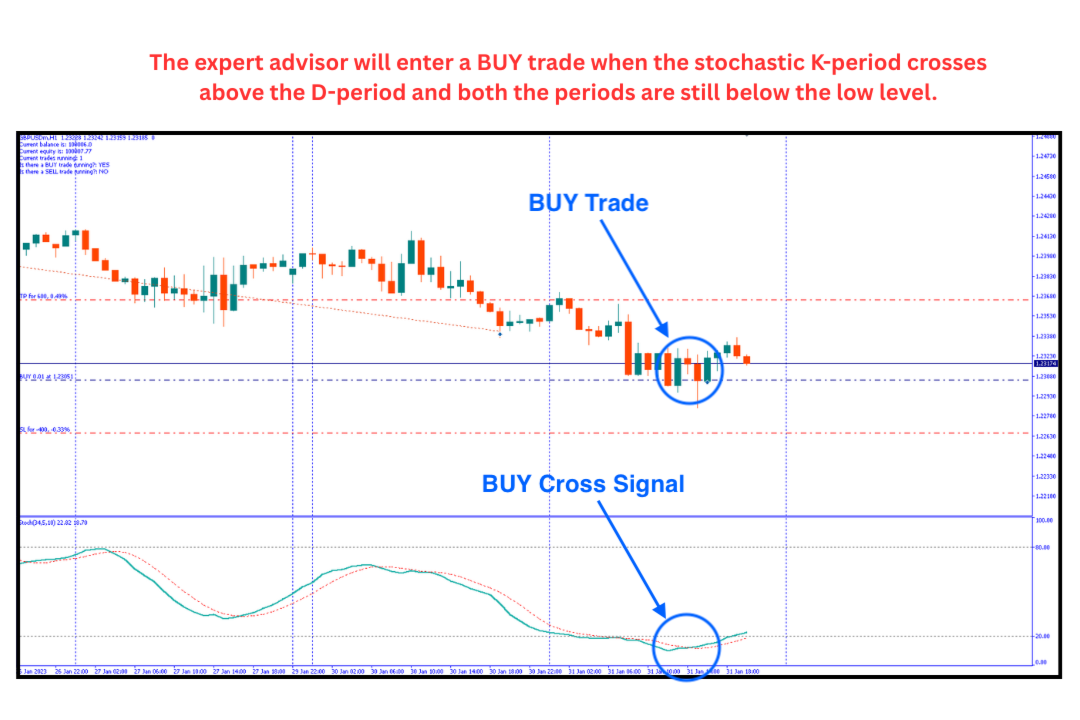
- The expert advisor will enter a BUY trade when the stochastic K-period crosses above the D-period and both the periods are still below the low level.
- The expert advisor will enter a SELL trade when the stochastic K-period crosses below the D-period and both the periods are still above the high level.
- You can modify and put any values of your choice in these input areas as you see fit, i.e the order send parameters and stochastic oscillator
- You can also edit and change the symbol and timeframe.
- You can read about the stochastic oscillator easily online on sources as so as to have an idea on how to use this ea as well as some of the inputs to use, for example: https://www.investopedia.com/terms/s/stochasticoscillator.asp
The Simple Stochastic Oscillator Expert Advisor IS That SIMPLE! Explore as you see fit...
---
NB: The EA will apply and use the currency and timeframe based on the chart you place the EA on unless otherwise specified.
---
- Adapting to Your Broker's Rules: Different brokers process trades in
different ways. The EA now automatically detects your specific broker's
system so your trades do not get rejected with execution errors.
- Warning for Tight Settings: If you set a Stop Loss or Take Profit that is
closer to the current price than your broker's rules allow, the EA will pop
up a warning alert on your screen when it starts.
- Auto-Adjusting Stops: If you attempt to open a trade with stops that are too
tight, the EA will automatically widen them to the broker's minimum allowed
distance so the trade is successfully opened instead of failing.
- Smart Trade Sizes (Crypto Fix): On pairs like ETHUSD, brokers require larger
minimum trade sizes than normal Forex pairs (like 0.1 instead of 0.01). If
your settings are too small for a specific pair, the EA now automatically
raises your trade size to the minimum required and prints a warning, rather
than silently ignoring the trade.
- Emergency Buffer for Fast Markets: If the market gaps or jumps past your
Stop Loss during a fast spike, the EA monitors the price on every tick. If
the price goes past your stops by more than a small buffer (default is 5
pips), the EA manually forces the trade to be closed as an emergency backup. Using
a buffer prevents the EA from conflicting with the broker's server during
normal trade exits.
- Multi-Pair Separation: The EA was updated to ensure that if you place it on
multiple charts (like EURUSD and GBPUSD at the same time), they operate
completely independently. An EA on one chart will never accidentally close
or block trades on another chart.
- Custom Magic Number: Added a setting that lets you assign a unique
identification number to each chart. This allows you to run different setups
or strategies on the same currency pair without them interfering with one
another.
VERSION 3
Added an external input for trade placement in settings.
This is the input,
Trade Mode: Allow Hedging (Buy and Sell can run together) or One Trade at a Time (Only a single Buy or Sell).
VERSION 4
-
Max 1 Buy & 1 Sell at a time (Default): The original mode where you can have at most one active buy trade and one active sell trade simultaneously.
-
Max total trades at a time: The combination mode where total trades are capped by your custom MaxTrades setting value X (for example if value X is 2; this will allow either 2 buys, 2 sells, or 1 buy and 1 sell at the same time). *Default is 2.
In your case you will select Max total trades at a time from the dropdown on Trade Limit then set the MaxTrades you want.
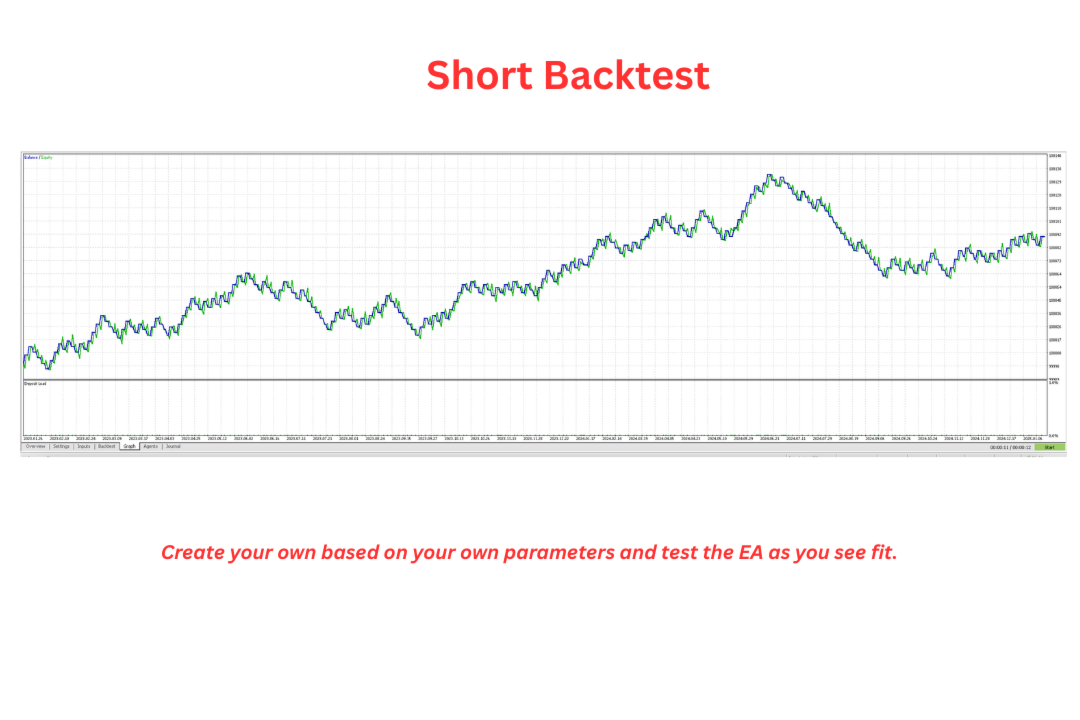
For example, I had a backtested with a MaxTrades of 20 as shown below, which as you can see opened a max of 20 trades.
More info:
Website: https://financebeta.com/
Telegram Channel: https://t.me/FinanceBeta
Telegram Group Chat: https://t.me/joinchat/KOChvq5dglFmMmQ9
Twitter: https://twitter.com/FinanceBeta
Instagram: https://www.instagram.com/financebeta/
Facebook: https://web.facebook.com/FinanceBeta





























This ea is not working it does not open any order and in demo test it does the same.
I m using exness pro mt5 and it just don t open any order at all. Where could I find error? The bot loads fine but nothing happens on M1 usoil
Error in comment
Ps: issue has been resolved quickly by developpers.