TradeAssistantquat
- Utilitaires
- Version: 2.20
- Activations: 5

Overview
Trade Assistant is a professional manual trading and automated position management solution developed for MetaTrader 5.
Designed for traders who prefer to make their own trading decisions, Trade Assistant combines streamlined order execution, intelligent position management, configurable risk controls and advanced account monitoring within a single interactive trading dashboard.
Instead of manually calculating position sizes, adjusting protective orders and managing multiple trades through separate MetaTrader windows, traders can perform these operations through a centralized interface.
You decide when to trade. Trade Assistant helps manage execution, risk and position administration.
The software does not generate independent trading signals or automatically determine market direction.
Professional One-Click Trading Interface
Trade Assistant provides a streamlined interface for manual market execution.
Its order authorization system is designed to reduce accidental duplicate transactions while allowing traders to initiate BUY and SELL operations directly from the dashboard.
Key capabilities include:
-
Manual BUY and SELL execution
-
Dedicated order authorization control
-
Automatic position-size calculation
-
Configurable percentage-based risk
-
Optional fixed-volume trading
-
Adjustable reward-to-risk objectives
-
Automatic protective order placement
-
Real-time execution feedback
The system evaluates order eligibility before submitting trading requests.
Its internal execution safeguards, authorization mechanisms and order-processing architecture are proprietary.
Intelligent Position Sizing
Trade Assistant integrates a dynamic position-sizing framework designed to help traders manage exposure consistently.
Order volume can be calculated using the selected account risk settings and current market conditions.
The panel also supports manually configured fixed trading volumes for users who prefer direct lot-size control.
Risk configuration features include:
-
Percentage-based position sizing
-
Fixed-lot trading
-
Configurable risk exposure
-
Maximum risk restrictions
-
Volatility-aware protective stop placement
-
Adjustable profit objectives
-
Broker trading-volume compatibility checks
-
Available-margin validation
If a proposed trade cannot satisfy the configured risk restrictions or broker requirements, the system can reject the order and display the reason.
The exact sizing calculations, volatility coefficients and internal risk-validation mechanisms are not publicly disclosed.
Advanced Trade Execution Protection
Before submitting a trading request, Trade Assistant evaluates a combination of account, broker and market conditions.
The execution framework includes:
Market Condition Monitoring
-
Spread evaluation
-
Trading-session availability
-
Market volatility information
-
Economic news restrictions
Broker Compatibility
-
Minimum stop-distance requirements
-
Symbol volume restrictions
-
Margin availability
-
Applicable execution conditions
Order Processing
-
Order authorization checks
-
Execution-result monitoring
-
Partial-fill handling
-
Retry management for eligible temporary execution failures
These functions are coordinated by an internal order-management engine designed to provide consistent trade-processing behavior.
Execution remains subject to broker acceptance, market liquidity, slippage and trading-session availability.
Automated Position Management
Trade Assistant includes an automatic trade-management system for eligible positions.
Once positions are opened, the manager can supervise protective orders and apply the selected management settings.
Automatic Breakeven Management
The system can adjust protective stop levels when a position satisfies the configured profit conditions.
Optional cost-aware adjustments are incorporated into the protection framework.
Dynamic Trailing Stop
A volatility-aware trailing mechanism can progressively update protective stop levels as market conditions and position performance evolve.
Its objective is to protect part of a favorable price movement without requiring continuous manual adjustments.
Missing Stop-Loss Protection
The system can identify eligible positions that do not have a protective stop and apply a recovery stop according to its configured management rules.
Broker-Aware Modification Management
Before modifying a position, Trade Assistant evaluates the relevant trading restrictions imposed by the broker.
Unsuccessful modification attempts are managed by the internal execution-control system to avoid unnecessary repeated requests.
The exact breakeven conditions, trailing calculations, internal timing rules and protective adjustment algorithms are proprietary.
Important: Automatic stop management cannot eliminate gap risk, slippage or execution uncertainty.
Advanced Position Closing Controls
Trade Assistant offers dedicated position-management buttons for quickly handling open trades.
Available actions include:
-
Partial Close: Close a configurable portion of eligible positions
-
Close Winners: Close positions currently showing a profit
-
Close Losers: Close positions currently showing a loss
-
Close Symbol: Close eligible positions associated with the selected symbol
-
Close All: Initiate a protected account-wide closing operation
-
Individual Close: Close a selected position directly from the position list
The system incorporates action-validation controls to reduce unintended operations.
The exact confirmation workflow and trade-processing mechanisms are not publicly disclosed.
Closing requests are subject to broker trading conditions and may not be executed at the displayed price.
Integrated Account Risk Protection
Trade Assistant includes a configurable account protection framework designed to monitor trading exposure and enforce selected restrictions.
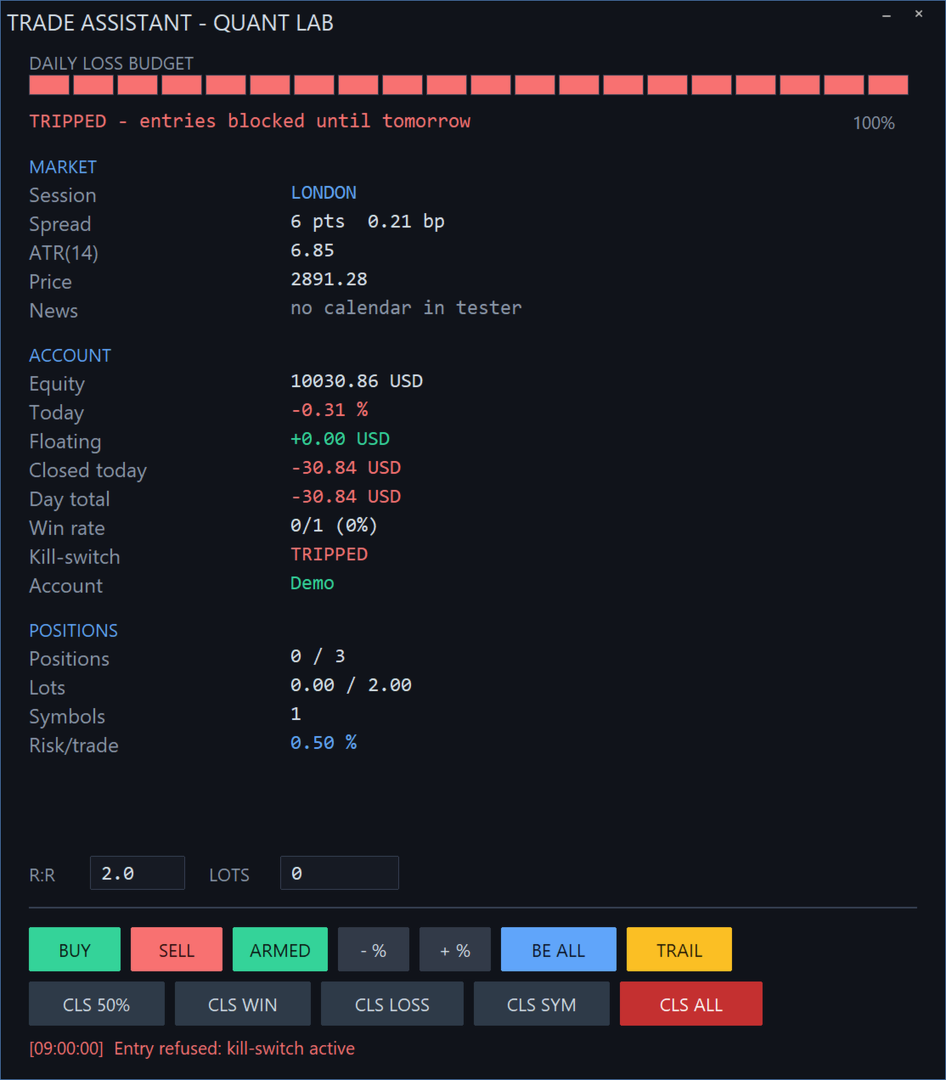
Daily Loss Protection
The account monitoring engine evaluates daily trading performance against a configured loss threshold.
When the defined protection condition is reached, the system can activate a daily trading lock, initiate protective position closures and reject further entries through its interface.
The protection state is maintained according to the configured trading-day rules.
Exposure Management
Users can establish restrictions on:
-
Maximum number of positions
-
Maximum overall trading volume
-
Maximum volume per instrument
-
Permitted risk per trade
-
Daily trading loss
Account-Wide Protection
The daily loss protection system can be configured to supervise the assistant's own positions or apply account-wide position closures.
By default, account-wide protection may close manual positions and positions opened by other Expert Advisors.
Users operating multiple trading systems should review this setting carefully before enabling automatic risk enforcement.
The underlying exposure calculations, internal risk-control logic and intervention mechanisms are proprietary.
Interactive Trading Dashboard
The integrated interface brings essential trading information and account controls into one workspace.
Market Overview
-
Current trading session
-
Live price information
-
Spread conditions
-
Volatility information
-
Economic news status
Account Monitoring
-
Account equity
-
Daily trading result
-
Floating profit and loss
-
Closed trading performance
-
Daily risk consumption
-
Protection system status
-
Account type information
Position Monitoring
-
Total open positions
-
Overall trading volume
-
Active trading symbols
-
Configured risk settings
-
Individual position performance
-
Position management controls
Execution Feedback
A dedicated status section provides information about completed operations, rejected requests and relevant trading conditions.
The chart can also display the entry, stop-loss and take-profit levels associated with managed positions.
Customizable Interface
Trade Assistant is designed for practical daily use across different trading environments.
Interface capabilities include:
-
Movable trading dashboard
-
Minimized panel mode
-
Configurable interface scaling
-
High-resolution display support
-
Persistent panel positioning
-
Interactive order and risk controls
-
Real-time position monitoring
The interface is designed to remain functional on standard and high-resolution displays.
Economic Calendar Integration
Trade Assistant incorporates economic event monitoring through the MetaTrader 5 economic calendar.
The news filter can help restrict new trade entries during configured high-impact event periods.
This provides an additional layer of execution discipline when trading around economic announcements.
Economic calendar functionality depends on supported live-terminal data and is not available in the MetaTrader 5 Strategy Tester.
The news filter does not guarantee protection against unexpected volatility or market gaps.
Price Alerts and Notifications
The EA includes configurable price monitoring and notification capabilities.
Available features include:
-
Price-level alerts
-
High and low price notifications
-
Optional MetaTrader push notifications
-
Trading operation feedback
-
Risk protection status messages
Push notifications require a correctly configured MetaQuotes ID and notification settings in the MetaTrader terminal.
Trading Activity Records
Trade Assistant can maintain structured activity records for trade-related operations.
These records are intended to help users review execution activity and identify relevant broker responses.
Logged events may include order submissions, position modifications, closing operations and execution results.
The internal record-management and operation-processing methods are proprietary.
Persistent Configuration and Account State
The software incorporates state management functionality designed to preserve selected settings and protection information across supported terminal restarts.
This includes relevant account risk references, trading protection states and user interface configurations.
The EA also includes instance-control functionality to reduce conflicts between installations using the same strategy identifier.
Certain account supervision features require the terminal to remain connected and operational.
Compatibility
Platform: MetaTrader 5
Supported Instruments: Broker-supported trading symbols
Chart Timeframes: All standard MT5 timeframes
Account Types: Hedging and Netting
Trading Method: Manual trade entry with automated management
Automated Trade Signals: No
Automatic Position Management: Yes
Risk-Based Lot Calculation: Yes
Fixed-Lot Execution: Yes
Breakeven Management: Yes
Trailing Stop Management: Yes
Partial Position Closing: Yes
Daily Loss Protection: Yes
Economic News Filter: Yes
Push Notifications: Yes
Trading Activity Logging: Yes
Strategy Tester and Product Screenshots
Trade Assistant includes an interactive dashboard that can be evaluated using MetaTrader 5 Strategy Tester visual mode.
The product screenshots demonstrate:
1. Managed Position on Chart
The trading dashboard displayed alongside a managed gold position, including visible entry and protective order levels.
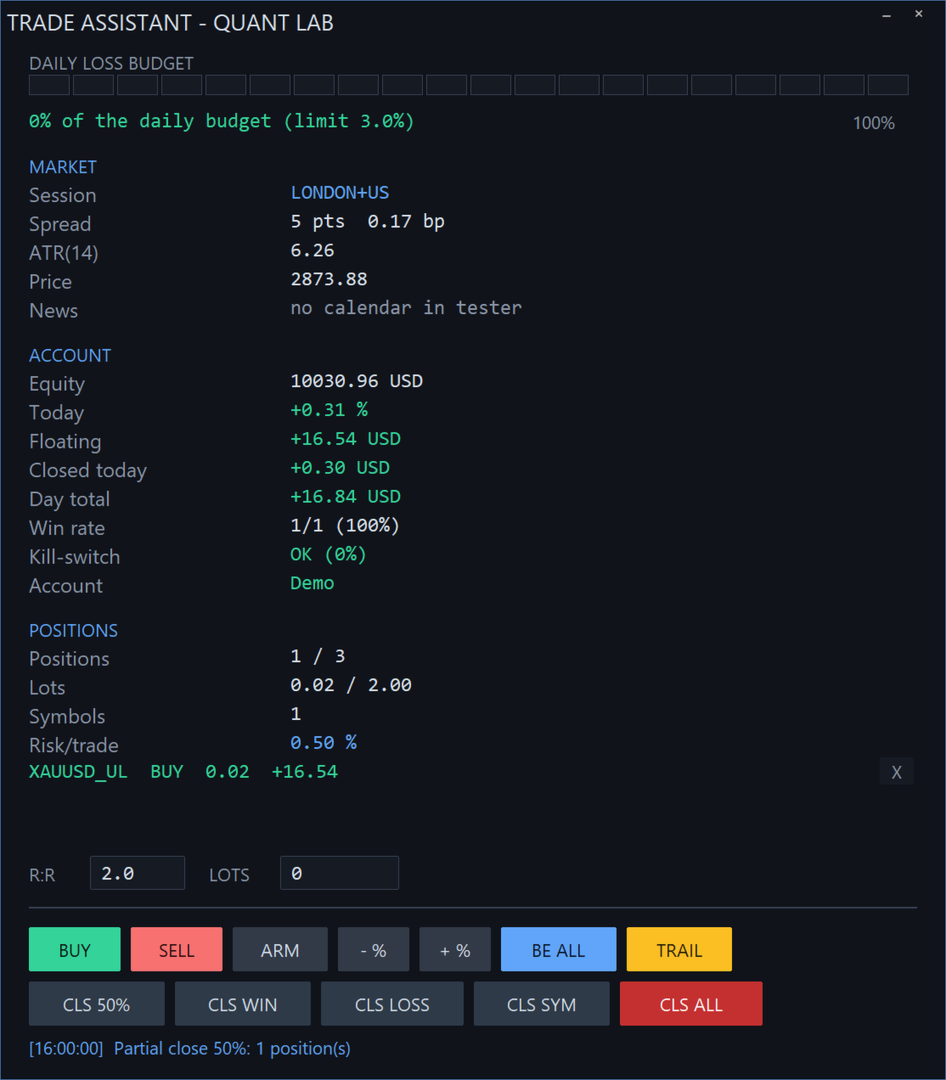
2. Active Position Dashboard
A detailed view of the trading interface showing account information, open positions and position performance.
3. Daily Loss Protection
An example of the account protection system responding to a configured daily loss condition and restricting further entries.
4. Partial Position Closing
An example of the interface displaying execution feedback after a partial position-close operation.
Screenshots illustrate specific historical test conditions and are not representations of guaranteed future trading results.
Important Information Before Using Trade Assistant
Trade Assistant is a manual trade execution and management utility.
It does not predict market movements, identify profitable opportunities independently or guarantee trading success.
Trading outcomes depend on the user's entry decisions, position management settings, market conditions and broker execution.
When account-wide protection is enabled, the software may close positions opened manually or by other Expert Advisors.
On netting accounts, positions in the same instrument are consolidated according to the account's trading model, which can affect position-level management.
Automated monitoring requires MetaTrader 5 to remain operational with algorithmic trading permissions enabled.
Broker execution limitations, disconnections, market gaps and slippage may prevent protective operations from executing at their intended levels.
Why Choose Trade Assistant?
Trade Assistant provides a unified workspace for traders who want greater consistency in their execution and risk-management processes.
Its core advantages include:
-
Manual trade entry with dedicated authorization
-
Centralized trading and account management
-
Automatic position-size calculation
-
Flexible risk configuration
-
Broker-aware order validation
-
Integrated breakeven and trailing management
-
Advanced closing controls
-
Daily account loss supervision
-
High-impact economic news filtering
-
Real-time dashboard monitoring
-
Persistent user settings
-
Detailed trading activity records
Focus on your trading decisions while Trade Assistant handles the configured execution and position-management tasks.
Proprietary Technology
Trade Assistant uses proprietary order authorization, position sizing, risk evaluation, execution management, protective stop adjustment and account monitoring technology.
Specific analytical parameters, calculation formulas, internal validation sequences, execution-retry mechanisms and software architecture are intentionally not publicly disclosed.
The product's functionality is described for user transparency, while its proprietary implementation remains protected.
Risk Disclosure
Trading financial markets involves substantial risk and may result in the loss of invested capital.
Trade Assistant is not an investment advisory system and does not guarantee profitable trading, successful execution or protection from all losses.
Historical testing and demonstration screenshots do not guarantee future performance.
Users should test the software in a demo environment and verify its settings before using it on a live trading account.