Momentum Pulse EA

Momentum Pulse EA trades the signals of the Momentum Pulse indicator automatically. The complete Momentum Pulse signal engine is built into the EA: every closed bar is coloured in one of nine momentum states, and a change of state becomes a buy or sell signal with its own Entry, Stop Loss and three take-profit levels. The EA takes those trades with risk-based position sizing, banks profit in steps at TP1 / TP2 / TP3 and manages the rest with breakeven and an ATR trailing stop. One chart can trade a single symbol or a whole portfolio.

Signal engine (identical to the Momentum Pulse indicator)

  • Composite momentum value from five components over an hours-based window: directional efficiency, candle body pressure, location in the recent range, fast/slow EMA trend bias and impulse.
  • Nine states from Extreme Bearish to Extreme Bullish. Delta mode for forex and metals, Strength mode for indices, crypto and other markets (Auto picks the mode per symbol); all thresholds are adjustable.
  • Three signal types, each with its own switch: activation (neutral to bullish/bearish), acceleration (same direction, stronger state) and flip (bullish to bearish or back).
  • Signal filters: cooldown between same-direction signals, volume above its average, Fibonacci market structure (swing highs/lows, uptrend / downtrend / range, buys only in the lower half of a range and sells only in the upper half), minimum reward-to-risk, optional "recommended signals only", and a higher-timeframe filter (block signals against the higher timeframe, or trade only in its direction) that uses closed higher-timeframe bars only.
  • Signals are evaluated on closed bars only: no intrabar entries and no repainting. With the same inputs, every signal of the EA matches an arrow of the Momentum Pulse indicator; the EA-only options (trading hours, spread, minimum strength) only decide which of those signals are traded.

Trade levels from every signal

  • Stop loss from the Fibonacci structure (beyond the swing low/high plus one ATR), capped at a maximum ATR distance; ATR fallback when no structure is found.
  • TP1 at a fixed R multiple, TP2 at the structure target (extended in a trend), TP3 as an extension of TP2.
  • Take-profit modes: close everything at TP1, TP2 or TP3, or partial: close a chosen share at TP1, another share at TP2 and let the rest run to TP3.
  • Breakeven with a lock-in profit when TP1 is reached, stop to TP1 when TP2 is reached, ATR trailing stop (always, after TP1 or after TP2), close on an opposite signal, optional exit when momentum returns to neutral, optional time exit after N bars.
  • Optional minimum stop distance in ATR and minimum momentum strength of the signal bar (light, medium, strong or extreme).
  • Before every entry the EA checks that the price has not already passed the stop or TP1, and that all levels respect the broker's stop and freeze levels.

Single symbol or portfolio

  • Enter a list such as USTEC,US500 or XAUUSD,USDJPY,BTCUSD to trade all of them from one chart, each with its own signal engine, or leave the list empty to trade the chart symbol.
  • Broker names are found automatically: suffixes (".a", "m", ".pro", ...) and common index and crypto names (USTEC / NAS100 / US100, US500 / SPX500, DE40 / GER40 / DAX40, BTCUSD / BITCOIN, ...). A fully tradable variant is preferred over a close-only one.
  • The signal timeframe is an input, so the chart can show any timeframe.
  • Max positions per symbol and in total, and an optional max number of new trades per day.

Money management and protection

  • Risk % per trade: the lot size is calculated from the stop-loss distance, or use a fixed lot. Lots respect the broker's minimum, maximum, step and volume limit plus an optional max lot.
  • Free margin is checked before every order; the volume is reduced or the trade is skipped instead of sending an order that would be rejected.
  • Daily loss limit (no new trades for the rest of the day, optionally close the EA's positions) and max equity drawdown from the peak (close the EA's positions and pause).
  • Max spread in points or as a % of the stop distance, trading hours, Friday close and a trading-session check; a signal that closes while the market is shut is traded at the re-open of the next bar.

On the chart

  • Chart candles painted in the nine momentum states, buy / sell arrows and the Entry, SL, TP1, TP2 and TP3 lines of the latest signal.
  • Panel in the Momentum Pulse style: auto-trading status with a one-click pause, balance, equity, open and today's P/L, closed trades, win rate and profit factor, the live momentum, last signal and position of every symbol, and the trade plan of the latest signal. Dark, Navy and Light themes, collapsible and movable; the position and theme are remembered per chart.
  • Popup, push and e-mail notifications for signals and trades.

Default settings

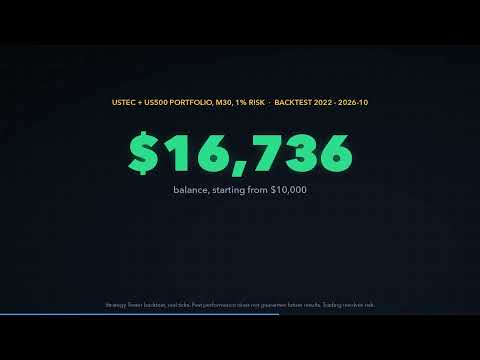
The defaults trade the two US index CFDs USTEC (Nasdaq 100) and US500 (S&P 500) on M30 signals with 1% risk per trade, only between 14:00 and 19:00 server time (the European afternoon and the US morning session on brokers whose server runs at GMT+2 / GMT+3), the H4 filter in "block signals against the higher timeframe" mode, partial exits (50% at TP1, 30% at TP2, the rest at TP3), an ATR trailing stop after TP1 and a spread filter of 20% of the stop distance. In our Strategy Tester research (real ticks, 2022 to October 2026) the momentum signals on these indices were profitable inside this session window and not outside it, The signal and exit settings were chosen on 2022-2024 and then checked on 2025-2026; the session window itself comes from the hourly statistics of the whole period. Backtest results do not guarantee future results; test the EA on a demo account with your broker's symbols and server time first.

How to use

  1. Attach the EA to any chart (for example USTEC M30) and allow Algo Trading. The chart symbol and timeframe do not matter: the EA trades the Symbols list on the signal timeframe.
  2. Check the Symbols list against your broker's Market Watch (NAS100 / US100 and SPX500 are recognised automatically), or enter your own list. Leave it empty to trade the chart symbol.
  3. If your broker's server time is not GMT+2 / GMT+3, shift the trading hours so they still cover the US morning session, or switch the hours filter off for other markets.
  4. Choose the risk per trade. With several symbols, keep it small, because several positions can be open at the same time.
  5. Use a different magic number for each chart if you run the EA on more than one chart.

Works on hedging and netting accounts. No DLLs and no external files.
Plus de l'auteur
MACD Divergence Radar Pro Multi-Symbol Divergence Scanner & Visual Dashboard for MetaTrader 5 Regular & Hidden Divergence 20+ Pairs Simultaneous Scan Entry / SL / TP Levels History Statistics One-Click Chart Opening Auto Oscillator Sub-Window Overview MACD Divergence Radar Pro is a professional-grade divergence detection indicator that continuously scans multiple currency pairs and timeframes in real time. It identifies both regular and hidden MACD divergences — bullish and bearish — and presen
Professional account protection for prop-firm challenges and funded accounts. It monitors drawdown, open risk, news windows, trading sessions, manual trades, profit targets, and challenge progress in real time, then warns, locks, de-risks, deletes orders, or closes managed exposure according to your rules. Two draggable on-chart panels — Economic Calendar and Performance Stats — keep news planning and account analytics on the chart without leaving MT5. Built for Prop-Firm Traders This EA does no
Overview SR Confluence Pro is a professional MetaTrader 5 indicator for support & resistance and chart pattern analysis. It combines dual S&R engines (high-volume box engine + multi-timeframe pivot engine), automatic detection of 16+ classic chart patterns , and a confluence scoring system that rates how closely price structure and S&R levels align. Every zone is back-tested on the chart history — touches, bounces, breaks, false breaks and bounce rate are combined into a 0–100 strength score — a
ICT Market Structure Pro ICT Market Structure Pro is a Smart Money Concepts / ICT trading tool designed to automatically draw the most important structural and liquidity elements directly on the chart. The indicator helps traders read price action through an institutional lens by mapping market structure shifts, liquidity pools, order blocks, imbalances, premium/discount zones, and key ICT session windows in one place. It supports both single-timeframe and multi-timeframe analysis modes, with a
A chart overlay indicator for traders who want a structured view of Smart Money Concepts, market structure shifts, order block patterns, fair value gaps, equal highs and lows, and key multi-timeframe price levels directly inside MetaTrader 5. BOS and CHoCH · Internal and Swing Structure · Order Block Finder · Input-Controlled FVG Colors · EQH and EQL · Premium and Discount Zones Product Overview SMC Price Action Patterns is designed to convert raw price action into a clear, visual market map. T
FREE
VoidFlow IFVG Trade Assistant Pro VoidFlow IFVG Trade Assistant Pro VoidFlow IFVG Trade Assistant Pro is a manual-first MetaTrader 5 trading assistant built for traders who want a cleaner Inverse Fair Value Gap (IFVG) workflow with structured trade planning, chart context, and optional automatic execution only when it is explicitly enabled by the user. It scans the selected signal timeframe for raw Fair Value Gaps, confirms true inversions, filters weak setups, draws the full trade plan on the c
Trade Assistant Risk Calculator is an all-in-one floating trading panel Expert Advisor for MetaTrader 5, built for professional manual traders. It combines visual chart trading , automatic risk calculation , and advanced position management in one compact interface. Stop calculating lot sizes manually. Stop guessing your Risk:Reward ratio. Drag the planning lines on the chart and the EA calculates the exact lot size for your selected risk percentage, equity, fixed-money risk, or fixed-lot workfl
Trade Assistant Risk Calculator is an all-in-one floating trading panel (Expert Advisor) designed for professional manual traders on MetaTrader 5. It combines Visual Chart Trading , Automatic Risk Calculation , and Advanced Position Management into a single, compact interface. Stop calculating lot sizes manually. Stop guessing your Risk:Reward ratio. Simply drag lines on the chart, and the EA calculates the exact lot size to match your risk percentage, equity, or money target. Important Notes Th
MT5 Indicator · All Markets · Non-Repainting Signals · Entry / SL / TP1-TP3 · MTF + Scanner Momentum Pulse colors every candle by the real momentum behind it, not by price alone. Each bar is scored on five dimensions and placed in one of nine strength states . On top of that you get buy/sell signals with Entry, Stop Loss and three Take Profit levels , a multi-timeframe bias dashboard , a multi-symbol scanner , a forward test of every past signal with win rate and profit factor, and a risk-based
Supertrend core · 11 click-to-toggle confirmation filters · Multi-timeframe trend dashboard · Entry / SL / TP1-TP3 levels · Higher-timeframe filter · Trend cloud · 5,000-bar performance simulation with profit factor & drawdown TrendGuard Pro is a professional-grade MT5 scalping indicator that fortifies every entry signal with up to 11 independent confirmation filters . False breakouts are systematically eliminated before an arrow ever appears on the chart, letting you trade only the highest-pro
ICT Market Structure EA ICT Market Structure EA trades fair value gaps in the direction of market structure, only inside the ICT Silver Bullet hours, and only when the H4 and D1 structure agree. One EA on one chart trades a whole portfolio — by default EURUSD, XAUUSD, USTEC and US500 . Its higher-timeframe context uses the same detection code as the indicator ICT Market Structure Pro (swings, BOS / CHoCH, order blocks, FVGs, premium / discount). The default portfolio and settings were checked wi
Price Action 10 Setups EA Price Action 10 Setups EA automates ten classic bar-by-bar price-action setups — the patterns that discretionary price-action traders consider the most reliable: major trend reversals, final flags, breakouts, High 2 / Low 2 pullbacks, wedges, channels, measured moves, trading-range reversals, opening reversals and magnet (breakout) tests. Every setup is a fully coded rule set with a precise entry, stop and target, so the EA trades the patterns the same way every time. O
MACD Divergence Radar EA MACD Divergence Radar EA trades MACD divergences automatically. It uses the same signal engine as the indicator MACD Divergence Radar Pro — price pivots compared with the MACD histogram (OsMA) or the MACD main line, regular and hidden divergences, bullish and bearish — and turns every freshly confirmed divergence into a trade with a stop beyond the divergence pivot and a fixed reward-to-risk target. One EA on one chart can trade a whole portfolio; by default EURUSD, GBPU
TrendGuard Pro Auto EA is a fully automated trend-following Expert Advisor built on the TrendGuard Pro signal engine. It enters when the Supertrend flips and the confirmation filters agree, protects every trade with an ATR stop loss, can bank profits in steps at TP1 / TP2 / TP3, lets winners run with an ATR trailing stop, and exits on the opposite signal. It trades the chart symbol, or a whole portfolio of symbols from one chart, and is controlled from an interactive on-chart dashboard. Signal e
Price Action 10 Setups Indicator Price Action 10 Setups Indicator finds ten classic bar-by-bar price-action setups on your chart and turns every one of them into a complete trade plan: entry, stop loss and target , drawn on the chart, tracked bar by bar and summarised in a modern dashboard with per-setup statistics, a multi-symbol scanner and alerts. The detection is the same code as in Price Action 10 Setups EA (the automated version on the MQL5 Market): the indicator shows a signal exactly whe
Filtrer:
Aucun avis
Répondre à l'avis