MP Smart Panel Full

SMART PANEL FULL

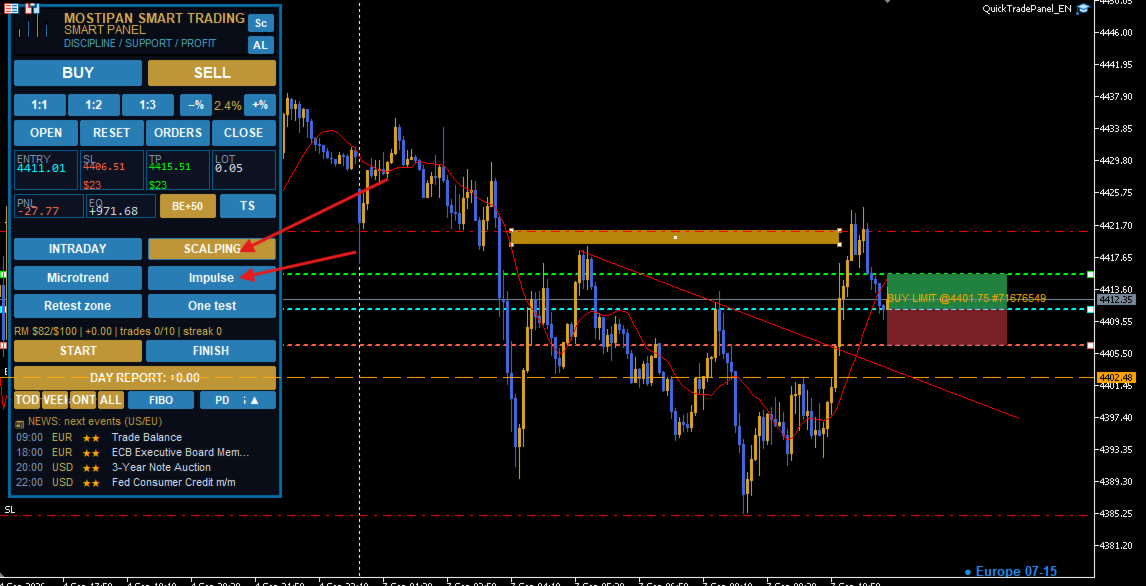
La version la plus complète du panneau de trading, réunissant dans une seule solution la gestion des positions, le contrôle du risque, l'analyse de l'activité de trading, un journal automatisé et des outils professionnels de recherche d'opportunités de marché.

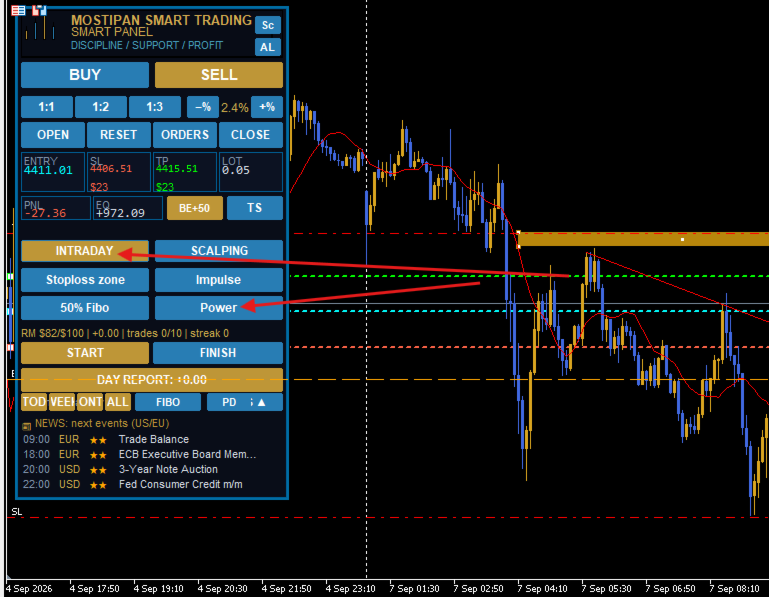
Le panneau permet une gestion complète de tous les types d'ordres et de positions. Les transactions peuvent être ouvertes, modifiées et clôturées directement depuis le panneau, ce qui permet de regrouper toutes les fonctions essentielles dans un seul espace de travail.

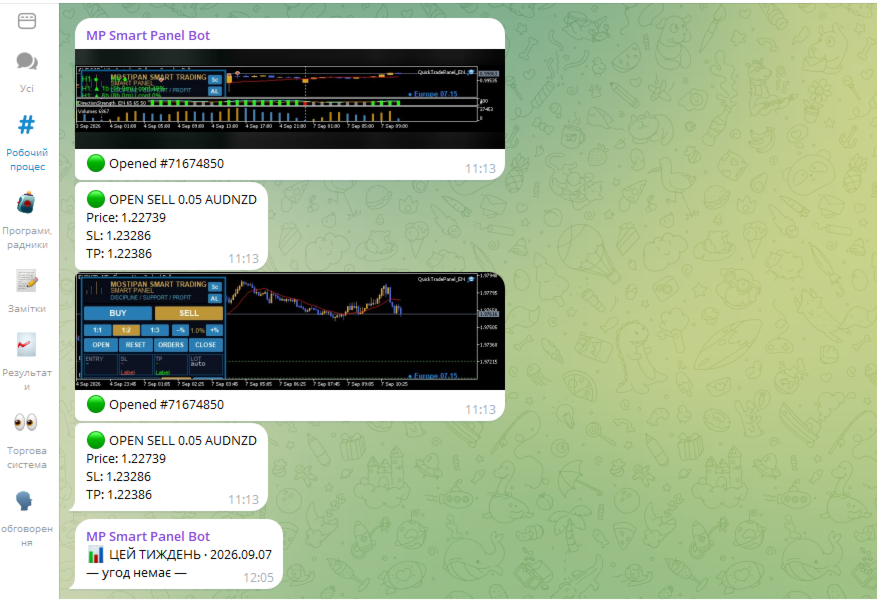
L'intégration complète avec Telegram transforme le panneau en journal de trading automatisé. Des captures d'écran sont automatiquement créées lors de l'ouverture et de la clôture des transactions, tandis que les paramètres, les résultats et les actions sont enregistrés et envoyés vers Telegram. Les rapports et l'historique de trading sont organisés automatiquement.

Le Risk Manager intégré calcule automatiquement la taille de lot optimale en fonction de la distance du Stop Loss et du pourcentage de risque défini par rapport au solde du compte. Cela permet de déterminer le risque avant l'ouverture d'une position sans calculer manuellement le volume.

Le système de contrôle du risque quotidien permet de définir un nombre maximal de Stop Loss ou une limite maximale de perte journalière. Une fois la limite atteinte, l'ouverture de nouvelles transactions est automatiquement bloquée. Cela permet d'éviter le trading émotionnel, les tentatives de récupérer les pertes et l'augmentation incontrôlée du risque.

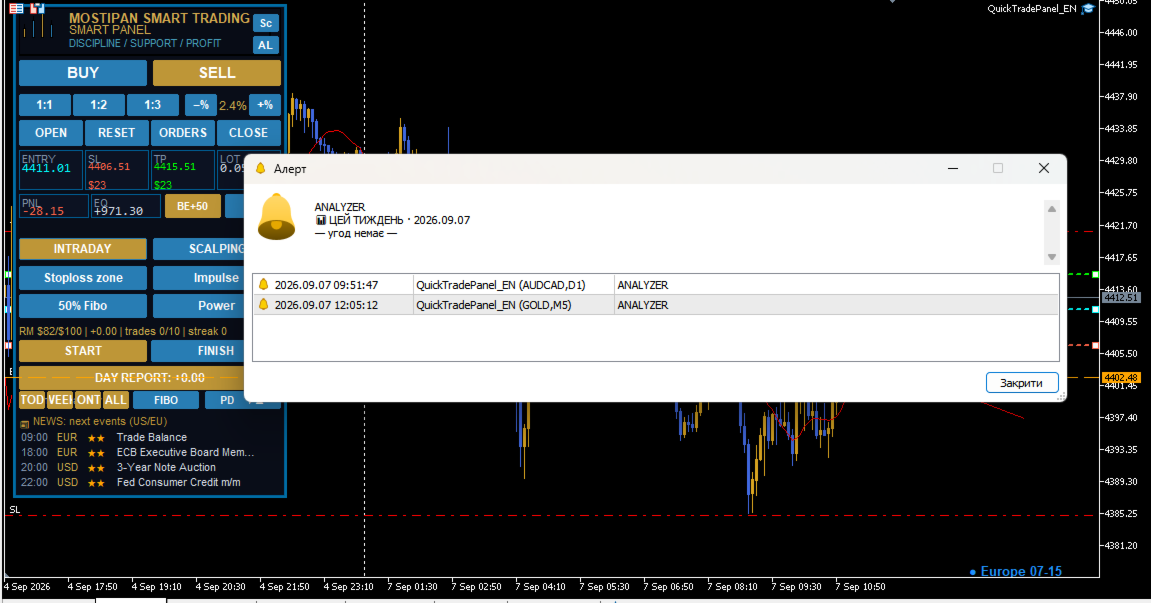
L'Analyseur d'Activité de Trading évalue non seulement le résultat financier, mais également l'ensemble du processus de trading. Il analyse le style de trading, la fréquence des transactions, la gestion des positions, les dépassements de risque et de limites, les signes de trading impulsif et les éventuelles situations de tilt.

À partir des statistiques collectées, le système génère des rapports quotidiens, hebdomadaires et mensuels. Chaque rapport met en évidence les réussites, les points problématiques et les aspects nécessitant une amélioration.

Mega Scanner transforme le panneau en un outil complet de recherche d'opportunités de trading. Il analyse les paires de devises et identifie des situations de marché déjà formées ainsi que des signaux potentiels. Pour chaque configuration détectée, il détermine les zones d'entrée possibles ainsi que les niveaux de Stop Loss et de Take Profit.

Mega Scanner comprend des scanners intégrés pour les impulsions, les tendances, les divergences et les extrêmes annuels. Cela permet d'obtenir une vision complète des conditions actuelles du marché et de trouver plus rapidement des configurations correspondant à l'approche de trading de l'utilisateur.

La Checklist du Système de Trading intégrée permet de contrôler le respect des propres règles avant l'ouverture d'une position. Deux modèles sont disponibles et peuvent être adaptés à différentes stratégies et styles de trading. Si les conditions nécessaires ne sont pas confirmées, l'ouverture de la transaction est bloquée.

La fonction Break-Even permet de déplacer une position individuelle au point d'équilibre en un seul clic. Chaque position peut être gérée indépendamment, offrant une flexibilité maximale lors du travail avec plusieurs transactions.

Le panneau prend en charge la clôture partielle automatique des positions. Le trader peut définir à l'avance les règles de prise de bénéfices et réduire progressivement la position au fur et à mesure que le mouvement se développe, tout en conservant une partie ouverte pour une éventuelle continuation.

Les Alertes de Prix permettent de définir des niveaux importants et de recevoir des notifications lorsque le marché les atteint. Il n'est ainsi plus nécessaire de rester constamment devant le graphique en attendant que le prix atteigne la zone souhaitée.

Le Calendrier Économique intégré permet de suivre les événements macroéconomiques et les actualités importantes susceptibles d'influencer fortement la volatilité et le comportement du marché.

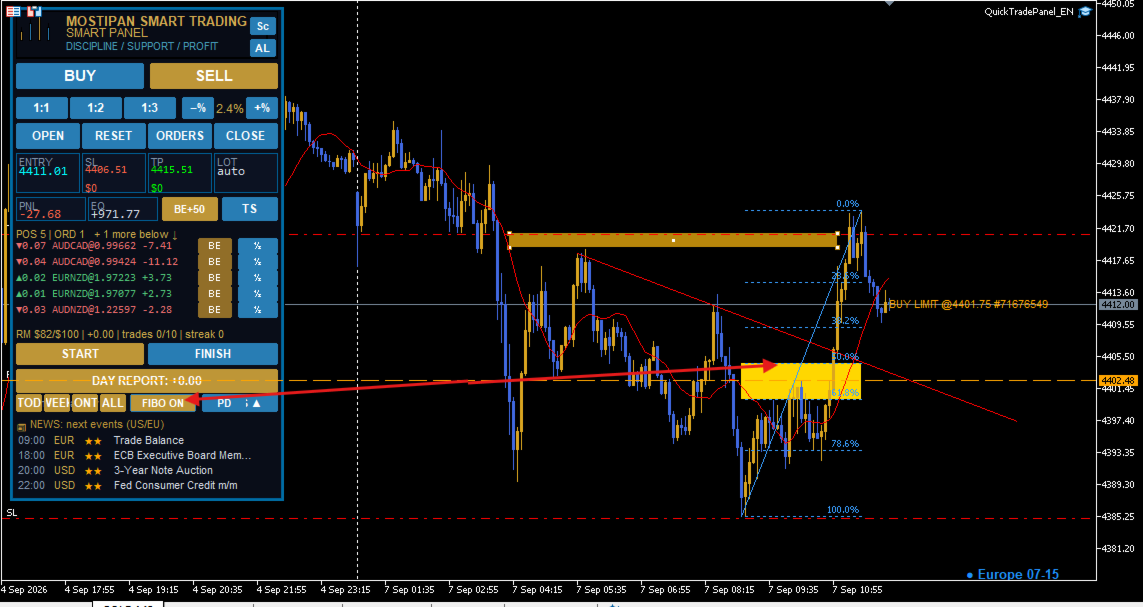
Les niveaux de Fibonacci permettent d'identifier rapidement les zones potentielles de correction, les zones de continuation et les objectifs de gestion des transactions sans utiliser d'outils supplémentaires.

L'Indicateur des Sessions de Trading affiche les principales sessions directement sur le graphique et aide à comprendre quand l'activité du marché augmente, quand les mouvements se développent et comment la volatilité évolue au cours de la journée.

SMART PANEL FULL est bien plus qu'un simple panneau de trading.

C'est un système complet de gestion du trading qui réunit l'exécution des transactions, le contrôle du risque, la discipline, la recherche d'opportunités, le journal automatisé, les statistiques et l'analyse du comportement du trader dans un seul outil.

Son objectif n'est pas de prendre des décisions à la place du trader.

Son objectif est de créer un environnement dans lequel le trader peut suivre son propre système avec davantage de régularité, contrôler ses risques, analyser ses actions et devenir progressivement plus discipliné et plus stable sur le long terme.

QuickTradePanel_EN — Guide utilisateur complet

**Version 😗* 1.30–1.40 **Type 😗* Expert Advisor (MetaTrader 5) **Fichier 😗*  MQL5\Experts\QuickTradePanel_EN.mq5  **Modules 😗*  Include\QT_Extra.mqh ,  QTAnalyzer_Lite.mqh ,  MegaScan_QL.mqh

0. L'idée centrale du panneau

Le panneau repose sur trois piliers qui bouclent le cycle de trading :

┌────────────────────────────────────────────────────────────┐ │ 1. TRADING entrées rapides BUY/SELL/LIMIT/STOP + RR, │ │ lots automatiques, lignes Entry/SL/TP │ │ 2. RISK MANAGER protection du capital : limites journal. , │ │ séries, budget de risque — bloque OPEN │ │ 3. ANALYSE journal de trading + Analyseur : winrate, │ │ PF, séries, sessions — on voit l'essentiel │ └────────────────────────────────────────────────────────────┘

  • Le risk management est prioritaire : chaque position a un SL, le lot est calculé depuis un % fixe du solde, le Risk Manager arrête le sur-trading.
  • L'analyse ferme la boucle : l'Analyseur transforme l'historique en chiffres (winrate, Profit Factor, séries, durée en position, raisons de sortie).
  • Le journal de trading enregistre tout : entrées, sorties (TP/SL/manuel), blocages RM, sessions (START/FINISH), rapports journaliers et captures.

Ce guide existe en 11 langues (fichiers séparés).

1. Fonctionnalités

Zone Fonctions
Trading MARKET BUY/SELL, ordres LIMIT/STOP, RR 1:1–1:3, multi-trade (g_mult)
Lignes Entry/SL/TP déplaçables, tuiles temps réel, auto-scroll
Risque lot auto (% ou $), Risk Manager (5 garde-fous), budget de risque du jour
Sortie Breakeven BE+n, Trailing Stop 20/50/100/200, Partial TP 1R/3R
Discipline Boutons conditions 1–4 + Modèles (les 4 avant OPEN)
Sessions START/FINISH + suivi par fuseaux, fichier WORK
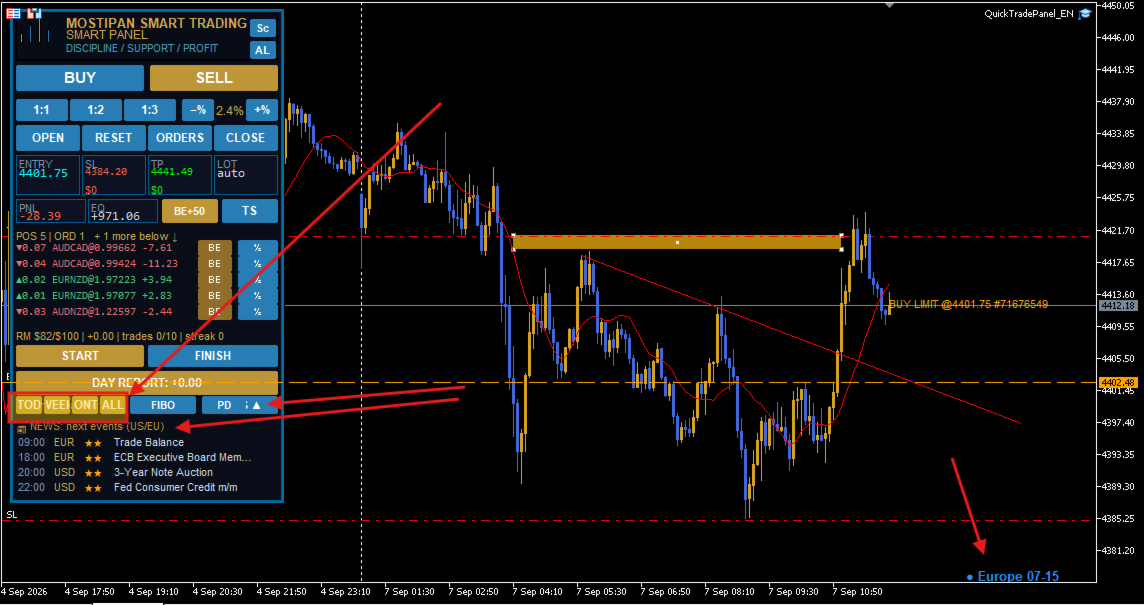
Rapports DAY REPORT, Analyseur (TOD/WEEK/MONTH/ALL), Telegram
Alertes alertes de prix (AL par clic), calendrier éco, zone Fibo
Scanner MegaScan multi-symboles (tendance H1, extrêmes, impulsion)

2. Installation

  1. Copier  .mq5  dans  MQL5\Experts , les trois  .mqh  dans  MQL5\Include .
  2. Compiler (F7) — attendre « 0 errors, 0 warnings ».
  3. Terminal : Autoriser le trading algorithmique (Alt+T).
  4. Glisser l'Expert sur le graphique. Panneau en haut à gauche (thème  InpTheme ).

3. Ouvrir une position

  1. BUY/SELL (ou  MARKET ▾  → LIMIT/STOP).
  2. Glisser SL au niveau d'invalidation, TP à la cible (ou boutons RR).
  3. Vérifier la tuile LOT (auto depuis le risque).
  4. OPEN (or = prêt).

4. Risk Manager (le cœur)

# Garde-fou Paramètre Bloque quand
1 Perte journalière InpRM_MaxDailyLoss PnL ≤ −500 $
2 Gain journalier InpRM_MaxDailyProfit PnL ≥ +500 $
3 Trades/jour InpRM_MaxTradesDay ≥ 10 trades
4 Série de pertes InpRM_MaxConsLoss ≥ 3 d'affilée
5 Budget de risque InpRM_DayRiskMoney / DayRiskPct pertes SL + risque ouvert + ordres > budget
  • Statut :  RM $roux/$limite | PnL | trades x/y | streak z .
  • Nouveau jour = compteurs à zéro ; RESET DAY = reset immédiat.

5. Gestion de sortie

  • BE+n — SL → ouverture + n points (toutes positions ou une via la bande POS).
  • TS — trailing stop par paliers  InpTS_Pts1..4 .
  • Partial TP — à RR1 fermer  InpPTP_Close1 % + SL sur BE ; à RR2 le reste.
  • Bande POS — boutons par position (BE, part TP, fermer).

6. Sessions & rapport du jour

  • START/FINISH — enregistre les sessions (zones Asie/Europe/Amérique),  Files\WORK* .
  • DAY REPORT — bouton or avec le PnL du jour ; clic → liste complète.

7. L'Analyseur (en détail)

L'Analyseur est un miroir statistique de votre trading. Boutons  TOD / WEEK / MONTH / ALL  : il construit un rapport depuis l'historique ( HistorySelect  + deals  InpMagic ) et l'envoie à Telegram et/ou Alert.

7.1 Contenu du rapport

Métrique Signification Pourquoi c'est important
Trades (n) / Volume deals fermés et volume en lots ampleur de l'activité
Winrate % gagnants / tous (wins/total) taux de réussite
Profit Factor (PF) gains bruts ÷ pertes brutes qualité clé : PF ≥ 1.5 = zone de confort
Avg win / Avg loss gain et perte moyens les gagnants > perdants ?
Séries (maxW/maxL) plus longues séries cycles d'émotion/tilt
Durée en position temps moyen, minutes trop court = couper les gains ?
Raisons de sortie par TP / SL / manuel audit de discipline
PnL total résultat net note finale

7.2 Verdict (psychologie intégrée)

  • PnL > 0 et PF ≥ 1.5 et aucun manuel  → excellente période : gardez le rythme.
  • PnL > 0 et PF ≥ 1.0  → dans le vert, continuez.
  • PnL > 0, PF < 1.0  → profit mais questions de discipline.
  • PnL < 0  → stop et audit : examinez SL et fermetures manuelles.
  • Alertes si % élevé de sorties SL ou manuelles.

7.3 Réglages

InpANA_Enabled=true  ·  InpANA_TG=true  (Telegram, chunks 3400) ·  InpANA_Alert=true .

7.4 Exemple : bilan de semaine

  1. WEEK. 2. Lecture : 34 deals, winrate 47 %, PF 1.8, maxL 4, 90 min. 3. Telegram : « période positive ». 4. Action : resserrer RM ( InpRM_MaxConsLoss=3 ).

8. Journal de trading (audit)

Cinq sources de vérité :

Source Ce qui est enregistré Où
Journal Expert prints  QT: / QT/RM:  : entrées, deals, retcodes, blocages Terminal → Journal (Experts)
État RM PnL jour, trades, série, risque used/limit ligne de statut +  RM_*
Fichier WORK START/FINISH par zone, secondes MQL5\Files\WORK*
Rapport jour deals fermés (heure, symbole, type, vol., prix, PnL) DAY REPORT / Telegram
Captures ouverture/fermeture avec screenshot MQL5\Files

**Pratique 😗* le matin DAY REPORT + Analyzer ALL · pendant la journée surveiller la ligne RM · le soir FINISH et DAY REPORT · chaque semaine WEEK/ALL et ajuster les paramètres de risque. Le journal ne supprime jamais votre historique — il lit l'historique du terminal et ajoute seulement ses annotations.

9. Telegram

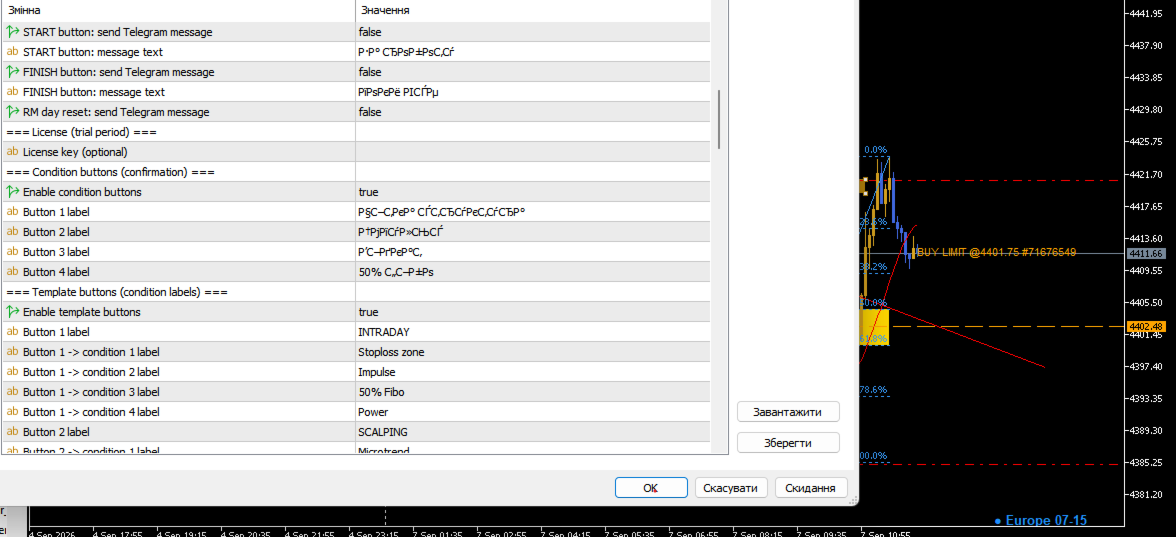
InpTG_Enabled ,  InpTG_Token ,  InpTG_ChatID  (ou  InpTG_AutoDetect=true ). Notifie : ouverture, fermeture (raison), BE, START/FINISH, reset RM, rapport du jour, rapports de l'analyseur, captures. (Build Standard : désactivé.)

10. AL / NEWS / FIBO / Scanner

  • AL — clic sur le graphique = ligne d'alerte ; franchissement → Alert + Telegram ; liste via 2e AL.
  • NEWS — événements USD/EUR (High ★★★/Medium ★★),  InpNews_Rows  lignes, refresh  InpNews_Refresh .
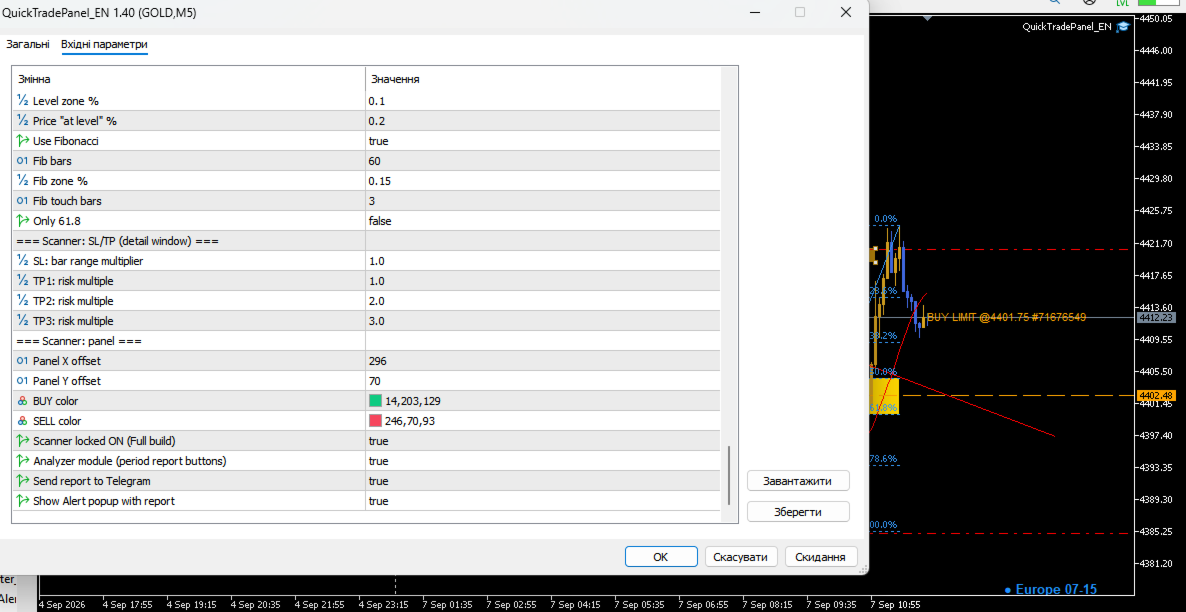
  • FIBO — zone 50–61,8 %, couleur  InpFiboFillColor .
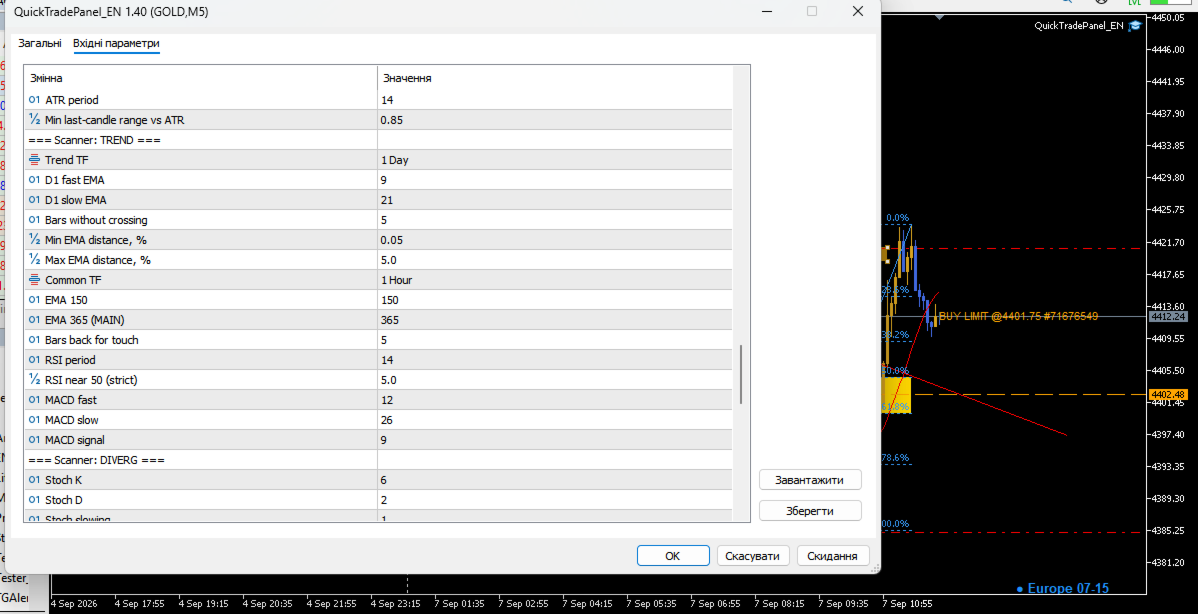
  • Sc — MegaScan : confirmation tendance H1 (ADX), extrêmes an/semestre, impulsion ;  InpMS_* .

11. Boutons de conditions & modèles

Avant chaque OPEN les 4 conditions doivent être confirmées (coche or). Libellés  InpCond1..4  ; modèles  InpTpl1_*  /  InpTpl2_* .

12. Licence

Essai : 3 jours (Full/Pro) ou 1 mois (Standard). Clé  InpLicKey  (SHA-256) :  forever  /  week  /  month . État :  Files\QT_lic.dat  + globales  QT_Lic_<login> .

13. Paramètres (référence)

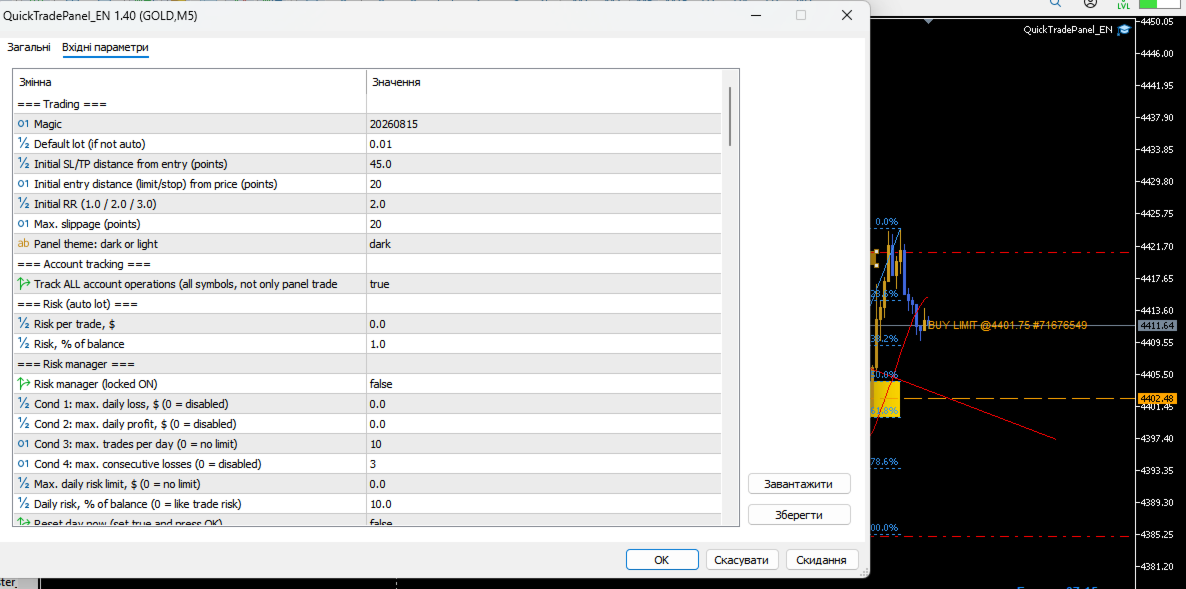
**Trading 😗*  InpMagic=20260815  ·  InpDefaultLots=0.01  ·  InpDefSL=45  ·  InpEntryPts=20  ·  InpDefRR=2.0  ·  InpDeviation=20  ·  InpTheme=dark  ·  InpTrackAll=true

**Risque 😗*  InpRiskMoney=50  ·  InpRiskPercent=1.0

**RM 😗*  InpRM_Enabled=true  ·  InpRM_MaxDailyLoss=500  ·  InpRM_MaxDailyProfit=0  ·  InpRM_MaxTradesDay=10  ·  InpRM_MaxConsLoss=3  ·  InpRM_DayRiskMoney=300  ·  InpRM_DayRiskPct=0  ·  InpRM_ResetDay=false

**Sortie 😗*  InpTS_Pts1..4=20/50/100/200  ·  InpPTP_On=false  ·  InpPTP_Close1=50  ·  InpPTP_Close2=100  ·  InpPTP_RR1=1.0  ·  InpPTP_RR2=3.0  ·  InpPTP_BE1=true  ·  InpFiboFillColor=Gold

**TG/News/Cond 😗*  InpTG_*  ·  InpNews_Rows=4  ·  InpNews_Refresh=60  ·  InpCond1..4  ·  InpTpl1/2_*

**Analyse/Scanner 😗*  InpANA_Enabled=true  ·  InpANA_TG=true  ·  InpANA_Alert=true  ·  InpMS_Enabled  ·  InpMS_MinCond=3  ·  InpMS_Refresh=10  ·  InpMS_MaxRows=12  ·  InpMS_H1AdxPeriod=14  ·  InpMS_H1AdxMin=25  ·  InpMS_ExtDaysY=365  ·  InpMS_ExtDaysHY=182  ·  InpMS_ExtNewBars=5  ·  InpMS_ImpTF=H1

14. Scénarios

  1. Momentum 1:2 — BUY → SL sous le swing → RR 1:2 → OPEN → BE+n → TS 50.
  2. Limit différée — MARKET≈LIMIT → Entry sur support → SL −45 → OPEN (GTC).
  3. Scale-out 1R/3R —  InpPTP_On=true  (50 % à RR1, BE, reste à RR2).
  4. Protection nouvelles — surveiller NEWS ★★★, garder  InpRM_DayRiskMoney  serré.
  5. Jour discipline — START → modèle+4 conditions → FINISH → DAY REPORT → WEEK.

15. Sécurité

  • Toujours un SL ; un SL trop serré pousse le lot auto au minimum.
  • D'abord démo / Strategy Tester. Un backtest n'est pas une garantie.
  • Le panneau exécute, il ne prédit pas. Tradez du capital à risque.

Généré à partir de : QuickTradePanel_EN.mq5, QT_Extra.mqh, QTAnalyzer_Lite.mqh, MegaScan_QL.mqh.

Produits recommandés
Trading Utility for Forex Currency Pairs Only not for Gold  Functions Auto Lot Calculation based on Risk Auto stoploss  Auto TakeProfit Breakeven Auto Close Half % Close in percentage with respect to the PIPs Pending Orders BuyLimit Sell Limit with distances BuyStop Sell Stop    with distances Trading Informations Risk in percentage For Multiple trades Combine Takeprofit and Combine Stoplosses
Overview Mirror Signals Service EA (Text only)   is a powerful monitoring Expert Advisor that automatically sends   real-time Telegram notifications   for all important trade events on your MetaTrader 5 account. It is engineered specifically for   signal providers ,   trade-copier operators ,   auditors ,   educators , and   professional trading services   that require immediate, detailed, and reliable reporting. Everything from   entries, exits, SL/TP changes, comment changes, trailing sto
Overview RealCost Risk Governor MT5 is an account and trade-risk monitoring utility for MetaTrader 5. It does not predict price movement and does not provide buy or sell signals. It watches configured risk limits and shows a compact on-chart panel for daily P/L, floating P/L, equity drawdown, trade count, open positions, pending orders, total lots, and chart spread. The default mode is alert-only. If the trader explicitly enables protection actions, the utility can close scoped positions, del
Scan a fixed list of assets (Ibovespa) in the chosen timeframe (TimeFrame). For each pair and for various periods. Calculate a regression model between the two assets (and, if desired, using the bova11 index as a normalizer). Generate the spread of this relationship, its mean, standard deviation, speculative deviation, and betas (B1 and B2). Apply an ADF test without exclusion (cointegration/stationarity). Calculate the Z-score of the current exclusion (how many standard deviations are away from
FREE
Trade Assistant 38 in 1
Makarii Gubaydullin
4.91 (23)
Outil multifonctionnel : Calculateur de Lot, Ordres Grid, Ratio R/R, Gestionnaire de Trades, Zones d'Offre et de Demande, Price Action et bien plus Version Démo   |   Manuel d'Utilisation L'Assistant de Trading   ne fonctionne pas dans le testeur de stratégies : vous pouvez télécharger la   Version Démo ICI  pour tester l' utilitaire . Contactez-moi   pour toute question  / idée d'amélioration / en cas de bug détecté Si vous avez besoin d'une version MT4, elle est disponible ici Simplifiez, acc
CosmiCLab SMC FIBO CosmiCLab SMC FIBO is a professional trading indicator designed for traders who use Smart Money Concepts (SMC), market structure analysis and Fibonacci retracement levels. The indicator automatically detects market swings and builds Fibonacci levels based on the latest impulse movement. It also identifies market structure changes such as BOS (Break of Structure) and CHOCH (Change of Character), helping traders understand the current market direction. CosmiCLab SMC FIBO also pr
Bastion is a monitor-and-close-only risk manager for prop-firm traders. It watches your account against your firm's daily-loss and maximum-drawdown limits in real time and force-closes your open positions BEFORE you cross a line. It never opens a trade of its own, so it stays fully within the tools allowed by FTMO, FundedNext, The5ers, FTUK and FXIFY. Why traders fail challenges A large share of failed evaluations end on a single daily-loss breach: a moment of inattention, a news spike, one tra
Ultimate Pro Trading Panel — All-In-One Manual & Grid Trading Dashboard Pro Trading Panel   is an all-in-one on-chart control panel that gives discretionary and semi-automated traders a complete toolkit for entries, exits, risk management, and grid trading — without leaving the chart. Every function is visual, draggable, and updates in real time. If you want to test this utility feel free to download the basic preview version of this tool here:  https://www.mql5.com/en/market/product/181435 Who
Confluence Meter : une évaluation consolidée de 26 indicateurs Confluence Meter calcule les signaux de 26 indicateurs populaires et les regroupe en une évaluation simple « vendre / neutre / acheter ». Inutile d'ouvrir des dizaines de fenêtres et de comparer les valeurs à la main. Un seul coup d'œil au panneau suffit pour voir vers quel côté le marché penche sur l'unité de temps sélectionnée. MT4-version:  https://www.mql5.com/en/market/product/199466 Our products: https://www.mql5.com/en/users/
Inverted_Chart_EA Utility Expert Advisor Inverted_Chart_EA creates and maintains a mirror-inverted chart of any symbol and timeframe. It automatically generates a custom instrument (e.g. US30_INV ) and keeps its price history updated in real time, with bars mirrored around a chosen pivot. This utility gives traders a new way to analyze the market from a different perspective by flipping the chart upside down. Why use an inverted chart? Highlight hidden patterns – price formations that look ordin
Easy Copier Limited  is utility tool to copy trade / trade copier form one account (master) to other account (slave) .  It works only with a single forex ( EURUSD ) . You can use this tool as local copier ( Terminals have to be in same PC / VPS ) as well as Remote Copier ( Terminals can be in different PC / VPS ). For remote copy you can use my server or it can be configured to your server . Trades are possible to copy from    MT4 => MT4     MT4 => MT5         MT5 => MT5       MT5 => M
Delta Profile Volume
Teresinha Moraes Correia
Technical Description of the Indicator – Delta Profile for MetaTrader 5 The Delta Profile is an indicator developed for MetaTrader 5 focused on detailed analysis of volume flow within a defined range of candles. It organizes and displays information about the imbalance of positive volumes (associated with upward movements) and negative volumes (associated with downward movements) at different price levels. The result is a clear view of the chart points where the highest concentration of trades o
Universal Trend
Maryna Shulzhenko
The Universal Trend indicator was created to detect trends in price movement and allows you to quickly determine not only the direction of the trend, but also understand the levels of interaction between buyers and sellers. The indicator works on all timeframes and currency pairs. The indicator gives fairly accurate signals and it is customary to use it both in trending and flat markets. It is advisable to use the indicator in combination with other tools for more reliable signals and making a
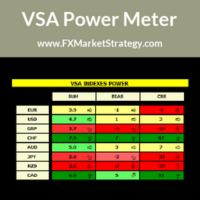
VSA Power Meter very powerful analysis method uses volume spread analysis to determine strongest currency and weakest currency and then gives signals based on it. VSA Power Meter System Features Analyze all available instruments. Clear panel that determines stronges and weakest currencies. Clear buy and sell signals. You can use it as independent trading system or as filter. VSA Power Meter   Trading Rules You can use VSA in two ways: Enter VSA signals. Use it as filter to determine strongest
Swing Predator
Muhammad Tanveer Ameer Muhammad
NO GRID NO MARTINGLE Swing Predator (with proper stoploss and take profit ) — Bitcoin and US Indices Expert Advisor for MetaTrader 5 Swing Predator is an automated trading Expert Advisor for MetaTrader 5, designed to manage a predefined basket of Bitcoin and US stock index instruments from a single chart. Built for traders who prefer a consistent setup, this MT5 trading robot handles trade selection, order placement and position management using its embedded trading logic. The supplied default c
RRtoolBox
David Ruiz Moreno
RRtoolbox - Professional Tools: Risk:Reward Trading Tool (SL/TP Horizontals + Pending orders + Diagonals), Alerts set on trend lines (for alerts on diagonal levels), SelfManagement (BE, partials...), close/cancelling by time, Statistics, Info and trading on chart. One-Click Trading with Visual Risk:Reward Management RRtoolbox is a comprehensive trading panel that combines one-click order execution,  statistics and  powerful visual Risk:Reward tools, alerts set with trendlines, on chart butt
TradePad
Ruslan Khasanov
5 (1)
TradePad est un outil pour le trading manuel et algorithmique. Nous vous présentons une solution simple pour des opérations de trading rapides et le contrôle des positions sur plusieurs instruments de trading. Attention, l'application ne fonctionne pas dans le testeur de stratégie! Version d'essai de l'application pour un compte démo et une description de tous les outils L'interface de l'application est adaptée aux moniteurs haute résolution, simple et intuitive. Pour un travail confortable, le
Auto Orders Manager EA
Mohamed Abdulmohsen Mohamed Saeed Ali
Professional Trading Orders Manager for MT5 with Signal-Analyzer-Direction-Power-Orders control - Scalping tools - Risk management - all in one trade panel and dashboard  A sophisticated Expert Advisor that transforms your MT5 platform into a complete trading command center. This tool seamlessly blends automated trading logic with comprehensive manual controls through dual interactive dashboards. Key Features: Automated Trading : advanced scalping strategy on M3 timeframe as a signal sample can
RSI Currency Strength Meter is a powerful and elegant multi-currency indicator that measures the real-time relative strength of the 8 major currencies using RSI logic. By calculating the smoothed performance of each currency across its major pairs and applying the RSI formula, it delivers clean and responsive strength lines that make it easy to spot which currencies are truly strong or weak at any moment. This indicator is particularly useful for visualizing currency correlations and divergence
Smart Risk Panel MT5 is an advanced execution and risk management panel designed for manual traders and Prop Firm traders (FundingPips, FTMO, FundedNext, the5ers, etc.).  Built with a NON-BLOCKING architecture, the EA runs smoothly without freezing your chart—even during high volatility or fast-moving markets. ================================================== KEY FEATURES ================================================== • Auto Lot Calculation: Automatically calculates your exact lot siz
Trade Insight Pro Trade Insight Pro is an advanced trading performance analytics utility for MetaTrader 5. It transforms your MT5 trading history into clear and useful performance statistics directly on the chart. The utility is designed for traders who want to understand their historical results in greater detail, identify performance patterns, compare BUY and SELL behavior, and review their trading activity using objective data. Trade Insight Pro does not generate trading signals and does
Timeframe Trading Limiter
AL MOOSAWI ABDULLAH JAFFER BAQER
Timeframe Trading Limiter is a professional risk management and trade discipline utility designed for MetaTrader 5. It empowers traders to enforce strict, automated limits on the number of trades and the maximum allowable drawdown within each trading period, based directly on the chart timeframe selected. Whether you are a discretionary trader prone to overtrading, a prop firm challenge participant needing to adhere to strict rules, or an algorithmic trader running multiple strategies, this tool
SL Risk Manager Auto SL System SL Risk Manager Auto SL System is a practical and easy-to-use tool designed to help you manage your Stop Loss levels before and after opening a trade . With this tool, you can set your Stop Loss level before entering a position . Especially when trading Gold (XAU), you can easily define your Stop Loss based on a specific dollar amount , giving you better control over the risk of each trade. You can also use the panel to automatically open trades according to the ra
CRYPTO ZEUS DUAL-CORE PROTOCOL  Advanced Crypto Matrix: Supertrend AI + External Sync Module - [NEW] 24/7 Crypto Unlock: The EA now fully supports weekend trading by auto-detecting Crypto assets. - [NEW] Continuous Trend Rider: Re-enters trades continuously on pullbacks if the macro-trend remains strong, maximizing profit on long runs. - [NEW] Ghost Trailing Stop: Added a virtual trailing stop to fully ride breakouts instead of exiting at fixed Fibo targets. - [NEW] Preset System: Added a buil
MyFxDesk
Truong Nguyen
MyFxDesk est un puissant indicateur d’analyse des retournements et des continuations, conçu pour identifier les changements émergents de direction du marché avant qu’ils ne deviennent évidents. MyFxDesk a été développé en combinant une recherche quantitative de nouvelle génération pilotée par l’IA, l’intelligence de marché et une analyse façonnée par des années d’expérience réelle du trading. Structure du graphique. Plusieurs unités de temps. Timing d’entrée. Risque. En tant que traders discrét
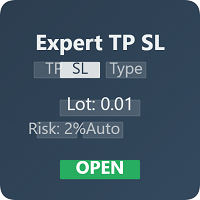
Expert TP SL v04 - Professional Trading Assistant with AI Motivation System Advanced manual trading tool with automatic risk management, overtrading protection, and intelligent psychological support for disciplined trading. PRODUCT OVERVIEW Expert TP SL v04 is a comprehensive trading assistant designed for manual traders who want to maintain emotional discipline while automating risk calculations. This isn't just another order placement tool - it's a complete trading psychology system that pr
Noize Absorption Index - is the manual trading system that measures the difference of pressure between bears forces and bulls forces. Green line - is a noize free index that showing curent situation. Zero value of index shows totally choppy/flat market.Values above zero level shows how powerfull bullish wave is and values below zero measures bearish forces.Up arrow appears on bearish market when it's ready to reverse, dn arrow appears on weak bullish market, as a result of reverse expectation.
Dolphin Wave Rider IMM is an automated MetaTrader 5 strategy designed to evaluate structured trend opportunities using hourly price data. The strategy combines market-structure breaks with trend alignment and Relative Strength Index confirmation. By default, trading decisions use completed candles to reduce intrabar signal changes. ### Trade management Automatic entries use broker-adapted stop-loss and take-profit prices. Position volume can be calculated from an equity-risk percentage or a fixe
JTC Smart Gold Indicator is a professional trading indicator designed exclusively for the XAUUSD (Gold) 5-minute timeframe on MetaTrader 5. It focuses on identifying high-quality trading opportunities during the New York session while helping traders maintain a disciplined and structured trading approach. Unlike indicators that generate excessive signals, JTC is designed to prioritise quality over quantity, typically highlighting a small number of carefully selected opportunities during active
Here   our more valuable tools SMC Trend Trading   ,  Easy SMC Trading  ,  Institutional SMC Architect Volume Analysis Tools  ,  Volume flow Profile  ,  Market volume profile  , FVG with Volume  , Liquidity Heatmap Profile  ,  Volume Spread Analysis Key Features 1.  Total Immersion UI (The "Blackout") Chart Masking:   Upon loading, the tool turns the background, grid, and candles pitch black. This hides the noise of the market ticks, allowing you to focus purely on your performance data withou
Les acheteurs de ce produit ont également acheté
Farmed Hedge Yield Farming | All Markets (Manual - Hybrid - Semi/Automated EA) VERIFIED TRADING RESULTS - Farmed Hedge Yield Axi Copy:  https://www.mql5.com/en/signals/2356376 - Farmed Hedge Yield Exn Copy:   https://www.mql5.com/en/signals/2356404 - Farmed Hedge Yield V Copy:  https://www.mql5.com/en/signals/2357156 IMPORTANT NOTICE: FarmedHedge is a MANUAL-FOCUSED TRADING UTILITY ,not a fully automated EA. Results shown on this Signal include manual trades and overall strategic management.
REVDEN AI Desk : pilotez votre trading depuis une seule conversation avec votre propre IA, sur le contexte de marché de REVDEN Imaginez piloter votre trading depuis une seule conversation. REVDEN AI Desk l'apporte dans MetaTrader 5 : vous demandez à votre propre IA comment elle lit le marché, et elle répond à partir du contexte complet de REVDEN sur les symboles que vous tradez, avec leur état, leur profil de risque et les publications à venir. Ses propositions arrivent avec entrée, stop, object
News Trade EA MT5
Konstantin Kulikov
4.55 (11)
Je voudrais vous présenter un robot efficace que j'utilise depuis plusieurs années. Il peut être utilisé en mode semi-automatique, comme en mode totalement automatique. >>> Chat <<< Le programme comporte des paramètres souples pour le commerce sur les nouvelles du calendrier économique. Il est impossible de le vérifier dans le testeur des stratégies. Ce qu’il faut, c’est le travail réel. Téléchargez la dernière archive des paramètres : https://www.mql5.com/en/blogs/post/747929 Surveillance des
The Patch
Mian Rameez Ali
The Patch It never opens a trade. It walks behind the ones that did. Every open position, every pending order — checked twice a second for the one thing that's easy to forget: a stop, a target. Found bare, it doesn't ask. It writes the missing number in, measured in points from wherever the position began, and moves on to the next. No strategy, no opinion on direction. Just the quiet assumption that nothing should ever sit on the market unprotected — not because someone decided it shouldn't,
Floor Watch
Syed Tauqeer Hussain Shah
Floor Watch One number, watched every thirty seconds: how far equity has fallen since the day began — or since its highest point, if it's told to trail the peak instead of the open. Cross the line and it doesn't argue. Every open position closes, every pending order vanishes, and anything that slips through afterward gets shut the moment it appears. Not asked. Removed. The floor holds until the clock turns 5 AM Pakistan time — then, and only then, does the day start over. One rule. No except
YuClusters
Yury Kulikov
4.93 (43)
Attention: You can view the program operation in the free version  YuClusters DEMO .  YuClusters is a professional market analysis system. The trader has unique opportunities to analyze the flow of orders, trade volumes, price movements using various charts, profiles, indicators, and graphical objects. YuClusters operates on data based on Time&Sales or ticks information, depending on what is available in the quotes of a financial instrument. YuClusters allows you to build graphs by combining da
Master Your Trading Discipline   Stop losing your hard-earned gains to overtrading and emotional decisions. The Discipline Tool is your ultimate trading assistant, ensuring strict risk management in real-time. Key Protection Features: Advanced Drawdown Defense : Automatically halts trading if your daily drawdown exceeds a preset threshold (percentage or dollar amount). Real-Time Equity Lock : Safeguard profits by referencing peak equity, ensuring drawdown stays within control. Hard Profit Target
Dealer Panel
Mian Rameez Ali
Dealer's Panel No signal decides anything here — a hand does. One click, and the panel calculates what's underneath: lot size from risk, target from a 30-step balance ladder that remembers exactly how far an account has climbed. Toggle between market and pending without touching an input field. Set a stop, and the take-profit can write itself — a fixed share of the balance, translated into price with no arithmetic left for the trader to get wrong. One trade live at a time; it won't let a seco
Un seul achat. Tous mes indicateurs et robots de trading (EA) pour MT4 et MT5, disponibles aujourd’hui et publiés à l’avenir, sans frais supplémentaires. Contactez-moi après l’achat pour connaître la procédure de réception. Il est prévu d’augmenter le prix de 50$ toutes les 10 ventes, jusqu’à 999$. Le prix du Market au moment du paiement fait foi. Gardez l’indicateur auquel vous faites confiance. Automatisez les tâches qui l’entourent. Votre signal. Vos règles. Votre exécution. Vous utilisez dé
Quant AI Agents
Ho Tuan Thang
5 (1)
Quant AI Agents are independent trading Expert Advisors. Instead of trading using a fixed strategy like other conventional EAs, Quant AI Agents   is a   multi-agent AI trading framework   that turns natural-language strategy prompts into live.  WANT THE SAME RESULTS AS MY LIVE SIGNAL?   Use the exact same brokers I do:   IC MARKETS , IC TRADING   .  Unlike the centralized stock market, Forex has no single, unified price feed.  Every broker sources liquidity from different providers, creating un
AI Arbitron — an MT5 Spot vs Future Gold Arbitrage Bot designed to capture price discrepancies between correlated Spot and Future instruments through hedged, non-directional trading. Platform: MT5 Use Swap Free Accounts, many of the regulated broker gives swap free accounts for 7 days, make use of it by only buying lower price asset and selling higher price asset, hold your position for 2-3 days. Asset: Mainly Gold (XAUUSD) using Spot + Future/CFD price feeds. Core strategy: It monitors the p
Trading Chaos Expert
Hennadii Stanilevych
5 (11)
This software has no equals in the world and represents a universal trade "console" covering trading signals, automated market entry, setting of Stop Loss and Take Profit, as well as Trailing Profit for multiple trades at the same time in a single open window. Intuitive control of the Expert Advisor in "three clicks" ensures a comprehensive use of all its functions on different computers, including tablets PCs. Interacting with additional signal indicators that mark the chart to give a real mark
Copy your MT5 trades to Interactive Brokers You keep using MT5. Every order you open or close is sent to your IB account. In real time. No coding. No changes to your strategy or EA. Try it first Rent 1 month: $30. Test on a live or paper account. What it does Real-time copying: same direction, reverse, or one side only. Map any MT5 symbol to any IB symbol. Set a lot ratio for each. Forex, Futures, Stocks, CFDs, Metals and Crypto. Position sync: both accounts checked, any difference fixed. Optio
MT5 Trading Deck
Manuel Michiels
5 (2)
One button. One trade. MT5 Trading Deck is a hotkey trading panel for MetaTrader 5 that turns the platform into a keyboard-driven execution cockpit. Stop loss, take profit and lot size are pre-calculated for every key; the moment you press, a market order is live on the broker. A complete technical user manual is attached in the product Comments section. It documents every input parameter, the full hotkey map, the recommended Stream Deck XL layout, and the advanced workflows for Pre-Limit orders
The  Easy Strategy Builder (ESB)  is a " Do It Yourself " solution that allows you to create a wide range of the automated trading strategies without any line of codes. This is the world’s easiest method to automate your strategies that can be used in STP, ECN and FIFO brokers. No drag and drop is needed. Just by set conditions of your trading strategy and change settings on desired values and let it work in your account. ESB has hundreds of modules to define unlimited possibilities of strategi
Features   With MT5 to Interactive Brokers(IB) Trader, you can: 1. Load chart data from IB to MT5, and Analyze with all standard or customer Indicators. 2. Place Orders to IB Account Directly in MT5. 3. Make your Own EAs upon IB Securities by only making minus changes of the trading function. Usage 1) Installation Copy the "Mt5ToIBTraderEn.ex4" and sample files to [MT5 Data Folder]->MQL5->Experts.  2)  MT5 Settings Add the IP Address to the MT5 Allowed URLs in 'Tools->Options->Expert Adviso
Unlimited Trade Copier Pro MT5 is a tool to copy trade remotely to multiple MT4, MT5 and cTrader accounts at different computers/locations over internet. This is an ideal solution for you if you are a signal provider and want to copy your trades to other receivers globally on your own rules. One provider can copy trades to multiple receivers and one receiver can get trade from multiple providers as well. The provider can even set the subscription expiry for each receiver, so that receiver will n
Adam FTMO MT5
Vyacheslav Izvarin
5 (2)
ADAM EA Special Version for FTMO Please use ShowInfo= false for backtesting ! Our 1st EA created using ChatGPT technology Trade only GOOD and checked PROP FIRMS  Default parameters for Challenge $100,000 Tested on EURUSD and GBPUSD only  Use 15MIN Time Frame Close all deals and Auto-trading  before Weekend at 12:00 GMT+3  Friday For Prop Firms MUST use special Protector  https://www.mql5.com/en/market/product/94362 --------------------------------------------------------------------------------
Mentfx Mmanage mt5
Anton Jere Calmes
4.25 (8)
The added video will showcase all functionality, effectiveness, and uses of the trade manager. Drag and Drop Trade Manager. Draw your entry and have the tool calculate the rest. Advanced targeting and close portions of a trade directly available in tool (manage trades while you sleep). Market order or limit order on either side with factored spread. Just draw the entry, the tool does the rest. Hotkey setup to make it simple. Draw where you want to enter, and the stop loss, the tool calculates al
QCML Assistant
Maxime Turcotte-lafreniere
QCML Assistant MT5 Votre Trading. Notre Assistant. Votre Avantage. Vous cherchez un outil qui transforme complètement votre expérience sur MetaTrader 5 ? QCML Assistant est la solution tout-en-un développée par des traders, pour des traders. Un seul outil installé sur votre graphique, et vous avez accès à une plateforme de trading ultra-complète, ultra-rapide et ultra-simple. Fini les heures perdues à configurer votre setup. Fini les prises de position compliquées. Avec QCML Assistant, tout devi
Hedge Trimmer EA
Michael Sipho Bhiya
Hedge Trimmer & Roll-Over EA Managing a hedged position means carrying two opposing trades simultaneously. Over time, the losing side grows while the profitable side offsets it. The standard problem is that closing the loser costs money you may not have sitting in cash — it has to come from somewhere. Hedge Trimmer EA solves this by using the floating profit on your winning trades as the funding source to progressively close down the losing side. It identifies which trades are in profit, uses a
Gamma Edge Pro MT5
Xuan Nam Diep
1 (1)
Gamma Edge Pro MT5 — GexBot Classic API Integration Gamma Edge Pro brings institutional-grade Gamma Exposure (GEX) data directly onto your MetaTrader 5 chart — the same data used by professional options traders to anticipate price magnets, hedging flows, and dealer positioning. Powered by the GexBot Classic API, this indicator automatically maps options market data from US-listed instruments onto any MT5 CFD instrument — Forex pairs, Gold, indices, and more — with intelligent price conversion bu
News Trader Pro is a unique robot that allows you to trade the news by your predefined strategy. It loads every piece of news from several popular Forex websites. You can choose any news and preset the strategy to trade it, and then News Trader Pro will trade that news by selected strategy automatically when the news comes. News release gives opportunity to have pips since the price usually has big move at that time. Now, with this tool, trading news becomes easier, more flexible and more exciti
If you wish to draw Support and Resistance lines, view: daily market opening, classical pivot levels, Fibonacci pivot levels, trend lines, Fibonacci levels, the remaining time to candle closing, and current spread. If you seek to place your orders with the exact lot that meets your desired stop loss risk. If you wish to do all this and more with just one click, then this is the perfect tool to use. This tool will allow you to feel more relaxed when deciding to open orders, as well as predicting
The new version of  MirrorSoftware 2021  has been completely rewriten and optimized.  This version requires to be loaded only on a single chart because  it can detect all actions on every symbol and not only the actions of symbol where it is loaded. Even the  graphics and the configuration mode  have been completely redesigned. The MirrorSoftware is composed of two components (all components are required to work):  MirrorController  (free indicator): This component must be loaded into the MASTER
ClusterSecond
Rafil Nurmukhametov
4.78 (32)
The utility allows you to build different types of graphs: Seconds chart from 1 second to 86400 seconds Tick chart from 1 tick and above The volume chart Delta chart Renko chart Range chart Demo version of the utility https://www.mql5.com/ru/channels/clustersecond Built-in indicators for volumetric analysis: daily market profile and market profile of the selected timeframe, Cluster Search Imbalance VWAP Dynamic POC, VAH, VAL the profile depth of the market vertical volume with various display op
Corporate Report MT5
Pavel Verveyko
5 (1)
The script displays info about the share's corporate reports and dividends. The data is downloaded from   investing.com : Report date Profit per share (EPS) Revenue Market capitalization Amount of dividends Date of payment of dividends Dividend income The product cannot be tested in the tester (since it is not possible to receive data from the Internet). Before launching:  Add 2   URL   https://ru.investing.com/earnings-calendar/Service/getCalendarFilteredData  and   https://ru.investing.com/di
Telegram Notify MT5 Telegram Notify MT5 is an utility tool to bridge your MetaTrader 5 activities to your Telegram chat/channel. It is useful for monitoring your MetaTrader 5 account by sending a notification to your particular Telegram chat/channel when someone/EA is placing trades, modifying order's TP/SL, closing trades and etc. This EA does not place any trade for your account. This EA also could be a convenient tool for monitoring other's EA trading activities or a tool for publishing your
Telegram ChartSnap MT5 is an utility tool to bridge your MetaTrader 5 activities to your Telegram chat/group/channel. It will screen shot your MetaTrader 5 chart and send it to your dedicated Telegram chat/group/channel through a Telegram bot. The whole process will keep repeating based on a time cycle that predetermined by the user. It is a convenient tool for those who like to get access to their favorite system/dashboard that only available at MetaTrader Desktop. Beside that, trader can easi
Quick operation, quick purchase, sale, empty operation. Provide three buttons: Buy, Sell, empty. Buy: Quickly place more orders after clicking, default 1 hand, profit point and stop-loss point are 110 points, after successful order can be manually modified. Sell: Quickly place an empty order after clicking, default 1 hand, profit point and stop-loss point are 110 points, can be manually modified after the order is successful. Empty: Quickly clear all orders, including purchase and s
Plus de l'auteur
MegaScanner — see the market with two eyes A universal multi-symbol scanner that combines two analytical systems in one panel. ️ Functionality Finds entry points   in the market and   shows the MEGA TRADER — Complete User Guide Version:   1.05   Type:   Expert Advisor for MetaTrader 5   Purpose:   automated trading of DIVERG divergence signals with a sideways-market filter, deposit-based risk management, ATR-based SL/TP and a trailing stop. ️   Important:   this is a fully automated Expert
MP Trend Scanner
Pavlo Mostipan
5 (1)
TREND SCANNER Stay With the Trend. Trade With Confidence. Trend Scanner analyzes the market to determine trend direction and strength using a combination of technical indicators. The system combines EMA 150/365, EMA 9/21, RSI, MA to confirm market direction and filter out weak or sideways conditions. Key Features: Bullish and bearish trend detection; EMA 150/365 and EMA 9/21 analysis; RSI confirmation; MACD momentum analysis; ️ ADX ranging-market filter; Trend strength measur
FREE
DIVERGENCE SCANNER Find Divergences Faster. See What Others May Miss. Divergence Scanner is a specialized tool designed to automatically identify potential divergences across multiple trading instruments. It analyzes Stochastic and RSI , detects bullish and bearish divergences, and presents the results in a clear, structured table. Key Features: Automatic divergence detection; Stochastic analysis; RSI analysis; Bullish divergences; Bearish divergences; MOSTIPAN SMART TRADING
FREE
MPDirection Strength
Pavlo Mostipan
5 (1)
DIRECTION STRENGTH is an indicator designed to analyze the current market movement. It helps you understand not only where the price is moving , but also how strong the movement is, how long the current series has lasted, and how likely it is to continue based on historical matches. What do you see on one screen? DIRECTION → where the market is moving STRENGTH 0–100 → how strong the movement is SERIES → how many candles the movement has continued TIME → how long the current series has lasted H
FREE
️ SMART PANEL TESTER — TESTEZ VOTRE STRATÉGIE. CONTRÔLEZ VOTRE RISQUE. SMART PANEL TESTER est une version simplifiée du SMART PANEL principal, spécialement conçue pour tester efficacement et confortablement des stratégies de trading dans le Strategy Tester . L'objectif principal du panneau est la gestion du risque . Une stratégie de trading ne repose pas uniquement sur de bons points d'entrée : ses performances à long terme dépendent également de la manière dont vous contrôlez le risque sur ch
FREE
MP Risk Manager
Pavlo Mostipan
5 (1)
️ RISK MANAGER — Risk Management Indicator Indicator version:   1.70 ·   Style:   QuikTrade ·   Position:   bottom-left corner of the chart 1. What it is Risk Manager   is an informational indicator for MetaTrader 5 that shows the   daily risk budget   in real time and helps calculate the   recommended lot , taking into account: risk per single trade (% of balance); daily risk (% of balance); losses and profits already realized today; risk of open positions (based on their Stop Loss); distance
FREE
One click to open. One click to protect. SMART PANEL is a minimalist panel for disciplined trading:   no extra noise   — only what a trader really needs every day: order placement, risk control and profit protecti 1. Fast order placement BUY / SELL   buttons with   MARKET / LIMIT / STOP   menu. Entry, stop and take-profit   lines — draggable right on the chart. Ready ratios   1:1 · 1:2 · 1:3   — one click, risk is already set. −% / +%   buttons — risk per trade adjusted in a second. 2. Built-in
FREE
️ MPSmartPanel — votre assistant de trading fiable MPSmartPanel   est un panneau de trading compact pour MetaTrader 5 qui allie la commodité et l'efficacité du trading manuel à une discipline stricte et un contrôle complet des risques. Le panneau   protège votre dépôt   contre les pertes et vous aide à trader consciemment, selon votre propre système. Checklist du système de trading (contrôlée par le programme) Vous remplissez vous-même   votre checklist (4 tuiles de conditions, ex. : tendanc
MP TGAlert
Pavlo Mostipan
One job, maximum flexibility:   the expert watches all activity on your trading account and sends you a Telegram message and/or chart screenshot for any chosen event type. Every event, message template and filter is user-configurable. What it is for You trade manually and want to   know instantly about your trades   in Telegram (openings, closings, TP/SL, trailing, breakeven, partial close). You run   EAs   — have a single notification channel for every trade on the account without opening t
Filtrer:
Тетяна Мостіпан
108
Тетяна Мостіпан 2026.11.01 12:54 

L'utilisateur n'a laissé aucun commentaire sur la note

Filimon
97
Filimon 2026.09.21 18:14 

L'utilisateur n'a laissé aucun commentaire sur la note

Pavlo Mostipan
852
Réponse du développeur Pavlo Mostipan 2026.09.21 18:17
Дякую, якщо будуть думки як доповнити пишіть
Trader202689
24
Trader202689 2026.09.21 17:37 

L'utilisateur n'a laissé aucun commentaire sur la note

Pavlo Mostipan
852
Réponse du développeur Pavlo Mostipan 2026.09.21 18:17
Дякую за оцінку
Oleksiy
76
Oleksiy 2026.09.18 17:05 

L'utilisateur n'a laissé aucun commentaire sur la note

Répondre à l'avis