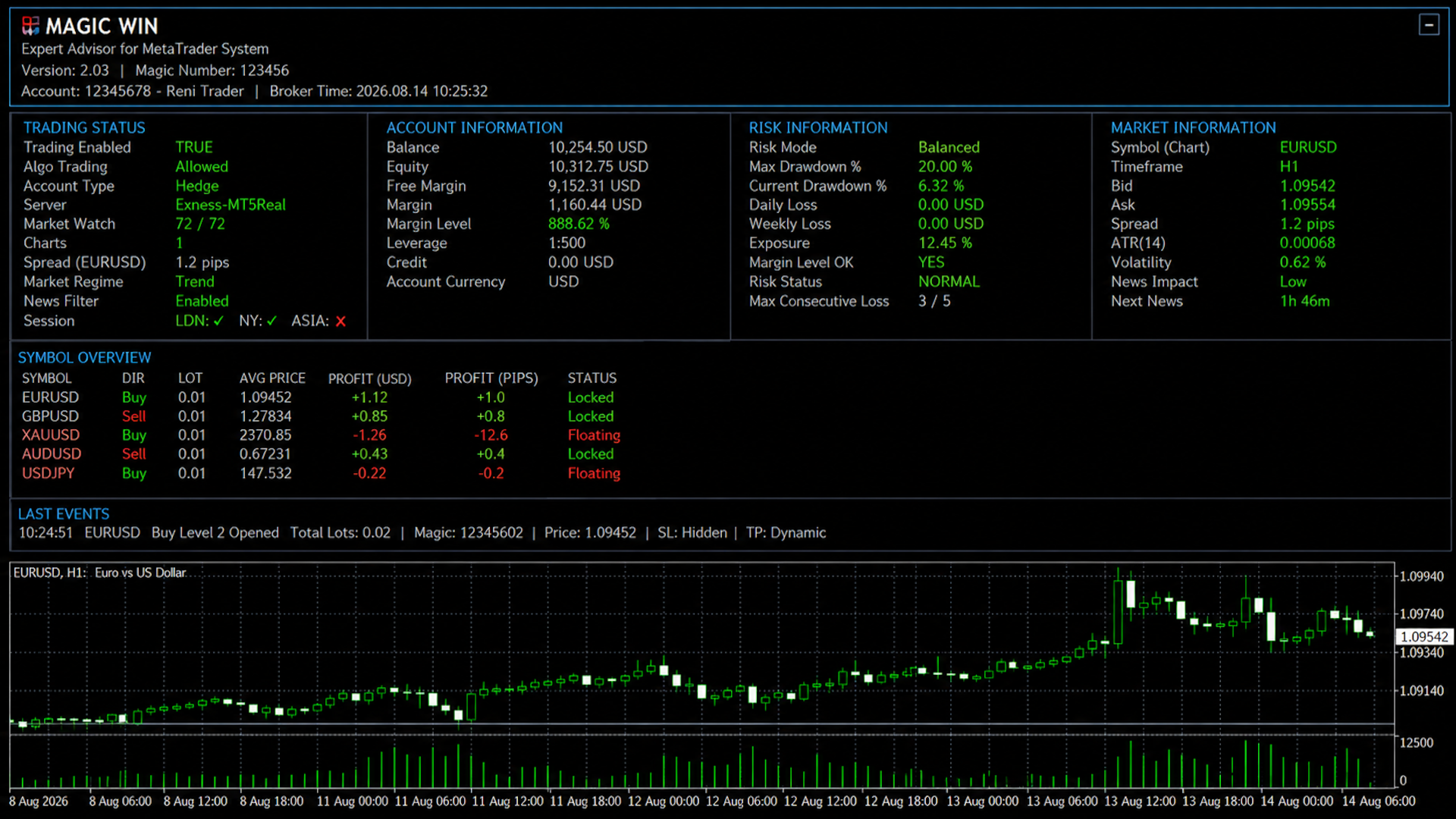
EA Magic Win MT5
- Experts
- Version: 2.3
- Activations: 10

For Set Files click here
Recommended Settings
For the first setup, we recommend using the default EA settings.
The main settings you may want to adjust are:
1. Lot Sizing
LotSizingMethod
Choose how the EA calculates trade volume.
LotSizingValueFixed
Used when Fixed Lot sizing is selected.
Example:
0.01 = 0.01 lot per initial trade.
MaximumLot
Sets the maximum lot size the EA can use.
For beginners, use a small lot size and test on a demo account first.
2. Symbols
Symbols
Enter the symbols you want Magic Win MT5 to manage.
Example:
EURUSD,GBPUSD,XAUUSD
Only use symbols that are available from your broker.
MaximumSymbols
Sets the maximum number of symbols the EA can process.
3. Trade Settings
InitialTP
Controls the initial target setting.
TradeDistance
Controls the distance used for additional trade levels.
MaximumTrades
Maximum number of trades/levels allowed.
MaximumSpread
Maximum allowed spread for trading.
MaximumSlippage
Maximum allowed slippage.
Do not increase trade limits, distance, or lot sizes aggressively. Higher exposure can increase risk.
4. Smart Settings
AllowOpeningNewGrid
- true → allows additional trade levels
- false → prevents new additional levels
AllowHedging
Controls whether opposite-direction positions can be allowed according to the EA's configuration.
TradeMultiplier
Controls the configured volume relationship between different trade levels.
5. Risk Protection
We recommend keeping the protection features enabled.
Important settings:
UseDrawdownProtection
Enables floating drawdown protection.
MaximumFloatingDrawdownPercent
Maximum floating drawdown percentage allowed by this protection.
MinimumMarginLevel
Minimum margin level protection.
The EA includes additional protection for daily loss, weekly loss, equity, consecutive losses, daily trades, cooldown periods, and total exposure.
6. Basket Management
These settings control how open positions are managed as a group.
UseBasketBreakEven
Enables basket break-even management.
BreakEvenProfit
Profit level used for basket break-even.
UseBasketProfitLock
Enables profit-lock management.
ProfitLockStart
Profit level at which profit locking begins.
ProfitLockStep
Profit-lock adjustment step.
MaximumBasketHours
Maximum time allowed for a basket according to the configured setting.
The default configuration enables basket break-even, profit lock, and dynamic basket TP.
7. Trading Sessions
UseSessionFilter
Controls session-based trading.
You can enable or disable:
- TradeLondon
- TradeNewYork
- TradeAsia
All three are enabled in the default configuration.
8. Friday & Sunday Settings
The EA includes controls for limiting trading around the weekend.
DisableFridayTrading
Stops new trading after the configured Friday time.
FridayStopHour
Defines the Friday stop hour.
DisableSundayTrading
Controls Sunday trading.
SundayStartHour
Defines when Sunday trading can begin.
For a new user:
- Keep the default settings.
- Adjust only the lot size according to your account.
- Keep risk protection enabled.
- Start with a small number of symbols.
- Test on a demo account first.
- Monitor the EA before increasing exposure.
Magic Win MT5 requires an MT5 Hedging account.
It does not support Netting accounts because the EA uses multiple positions and individual trade levels. The EA will automatically stop if a Netting account is detected.
Important Risk WarningMagic Win MT5 is an automated trading tool. It does not guarantee profits.
Forex and CFD trading involves significant risk. Always use appropriate risk management and test the EA before using real funds.
Do not increase lot size or exposure simply because previous results were profitable.
Quick Rule
Start small → Keep protection ON → Test → Monitor → Increase gradually only if appropriate.
Note: The EA's trading strategy and internal signal logic are proprietary and are not disclosed in this user guide.