RONIN Trading Panel

Before we start...


Honestly, I just made this EA for fun. I felt like MT5's platform wasn't super optimized and I still find it pretty hard to understand for beginners like me. Cause yes, I'm still a noobie. The panel is super efficient.. really efficient. I use it in pretty much all of my trades. I hope you'll like it as much as I do.

Feel free to leave a comment and ask me any questions. I'll respond to pretty much anyone. 

IMPORTANT NOTICE :

It is a Trading PANEL… not an automated trading system. BackTesting this EA will NOT give you results. If you want to try it out, link it to your demo account and look at the features.


RONIN TRADING & MANAGEMENT PANEL

RONIN is a manual trading and position-management panel for MetaTrader 5.

It combines direct BUY and SELL execution, visual Risk-to-Reward planning, position sizing, global and individual trade management, risk monitoring, session information, and interface customization in one chart-based panel.

RONIN does not make trading decisions automatically. The trader remains in control of entries, risk, targets, and position management.

FAST BUY & SELL EXECUTION

Open BUY or SELL positions directly from the panel.

RONIN supports:

• Market BUY and SELL 
• Risk-based position sizing
• Fixed lot sizing
• Max allowed slippage
• Broker aware volume normalization
• Trading validation before order submission

When the R:R tool is active, the order can also be built from the Entry, Stop Loss, and Take Profit levels available directly on the chart.

VISUAL RISK-TO-REWARD TOOL

RONIN includes an interactive Risk-to-Reward tool designed for visual trade planning directly on the chart.

The tool provides three draggable levels:

• ENTRY
• STOP LOSS
• TARGET

You can move the levels directly with your mouse by dragging it on the graph.

The panel calculates and displays :

• Risk to Reward ratio
• Potential losses
• Potential gains
• Position size (based on configured risk)
• Entry price
• Stop Loss price
• Take Profit price

The R:R ratio can be adjusted using the R:R − and R:R + controls.

The R:R step is configurable, and the initial Stop Loss distance is based on a configurable ATR 14 multiplier.

The visual risk and reward zones can also be adjusted in width.

MARKET, LIMIT & STOP EXECUTION

When the R:R tool is active, the position of the Entry line determines how the order is sent.

Depending on the Entry location relative to the current market price, RONIN can use:

• Market execution
• Buy Limit / Sell Limit
• Buy Stop / Sell Stop

For pending orders, RONIN validates the Entry, Stop Loss, Take Profit, and minimum trading distances before submitting the request.

For market execution, the current Bid or Ask is used as the effective execution price while preserving the distances defined by the R:R tool (when possible).

RISK-BASED POSITION SIZING

RONIN can calculate position size according to % of account balance.

The calculation uses the Entry and Stop Loss distance defined by the trade setup.

The position’s size calculation takes the symbol's trading specifications into account, including:

• Tick value
• Tick size
• Volume step
• Minimum volume
• Maximum volume

When Risk Per Trade is set to 0, RONIN uses the configured fixed lot size by default.

MANUAL LOT CONTROL

The trading volume can also be adjusted manually directly on the panel.

The lot controls includes:

• LOT −
• LOT +
• AUTO

AUTO returns the panel to its automatically calculated position size.

The selected volume is normalized according to the broker's allowed minimum, maximum, and volume step.

GLOBAL POSITION MANAGEMENT

RONIN provides global position management controls on the main panel.

The main controls are:

• CLOSE
• BREAK-EVEN
• PARTIAL

The main CLOSE function closes all RONIN positions on the current chart symbol and also removes RONIN pending orders for that symbol.

The global Break-Even function applies Break-Even management to qualifying RONIN positions.

The global Partial function reduces qualifying RONIN positions according to the configured partial percentage.

INDIVIDUAL TRADE MANAGEMENT

Opened RONIN positions can also display their own management controls (individually)

Individual controls also include:

• CLOSE
• BREAK-EVEN
• PARTIAL

This allows individual positions to be managed independently instead of always applying an action globally.

The controls are associated with the individual position ticket and are created or removed automatically as positions appear or disappear.

The colors of the individual CLOSE, BREAK-EVEN, and PARTIAL buttons can be customized independently.

BREAK-EVEN MANAGEMENT

RONIN includes configurable Break-Even management.

The Break-Even buffer can be specified in points.

When the buffer is set to zero, RONIN automatically derives the buffer from the current spread.

The Break-Even calculation can also include an estimated round-trip commission.

This allows you, the user, to account for additional trading costs when moving a position toward Break-Even.

PARTIAL CLOSE

The Partial function allows the trader to reduce an active position without closing the entire position.

The percentage closed is also configurable.

RONIN checks the broker's volume requirements before attempting the operation, including minimum volume and volume step.

The panel shows the volume actually closed after the operation.

ACCOUNT INFORMATION

The ACCOUNT section displays key account information in the panel.

Available information includes:

• Balance
• Equity
• Free Margin

The current Spread can also be displayed directly in the interface.

SESSION PERFORMANCE

RONIN provides a performance overview for the current trading session.

The panel can display:

• Session Profit
• Closed Trades
• Open Trades
• Pending Orders

The displayed monetary values can be converted to the selected display currency.

RISK EXPOSURE MONITORING

RONIN can display estimated open and pending risk as a percentage of account balance.

The Risk Scope can be configured in two ways:

• Entire Account — evaluates account-wide exposure
• RONIN Panel — evaluates orders belonging to RONIN on the current symbol

Positions without a Stop Loss are identified separately rather than being incorrectly treated as zero risk.

RONIN also distinguishes positions for which the risk calculation cannot be reliably determined.

DAILY LOSS PROTECTION

RONIN includes an optional Daily Loss Limit.

The limit is configured as a percentage.

When enabled, the system monitors the realized trading result for the current trading day.

If the configured daily loss threshold is reached:

• New RONIN entries are blocked
• RONIN pending orders are cancelled

If the daily loss cannot be reliably evaluated, new entries are also blocked while the protection remains enabled.

A value of zero disables the Daily Loss Limit.

SPREAD MONITORING

The current spread can be displayed in the panel.

RONIN also provides a Spread Warning system.

The warning threshold can either be:

• Manually defined in points
• Automatically calculated from recent spread behavior

When the current spread exceeds the configured or automatically determined threshold, the spread display is visually highlighted.

MARKET SESSION BADGE

RONIN can display a session badge in the panel header.

The system calculates the active trading session using broker server time together with the configured server UTC offset and European daylight-saving setting.

Supported session labels include:

• SYD — Sydney
• TYO — Tokyo
• LDN — London
• NYC — New York

The badge can also reflect overlapping active sessions.

DISPLAY CURRENCY

RONIN can display monetary values using the account's native currency or a selected display currency.

Available currencies include:

• Account Currency
• USD
• CAD
• EUR
• GBP
• JPY
• CHF
• AUD
• NZD

This conversion affects the values displayed by the panel only. It does not change the trading account's actual currency.

FULL INTERFACE CUSTOMIZATION

RONIN includes several visual themes:

• Custom Colors
• Dark Theme
• Light Theme
• Cyber Punk

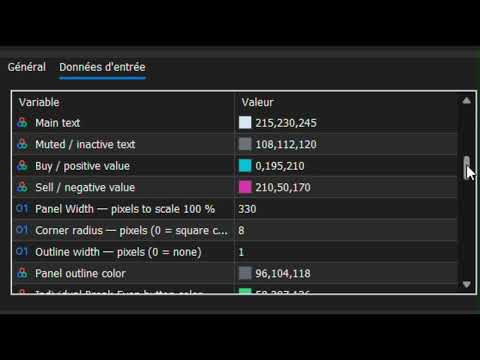
With Custom Colors selected, the trader can customize the main visual elements of the interface, including:

• Background
• Header
• Border
• Accent
• Main Text
• Muted Text
• Bullish / Buy Color
• Bearish / Sell Color
• Individual Break-Even Color
• Individual Partial Color
• Individual Close Color

Additional layout settings include:

• Panel Width
• Corner Radius
• Outline Width
• Outline Color

ENGLISH & FRENCH

The interface supports:

• English
• French

English is the default language.

PANEL SCALE

RONIN supports four interface scaling levels:

• 80%
• 100%
• 125%
• 150%

This allows the panel size to be adapted to different screen resolutions and chart layouts.

MOVABLE PANEL

The panel can be positioned directly on the chart.

The initial X and Y coordinates can be configured in pixels.

When panel dragging is enabled, the interface can be repositioned directly by dragging its header.

RONIN can also remember the panel position and state between sessions.

CONFIGURABLE DISPLAY ELEMENTS

The trader can choose which major information blocks and controls are visible.

Configurable display elements include:

• Session Badge
• Account Section
• Spread
• Performance
• Risk Exposure
• Open Positions
• R:R Controls
• Lot Controls
• Break-Even / Partial Controls

This allows the interface to be adapted to the trader's preferred workflow.

BROKER-AWARE VALIDATION

RONIN performs validation before sending or modifying trading operations.

The implementation accounts for broker and symbol requirements such as:

• Stop Loss / Take Profit minimum distances
• Pending Entry distance requirements
• Tick size
• Volume step
• Minimum volume
• Maximum volume
• Maximum allowed deviation
• Trading server return codes

This helps ensure that trading requests respect the conditions imposed by the current broker and symbol.

RONIN TRADE IDENTIFICATION

RONIN uses a configurable Magic Number to identify its own trading operations.

This identifier is used when the panel needs to distinguish RONIN-managed positions and pending orders from other trades.

MANUAL TRADING — NOT AN AUTOMATED STRATEGY

RONIN is designed as a manual trading and position-management tool.

It does not automatically analyze the market and decide when to enter or exit trades.

The trader determines:

• Direction
• Entry
• Stop Loss
• Take Profit
• Risk
• Position size
• Trade management

RONIN provides the interface and calculations needed to execute and manage those decisions directly from the MT5 chart.

IMPORTANT NOTICE

RONIN is a trading software tool for MetaTrader 5.

It does not constitute financial or investment advice.

Trading financial markets involves significant risk, and no trading result or level of profitability is guaranteed.

Always evaluate the product in an appropriate testing environment and use risk management suitable for your own circumstances.

Produits recommandés
GDS Renko Pip ST Chart - Pip-Based Renko Chart Indicator for MetaTrader 5 GDS Renko Pip ST Chart is a pip-based Renko chart indicator for MetaTrader 5. It helps traders build and study cleaner Renko price movement using a practical fixed pip or point-based brick structure. This tool is designed as a Renko chart foundation for manual analysis. It does not predict the market, does not generate buy or sell signals and does not decide whether a trade should be opened. Renko EDGE EA Golden Delta | A
Bneu Execution Scaling System
Marvinson Salavia Caballero
Bneu Execution and Scaling System — Professional Trading Command Center Premium on-chart command center with 5 dashboard tabs. 28-pair opportunity radar scans every 8 seconds. Dual-gate qualification: indicator engine + AI confidence scoring. One-click execution with auto SL/TP and smart lot sizing. Full autopilot mode with 6 built-in safeguards. Multi-account trade copier (publisher or receiver in one EA). Adaptive Money Management protects every position automatically. WHAT IT DOES Attach
CosmiCLab SMC FIBO CosmiCLab SMC FIBO is a professional trading indicator designed for traders who use Smart Money Concepts (SMC), market structure analysis and Fibonacci retracement levels. The indicator automatically detects market swings and builds Fibonacci levels based on the latest impulse movement. It also identifies market structure changes such as BOS (Break of Structure) and CHOCH (Change of Character), helping traders understand the current market direction. CosmiCLab SMC FIBO also pr
TradingAssistant TA
Jim Ariel Camarce Ignao
TradingAssistant TA Interactive Manual & Semi-Automatic Trading Panel for MetaTrader 5 Trading Assistant Dashboard is a practical on-chart trading panel designed for traders who want fast manual order execution, flexible position management, and real-time multi-timeframe market information — all from one dashboard. Instead of navigating through multiple MT5 windows, the assistant places essential trading controls directly on the chart, allowing traders to manage positions and monitor market cond
Inverted_Chart_EA Utility Expert Advisor Inverted_Chart_EA creates and maintains a mirror-inverted chart of any symbol and timeframe. It automatically generates a custom instrument (e.g. US30_INV ) and keeps its price history updated in real time, with bars mirrored around a chosen pivot. This utility gives traders a new way to analyze the market from a different perspective by flipping the chart upside down. Why use an inverted chart? Highlight hidden patterns – price formations that look ordin
Indicateur Crypto_Forex « WPR avec 2 Moyennes Mobiles » pour MT5, sans repeint. - Le WPR est l'un des meilleurs oscillateurs pour le scalping. - L'indicateur « WPR et 2 Moyennes Mobiles » permet de visualiser les moyennes mobiles rapide et lente de l'oscillateur WPR. - Cet indicateur permet d'anticiper les corrections de prix. - Très facile à configurer via ses paramètres, il est utilisable sur toutes les unités de temps. - Les conditions d'entrée à l'achat et à la vente sont illustrées. - Ave
ChronoEquity Beacon
Ekaterina Panteleeva
CHRONOEQUITY BEACON — ACCOUNT MONITORING AND ECONOMIC CALENDAR ChronoEquity Beacon is an information utility for MetaTrader 5. It monitors the trading account, summarizes open positions and sends reports and alerts to Telegram. The utility does not open, modify or close trades. It can run on a separate chart alongside any manual or automated trading system. MAIN FEATURES • Monitoring table for all available currency symbols. • Number of BUY and SELL positions. • Total trading volume and curr
MT5 to Binance
Roman Zhitnik
4.2 (5)
The MT5 to Binance trading panel is the perfect tool for cryptocurrency traders looking to maximize their purchases on Binance and Binance US exchanges. Before purchase please familiarize with comparison between MT5 to Binance and Binance Copier To get started, simply input your API Key and Secret Key created in the client area of Binance and select the Enable Spot & Margin Trading and Enable Futures checkboxes and start trading Once launched, the trading panel automatically loads all Spot and F
If you've ever stared at a gold chart, done the math in your head three times, and still second-guessed your lot size right before entry - this tool was built for you. Current price: $39 - increases by $10 after every 20 purchases until reaching the final price of $89 . Next price: $49 . Complete Buyer Kit: 34 Professional Resources included at no additional cost. MT5 Presets, PDF Guides, Checklists, Mindmaps, Reference Cards, and Excel Workbooks - built from 8 years of developing structured XAU
TradePilotmt5
Hossein Khalil Alishir
TradePilot Expert Advisor (EA) for MetaTrader 5 TradePilot is a professional and user-friendly Expert Advisor (EA) for MetaTrader 5 (MT5) . It simplifies automated trading , risk management , and trade execution with a smart trading panel . Perfect for beginners and experienced traders looking for a reliable trade manager EA with automated lot size calculation and smart position management. Key Advantages User-Friendly Trading Panel: Customizable panel with buttons and hotkeys for fast ex
The   Trendlines Oscillator   helps traders identify trends and momentum based on the normalized distances between the current price and the most recently detected bullish and bearish trend lines. The indicator features bullish and bearish momentum, a signal line with crossings, and multiple smoothing options. USAGE The   Trendlines Oscillator   works by systematically: Identifying pivot highs and lows. Connecting pivots to form bullish (support) and bearish (resistance) trendlines. Measuring
# RSI Pro Alert - Advanced RSI Indicator A powerful professional-grade RSI indicator with intelligent alerts, scheduled snapshots, and multi-dimensional notifications to help you capture market opportunities with precision! --- ## Key Features ### Smart Signal Detection - **Precision Cross Detection** : Automatically identifies critical moments when RSI crosses overbought/oversold levels - **State Tracking Mechanism** : Real-time monitoring of market state changes (Overbought/Overso
Long Beach EA
Sergey Kasirenko
Long Beach EA est un système de suivi de tendance qui utilise l'indicateur des canaux de Keltner pour les entrées en position. Il surveille les canaux de Keltner supérieur, médian et inférieur. Lorsque le prix atteint ou franchit la limite supérieure du canal, l'EA achète ; lorsqu'il atteint ou franchit la limite inférieure du canal, il vend. L'EA détecte avec précision le début des tendances haussières et baissières et gère les positions ouvertes selon une stratégie de type martingale/grille j
Enhanced Elliott Wave Pro – Advanced Market Structure & Wave Analysis   Enhanced Elliott Wave Pro is a lightweight, institutional-grade MT5 indicator that eliminates chart clutter by detecting and displaying only the current, active market structure: the 1-2-3-4-5 Impulse wave and the subsequent A-B-C Correction.   Built with classic Prechter wave rules and ATR-adaptive pivot detection, it delivers clean, real-time wave counts without bogging down your terminal.   ――――――――――――――――――――――――――――
SolarTrade Suite Financial Robot: LaunchPad Market Expert - conçu pour ouvrir des transactions ! Il s'agit d'un robot de trading qui utilise des algorithmes spéciaux innovants et avancés pour calculer ses valeurs, votre assistant dans le monde des marchés financiers. Utilisez notre ensemble d'indicateurs de la série SolarTrade Suite pour mieux choisir le moment de lancer ce robot. Découvrez nos autres produits de la série SolarTrade Suite en bas de la description. Vous souhaitez naviguer en
Expert TP SL v04 - Professional Trading Assistant with AI Motivation System Advanced manual trading tool with automatic risk management, overtrading protection, and intelligent psychological support for disciplined trading. PRODUCT OVERVIEW Expert TP SL v04 is a comprehensive trading assistant designed for manual traders who want to maintain emotional discipline while automating risk calculations. This isn't just another order placement tool - it's a complete trading psychology system that pr
Zigzag Price Arrows 1
Aiman Saeed Salem Dahbag
The Zigzag Price Arrow indicator   is an enhanced version of the classic Zigzag indicator, combining the traditional zigzag pattern with advanced visual features. It not only identifies major market turning points but also provides clear trading signals through: •   Directional arrows:   Displays colored arrows (green for buy, magenta for sell) indicating potential trend directions. •   Price labels:   Shows the exact price values at each pivot point directly on the chart. •   Improved visual c
Apex Zone Reversal
Joseph Muguai Nguru
Here is the MQL5-compliant product description translated into French, Italian, and Turkish: French (Français) Apex Zone Reversal Aperçu du produit Apex Zone Reversal est un indicateur d'analyse technique développé pour MetaTrader 5 (MT5). Il est conçu pour aider les traders à identifier les zones de support, de résistance et de retournement du marché sur la base du cadre ZORRO et des retours de la structure du marché. Caractéristiques principales Cartographie des zones : Identifie automatiqueme
HAS RSI Signal — Indicateur de Tendance Professionnel avec Calcul SL/TP HAS RSI Signal est un outil de trading puissant combinant des classiques éprouvés et des algorithmes modernes de filtrage du bruit. L'indicateur analyse le marché à travers le prisme des bougies Heiken Ashi Smoothed (HAS) et de l'oscillateur RSI , offrant au trader des signaux d'entrée clairs lors des retournements de tendance ou des sorties de zones de surachat/survente. Principaux Avantages : Double Filtrage : L'utilisatio
RBreaker
Zhong Long Wu
RBreaker Gold Indicators est une stratégie de trading intraday à court terme pour les contrats à terme sur l'or, qui combine deux approches : le suivi de tendance et le retournement intraday. Elle permet non seulement de capturer les profits dans les marchés en tendance, mais aussi de prendre des bénéfices en temps opportun lors des retournements de marché et d'ouvrir une position en sens inverse. Cette stratégie a été classée pendant 15 années consécutives parmi les dix stratégies de trading l
StrategyDeck — un cockpit pour le trading manuel et discrétionnaire. StrategyDeck dessine et mesure. Il ne décide pas, et il n'envoie jamais d'ordre de lui-même. Ce qu'il dessine sur le graphique Les box d'opening range des sessions Asie, Europe et US, un canal de régression linéaire, les extrêmes de la veille avec l'ouverture du jour, et les figures de chandeliers clés. Chaque calque peut être éteint, mis en tracé seul ou en signal — et la position signal n'existe que là où une portée mesur
EMA256 Fourier Cycle Trader EMA256 Fourier Cycle Trader is an advanced MetaTrader 5 Expert Advisor combining a long-term EMA or TEMA trend model, causal Fourier cycle analysis, configurable averaging and a unified basket take-profit system. The Expert Advisor is designed primarily for CENT accounts and for traders who understand basket recovery strategies, geometric lot progression and the risks associated with trading without a mandatory Stop Loss. RECOMMENDED STARTING CONFIGURATION Recommended
Bober Real MT5
Arnold Bobrinskii
4.88 (16)
Bober Real MT5 is a fully automatic Forex trading Expert Advisor. This robot was made in 2014 year and did a lot of profitbale trades during this period. So far over 7000% growth on my personal account. There was many updates but 2019 update is the best one. The robot can run on any instrument, but the results are better with EURGBP, GBPUSD, on the M5 timeframe. Robot doesn't show good results in tester or live account if you run incorrect sets. Set files for Live accounts availible only for cu
CCI Fixed Dual
Edoardo Centorame
Qu est ce que CCI FIXED DUAL CCI FIXED DUAL est un Trend Direction Filter professionnel, conçu pour identifier avec précision : la direction dominante du marché la qualité structurelle du mouvement la cohérence entre la tendance principale et les phases d accélération Ce n est pas un indicateur d entrée directe. Ce n est pas un oscillateur classique. C est un outil de contexte, conçu pour aider le trader à décider quand opérer et quand NE PAS opérer, en réduisant drastiquement le bruit de marché
BTC Trend Scalper MT5 Trend Capture Edition — Trading de Momentum de Précision pour BTCUSD Bonjour, traders ! Je suis le   BTC Trend Scalper MT5   — un Expert Advisor intelligent pour le trading du Bitcoin, conçu pour capturer les mouvements de momentum avec une gestion des risques disciplinée. Je ne suis   pas   un martingale. Je ne suis   pas   un système en grille. Je ne suis   pas   un robot de jeu. Je suis un   scalpeur suiveur de tendance   construit spécifiquement pour les traders qui c
Alpha Bullish Engine MT5 Overview Alpha Bullish Engine(No Martingale, no Grid) is a professional Expert Advisor for MetaTrader 5 designed to identify and trade high-quality market bullish opportunities while maintaining a strong focus on risk management and capital preservation. Built with a combination of trend analysis, momentum assessment, and intelligent trade management, the EA is designed to operate in favorable market conditions while avoiding unnecessary exposure during less suitable env
Meta Trend PRO MT5
Roman Podpora
5 (1)
META TREND PRO       — est un outil de suivi de tendance qui élimine les conjectures en matière de trading et indique les décisions déjà prises par le marché. Cet indicateur identifie les points clés de changement de tendance et de structure, et met en évidence les zones de retournement des prix, offrant ainsi aux principaux acteurs l'opportunité de se positionner. Vous ne vous contentez pas d'observer le mouvement : vous en comprenez la logique. Tous les signaux sont enregistrés après la clôtur
Demo version T Position Size Calculator   doesn't work in the strategy tester. The Strategy Tester does not support the processing of ChartEvent. It does not support most of the panel's functionality. Contact me for any questions or ideas for improvement or in case of a bug found. Control and manage your trading like a professional trader with T Position Size Calculator. T Position Size Calculator – an MT5 Expert Adviser, is a user-friendly custom tools (Dialog Panel and Three Lines, Order Line
Price Alerts Advanced Suite for MetaTrader 5 Take control of your trading execution with the Price Alerts Advanced Suite , a professional-grade technical analysis tool built exclusively for MetaTrader 5. This suite goes far beyond simple horizontal lines; it is a complete analytical ecosystem designed to identify key market levels, monitor price action in real-time, and deliver instant notifications across multiple channels. Whether you are a day trader, swing trader, or algorithmic develope
ZT Scalper Bundle 1
Damien Joseph Marie Juge
This Bundle offers an all-in-one tools for scalpers. Basic but effective. Powerfull together. Namely Breakout detector with pivot or ohlc and a colored MA to check the trend. --------------- It includes :  - Pivot levels with different parameters - Colored MA, to visualize trends and reversals - OHLC, to keep an eye on daily key levels. - BreakOut detector, to take advantage of breakouts on all UT and take the trend.
Les acheteurs de ce produit ont également acheté
Trade Assistant MT5
Evgeniy Kravchenko
4.43 (216)
It helps to calculate the risk per trade, the easy installation of a new order, order management with partial closing functions, trailing stop of 7 types and other useful functions. Additional materials and instructions Installation instructions - Application instructions - Trial version of the application for a demo account Line function -   shows on the chart the Opening line, Stop Loss, Take Profit. With this function it is easy to set a new order and see its additional characteristics bef
Bienvenue sur Trade Manager EA, l’outil ultime de gestion des risques conçu pour rendre le trading plus intuitif, précis et efficace. Ce n’est pas seulement un outil d’exécution d’ordres ; c’est une solution complète pour la planification des trades, la gestion des positions et le contrôle des risques. Que vous soyez débutant, trader expérimenté ou scalpeur ayant besoin d’une exécution rapide, Trade Manager EA s’adapte à vos besoins, offrant une flexibilité sur tous les marchés, des devises et i
================================================================================ POC BREAKOUT - V20.72. Full Professional Grade Toolkit ================================================================================ POC Breakout is a full MetaTrader 5 trading dashboard for discretionary traders who want breakout signals, Point of Control (POC) context, volume profiles, order flow, market structure, news, alerts, and advanced trade planning in one professional workspace. Attached directly to you
Telegram to MT5 Multi-Channel Copier   copie automatiquement les signaux de trading de vos canaux Telegram directement vers MetaTrader 5. Pas de bots, pas d'extensions de navigateur, pas de copie manuelle. Un signal arrive sur Telegram et l'EA ouvre le trade dans votre terminal en quelques secondes. Et avant de copier un canal, le backtester intégré vous montre ce que ce canal aurait fait sur votre compte. Le produit comprend deux composants : une application Windows qui écoute vos canaux Telegr
TradePanel MT5
Alfiya Fazylova
4.88 (170)
Trade Panel est un assistant commercial multifonction. L'application contient plus de 50 fonctions de trading pour le trading manuel et permet d'automatiser la plupart des tâches commerciales. Instructions d'utilisation : https://www.mql5.com/fr/blogs/post/762589 Version d'essai de l'application pour un compte démo : https://www.mql5.com/fr/blogs/post/762644 Comment installer l'application : https://www.mql5.com/fr/blogs/post/762645 Comment tester l'application en mode visuel : https://www.mql5.
Copiez les signaux Telegram avec vos propres règles de trading Telegram to MT5 Signal Trader copie automatiquement les signaux de trading au format texte provenant de canaux et de groupes Telegram publics et privés vers MetaTrader 5. Gérez plusieurs fournisseurs et comptes MT5 depuis une seule application de bureau, avec des paramètres de risque et de trading propres à chaque fournisseur . Aucun bot Telegram ni configuration d'API n'est nécessaire pour copier les signaux. Connectez-vous simpleme
Farmed Hedge Yield Farming | All Markets (Manual - Hybrid - Semi/Automated EA) VERIFIED TRADING RESULTS - Farmed Hedge Yield Axi Copy:  https://www.mql5.com/en/signals/2356376 - Farmed Hedge Yield Exn Copy:   https://www.mql5.com/en/signals/2356404 - Farmed Hedge Yield V Copy:  https://www.mql5.com/en/signals/2357156 IMPORTANT NOTICE: FarmedHedge is a MANUAL-FOCUSED TRADING UTILITY ,not a fully automated EA. Results shown on this Signal include manual trades and overall strategic management.
Exp COPYLOT CLIENT for MT5
Vladislav Andruschenko
3.97 (35)
Copieur professionnel de trades pour MetaTrader 5 Un copieur de trades rapide, professionnel et fiable pour MetaTrader . COPYLOT permet de copier des trades Forex entre les terminaux MT4 et MT5 avec prise en charge des comptes Hedge et Netting . La version MT5 de COPYLOT prend en charge : - MT5 Hedge → MT5 Hedge - MT5 Hedge → MT5 Netting - MT5 Netting → MT5 Hedge - MT5 Netting → MT5 Netting - MT4 → MT5 Hedge - MT4 → MT5 Netting Version MT4 Description complète + DEMO + PDF Comment acheter Comme
Power Candles Strategy Scanner - Outil de recherche de configurations multi-symboles à optimisation automatique Le Power Candles Strategy Scanner utilise le même moteur d'auto-optimisation que celui qui alimente l'indicateur Power Candles, pour chaque symbole de votre Market Watch, en parallèle. Un panneau vous indique quels symboles sont statistiquement négociables à l'instant, quelle stratégie est la plus performante pour chacun, la paire Stop Loss / Take Profit optimale, et vous alerte dès qu
Signal Trading View to MT5 Pro
Mirel Daniel Gheonu
4.5 (2)
Signal TradingView to MT5 Pro Automator Exécution professionnelle instantanée entre TradingView et MetaTrader 5 Automatisez votre stratégie de trading avec le pont de communication le plus robuste entre les alertes TradingView et l'exécution réelle sur MT5. Conçu pour les traders qui exigent vitesse, flexibilité et une gestion des risques impeccable, cet Expert Advisor transforme tout message d'alerte en un ordre au marché ou à cours limité précis. POINTS FORTS ET AVANTAGES Moteur d'analyse univ
MT5 to Telegram Signal Provider est un utilitaire facile à utiliser et entièrement personnalisable qui permet l'envoi de signaux spécifiés vers un chat, un canal ou un groupe Telegram, transformant ainsi votre compte en fournisseur de signaux. Contrairement à la plupart des produits concurrents, il n'utilise pas d'importations DLL. [ Démonstration ] [ Manuel ] [ Version MT4 ] [ Version Discord ] [ Canal Telegram ]  New: [ Telegram To MT5 ] Configuration Un guide utilisateur étape par étape est
Premium Trade Manager - Le panneau de trading avec un coach intégré Premium Trade Manager intègre un coach de trading directement dans votre graphique, avec un moteur d'exécution complet en dessous. Configurez le trade comme vous le faites toujours, puis laissez Max, votre coach de trading IA, analyser ce setup exact par rapport à votre compte en direct et vous donner un verdict clair avant de vous engager : le stop est-il discipliné, le risque est-il raisonnable, une publication à fort impact e
EA Overfitter
Stephen J Martret
5 (1)
That backtest looks great. But will it still be making money tomorrow, next week, next month? EA Overfitter re-runs your EA on 100 price histories it has never seen. One score tells you if the edge is real. A backtest tells you what an EA did on one price history — the one that happened to occur. What you cannot tell from it is how much of that result was the strategy and how much was the particular path. EA Overfitter answers that. It builds up to 100 synthetic price histories your EA has n
Footprint Chart Pro — Professional OrderFlow EA for MetaTrader 5 Version 6.34 | Professional tool for real traders | Institutional-Grade Visualization DEMO USERS - PLEASE SELECT EVERY TICK / REAL TICK WHEN TESTING AND YOU HAVE DOWNLOADED HISTORICAL DATA. IF YOU SEE A WAITING SCREEN AND IT IS NOT DOWNLOADING, IT MEANS YOU HAVE LOW HISTORICAL DATA. TRY 1 MIN AND 5 MIN FIRST ON 1 DAY DATA. ONE DAY DATA SHOULD BE THE NEWEST AND MOST CURRENT DATE. PLEASE WAIT UNTIL THE MARKET HAS ROLLED OVER PERIOD.
EA Slipstream
Stephen J Martret
5 (1)
Your backtest filled every order at the price it asked for. Your account does not. EA Slipstream measures what execution costs your EA, using your own fills, slippages and spreads to show you the true performance of your EA. A backtest prices every trade at the level the EA named. In live trading a pending order fills at whatever price is available when it triggers, a stop closes wherever the market is when it is hit, and the spread at that moment is whatever the account was quoting. The differ
Trade Manager DaneTrades
Levi Dane Benjamin
4.23 (30)
Trade Manager pour vous aider à entrer et sortir rapidement des transactions tout en calculant automatiquement votre risque. Y compris des fonctionnalités pour vous aider à éviter le sur-trading, le trading de vengeance et le trading émotionnel. Les transactions peuvent être gérées automatiquement et les mesures de performances du compte peuvent être visualisées dans un graphique. Ces fonctionnalités rendent ce panneau idéal pour tous les traders manuels et contribuent à améliorer la plateforme
Dynamic Fibonacci Grid
Tsvetan Tsvetanov
5 (1)
Présentation de la dernière version du Dynamic Fibonacci Grid Dashboard pour MT5. Désormais doté de nombreuses nouvelles fonctionnalités, ce tableau de bord transforme votre expérience de trading et vous permet de visualiser le marché et l’action des prix sous un angle totalement différent. Découvrez de nouvelles possibilités grâce à l’analyse simultanée de plusieurs périodes et de plusieurs symboles. Interface conviviale pour le trading manuel et la gestion des positions, avec une capacité éte
Trade Indicator Assistant   is a powerful MT5 utility designed to turn indicators into automated trading systems. Its main feature is the ability to automatically detect an indicator’s   BUY and SELL signal buffers , without requiring you to know the buffer numbers, search through indicator settings, or modify the indicator source code. Bonus Indicator:   After purchasing Trade Indicator Assistant, contact me to receive   Trade Signal Pro   completely free as a bonus indicator. [Download Demo V
Welcome to ENTRY IN THE ZONE AND SMC MULTI TIMEFRAME Entry In The Zone and SMC Multi Timeframe is a real-time market analysis tool based on Smart Money Concepts (SMC), designed to analyze market structure, price direction, and key trading zones. It supports both Single-Timeframe Analysis and Multi-Timeframe Analysis, providing a clearer view of the overall market structure across multiple timeframes, with real-time BUY / SELL signals that do not repaint. It is designed to help filter trading opp
Grid Manual MT5
Alfiya Fazylova
4.73 (22)
Grid Manual est un panneau de trading permettant de travailler avec une grille d'ordres. L'utilitaire est universel, possède des paramètres flexibles et une interface intuitive. Il fonctionne avec une grille d'ordres non seulement dans le sens des pertes, mais aussi dans le sens de l'augmentation des profits. Le commerçant n'a pas besoin de créer et de maintenir une grille d'ordres, l'utilitaire le fera. Il suffit d'ouvrir une ordre et "Grid Manual" créera automatiquement une grille de ordres po
DrawDown Limiter
Haidar Lionel Haj Ali
5 (22)
DrawDown Limiter v5.0 — Contrôleur avancé de protection de compte DrawDown Limiter v5.0 est un contrôleur de protection de compte côté client conçu pour surveiller votre compte de trading et réagir automatiquement lorsque les limites configurées de risque, de profit, d’actualités, de planification, de rollover ou de nombre de positions sont atteintes. Il peut surveiller les opérations manuelles, les stratégies automatisées, plusieurs Expert Advisors, les ordres en attente et les positions ouvert
The product will copy all telegram signal to MT5 ( which you are member) , also it can work as remote copier.  Easy to set up, copy order instant, can work with almost signal formats, image signal,  s upport to translate other language to English Work with all type of channel or group, even channel have "Restrict Saving Content", work with  multi channel, multi MT5 Work as remote copier: with signal have ticket number, it will copy exactly via ticket number. Support to backtest signal. How to s
Anchor Trade Manager
Kalinskie Gilliam
5 (9)
Your EAs cannot see each other, but Anchor can. Anchor gives you one place to coordinate your EAs, manage risk, and decide when trading is allowed. It works alongside the trading bots you already use without any changes to them. The Problem One EA opens a trade. Then another starts trading. The next thing you know, you wake up to multiple grids built across your account. Each EA may be doing exactly what it was designed to do, but together they can place far more risk on your account than you in
FUTURES ORDERFLOW FOOTPRINT CHART Professional OrderFlow EA for MetaTrader 5 Version 1.01| Professional tool for real traders | Institutional-Grade Visualization STRATEGY TESTER USERS - PLEASE SELECT EVERY REAL TICK WHEN TESTING AND YOU HAVE DOWNLOADED HISTORICAL DATA. IF YOU SEE A WAITING SCREEN AND IT IS NOT DOWNLOADING, IT MEANS YOU HAVE LOW HISTORICAL DATA. TRY 1 MIN AND 5 MIN FIRST ON 1 DAY DATA. ONE DAY DATA SHOULD BE THE NEWEST AND MOST CURRENT DATE. PLEASE WAIT UNTIL THE MARKET HAS ROL
The Expert Advisor will help you forward all alert from  MetaTrader 5 to Telegram channel/ group.  All alert must save to folder <Data folder>MQL5\Files\Alerts\ , text file with format *.txt and screenshot with format *.gif or *.png. Parameters: - Telegram Bot Token: - create bot on Telegram and get token. - Telegram Chat ID:  - input your Telegram user ID,  group / channel ID - Forward Alert: - default true, to forward alert. - Send message as caption of Screenshot: - default false, set true t
The product is used to trade base on any Alert signal in MT5 Easy to setup, simple format with custom keyword All option to management orders as trailing stop, breakeen, partial close, time filter, news filter ... Option to auto open grid orders How to setup and guide: Let read all details about setup and download indicator for auto get   Alert Signal   here Do not buy if you even can not install demo EA to your VPS ( some VPS block download EA from mql5 market) We always bring customers high q
Timeless Charts
Samuel Manoel De Souza
5 (8)
Timeless Charts est un utilitaire de trading tout-en-un destiné aux traders professionnels. Il combine des types de graphiques personnalisés tels que les graphiques en secondes et Renko avec une analyse avancée du flux d’ordre s utilisant Footprints , Clusters , Profils de Volume , études VWAP et outils d’analyse ancrés pour une compréhension plus approfondie du marché. Le trading et la gestion des positions sont effectués directement depuis le graphique via un panneau intégré de gestion des ord
Prop Guardian Risk Manager MT5 – Drawdown, Risk & Hedge Protection for Prop Firm and Managed Accounts Prop Guardian Risk Manager is a professional risk-control utility for MetaTrader 5, designed for prop firm traders, money managers and anyone who wants strict account-level risk protection. It does not generate trading signals, strategy entries or trading decisions. Instead, it runs in the background, monitors your account risk and can automatically block new exposure, close managed positions or
Mentfx Mmanage mt5
Anton Jere Calmes
4.25 (8)
The added video will showcase all functionality, effectiveness, and uses of the trade manager. Drag and Drop Trade Manager. Draw your entry and have the tool calculate the rest. Advanced targeting and close portions of a trade directly available in tool (manage trades while you sleep). Market order or limit order on either side with factored spread. Just draw the entry, the tool does the rest. Hotkey setup to make it simple. Draw where you want to enter, and the stop loss, the tool calculates al
Trade Manager DashPlus
Henry Lyubomir Wallace
4.85 (13)
DashPlus est un outil de gestion de trading avancé conçu pour améliorer l'efficacité et la performance de vos transactions sur la plateforme MetaTrader 5. Il offre un ensemble complet de fonctionnalités, incluant le calcul des risques, la gestion des ordres, des systèmes de grilles avancés, des outils basés sur les graphiques et des analyses de performance. Fonctionnalités principales 1. Grille de récupération Implémente un système de grille flexible et de moyenne pour gérer les transactions dan
Filtrer:
Aucun avis
Répondre à l'avis


















