Gold Cleave EA
- Experts
- Version: 1.1
- Mise à jour: 22 juillet 2026
- Activations: 10

GOLD CLEAVE EA
Cut Through Gold's Breakouts. Not Get Cut By Them.
"Gold doesn't creep anymore — it lunges. GOLD CLEAVE EA is built to ride the lunge, and step aside from the fake-outs that punish everyone else."
Launch Pricing
🔥 Launch Price: $49
Price increases as sales milestones are reached. Early buyers lock in the lowest price this EA will ever be sold at — once each pricing tier sells out, the price steps up permanently for everyone after.
Why This EA, Why Now
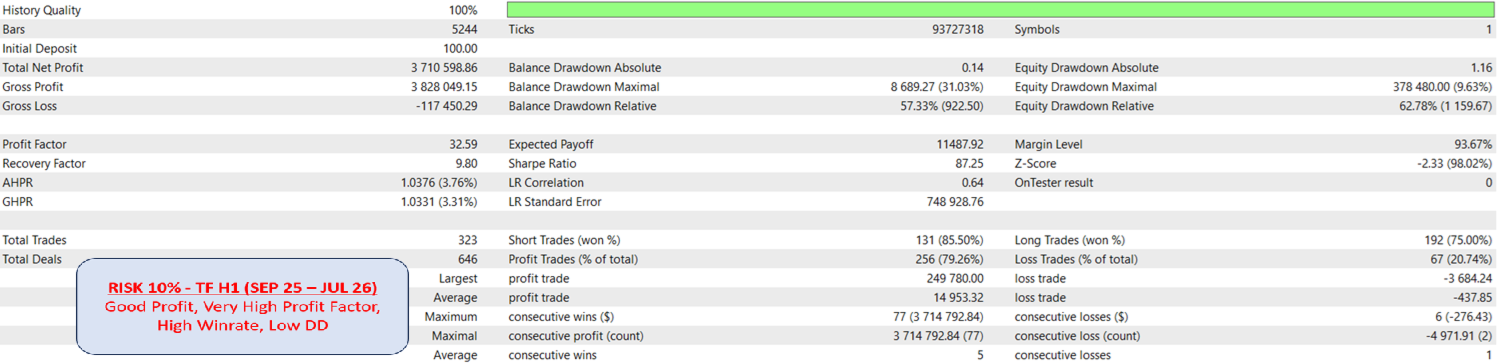
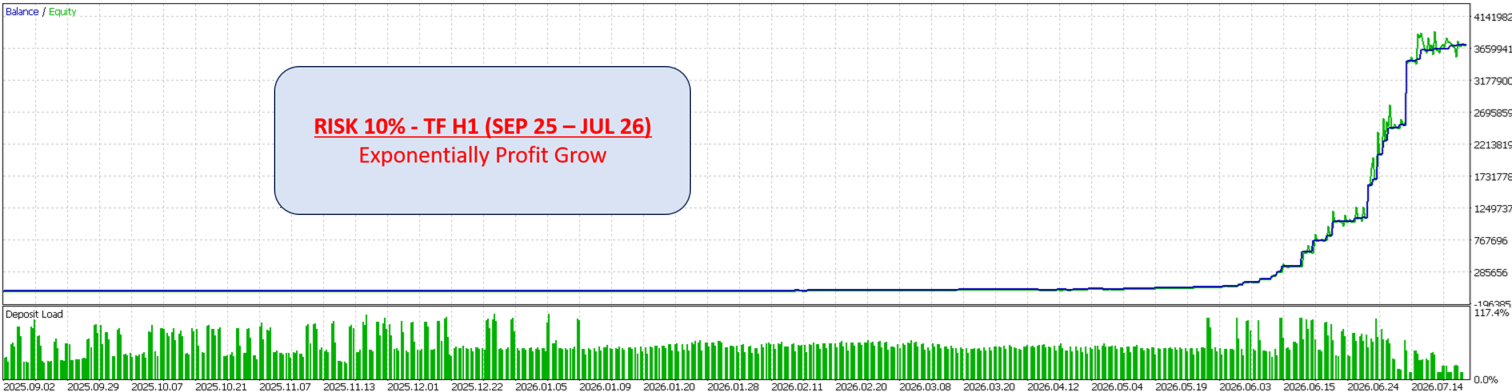
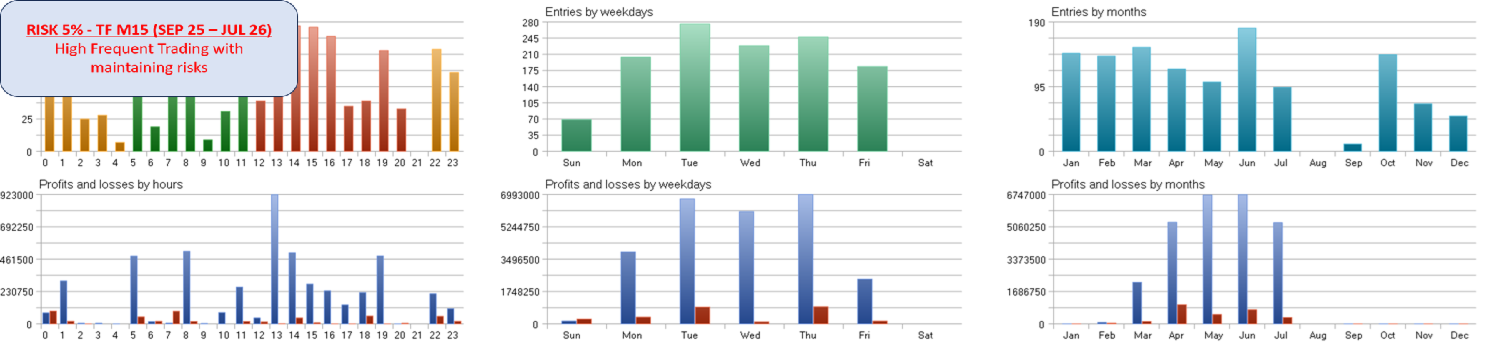
Since September 2025, gold has been on a historic climb — pushing to new highs with wider daily ranges, faster spikes, and far more volatility than the slow-grinding gold market traders were used to for years. That's a double-edged sword: bigger moves mean bigger opportunity, but also bigger risk for anyone trading it manually or with a strategy that isn't built for this kind of market.
When price is repeatedly slamming into fresh highs and lows, breakout trading is one of the most natural strategies to exploit that behavior — but it's also the strategy most punished by fake breakouts, where price pierces a level just far enough to trigger orders, then snaps back and stops everyone out.
GOLD CLEAVE EA was built specifically for this environment: a pure, disciplined breakout system for XAUUSD, engineered with a false-breakout defense layer that most retail breakout EAs simply don't have.
The Strategy — Pure Breakout, Nothing Else
GOLD CLEAVE EA trades one strategy, done properly: it identifies the recent trading range, places orders to catch a genuine breakout of that range, and manages the trade from entry to exit. No indicator soup, no mixed signal systems, no strategy-hopping. Just breakout logic, refined.
Key Features
🛡️ Absorption Detection — Anti-Fake-Breakout Engine Breakout traders' biggest enemy is the false breakout: price tags the high or low, triggers a wave of orders, then reverses and takes everyone out. GOLD CLEAVE EA runs a dedicated absorption detection layer that reads buy/sell power before price fully commits to a breakout. When it senses the move is being absorbed rather than driven through, it flags an early reversal warning — and automatically cancels pending orders before they can fill on a trap.
⏱️ Early Breakout Detection The EA doesn't wait passively for price to hit the exact high/low. It can pre-position ahead of the level, so genuine breakouts are caught earlier instead of chasing price after the move has already run.
🕒 Extensive Time Filter Full daily scheduling, independently configurable for every day of the week, with two modes:
- Allow mode — only trade inside your defined windows
- Avoid mode — trade anytime except your defined windows
💾 Time Filter Save & Restore Most EAs simply discard a signal if it happens during a blocked trading window. GOLD CLEAVE EA doesn't throw it away — it remembers the signal, and once your trading schedule allows trading again, it restores and places the trade (as long as price hasn't moved too far from the original level, keeping the entry realistic).
🛑 Stop Loss on Every Trade No trade is ever left unprotected. Every position opens with a hard Stop Loss.
🎯 Take Profit, Trailing Stop & Break-Even Profit isn't just targeted — it's actively defended. Fixed TP, a configurable trailing stop, and a break-even mechanic work together to lock in gains as the trade develops in your favor.
🚫 No Martingale. No Grid. Ever. Every trade is sized independently. No averaging down, no lot multiplication, no recovery grids. What you see in the settings is the actual risk per trade — nothing hidden behind a "recovery mechanism."
🚫 No AI, No Black Box Every rule in this EA is transparent, deterministic breakout logic — not an opaque model making unexplainable decisions with your money.
⚖️ Flexible Risk Management Trade with a fixed lot, a $-per-0.01-lot scaling model, or a percentage-of-balance risk model — plus a hard cap on the maximum number of concurrent pending orders.
⚙️ Optimized Default Settings Ships with a tested, sensible default configuration so you're not starting from zero — while every input remains fully adjustable for your own risk profile and broker conditions.
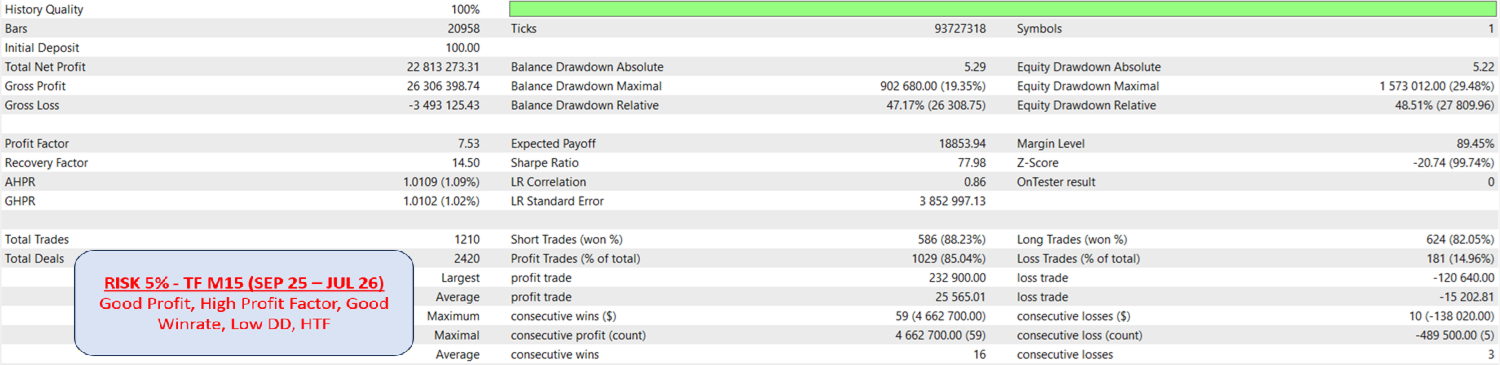
⏰ Timeframe Primary design and testing target is H1 on XAUUSD. The breakout engine also adapts to M15/M30 for traders who want a faster cadence.
Input Parameters
| Input | Description |
|---|---|
| General | |
| Enabled EA for Trading | Master switch. When off, the EA runs (monitoring, drawing, logging) but will never open or place new trades. |
| EA Magic Number | Unique ID stamped on every order this EA places, so it never interferes with manual trades or other EAs on the same account. |
| EA Comment | Custom text label attached to every order, visible in your trade history and terminal for easy identification. |
| Lot & Risk Management | |
| Lot mode | Choose how position size is calculated: Fixed Lot, $ per 0.01 Lot, or Risk % of Balance. |
| Fixed lot | The exact lot size used for every trade when Lot Mode is set to Fixed. |
| $ per 0.01 lot | Account currency amount that corresponds to 0.01 lot; position size scales automatically as your balance grows or shrinks. |
| Risk % of balance | Percentage of your account balance risked per trade; lot size is calculated automatically from your Stop Loss distance. |
| Max pending orders | The maximum number of pending orders the EA is allowed to have open at once, capping total market exposure. |
| Trade Exit Management | |
| TP in pips | Take Profit distance, set in pips from entry price. |
| SL in pips | Stop Loss distance, set in pips from entry price. |
| Enable trailing | Turns the trailing stop feature on or off. |
| Trail distance (pips) | The distance, in pips, maintained between current price and the trailing Stop Loss. |
| Trail step (pips) | The minimum price movement, in pips, required before the trailing stop advances again. |
| Enable break-even | Turns the break-even feature on or off. |
| Profit to activate BE (pips) | How many pips of floating profit are required before the Stop Loss is moved to break-even. |
| Extra buffer above BE (pips) | Additional pips added beyond the entry price when moving to break-even, locking in a small guaranteed profit instead of a flat break-even. |
| Breakout Engine | |
| Opening Mode: Aggressive / Conservative | Aggressive enters earlier on developing breakout signals for better entry price; Conservative waits for stronger confirmation before committing, trading fewer but higher-conviction setups. |
| Bars lookback for Breakout | Number of recent bars scanned to calculate the current breakout range (high/low). |
| Range Order before Breakout in Pips | Places pending orders a set number of pips before the actual breakout level, so entries are captured earlier instead of exactly at the level. Set to 0 to place orders exactly at the range boundary. |
| Expired Pending Order in Minutes | Automatically cancels a pending order if it hasn't been filled within this many minutes. Set to 0 to disable expiry. |
| New Bar Setup for Open Pending Orders | Controls whether new pending orders are (re)placed only on the formation of a new bar, keeping order placement synced to a clean bar-by-bar cycle. |
| Use TP and SL Correction after position made | When a pending order activates into a live position, this re-anchors the Stop Loss and Take Profit to the actual fill price rather than the original pending price — correcting for slippage or gaps on fast breakout moves. |
| Volatility & Range Filters | |
| ATR period for Filter | The lookback period used to calculate ATR (Average True Range) for the volatility filter. |
| Min ATR as multiplier of price (result in pips) | The minimum volatility threshold, expressed as a multiplier of price and converted to pips, that must be present before the EA will trade — filters out dead, choppy conditions where breakouts are unreliable. |
| Enable range filter | Turns on a filter that avoids placing orders when the current range is too tight relative to your broker's minimum stop distance. |
| Approach zone: distance from closest stop (pips) | A safety buffer, in pips, kept from your broker's minimum stop level (Stop Level) to prevent order-rejection errors when placing or modifying orders. |
| Absorption Detection (False Breakout Filter) | |
| Absorption Indicator Period | Lookback period used by the absorption detection engine to measure buying/selling pressure |
| Absorption Minimum buy/sell power (0.00 – 1.00) | Sensitivity threshold for absorption detection. Higher values demand stronger evidence of absorption before the EA treats a breakout as suspect and cancels pending orders; lower values react sooner but more cautiously. |
| Virtual Order System | |
| Use virtual pending orders instead of broker pendings | Manages pending orders internally in the EA rather than sending them to the broker as real pending orders — reducing order clutter, avoiding broker-side pending-order limits, and enabling more flexible management. |
| Draw dashed entry lines for virtual orders | Displays the virtual pending order levels on your chart as dashed lines so you can visually track them even though they aren't live broker orders. |
| Time Filter | |
| Enable time filter | Turns the entire time filtering system on or off. |
| Mode: Avoid or Allow trading on schedule | Choose whether your configured schedule defines windows where trading is allowed, or windows where trading is avoided. |
| Allow trading on weekends (ignores schedule) | When enabled, overrides the daily schedule to permit trading on weekends regardless of other time filter settings. |
| Monday schedule (HH:MM–HH:MM) | Trading window (or blackout window, depending on Mode) for Monday, in broker server time. Multiple schedule comma separated (HH:MM–HH:MM,HH:MM–HH:MM) |
| Tuesday schedule (HH:MM–HH:MM) | Trading window for Tuesday. Multiple schedule comma separated (HH:MM–HH:MM,HH:MM–HH:MM) |
| Wednesday schedule (HH:MM–HH:MM) | Trading window for Wednesday. Multiple schedule comma separated (HH:MM–HH:MM,HH:MM–HH:MM) |
| Thursday schedule (HH:MM–HH:MM) | Trading window for Thursday. Multiple schedule comma separated (HH:MM–HH:MM,HH:MM–HH:MM) |
| Friday schedule (HH:MM–HH:MM) | Trading window for Friday. Multiple schedule comma separated (HH:MM–HH:MM,HH:MM–HH:MM) |
| Range of Deletion in pips | Used by the Time Filter Save & Restore feature: if price has moved further than this many pips from a saved signal by the time trading is allowed again, the saved signal is discarded instead of restored — keeping restored trades realistic instead of chasing stale levels. |