US100 Nasdaq EA

499.99 USD
Descargado demo:
500
Publicado:
24 noviembre 2024
Versión actual:
2.2
¿No ha encontrado el robot adecuado?
Encargue el suyo
en la bolsa Freelance.
Pasar a la bolsa
Encargue el suyo
en la bolsa Freelance.
Cómo comprar un robot comercial o indicador
Inicia el robot en el
hosting virtual
hosting virtual
Pruebe un indicador/robot comercial antes de comprarlo
¿Quieres ganar en el Market?
Cómo ofrecer un producto para que lo compren

Está perdiendo oportunidades comerciales:
- Aplicaciones de trading gratuitas
- 8 000+ señales para copiar
- Noticias económicas para analizar los mercados financieros
Registro
Entrada
Usted acepta la política del sitio web y las condiciones de uso
Si no tiene cuenta de usuario, regístrese
Increased the number of transactions. Transactions are divided into sectors, so you can select only certain ones, or use all of them.
For each trading mode separate signal are added on the EA's page for your reference
News mode (number 10): 10777
Increased the number of transactions (another sector has been added).
News mode (number 10): 10777
Fast Scalping : 11777,12777
Sample of Fast scalping deals on Darwinex zero (lot size is the default)
Also, a new signal on ICM has been added on the EA's page
Increased the number of transactions (another sector has been added).

The number of sectors has now increased to four. A new sector has been added with the name "fast Scalping2".
In version 1.4, sectors are described differently in the comments.
As fast scalping can produce different results in different brokers as a result of different executions, by default they are set to False
You may change them to True if you wish to try them.
The Fast Scalping 2 program offers more stable results across different brokers, though you can check them on one account or with a smaller lot size on the second chart.
To do so you can do this:
2 charts, one with Conservative + News= True
Fast scalping = False
and the 2nd chart
Conservative and News= False
Fast scalping or fast scalping 2 = true
No need to change magic numbers because different strategies have different magic numbers
In the new update 1.4 on the info panel also you can see your activated sectors
As an example, today's best signal was the first one that ended in profit. For that strategy, the average target is 12 USD for a 0.1 lot, but today it reached 11 and pulled back to close to around 6 USD for a 0.1 lot.
I would make these changes if I'm running US100 on several accounts. for better diversification, you can do this arrangement on one account and then compare it with another account running by default for several weeks or months to see which one works better.
Overall, US100 EA was positive today, with one news deal TP, and one conservative deal SL. The conservative deal was in profit of around 9 USD for 0.1 lot, but it didn't reach the minimum target. I'm running a cross-test with trailing TP on conservative as an additional option and if it works after some stress testing I'll include it in the EA.
I'm not a big fan of trailing especially in the Swing system. However, since some users like to cut the TP quickly, and most of the time deals go to the good profit I may add trailing as an option.
I'm also testing closing by time with half the target. Technically if it doesn't reach average TP after 50-60 minutes, it's better to close in profit
OK, Guys, a new update with some new features including "closing by time" was ready a couple of days ago. but I still wanted to give it more shot. I will run the previous version on some accounts because I believe Dec and Jan have been slower than other months and if we want to update EAs only based on one or two months' performance and temporary market conditions meaning that we don't feel confident about strategies in the long run. though what I'm doing now is only because of the users who gave me some feedback about trailing and ...
Update 1.6
New transaction categories have been added.

Some good info: the EA by default will be activated only with the 2 sections in the red.
News st is the same with the old version.
Conservative will use closing by time if the deal is in profit after 30 minutes. using trailing is still under testing and will be added after more tests in the next update (if it will be necessary)
Hyper News, (a new sector) is False by default. technically if you use Hyper news then no need to use News str. Hyper news will work with more news and will use closing by time.
Ultra-conservative: if you use Conservative then no need to use Ultra conservative because strategies in Ultra conservative is in Conservative. tough this sector doesn't use closing by time.
fast scalping= False by default. the same as the old version.
If you decide to put all 5 sectors to True make sure you lower the risk in the money management. I recommend using 100 or a bigger number. please remember that changing this item will lower your risk if your deposit is small.

2 new sectors with trailing added. by default Conservative+ News sector+ Scalping_Trailing_Conservative = True ( means activated) if you want to use only sectors with trailing then you have 2 new options in the new update. Scalping_Trailing_Conservative and Scalping_Trailing_Moderate. if you want to use only trailing sectors need to put them =True and change other sectors=False
These are 2 new sectors with trailing options.
This is how trailing works with US100 EA. I think many users who love trailing will be more than happy with that :) with my US100 EA most of the time we go in profit between 3 to 8 USD for 0.1 lot so entries are pretty good, just a temporary period with some False breakouts! recovery factor with my US100 EA Swing strategies are good, so just a few good deals can make it up.
However trailing is a kind of micro pips earning. When the Swing system doesn't work well in a tempo situation trailing can help. When swing systems go to a good period trailing will lower your profit. technically if you win 1 Swing deal it can recover 3 losing deals. but if your SL hit with trailing you may need 5 to 10 deals for recovering one losing deal. I would make a separate signal for the trailing sector. at least after 6 months to one year, we will see which sector will be a winner.
Enjoy :)
2024 until today with real tick. only 2 new trailing sectors =True
From today March 9th 2025 my last live signal on the EA's page will be switched to 2 trailing sectors as a reference for users
If someone wants to use only trailing, can use only 1 or both of them ! (other sectors should be False)
Scalping_Trailing_Moderate. it was the only deal we had today.
🚀 Upcoming Update for US100 – Probably Releasing Today!
Hey everyone! Just a quick update—I'm planning to release a new update for US100 today. 🎉
In this update, I’ve optimized the trailing option for news-based trades. Instead of having separate news sectors, I’ve combined them into a single setting: Scalping_Trailing_News. This change helps avoid potential issues for users with multiple sectors enabled, which could impact account margin and cause delays in order execution.
Recently, extreme market fear around Trump’s tariff policies has caused rapid direction changes in the index market. Since these shifts are driven by every single press release on tariffs, strategies with large take profits (like Swing) have been struggling. To adapt, using trailing-based strategies during this period will help maximize profits and minimize risks.
Additionally, since the three trailing sectors now have a broader working range, this update will also increase trading frequency—allowing us to capture more opportunities.
Since we no longer have separate news sectors in this update, I’ve also introduced two new monitoring signals:
✅ One using all three trailing options
✅ One using only Trailing Conservative
This will help in tracking performance under different conditions. Looking forward to hearing your feedback once the update is live! 🚀
This is how trailing worked on News today
Update 1.82

The news strategies have been modified.
To use only trailing sectors, please ensure you check the box as shown above. You can verify this selection on your info panel to confirm it's correctly applied. You have the flexibility to use one, two, or all three trailing sectors simultaneously.
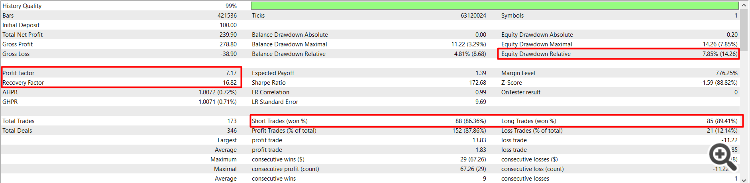
The backtest below demonstrates the performance when running all three trailing sectors together. If you prefer a more conservative approach, you can opt for Scalping_Trailing_Conservative to maintain a very low drawdown (DD).