Market State Intelligence PSAR Duo Drive
- Experts
- Version: 1.6
- Activations: 5

MSI-PSAR Duo-Drive
What It Is
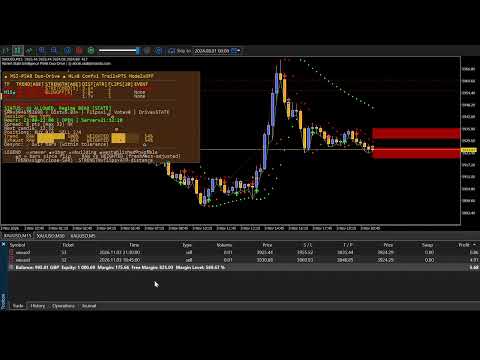
MSI-PSAR Duo-Drive is a trend-following expert advisor built around the Parabolic SAR, one of the oldest and most respected directional filters in technical analysis. It reads the flip, the exact bar where SAR changes sides, and turns that single, unambiguous event into a full trade-management framework. Direction, timing, and risk are all governed by the same signal. A panel on the chart tells you why it is, or is not, taking a trade at any given moment.
It does not guess. It does not predict. It waits for price to tell it the trend has turned, then acts.
Why a Flip, and Why This Flip
Parabolic SAR has one clean output: it is either below price or above it. The moment it crosses is a directional decision that is:
-
Objectively verifiable. No interpretation, no discretionary line-drawing.
-
Time-stamped to the bar. The flip has a bar and a price. Everyone looking at the same chart sees the same flip.
-
Flicker-free in this build. The EA reads the algorithmic direction buffer, not a live price-versus-SAR comparison, so the signal fires once and stays fired.
Most SAR traders either take every flip, which is too many and too noisy, or filter by eye, which is inconsistent. MSI-PSAR adds discipline by combining the flip with three independent confirmations:
-
Freshness. How recently the flip occurred. A flip from 2 bars ago carries more weight than one from 20 bars ago.
-
Choppiness. How many flips have happened recently. A market that has whipsawed 4 times in 20 bars is not a market to trust.
-
Distance. How far price has travelled from SAR, normalised by ATR so the number means the same on M5 and D1 (instrument agnostic).
Each contributes to a STRENGTH reading (CHOPPY, BUILDING, TRENDING, STRETCHED, BLOWOFF) that appears in the panel and drives both entry gating and confidence weighting. No single filter is definitive. The confluence is.
The Decision Hierarchy: How Confidence Rises
The EA uses a layered gate system. A trade is only opened if every active layer agrees, and the STRENGTH column visualises which layers are aligned.
Tier 1. The directional signal (mandatory). The base requirement differs by mode.
-
EVENT mode. The flip establishes the direction. The EA can attempt entry on the flip bar itself and, if UseFreshFlipEntry is enabled (default), on any bar within FreshFlipMaxBars of the flip provided gates align.
-
STATE mode. The SAR direction is the signal. A position can be opened on any bar where SAR remains aligned with the desired trade direction, provided the filters all allow it. The initial flip establishes the direction. Every subsequent bar confirms it.
Tier 2. Current-TF strength (default on). The flip must not have occurred during a chop period. If FLIPS[20] shows 3 or more recent reversals, entries are blocked. This is the single most effective filter for reducing whipsaws.
Tier 3. MTF consensus (optional, off by default). A three-row panel votes across upper TF, current TF, and lower TF. The user picks the strictness:
Each reference timeframe can be any standard custom value , ranging from M1 through MN1 while the current timeframe user trades on (shows TF★) can be any custom timeframes where available (e.g, H6).
Tier 4. Freshness and distance (optional). The user can require the flip to be within N bars.
Each layer that disagrees contributes a named reason to the STATUS line: "Flip age 12 > 8", "Choppy: 4 flips in 20 bars", "MTF vote neutral", and so on. The trader can see exactly which gate blocked a potential trade and adjust the inputs accordingly. There is no black box.
Two Modes, One Engine
EVENT mode. Fires on the flip bar and, by default, on any bar within FreshFlipMaxBars of the flip if gates align. Two attempts per flip, not one, is the default. The second attempt catches trades that were blocked on the flip bar by spread, session, or proximity gates. Set UseFreshFlipEntry = false if you want a strict one-shot-per-flip rule.
STATE mode. Persists direction. Every flip sets a regime that stays active until the next flip. The EA keeps entering while the regime holds, subject to a basket-breakeven rule: pyramiding is only allowed once the existing positions in that direction are at or above breakeven. This is the mode for traders who want to build exposure into a trend, but only after the first position has proven itself.
Both modes use identical gates, identical risk management, and identical panel. The only difference is entry cadence.
Risk Management: The Full Life Cycle
The trade is not managed by luck after it opens. Every position from entry to exit is governed.
-
Entry sizing. Fixed lots, risk-percent of balance, or equity-percent.
-
Entry timing. Bar-close evaluation. No intrabar stacking. The EA evaluates once per bar, using the previous closed bar's flip state.
-
Take profit and stop loss. Fixed points from entry, or disabled entirely for SAR-driven exits.
-
Breakeven. Optional. Moves the stop to entry once a user-defined fraction of TP is reached.
-
Trailing stop. Three choices via a single dropdown:
-
OFF. No trailing.
-
POINTS. Fixed distance from current price.
-
SAR. Trail at the last closed SAR value, flicker-free, activation driven by the flip itself rather than an arbitrary profit threshold.
-
-
Partial close. Optional scale-out at a percentage of TP or fixed points, reducing exposure as the trade matures.
-
Entry spacing. A minimum distance between same-direction entries, with visual gap zones drawn on the chart. Prevents clustering entries at the same price during volatile chop.
-
Flip exits. An opposite flip closes the position. Two flavours via a single input
-
Flip exits fire regardless of P&L. If the flip is a reversal, the EA evaluates the reversal as a fresh entry through every gate OR
-
Flip exits only fire on profitable positions. Losing trades are held until the flip becomes profitable or the stop hits.
-
-
Manual trade adoption. Set MagicNumber=0 and EA auto-manages all trades on the chart, even those user manually openned.
Configuration warning
If you disable the stop loss by setting StopLossPoints = 0 while leaving UseModeZ = false (2nd setting after DriveMode) , the panel header shows a warning: ⚠ SET SL! to remind user has no automatic exit until the next flip happens to catch it in profit. Either set a stop loss or enable UseModeZ to allow flip exits on losing positions.
Ease of Use: The Panel Is the Manual
The panel answers the trader's practical questions directly, in real time.
| Trader question | Where it is answered |
|---|---|
| Is there a trend? | TREND column. ▲ BULL or ▼ BEAR with bars-held count [Age] |
| How strong is it? | STRENGTH column. CHOPPY, BUILDING, TRENDING, STRETCHED, BLOWOFF |
| How far has price moved from SAR? | DIST[ATR] column. Normalised so 2.3× means the same across TFs |
| Is this market choppy or trending? | FLIPS[20] column. Raw flip count, colour-coded |
| What just happened? | EVENT column. Most recent flip, with age in bars |
| Are the timeframes aligned? | Alignment row. Full, partial, or divergent |
| Why didn't it take that trade? | STATUS line. Names the exact gate that blocked |
| What's happening right now? | Summary. Live SAR value, distance, flip count, vote |
| Is my broker or session interfering? | Session, hours, server clock, spread, countdown, positions |
The panel is on the main chart, styled with the same visual grammar as the on-chart SAR dots. Bull reads lime. Bear reads red. Choppy reads dim. Stretched and blowoff read orange. There is not much of a learning curve. A trader who knows SAR already knows what the panel means.
Minimal Configuration, Sensible Defaults
A trader drops the EA on a chart and it works immediately.
-
Drive mode: EVENT.
-
Entry signals: flip plus fresh flip. Two chances to catch the same trend.
-
Gates: chop filter on (the single biggest improvement over naive SAR). MTF filter off, to avoid over-filtering on first use.
-
Trailing: POINTS mode, 1000 points, activation 1500 points.
-
Lot sizing: 0.01 fixed.
-
Stop loss: 5000 points. Symmetric with the TP default, wide enough to be a real stop without being aggressive.
When UpperTF and LowerTF are left at PERIOD_CURRENT , the EA auto-derives them from the chart timeframe using the standard MT5 sequence (M1, M5,....,MN1): upper becomes two steps slower, lower becomes two steps faster.
A user who wants a more aggressive profile can request user manual for these settings opon purchase.
Trend-Friendly Settings
The EA supports patterns that make it easy to trade with the trend and stand aside in ranges.
One direction only. Setting MaxBuyPositions to 0 disables BUY entries entirely. The EA becomes SELL-only. Similarly, MaxSellPositions set to 0 makes it BUY-only. Useful for traders who want to align with a higher-TF bias manually and let the EA handle execution on the chart TF.
Basket BE pyramiding. In STATE mode, RequireBasketBEForPyramiding set to true means the EA will only add to a winning basket. It will not pyramid into a losing trend, no matter how strong the signal. The first position must reach breakeven before the second is opened. A defensive default that experienced trend traders often want. Users who want aggressive pyramiding can turn it off.
Consensus with self-weighting. Setting both UpperTF and LowerTF to the same value, for example both H4 while trading on H1, means H4's opinion counts twice in the vote. In 2OF3 mode, that makes H4 dominant. Preferred by traders who trust one specific reference timeframe above all others.
Discipline Over Prediction
The EA does not try to predict. It reacts, but reacts with discipline. Every entry is filtered, every exit is gated, every position can be trailed, and every decision is logged. The trader sees:
-
What is happening, via the panel columns
-
Why something did or did not happen, via the STATUS line
-
What the EA is doing about it, via the positions counter, zones, and trail behaviour
There is no hidden state, no black box, no "proprietary signal". The entire decision chain, from flip to chop filter to distance filter to freshness filter to MTF vote to caps to spacing to basket BE, is visible in the panel and reproducible from the code. If you do not like a decision, you can trace it to a specific gate and adjust that gate.
That is the value. Not prediction. Discipline, applied consistently, with every decision visible and every risk pre-managed.
What It Does Not Do
For honesty's sake.
-
It does not predict price direction beyond the flip.
-
It does not guarantee profit on any trade.
-
It does not self-tune the thresholds. Freshness half-life, choppiness cap, MTF vote mode, and distance gate thresholds are all user-set. They do not adapt to volatility or to recent performance.
-
It does not optimise parameters in the background. There is no walk-forward logic, no genetic search.
What it does do is apply a clear, testable rule set with total transparency, in a way that lets a trader with discipline and a tested configuration execute consistently, without the emotional wobble of discretionary entries, discretionary exits, and discretionary "one more trade".
A detailed product guide covering recommended settings by timeframe (M1 to M5 scalping, M15 to M30 intraday, H1 to H4 swing, D1 position), input reference, and troubleshooting is available on request after purchase.