Indicators: Pivot Lines TimeZone
Parameters
- DayStartHour - Hour of the day start time.
- PivotsBufers - Display Pivot levels by indicator buffers.
- MidpivotsBuffers - Display intermediate Pivot levels with indicator buffers.
- CamarillaBuffers - Display Camarilla levels with indicator buffers.
- PivotsLines - Display current Pivot levels with horizontal lines.
- MidpivotsLines - Display current intermediate Pivot levels with horizontal lines.
- CamarillaLines - Display current Camarilla levels with horizontal lines.
- AttachSundToMond - Attach Sunday bars to Monday bars
Interesting indicator, especially the settings where you can change the start time of the day. But when I change the start time of the day, it does not change the start of the day of Monday only, it remains at the terminal time, and all other days change normally. This problem is not solved in these settings - (AttachSundToMond - Attach Sunday bars to Monday).
It is necessary to add weekly and monthly settings of pivot levels, and, moreover, that they can be displayed on the chart one, two or all three at once, i.e. daily, weekly and monthly levels. There is such an indicator in the code base, but it lacks the setting of the beginning of the day and the lines are too bold, as well as weekly levels are displayed for 4 days, not 5 days.
Vertical lines connecting horizontal lines clog the chart. How can I get rid of them?
Thank you in advance.
Parameters
- DayStartHour - Hour of the day start time.
- PivotsBufers - Display Pivot levels by indicator buffers.
- MidpivotsBuffers - Display intermediate Pivot levels with indicator buffers.
- CamarillaBuffers - Display Camarilla levels with indicator buffers.
- PivotsLines - Display current Pivot levels with horizontal lines.
- MidpivotsLines - Display current intermediate Pivot levels with horizontal lines.
- CamarillaLines - Show current Camarilla levels with horizontal lines.
- AttachSundToMond - Attach Sunday bars to Monday bars
1. interesting indicator, especially the settings where you can change the start time of the day. But when I change the start time of the day, it does not change the start of the day only on Monday, it remains at the terminal time, and so all other days change normally. This problem is not solved in these settings - (AttachSundToMond - Attach Sunday bars to Monday).
2. It would be necessary to add weekly and monthly settings of pivot levels, and, moreover, that they can be displayed on the chart one, two or all three at once, i.e. daily, weekly and monthly levels. There is such an indicator in the code base, but it lacks the setting of the beginning of the day and the lines are too bold, as well as weekly levels are displayed for 4 days, not 5 days.
3. Vertical lines connecting horizontal lines clog the chart. How can I get rid of them?
Thank you in advance.
1. I'll deal with this sometime at my leisure....
2, 3 - with such questions and suggestions, please contact Work
...But when I change the start time of the day, the start of the day does not change only on Monday, it remains at the terminal time, and all other days change normally. This problem is not solved in these settings - (AttachSundToMond - Attach Sunday bars to Monday)....
Fixed, file updated.
How to Use Forex Yearly Pivot Points to Forecast Euro Targets (based on dailyfx article)
- Pivot points is a popular and easy way that traders can identify potential support and resistance
- Pivot points are based on a mathematical calculation that uses the previous high, low and close of a specified period; weekly, daily, monthly, yearly
- Yearly pivots can forecast maximum and minimum price extremes for the coming year as well as areas where price can change direction.
While most traders are familiar with daily, weekly, and even monthly pivots which fit their type of trading, yearly pivots can also be used to forecast future potential support and resistance areas. Buying at or near a significant area of support and selling at a key area of resistance is the main focus of any trader no matter what the market or the duration traded. Yearly pivots can be monitored for those key trading opportunities.
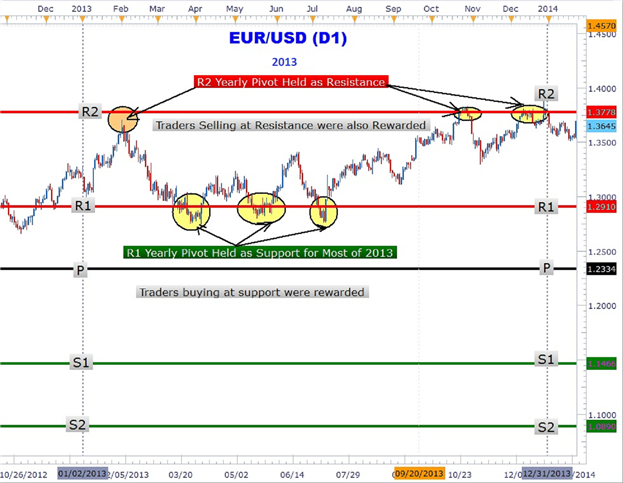
As you can clearly see in the Euro chart above, forex yearly pivots have been plotted. Notice how the Euro rallied up to the R2 pivot and turned around sharply falling over 600 pips in February. Another significant area that can be easily seen showing the power of yearly pivots is the triple touch of the R1 yearly pivot at 1.2910. The third and final touch led to over a 600-pip rally back to the R2 yearly pivot to close out 2013 up over 4%.
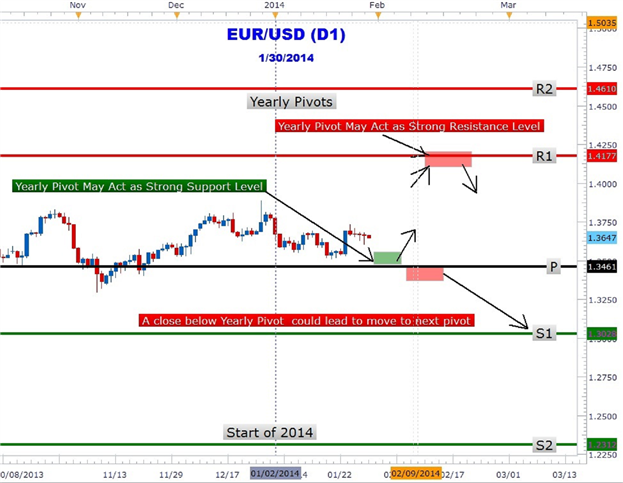
Could forex yearly pivots show traders the next move in the Euro? In the chart above the 2014 yearly pivots are plotted on the EURUSD chart. The year is just getting started and the great thing about yearly pivots is only having to draw them once a year! EURUSD is trapped between the central pivot at 1.3461 and R1 at 1.4177. As at the time of this writing, the Euro has not tested either pivot. However, forex traders may be waiting for a move down to the central pivot (1.3461) for a move back toward the R1 (1.4177) yearly pivot resistance.
Alternative scenario is for the Euro to make an immediate run for it up to the R1 level. At R1 pivot resistance, traders may look to take profit on their longs and/or short the Euro at this level. However, a close above R1 could lead to a move higher to the R2 pivot (1.4610). Traders should also consider the possibility of a close below the central pivot that could lead to a prolonged down push to the S1 (1.3028) level.
Forex traders who scalpers, position or swing traders can make use of yearly pivots to locate key areas of support and resistance. Look for future articles on other currency pairs that lay out the yearly pivot ‘landscape’ to help you navigate the forex market.
joining the Saturday night session to the Monday night session does not work

- Free trading apps
- Over 8,000 signals for copying
- Economic news for exploring financial markets
You agree to website policy and terms of use
Pivot Lines TimeZone:
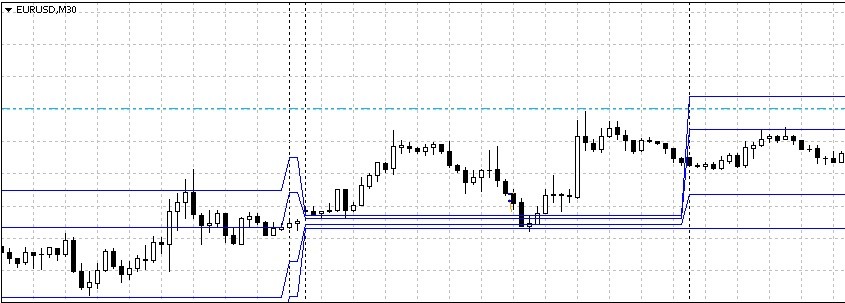
The Pivot levels indicator, the Pivot sublevels and the Camarilla levels showing indicator buffers and horizontal lines.
Placing levels by horizontal lines.
Author: Дмитрий