
You are missing trading opportunities:
- Free trading apps
- Over 8,000 signals for copying
- Economic news for exploring financial markets
Registration
Log in
You agree to website policy and terms of use
If you do not have an account, please register
anyone find a solution for this problem? Me too i can't see my purchased product....
Forum on trading, automated trading systems and testing trading strategies
Unable to install purchased EA in MT4
Sergey Golubev, 2018.08.20 07:23
If you are on Windows (because Linux and Mac does not work with the Market) - use the following threads/pages for more information:
----------------
Where can I see my purchases?
https://www.mql5.com/en/forum/9950/page70#comment_2564931
How to Install an Earlier Purchased Application
https://www.metatrader5.com/en/terminal/help/market_buy
Market Tab Error, show a blank page and missing option
https://www.mql5.com/en/forum/170760
Try this:
Add https://*.mql5.com address to Trusted Sites in Internet Explorer and set the lowest security level for this zone.
then try next:
1. File - Open Data Folder. Click on Terminal - Community.
2. Please close the terminal.
3. Delete all *.dat files from C:\Users\%USERNAME%\AppData\Roaming\MetaQuotes\Terminal\Community\ folder.
4. Start the terminal and try once again.
Open data folder and go to Terminal folder:
If you couldn't find Community\folder or look like below attached screenshot:
Please uninstall ALL your MT4, delete ALL the MetaQuotes files, then reinstall it till you see the folder.
Hope this help!
Try this:
Add https://*.mql5.com address to Trusted Sites in Internet Explorer and set the lowest security level for this zone.
then try next:
1. File - Open Data Folder. Click on Terminal - Community.
2. Please close the terminal.
3. Delete all *.dat files from C:\Users\%USERNAME%\AppData\Roaming\MetaQuotes\Terminal\Community\ folder.
4. Start the terminal and try once again.
Open data folder and go to Terminal folder:
If you couldn't find Community\folder or look like below attached screenshot:
Please uninstall ALL your MT4, delete ALL the MetaQuotes files, then reinstall it till you see the folder.
Hope this help!
yes
it works, saved me some headache
Try this:
Add https://*.mql5.com address to Trusted Sites in Internet Explorer and set the lowest security level for this zone.
then try next:
1. File - Open Data Folder. Click on Terminal - Community.
2. Please close the terminal.
3. Delete all *.dat files from C:\Users\%USERNAME%\AppData\Roaming\MetaQuotes\Terminal\Community\ folder.
4. Start the terminal and try once again.
Open data folder and go to Terminal folder:
If you couldn't find Community\folder or look like below attached screenshot:
Please uninstall ALL your MT4, delete ALL the MetaQuotes files, then reinstall it till you see the folder.
Hope this help!
I don't understand these instructions. I don't use Internet Explorer, I use Chrome. How can it be done on Chrome?
It was working fine yesterday and suddendly now I have lost access on 2 different computers at the same time.
How could it be related to the browser?
I don't understand these instructions. I don't use Internet Explorer, I use Chrome. How can it be done on Chrome?
It was working fine yesterday and suddendly now I have lost access on 2 different computers at the same time.
How could it be related to the browser?
I figured out how to do it on Chrome but it was not working.
It changed nothing.
The only way I could fix it was to exit from MT4 and restart it.
For now I don't mind, I am only on a Demo account. But when I will be trading real money on MT4 this will not be really a good option.
Is there a better solution?
I have the feeling that my problem started when I was logged on 2 computers at the same time.
Is it permitted?
I don't understand these instructions. I don't use Internet Explorer, I use Chrome. How can it be done on Chrome?
It was working fine yesterday and suddendly now I have lost access on 2 different computers at the same time.
How could it be related to the browser?
I figured out how to do it on Chrome but it was not working.
It changed nothing.
The only way I could fix it was to exit from MT4 and restart it.
For now I don't mind, I am only on a Demo account. But when I will be trading real money on MT4 this will not be really a good option.
Is there a better solution?
I have the feeling that my problem started when I was logged on 2 computers at the same time.
Is it permitted?
Did it update in between restarts (did you notice any prompt to update?)
You can have as many terminals as you like .
Location should be a concern for this forum account if you have ip binding.
Also , for a real trading account you must read your brokers terms for being logged in from 2 separate locations
And , computers (amount of unique ones used), should be a concern when you are using a paid tool from the market (activations)
Try this:
Add https://*.mql5.com address to Trusted Sites in Internet Explorer and set the lowest security level for this zone.
then try next:
1. File - Open Data Folder. Click on Terminal - Community.
2. Please close the terminal.
3. Delete all *.dat files from C:\Users\%USERNAME%\AppData\Roaming\MetaQuotes\Terminal\Community\ folder.
4. Start the terminal and try once again.
Open data folder and go to Terminal folder:
If you couldn't find Community\folder or look like below attached screenshot:
Please uninstall ALL your MT4, delete ALL the MetaQuotes files, then reinstall it till you see the folder.
Hope this help!
Thanks for this it really helped>
Forum on trading, automated trading systems and testing trading strategies
How to Start with Metatrader 5
Sergey Golubev, 2019.10.10 10:48
I just discovered about how to fix it:
go to the Journal in Metatrader to see the recommendation:
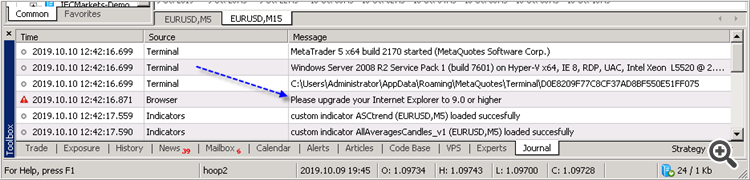
And I use this link to install the latest Internet Explorer:
https://www.microsoft.com/en-us/download/internet-explorer-11-for-windows-7-details.aspx
and I got the Market tab -
----------------
So, if you do not see the Market tab on the latest build of Metatrader (or if you are having the error with this Market tab for example) - install (or re-install) Internet Explorer to the latest version (to the version 11 for example).