MT5 Builds 5833 and 5836 - unable to sort chart template names
I seem to recall having been able to right click on a chart, select Templates, and then click-hold-and-drag a template name up or down for the purpose of manually sorting the names. As referenced in the subject of this thread, I'm no longer able to do so in MT5 Build 5833 nor 5836 with or without holding Ctrl. The templates folder is already sorted alphabetically. A few questions:
- Did this feature ever actually exist or am I mistaken?
- Can anyone currently using previous Builds sort like so?
I have no idea what you are talking about.
Within the following MT5 terminal menu, template names were manually sortable by way of click-hold-and-drag:
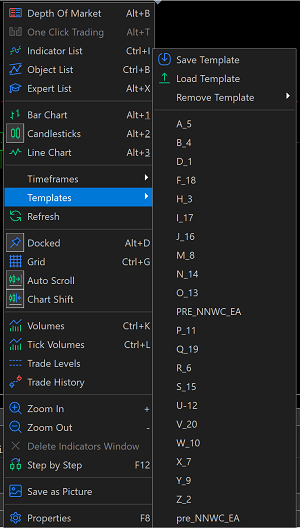
I have deduced by way of testing that the menu is currently auto-alphabetized, but the menu also relegates template names having lower case first characters to the bottom of the list─in contrast to the Templates folder.
And course, the template names are currently immovable─in contrast to the Templates folder.
Within the following MT5 terminal menu, template names were manually sortable by way of click-hold-and-drag:
I have deduced by way of testing that the menu is currently auto-alphabetized, but the menu also relegates template names having lower case first characters to the bottom of the list─in contrast to the Templates folder.
And course, the template names are currently immovable─in contrast to the Templates folder.
could it be that the bottom template is just the template that you just then, made? ie, is the order the same when you restart mt5?
I actually did extensive testing with multiple folder renames, folder recreations, and MT5 restarts. As best as I can tell, alphabetical auto-sorting always puts caps atop. The numbers in the file names in my previously posted image represent the order in time, respectively, that each template was saved. The "PRE" and "pre" prefixed names were saved last.
The end result that I personally desired was achieved by simply capitalizing the first character of each template file name─I just want to sort A to Z.
Forum on trading, automated trading systems and testing trading strategies
Ryan L Johnson, 2026.05.16 22:26
That problem has been frequently reported in the Forum for years. Here's one example thread:
Interestingly, I had a similar issue when testing a custom symbol, M1 timeframe chart. The Tester Journal repeatedly showed that an erroneous settings txt file was being called despite me having previously deleted it. My trial and error deduced solution was to close the custom chart, delete the custom symbol, restart MT5, regenerate the custom chart, and retest. I can only guess that my overall setup is a bit burdensome on MT5 because my CPU usage remained between 1% and 3%. It seemed that somehow the old backtest settings were hitched to the custom symbol somehow. Totally bizarre.
I should note that this is in MT5 Release Build 5833. I also get double instances of indicators attached to a chart when I load a chart template that includes an instance of an EA that uses iCustom() and ChartIndicatorAdd(). This is not happening in MT5 Beta Build 5836. I even tried copying a template file from Beta to Release─same result. Again, this is on a custom symbol so who knows...

- Free trading apps
- Over 8,000 signals for copying
- Economic news for exploring financial markets
You agree to website policy and terms of use
I seem to recall having been able to right click on a chart, select Templates, and then click-hold-and-drag a template name up or down for the purpose of manually sorting the names. As referenced in the subject of this thread, I'm no longer able to do so in MT5 Build 5833 nor 5836 with or without holding Ctrl. The templates folder is already sorted alphabetically. A few questions: