[BUG]latest version 5572 ,terminal freeze when font dont support
guys you can try to add Marketprofile indicator to your chart and see what will happen
my chart here immediately feezes af after i add this indicator . something WRONG with this new version.
Please check these BUGs and MMGA^_^
The truth is not only about chinese font name. using default font, Trebuchet MS, or Arial, will also have poor performance
The Chinese font name will only make the terminal process die
Bug occured when i update terminal , seems not my PC problem
Win11 24H2
windows language 中文
language for non-Unicode programs: English
Could you provide me such a Chinese font so I could try it and report this issue to MetaQuotes with a clear way to reproduce it ?
Could you provide me such a Chinese font so I could try it and report this issue to MetaQuotes with a clear way to reproduce it ?
Sure thing.
The attached file contains a well-known open-source Chinese font, used by many self-media outlets. It's called "得意黑" in Chinese and "Smiley Sans Oblique" in English.
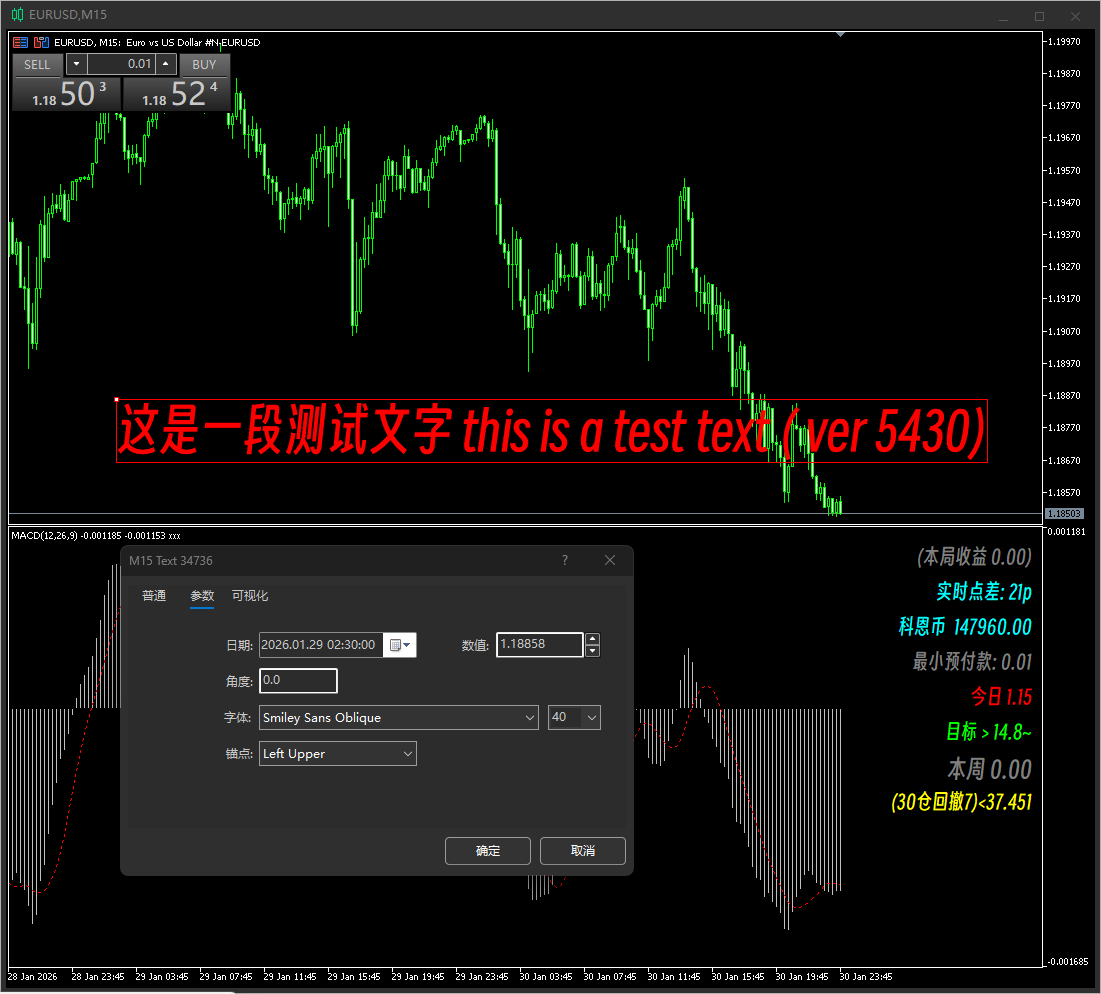
Figure 1 shows my code written on the privious terminal.
         ObjectCreate ( 0 , currentLabel, OBJ_LABEL , 0 , 0 , 0 );
       ObjectSetInteger ( 0 , currentLabel, OBJPROP_CORNER , 3 );
       ObjectSetInteger ( 0 , currentLabel, OBJPROP_XDISTANCE , 10 );
       ObjectSetInteger ( 0 , currentLabel, OBJPROP_YDISTANCE , ydistance);
       ObjectSetInteger ( 0 , currentLabel, OBJPROP_COLOR , clrGray );
       ObjectSetInteger ( 0 , currentLabel, OBJPROP_FONTSIZE , 15 );
       ObjectSetInteger ( 0 , currentLabel, OBJPROP_BACK , false );
       ObjectSetString ( 0 , currentLabel, OBJPROP_TEXT , lines[i]);
       ObjectSetString ( 0 , currentLabel, OBJPROP_FONT , "得意黑" );
My computer uses a non-Unicode program with English as the language. The font name in the text label dropdown menu is Smiley Sans Oblique, and the text label displays correctly. I also entered the font's Chinese name in the indicator, and the indicator still displays correctly.
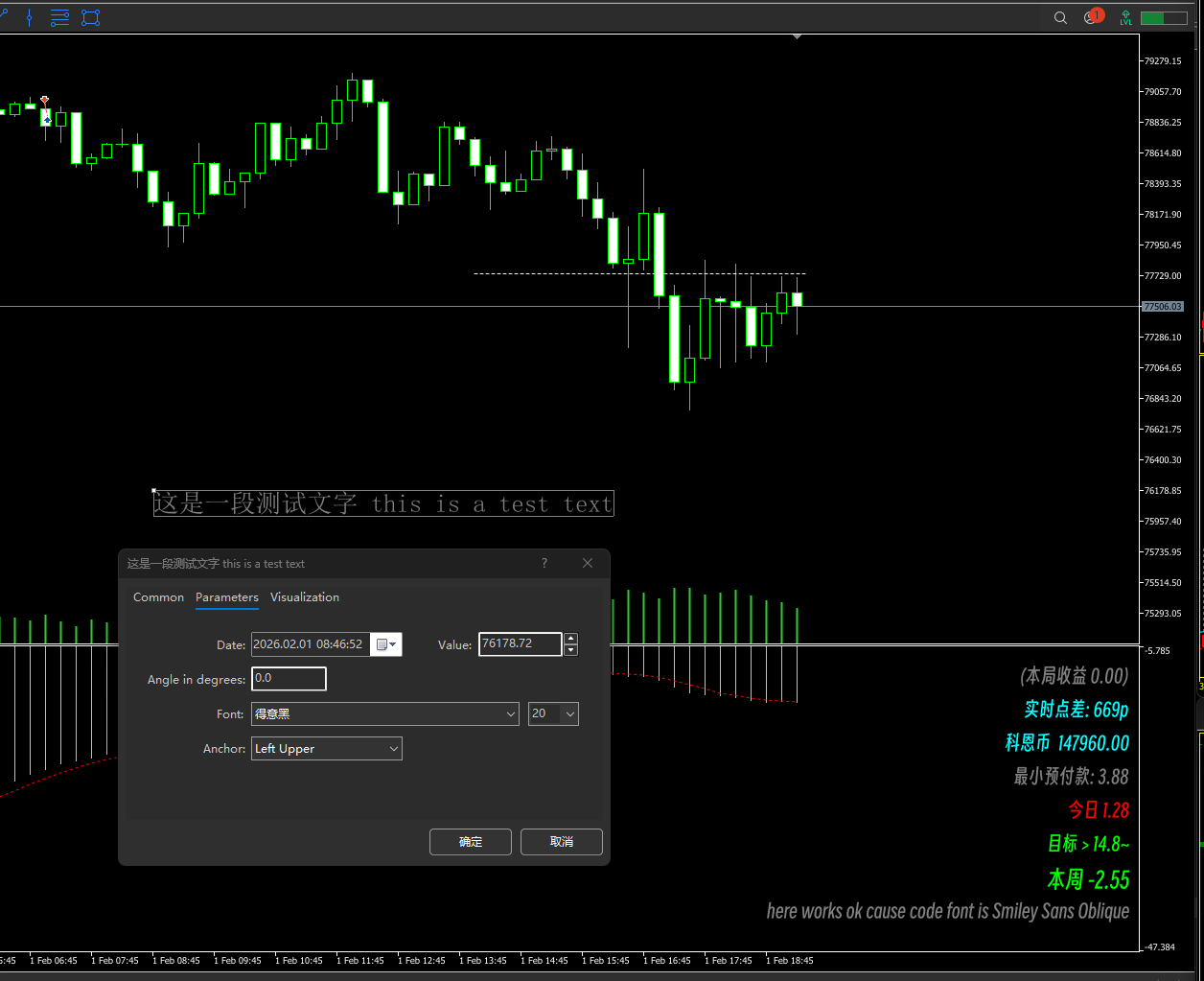
In Figure 2, I changed the computer's non-Unicode program language back to Chinese, which I used normally. The text label dropdown menu showed "得意黑" (De Yi Hei), but selecting it didn't display the font correctly. The indicators displayed correctly because the code was written like this:
         ObjectCreate ( 0 , currentLabel, OBJ_LABEL , 0 , 0 , 0 );
       ObjectSetInteger ( 0 , currentLabel, OBJPROP_CORNER , 3 );
       ObjectSetInteger ( 0 , currentLabel, OBJPROP_XDISTANCE , 10 );
       ObjectSetInteger ( 0 , currentLabel, OBJPROP_YDISTANCE , ydistance);
       ObjectSetInteger ( 0 , currentLabel, OBJPROP_COLOR , clrGray );
       ObjectSetInteger ( 0 , currentLabel, OBJPROP_FONTSIZE , 15 );
       ObjectSetInteger ( 0 , currentLabel, OBJPROP_BACK , false );
       ObjectSetString ( 0 , currentLabel, OBJPROP_TEXT , lines[i]);
       ObjectSetString ( 0 , currentLabel, OBJPROP_FONT , " Smiley Sans Oblique " );
If I change the code like this:
ObjectSetString ( 0 , currentLabel, OBJPROP_FONT , "得意黑" );
The terminal will then completely freeze AF !!!!!!!!!
So do you understand the problem? The current version has serious language encoding issues.
Additional problem, its the terminal indicator marketprofile. Also its a encoding issue cause this indicator use a lot of Symbols
my chart here immediately feezes af after i add this indicator ,no matter what non-Unicode program language i chose.
Sure thing.
The attached file contains a well-known open-source Chinese font, used by many self-media outlets. It's called "得意黑" in Chinese and "Smiley Sans Oblique" in English.
Figure 1 shows my code written on the privious terminal.
My computer uses a non-Unicode program with English as the language. The font name in the text label dropdown menu is Smiley Sans Oblique, and the text label displays correctly. I also entered the font's Chinese name in the indicator, and the indicator still displays correctly.
In Figure 2, I changed the computer's non-Unicode program language back to Chinese, which I used normally. The text label dropdown menu showed "得意黑" (De Yi Hei), but selecting it didn't display the font correctly. The indicators displayed correctly because the code was written like this:
If I change the code like this:
The terminal will then completely freeze AF !!!!!!!!!
So do you understand the problem? The current version has serious language encoding issues.
Additional problem, its the terminal indicator marketprofile. Also its a encoding issue cause this indicator use a lot of Symbols
my chart here immediately feezes af after i add this indicator ,no matter what non-Unicode program language i chose.
//+------------------------------------------------------------------+
//|                                                ChineseCharEA.mq5 |
//|                                  Copyright 2025, MetaQuotes Ltd. |
//|                                             https://www.mql5.com |
//+------------------------------------------------------------------+
#property copyright "Copyright 2025, MetaQuotes Ltd."
#property link      "https://www.mql5.com"
#property version   "1.00"
//+------------------------------------------------------------------+
//| Expert initialization function                                   |
//+------------------------------------------------------------------+
int OnInit()
  {
//---

//---
   return(INIT_SUCCEEDED);
  }
//+------------------------------------------------------------------+
//| Expert deinitialization function                                 |
//+------------------------------------------------------------------+
void OnDeinit(const int reason)
  {
//---
   ObjectsDeleteAll(0);
  }
//+------------------------------------------------------------------+
//| Expert tick function                                             |
//+------------------------------------------------------------------+
void OnTick()
  {
//---
   MyButton("an8_t",CORNER_RIGHT_LOWER,"正常下单",clrWhite,clrOrange,90,90,80,28,"",15,0);
  }
//+------------------------------------------------------------------+
//|                                                                  |
//+------------------------------------------------------------------+
void MyButton(string b1,int sub_window,string nr,color c1,color c2,int x,int y,int w,int h,string fz,int fs,int st)
  {

   ObjectCreate(0,b1,OBJ_BUTTON,0,100,100);

   //ObjectSet(b1,OBJPROP_CORNER,sub_window);

   ObjectSetInteger(0,b1,OBJPROP_COLOR,c1);

   ObjectSetInteger(0,b1,OBJPROP_BGCOLOR,c2);

   ObjectSetInteger(0,b1,OBJPROP_XDISTANCE,x);

   ObjectSetInteger(0,b1,OBJPROP_YDISTANCE,y);

   ObjectSetInteger(0,b1,OBJPROP_XSIZE,w);

   ObjectSetInteger(0,b1,OBJPROP_YSIZE,h);

   ObjectSetString(0,b1,OBJPROP_FONT,fz);

   ObjectSetString(0,b1,OBJPROP_TEXT,nr);

   ObjectSetInteger(0,b1,OBJPROP_FONTSIZE,fs);

   ObjectSetInteger(0,b1,OBJPROP_SELECTABLE,st);

   //ObjectSet(b1,OBJPROP_ZORDER,0);

  }
//+------------------------------------------------------------------+
Hi admin, please attach this test ea on your chart the terminal will immediately freeze, thank you.

- Free trading apps
- Over 8,000 signals for copying
- Economic news for exploring financial markets
You agree to website policy and terms of use
Bug occured when i update terminal , seems not my PC problem
Win11 24H2
windows language 中文
language for non-Unicode programs: English