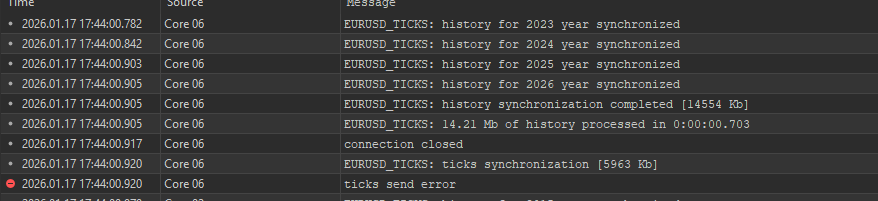
MT5 Build 5505 – Optimization fails on Custom Symbols - ticks send error / history synchronization interrupted

- How to Stop MT5 from downloading history data
- Error [Market Closed] when backtesting in MT5 on a custom symbol
- Cannot Synchronize history stops other agents
You'd have to post your EA code to get a 100% accurate answer.
Having said that, the general cause of your opening statement is failing to specify a separate tradable symbol (order handling) in the EA code where the EA is running on a custom symbol.
You'd have to post your EA code to get a 100% accurate answer.
What is needed is a way to reproduce it, not necessarily their advisor code. If it can be reproduced using MT5's built-in EA, great.
I don't have enough experience to try to reproduce this. Let's wait for someone more qualified in this matter...
Is this a known bug in Build 5505 affecting custom symbols optimization? Is there a workaround, or will it be fixed in an upcoming update?
Please provide the full log file, not screenshots.
Here is the log file
You'd have to post your EA code to get a 100% accurate answer.
Having said that, the general cause of your opening statement is failing to specify a separate tradable symbol (order handling) in the EA code where the EA is running on a custom symbol.
I know very well when an EA has a problem and when the terminal itself is causing it. This issue is clearly on MT5 Build 5505, not the EA.
Thanks!
This issue is a general issue on the Strategy Tester with recent beta 5505/5506, not related specifically to Custom symbols.
Confirmed and reported to MQ attention.
In the meantime you can downgrade to build 5430.
Forum on trading, automated trading systems and testing trading strategies
Alain Verleyen, 2025.12.16 22:54
In case you got an BETA update, for whatever reason, and you want to move to the last official release :
- A Telegram channel has been created, you will always find there the last official release needed exe files.
- MT5 Terminal is available in several versions according to your CPU capabilities. You can check which version you have to use in the Journal log, at the first entries after you started MT5.
 Here my version is AVX2, an other possibility is X64
- With this information you will know which zip file to download.

- You then just have to replace your current exe files with the ones from the Zip. If you don't know how to do, then doing this operation is probably not a good idea.
After MT5 is restarted, you will have the last official release.
If you don't want to get beta-build updates again :
- NEVER connect to MetaQuotes-Demo server.
- NEVER use MT5 Terminal Help menu=>Check for Updates=>Last Beta Version.
This issue is a general issue on the Strategy Tester with recent beta 5505/5506, not related specifically to Custom symbols.
Confirmed and reported to MQ attention.
In the meantime you can downgrade to build 5430.
Thank you so much for the help and confirmation, I really appreciate it.

- Free trading apps
- Over 8,000 signals for copying
- Economic news for exploring financial markets
You agree to website policy and terms of use