Strategy Tester (unexpected end of testing)
- Sending email notifications
- Questions about how to set up MetaTester 5 Agents Manager - MQL5 Cloud Network
- Forced test stop: TesterStop
While attempting to test my EA, this message keeps popping up and my test doesn't run. Ive attached an image of the errors, and spent time trying many things to fix it, but nothing seems to work. Thanks for the help
I see a history synchronization error.
Does your EA code incorporate multiple timeframes or multiple symbols?
While attempting to test my EA, this message keeps popping up and my test doesn't run. Ive attached an image of the errors, and spent time trying many things to fix it, but nothing seems to work. Thanks for the help
You will need to give more details :
- What build / OS... see https://www.mql5.com/en/forum/449342
- The "path" in your log is strange. Error 3 seems something related to it.
- What have you already tried ?

- 2023.06.20
- www.mql5.com
While attempting to test my EA, this message keeps popping up and my test doesn't run. Ive attached an image of the errors, and spent time trying many things to fix it, but nothing seems to work. Thanks for the help
I am facing the same issue, did you manage to find solution?
Following are the logs:
2026.01.17 12:03:25.956 XAUUSD: history synchronization started
2026.01.17 12:03:26.314 base file C:\Users\rohit\AppData\Roaming\MetaQuotes\Tester\D7ED78B5721D43771AFED1937E52A4FF\Agent-127.0.0.1-3000\..\bases\MetaQuotes-Demo\history\XAUUSD\2023.hcs open error [3]
2026.01.17 12:03:26.314 XAUUSD: history synchronization error [apply error]
2026.01.17 12:03:26.314 XAUUSD: load 6.63 Mb of history data to synchronize in 0:00:00.357
2026.01.17 12:03:26.314 XAUUSD: history synchronized from 2023.01.03 to 2023.12.29
2026.01.17 12:03:26.314 XAUUSD: history data load error
2026.01.17 12:03:26.315 XAUUSD: there is no history. Please make sure that XAUUSD history is available on the trade server
2026.01.17 12:03:26.315 cannot get history XAUUSD,M1
2026.01.17 12:03:26.315 log file "C:\Users\rohit\AppData\Roaming\MetaQuotes\Tester\D7ED78B5721D43771AFED1937E52A4FF\Agent-127.0.0.1-3000\logs\20260117.log" written
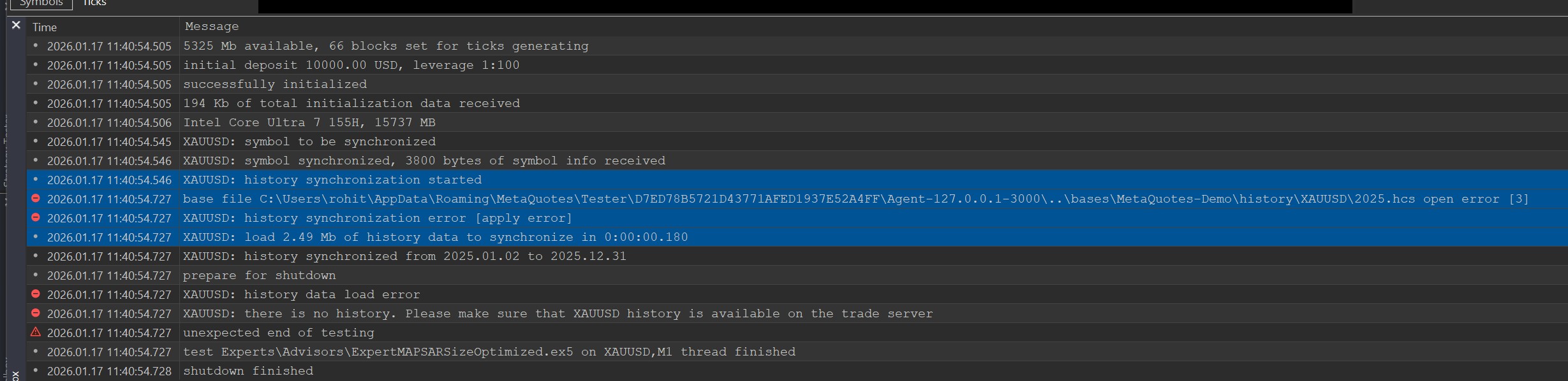

got the same problem. i can't run the test
i tried these:
1delete data.download again.
2reinsall the newest version
all failed.
My system is win11.
You will need to give more details :
- What build / OS... see https://www.mql5.com/en/forum/449342
- The "path" in your log is strange. Error 3 seems something related to it.
- What have you already tried ?
- I've reinstalled MT5, with all updates
- Checked to see that I have more than enough space in my device for any data
- Tried downloading the bar and tick data for the timeframe I wanted to test
- Deleted all vpns to prevent any blockage from that
- Attempted to run mt5 as administrator
- Tried mt5's built in strategies (didn't work)

Forum on trading, automated trading systems and testing trading strategies
Alain Verleyen, 2025.12.16 22:54
In case you got an BETA update, for whatever reason, and you want to move to the last official release :
- A Telegram channel has been created, you will always find there the last official release needed exe files.
- MT5 Terminal is available in several versions according to your CPU capabilities. You can check which version you have to use in the Journal log, at the first entries after you started MT5.
 Here my version is AVX2, an other possibility is X64
- With this information you will know which zip file to download.

- You then just have to replace your current exe files with the ones from the Zip. If you don't know how to do, then doing this operation is probably not a good idea.
After MT5 is restarted, you will have the last official release.
If you don't want to get beta-build updates again :
- NEVER connect to MetaQuotes-Demo server.
- NEVER use MT5 Terminal Help menu=>Check for Updates=>Last Beta Version.

- Free trading apps
- Over 8,000 signals for copying
- Economic news for exploring financial markets
You agree to website policy and terms of use