Visual regression in DRAW_COLOR_CANDLES rendering (Blend2D Anti-Aliasing artifacts)
Please check beta 5495.
If the problem is not fixed, please post the needed code to reproduce the issue.
Please check beta 5495.
If the problem is not fixed, please post the needed code to reproduce the issue.
Hi!
Even though this is not the subject... I just downloaded MT5 latest installer from its website and version 5495 is the one being installed, so it quite doesn't look like beta (and btw it's buggy ^^ which is why I'm back to the forum :D But I'll open a specific topic about my problem to discuss there)
Hi!
Even though this is not the subject... I just downloaded MT5 latest installer from its website and version 5495 is the one being installed, so it quite doesn't look like beta (and btw it's buggy ^^ which is why I'm back to the forum :D But I'll open a specific topic about my problem to discuss there)
5495 is the last beta.

- 2025.12.16
- www.mql5.com
Please check beta 5495.
If the problem is not fixed, please post the needed code to reproduce the issue.
The code snippets are from the Examples directory.
//+------------------------------------------------------------------+
//|                                                      ProjectName |
//|                                      Copyright 2020, CompanyName |
//|                                       http://www.companyname.net |
//+------------------------------------------------------------------+

//+------------------------------------------------------------------+
//|                                                  Heiken_Ashi.mq5 |
//|                             Copyright 2000-2026, MetaQuotes Ltd. |
//|                                                     www.mql5.com |
//+------------------------------------------------------------------+
#property copyright "Copyright 2000-2026, MetaQuotes Ltd."
#property link      "https://www.mql5.com"
//--- indicator settings
#property indicator_chart_window
#property indicator_buffers 5
#property indicator_plots   1
#property indicator_type1   DRAW_COLOR_CANDLES
#property indicator_color1  clrDodgerBlue,clrRed
#property indicator_label1  "Heiken Ashi Open;Heiken Ashi High;Heiken Ashi Low;Heiken Ashi Close"
//--- indicator buffers
double ExtOBuffer[];
double ExtHBuffer[];
double ExtLBuffer[];
double ExtCBuffer[];
double ExtColorBuffer[];
//+------------------------------------------------------------------+
//| Custom indicator initialization function                         |
//+------------------------------------------------------------------+
void OnInit()
  {
//--- indicator buffers mapping
   SetIndexBuffer(0,ExtOBuffer,INDICATOR_DATA);
   SetIndexBuffer(1,ExtHBuffer,INDICATOR_DATA);
   SetIndexBuffer(2,ExtLBuffer,INDICATOR_DATA);
   SetIndexBuffer(3,ExtCBuffer,INDICATOR_DATA);
   SetIndexBuffer(4,ExtColorBuffer,INDICATOR_COLOR_INDEX);
//---
   IndicatorSetInteger(INDICATOR_DIGITS,_Digits);
//--- sets first bar from what index will be drawn
   IndicatorSetString(INDICATOR_SHORTNAME,"Heiken Ashi");
//--- sets drawing line empty value
   PlotIndexSetDouble(0,PLOT_EMPTY_VALUE,0.0);
  }
//+------------------------------------------------------------------+
//| Heiken Ashi                                                      |
//+------------------------------------------------------------------+
int OnCalculate(const int rates_total,
                const int prev_calculated,
                const datetime &time[],
                const double &open[],
                const double &high[],
                const double &low[],
                const double &close[],
                const long &tick_volume[],
                const long &volume[],
                const int &spread[])
  {
   int start;
//--- preliminary calculations
   if(prev_calculated==0)
     {
      ExtLBuffer[0]=low[0];
      ExtHBuffer[0]=high[0];
      ExtOBuffer[0]=open[0];
      ExtCBuffer[0]=close[0];
      start=1;
     }
   else
      start=prev_calculated-1;

//--- the main loop of calculations
   for(int i=start; i<rates_total && !IsStopped(); i++)
     {
      double ha_open =(ExtOBuffer[i-1]+ExtCBuffer[i-1])/2;
      double ha_close=(open[i]+high[i]+low[i]+close[i])/4;
      double ha_high =MathMax(high[i],MathMax(ha_open,ha_close));
      double ha_low  =MathMin(low[i],MathMin(ha_open,ha_close));

      ExtLBuffer[i]=ha_low;
      ExtHBuffer[i]=ha_high;
      ExtOBuffer[i]=ha_open;
      ExtCBuffer[i]=ha_close;

      //--- set candle color
      if(ha_open<ha_close)
         ExtColorBuffer[i]=0.0; // set color DodgerBlue
      else
         ExtColorBuffer[i]=1.0; // set color Red
     }
//---
   return(rates_total);
  }
//+------------------------------------------------------------------+
//+------------------------------------------------------------------+
//|                                            ColorCandlesDaily.mq5 |
//|                             Copyright 2000-2026, MetaQuotes Ltd. |
//|                                                     www.mql5.com |
//+------------------------------------------------------------------+
#property copyright "Copyright 2000-2026, MetaQuotes Ltd."
#property link      "https://www.mql5.com"

#property indicator_separate_window
#property indicator_buffers 5
#property indicator_plots   1
//--- plot ColorCandles
#property indicator_type1   DRAW_COLOR_CANDLES
#property indicator_label1  "Open;High;Low;Close"
//--- indicator buffers
double ExtOpenBuffer[];
double ExtHighBuffer[];
double ExtLowBuffer[];
double ExtCloseBuffer[];
double ExtColorsBuffer[];
//---
color  ExtColorOfDay[6]= {clrNONE,clrMediumSlateBlue,clrDarkGoldenrod,clrForestGreen,clrBlueViolet,clrRed};
//+------------------------------------------------------------------+
//| Custom indicator initialization function                         |
//+------------------------------------------------------------------+
void OnInit()
  {
//--- indicator buffers mapping
   SetIndexBuffer(0,ExtOpenBuffer,INDICATOR_DATA);
   SetIndexBuffer(1,ExtHighBuffer,INDICATOR_DATA);
   SetIndexBuffer(2,ExtLowBuffer,INDICATOR_DATA);
   SetIndexBuffer(3,ExtCloseBuffer,INDICATOR_DATA);
   SetIndexBuffer(4,ExtColorsBuffer,INDICATOR_COLOR_INDEX);
//--- set number of colors in color buffer
   PlotIndexSetInteger(0,PLOT_COLOR_INDEXES,6);
//--- set colors for color buffer
   for(int i=1; i<6; i++)
      PlotIndexSetInteger(0,PLOT_LINE_COLOR,i,ExtColorOfDay[i]);
//--- set accuracy
   IndicatorSetInteger(INDICATOR_DIGITS,_Digits);
   PrintFormat("We have %i colors of days",PlotIndexGetInteger(0,PLOT_COLOR_INDEXES));
  }
//+------------------------------------------------------------------+
//| Custom indicator iteration function                              |
//+------------------------------------------------------------------+
int OnCalculate(const int rates_total,
                const int prev_calculated,
                const datetime &time[],
                const double &open[],
                const double &high[],
                const double &low[],
                const double &close[],
                const long &tick_volume[],
                const long &volume[],
                const int &spread[])
  {
   int         pos;
   MqlDateTime tstruct;
//---
   if(prev_calculated<1)
      pos=0;
   else
      pos=prev_calculated-1;
//--- main cycle
   for(int i=pos; i<rates_total && !IsStopped(); i++)
     {
      ExtOpenBuffer[i]=open[i];
      ExtHighBuffer[i]=high[i];
      ExtLowBuffer[i]=low[i];
      ExtCloseBuffer[i]=close[i];
      //--- set color for every candle
      TimeToStruct(time[i],tstruct);
      ExtColorsBuffer[i]=tstruct.day_of_week;
     }
//--- return value of prev_calculated for next call
   return(rates_total);
  }
//+------------------------------------------------------------------+

- Free trading apps
- Over 8,000 signals for copying
- Economic news for exploring financial markets
You agree to website policy and terms of use
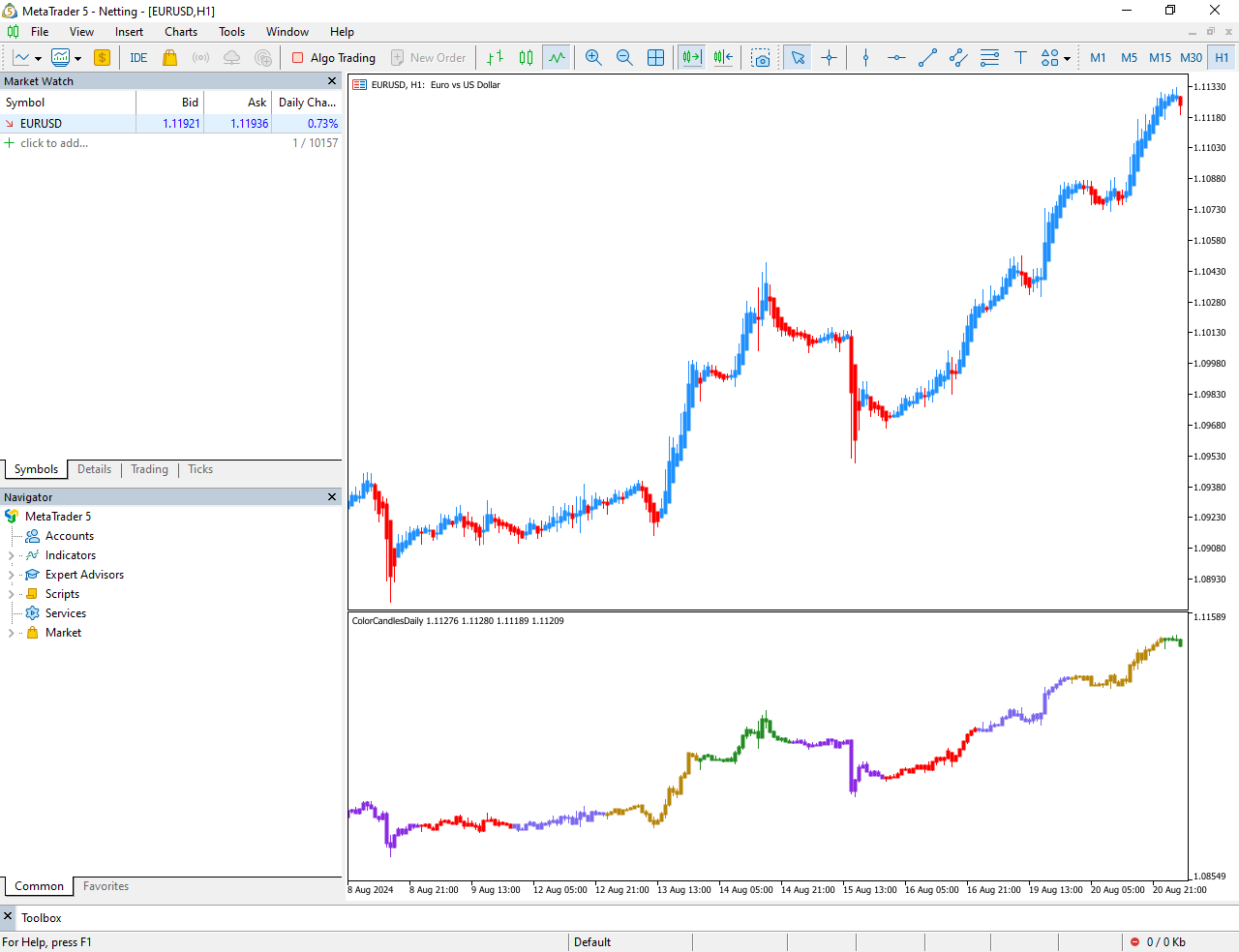
The Issue:
This "pixel bleeding" causes adjacent candles to visually merge into each other, especially on standard or lower zoom levels.