My MT5 VPS is not copying the Signal providers GBPUSD+ trades.
It is related to the mapping, and you do not need to ask the brokers about it.
For example:
-------------------------

- 2013.02.20
- www.mql5.com
Margin calculation can be found in the symbol's specification (right mouse click on the symbol in the Market Watch - Specification) -
-------------------
Example with margin calculatuon which is not firex:
Forum on trading, automated trading systems and testing trading strategies
MQL Uregent ATtention required
Sergey Golubev, 2023.02.27 15:08
Examples.
1. If I want to select the signal to subscribe, and signal provider is trading Gold (XAU/USD).
Well ... first of all - I will check margin calculation for Gold (XAU/USD):
right mouse click on XAU/USD in the Market Watch - Specification - and I see:
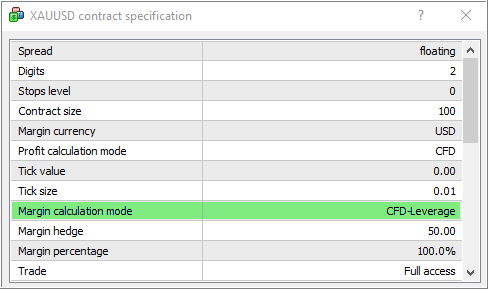
So, my broker provided margin calculation type/mode as CFD for this symbol, but I need to be Forex.
It means the following: if I subscribe to the signal traded Gold so I will have "no symbol found" issue and all trades for Gold will not be copied (according to the FAQ item 13).
-------------------
Example with margin calculation which is Forex:
Forum on trading, automated trading systems and testing trading strategies
MQL Uregent ATtention required
Sergey Golubev, 2023.02.27 15:14
Next example.
2. I select the signal, and the signal provider is traded AUD/USD.
I will check margin calculation for AUD/USD (right mouse click on XAU/USD in the Market Watch - Specification):
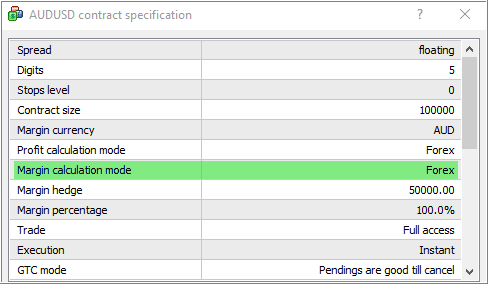
As I see - the broker made margin calculation mode/type for AUD/USD is Forex, and it is fine.
Next step - I will check about how many AUD/USD symbols proposed by broker for me.
If only one symbol (AUD/USD, or AUD/USDm or any but one AUDUSD only) - this symbol will be copied for me.
If more than one - not.
So, you can check it by yourself, and do not need to ask the broker for that.
Next step - how many GBPUSD symbols do you have? How many of the proposed by the broker?
If more than one so this symbol will not be copied, example:
Forum on trading, automated trading systems and testing trading strategies
MQL Uregent ATtention required
Sergey Golubev, 2023.02.27 15:25
3. Example with AUD/USD for one broker (Metatrader 5).
This broker (account) is proposing two symbols for AUD/USD.
Yes, margin calculation for both symbols are Forex.
But they are two ... and it means that if I subscribe to MT5 signal traded AUD/USD so I will not get trades: the trades for AUD/USD will not be copied for me.
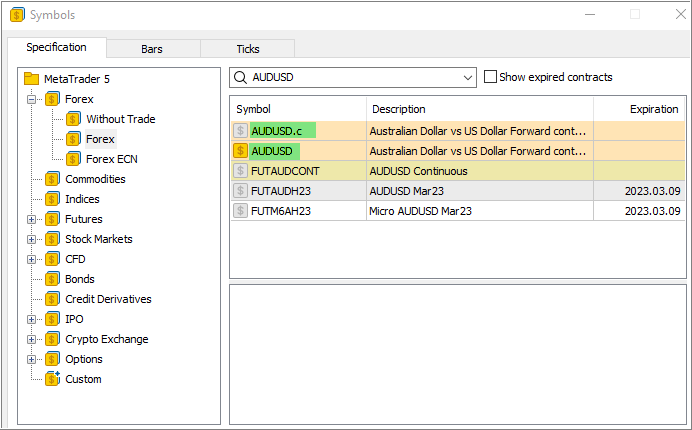
So, you can check it by yourself, and do not need to ask the broker for that.
Next step - how many GBPUSD symbols do you have? How many of the proposed by the broker?
If more than one so this symbol will not be copied, example:
I have 2 symbols for GBPUSD in MT5. The symbol ending with .PRO indicates the raw spread and preferred for trading this signal.
Please confirm... you're saying that even though the GBPUSD is hidden and not visible in the Market Watch section of MT5, having 2 symbols (GBPUSD and GBPUSD.PRO) is the cause of this signal not copying correctly and the "symbol not found" error.
The linked support forum article is 2 years old. When is the enhancement to enable mapping of signal symbols scheduled for development and rollout?

I have 2 symbols for GBPUSD in MT5. The symbol ending with .PRO indicates the raw spread and preferred for trading this signal.
Please confirm... you're saying that even though the GBPUSD is hidden and not visible in the Market Watch section of MT5, having 2 symbols (GBPUSD and GBPUSD.PRO) is the cause of this signal not copying correctly and the "symbol not found" error.
The linked support forum article is 2 years old. When is the enhancement to enable mapping of signal symbols scheduled for development and rollout?
You need to clear up with your broker which one of the 2 GBPUSD symbols is the enabled one for your trading account, they can't be both.
This happens, because you have logged into your trading account with a MT5 terminal that was used to log into another trading account before and symbols have been mixed.
This is why is highly advised to download and install the custom/branded MT5 terminal from your broker's website, each time you login into a different trading account.
Using the same MT5 terminal to login into multiple trading accounts from various brokers, causes such issues.
You need to clear up with your broker which one of the 2 GBPUSD symbols is the enabled one for your trading account, they can't be both.
This happens, because you have logged into your trading account with a MT5 terminal that was used to log into another trading account before and symbols have been mixed.
This is why is highly advised to download and install the custom/branded MT5 terminal from your broker's website, each time you login into a different trading account.
Using the same MT5 terminal to login into multiple trading accounts from various brokers, causes such issues.
I only have one broker. In this case my broker says nothing can be done about the way those symbols show up in my RAW spread .PRO account. The normal forex symbols is deactivated but is still visible. I will look into a non-raw account with my same broker and hopefully they don't show the deactivated .PRO raw account symbols.
Are you suggesting I run multiple installations of my brokers custom branded MT5? one for each trading account with the same broker?
have 2 symbols for GBPUSD in MT5. The symbol ending with .PRO indicates the raw spread and preferred for trading this signal.
Please confirm... you're saying that even though the GBPUSD is hidden and not visible in the Market Watch section of MT5, having 2 symbols (GBPUSD and GBPUSD.PRO) is the cause of this signal not copying correctly and the "symbol not found" error.
You can read it by yourself:
https://www.mql5.com/en/forum/10773#q13

- 2013.02.20
- www.mql5.com
I only have one broker. In this case my broker says nothing can be done about the way those symbols show up in my RAW spread .PRO account. The normal forex symbols is deactivated but is still visible. I will look into a non-raw account with my same broker and hopefully they don't show the deactivated .PRO raw account symbols.
Are you suggesting I run multiple installations of my brokers custom branded MT5? one for each trading account with the same broker?
It is not written about "hidden symbol" or "not hidden symbol". It is about what the broker proposes for trades. If the broker is proposing two symbols for GBPUSD so the trades for GBPUSD will not pass the mapping.
You can read it by yourself:
https://www.mql5.com/en/forum/10773#q13
The reason my account is not copying the GBPUSD signal is clear... its because my Raw spread "PRO" brokerage account displays the disabled standard forex symbols. 2 symbols = no match. Screenshot below clearly shows 2 of the same symbol for GBPUSD, even though 1 is disabled.
Disabled codes are not excluded as they are not part of the signal matching logic documented in forum /10773#q13. I would offer as an enhancement suggestion that the signal matching logic excludes disabled symbols (or... looks to find all possible matching 'symbols' and 'trade status' and matches based only one enabled symbol).
Through MT5 is it possible for me to control which Symbols are displayed in my brokers custom branded MT5? To be clear I'm asking if I can control this through MT5? My broker support ticket has already been submitted...I'm asking if I can control this through MT5 myself?


- Free trading apps
- Over 8,000 signals for copying
- Economic news for exploring financial markets
You agree to website policy and terms of use
According to MQL5 documentation ...forum/10773#q13 Question #13 says my MT5 should match
q13. 1. On the Subscriber's account, the system searches for all symbols with the names coinciding with the Provider's symbol by the first 6 characters. For example, EURUSD == EURUSDxxx == EURUSDyyy.
I verified: MT5 VPS is coping the signal symbol XAUUSD+ to XAUUSD.PRO. However, symbol GBPUSD+ is not found and matched to GBPUSD.PRO
q13. 2. Full permission to perform trading is checked for each detected symbol. If trading is allowed partially or completely forbidden, such a symbol is discarded.
I verified: My broker confirmed trading on GBPUSD.PRO is fully allowed and that is correct symbol that should be matched.
q13. 3. Margin calculation type is checked for each remaining symbol - if it is Forex, a symbol is considered to be suitable. Symbols of CFD, Futures or other calculation types are discarded.
I verified: Configuration is "Calculation = Forex"