How can I limit writing logs expert on MT5 ?
Manu Tabtim:
I’m using an EA developed by someone else, but the problem is it prints logs excessively, which makes my hard disk fill up very quickly.
Does MT5 have any function to limit log writing — like at least make it print on screen but not actually write to the HDD?
Enable auto-trading it will get better.
There is no point to let a trading EA running without permission to trade automatically.
Manu Tabtim:
Does MT5 have any function to limit log writing — like at least make it print on screen but not actually write to the HDD?
Delete this folder
MQL5\Logs
and create a zero-length file of the same name in its place.
Manu Tabtim: I’m using an EA developed by someone else, but the problem is it prints logs excessively, which makes my hard disk fill up very quickly. Does MT5 have any function to limit log writing — like at least make it print on screen but not actually write to the HDD?
MQL5:
LogLevel(ENUM_LOG_LEVELS) - CTrade - Trade Classes - Standard Library - MQL5 Reference
[EDIT] If you don't have the EA code, contact the developer and ask them to add the above feature as an input parameter.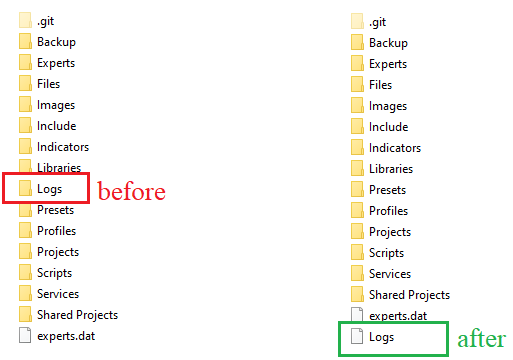
To everyone, only use fxsaber tweak if you know exactly what you are doing.
Olufemi Adeyemo #: Thanks so much, I'm grateful. But permit me to ask "What file or doc can I use to create the file and how do I set it to read-only ATTRIBUTE?
😊 Example for Windows:
1. With the MQL5 folder selected, after moving (or removing) the Logs folder, right-click >> New >> Text Document >> Save as "Logs" (without the .txt extension);
2. Right-click the new file >> Properties >> on the General tab, select the "read-only" attribute.

You are missing trading opportunities:
- Free trading apps
- Over 8,000 signals for copying
- Economic news for exploring financial markets
Registration
Log in
You agree to website policy and terms of use
If you do not have an account, please register
I’m using an EA developed by someone else, but the problem is it prints logs excessively, which makes my hard disk fill up very quickly.
Does MT5 have any function to limit log writing — like at least make it print on screen but not actually write to the HDD?
