Libraries: ConvertServerTime
I slightly modified the example application so that all dates where shifts occur are visible.
#property script_show_inputs

#include <amrali\ConvertServerTime\ConvertServerTime.mqh> // https://www.mql5.com/en/code/65102

input int            InpSourceOffsetUTC = 7200;          // source server standard (winter) UTC offset in seconds
input int            InpDestinationOffsetUTC = 7200;     // destination server standard (winter) UTC offset in seconds
input ENUM_RULE_DST  InpSourceRuleDST = DST_EU;          // source server daylight savings schedule
input ENUM_RULE_DST  InpSestinationRuleDST = DST_US;     // destination server daylight savings schedule

void OnStart()
{
  PrintFormat("Source: UTC = %d (%s)    | Dest: UTC = %d (%s)",
             InpSourceOffsetUTC, EnumToString(InpSourceRuleDST),
             InpDestinationOffsetUTC, EnumToString(InpSestinationRuleDST));

  int Offset = 0;

  for (datetime Time = D'2020.01.01'; Time < D'2026.01.01'; Time += 3600)
  {
    const int NewOffset = (int)(ConvertServerTime(Time, InpSourceOffsetUTC, InpDestinationOffsetUTC,
                                                  InpSourceRuleDST, InpSestinationRuleDST) - Time);

    if (Offset != NewOffset)
    {
      PrintFormat("Source: Time: %s |  dst: %s", (string)Time, (string)(Time + NewOffset));

      Offset = NewOffset;
    }
  }
}
Source: UTC = 7200 (DST_EU)    | Dest: UTC = 7200 (DST_US)
Source: Time: 2020.03.08 00:00:00 |  dst: 2020.03.08 01:00:00
Source: Time: 2020.03.29 00:00:00 |  dst: 2020.03.29 00:00:00
Source: Time: 2020.10.25 00:00:00 |  dst: 2020.10.25 01:00:00
Source: Time: 2020.11.01 00:00:00 |  dst: 2020.11.01 00:00:00

Source: Time: 2021.03.14 00:00:00 |  dst: 2021.03.14 01:00:00
Source: Time: 2021.03.28 00:00:00 |  dst: 2021.03.28 00:00:00
Source: Time: 2021.10.31 00:00:00 |  dst: 2021.10.31 01:00:00
Source: Time: 2021.11.07 00:00:00 |  dst: 2021.11.07 00:00:00

Source: Time: 2022.03.13 00:00:00 |  dst: 2022.03.13 01:00:00
Source: Time: 2022.03.27 00:00:00 |  dst: 2022.03.27 00:00:00
Source: Time: 2022.10.30 00:00:00 |  dst: 2022.10.30 01:00:00
Source: Time: 2022.11.06 00:00:00 |  dst: 2022.11.06 00:00:00

Source: Time: 2023.03.12 00:00:00 |  dst: 2023.03.12 01:00:00
Source: Time: 2023.03.26 00:00:00 |  dst: 2023.03.26 00:00:00
Source: Time: 2023.10.29 00:00:00 |  dst: 2023.10.29 01:00:00
Source: Time: 2023.11.05 00:00:00 |  dst: 2023.11.05 00:00:00

Source: Time: 2024.03.10 00:00:00 |  dst: 2024.03.10 01:00:00
Source: Time: 2024.03.31 00:00:00 |  dst: 2024.03.31 00:00:00
Source: Time: 2024.10.27 00:00:00 |  dst: 2024.10.27 01:00:00
Source: Time: 2024.11.03 00:00:00 |  dst: 2024.11.03 00:00:00

Source: Time: 2025.03.09 00:00:00 |  dst: 2025.03.09 01:00:00
Source: Time: 2025.03.30 00:00:00 |  dst: 2025.03.30 00:00:00
Source: Time: 2025.10.26 00:00:00 |  dst: 2025.10.26 01:00:00
Source: Time: 2025.11.02 00:00:00 |  dst: 2025.11.02 00:00:00
I slightly modified the example application so that all dates where shifts occur are visible.
Please correct the library's behavior.
Source: UTC = 7200 (DST_EU)    | Dest: UTC = 7200 (DST_EU)
Source: Time: 2020.03.29 00:00:00 |  dst: 2020.03.28 23:00:00
Source: Time: 2020.03.29 01:00:00 |  dst: 2020.03.29 01:00:00
Your explanation of server time changes isn’t quite accurate. Forex servers align their trading sessions (the first H1 bar) with New York time.
The Forex market opens on Sunday at 17:00 New York time — that’s 22:00 UTC in winter (GMT-5) and 21:00 UTC in summer (GMT-4). Gold and silver trading usually begins an hour later.
When following U.S. DST (+2/+3), servers generate five D1 candles per week, one for each weekday (none on Saturday or Sunday).
Under U.K. DST (+2/+3), for about three weeks each year — two in March and one in late October — U.S. and EU DST schedules don’t match (U.S. summer is longer). During those weeks, trading starts Sunday at 23:00, resulting in six D1 candles instead of five.
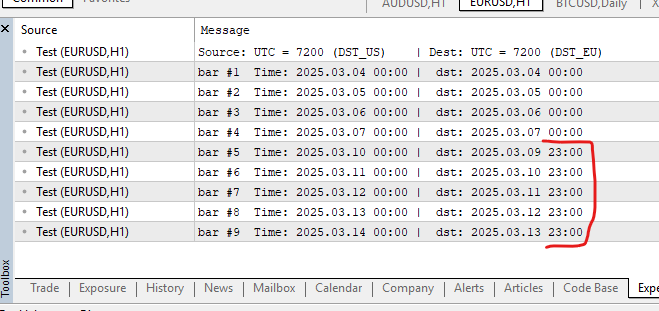
Edit:
There are also DST_NONE brokers (like Exness) that do not follow DST.
I reasure you that the function works perfectly with any of the 6 possible combinations of src/dest servers .
I reasure you that the function works perfectly with any of the 6 possible combinations of src/dest servers .
Marked the same values in yellow.
Forum on trading, automated trading systems and testing trading strategies
fxsaber, 2025.10.22 17:41
Please correct the library's behavior.
Source: UTC = 7200 (DST_EU)    | Dest: UTC = 7200 (DST_EU)
Source: Time: 2020.03.29 00:00:00 |  dst: 2020.03.28 23:00:00
Source: Time: 2020.03.29 01:00:00 |  dst: 2020.03.29 01:00:00
I know about this absent feature, please read the description: "Here is a simplified function to convert server times."
2020.03.29 is Saturday, which is not a server time :-)
It is also an example of inavlid time (around a DST switch).
The function is meant to be simple as possible (it is not intended to be a general purpose time converter).
My other bigger library Local Timezones and Local Session Hours, can do general time conversions (including server time) with the ability to resolve ambiguous times, and invalid times.
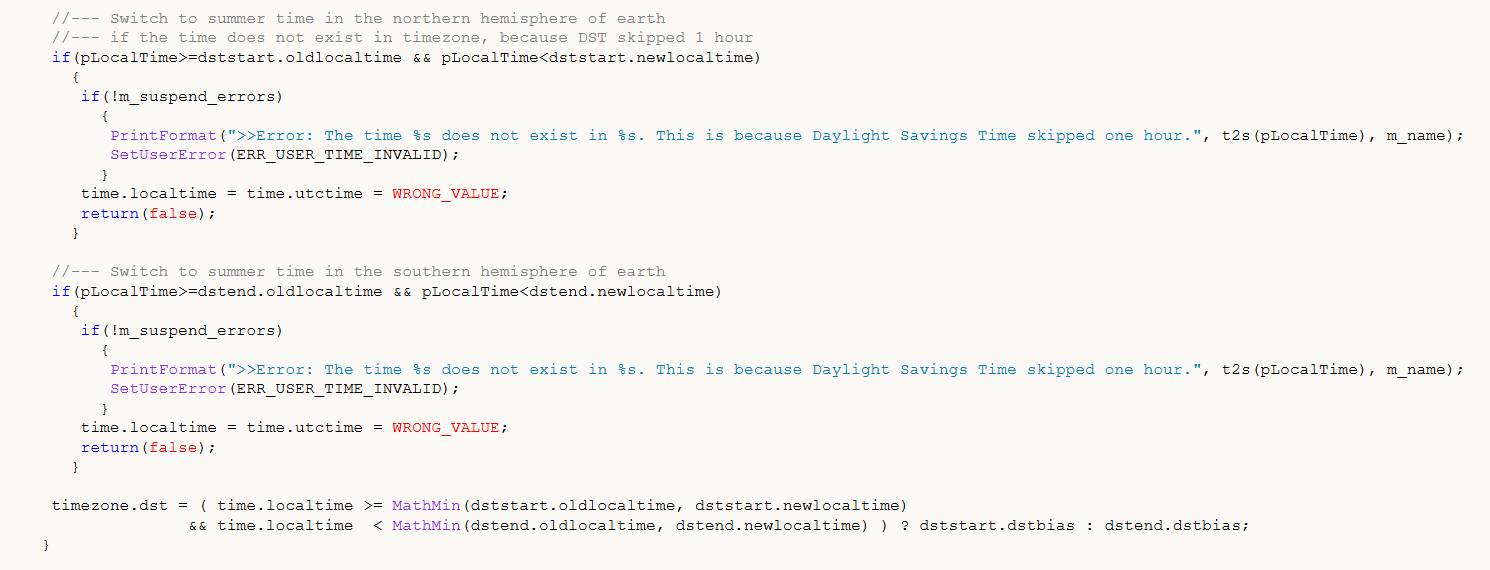
For example This is the code that handles invalid times:

- adegeo
- learn.microsoft.com
Forum on trading, automated trading systems and testing trading strategies
fxsaber, 2025.10.22 17:41
Please correct the library's behavior.
Source: UTC = 7200 (DST_EU)    | Dest: UTC = 7200 (DST_EU)
Source: Time: 2020.03.29 00:00:00 |  dst: 2020.03.28 23:00:00
Source: Time: 2020.03.29 01:00:00 |  dst: 2020.03.29 01:00:00
Fixed in v1.10: invalid time conversions are now handled identically to TimeZoneInfo::ConvertLocalTime, as requested by fxsaber.
ERROR: 2020.03.29 01:00 is invalid for DST_EU (DST skipped this hour).
Check it here: https://www.timeanddate.com/worldclock/converted.html?iso=20200329T01&p1=136&p2=136

- www.timeanddate.com

- Free trading apps
- Over 8,000 signals for copying
- Economic news for exploring financial markets
You agree to website policy and terms of use
ConvertServerTime:
Function to convert server time from one broker's time zone to another.
Author: amrali