dpi reading not updating
how come the dpi reading is not changing even if i change screen resolutions ?
im getting 96 at 1280x1024 and 96 down to 800x600
thanks
it is because mt4/5 is based on old technology. Only way to fix it is to recode mt4/5 gui. There are 3rd party programs that will fix it, but those can be unpredictable.
it is because mt4/5 is based on old technology. Only way to fix it is to recode mt4/5 gui. There are 3rd party programs that will fix it, but those can be unpredictable.
When i change the monitor scale in settings if i restart mt5 it detects the new 144 dpi (150% scale through windows display settings)
So the dpi setting is correct ?
thanks
(so can an auto adjusting panel rely on the dpi reading assuming the user did not alter dpi mid session?)you can right click on a shortcut and got to tab "Compatability" to change the dpi, but i believe this only updates upon restarting the program. no 3rd party program used for this method.
you can right click on a shortcut and got to tab "Compatability" to change the dpi, but i believe this only updates upon restarting the program. no 3rd party program used for this method.
i just want the user to do as little as possible .
I mean if the test starts on the tester and they can't see the ui properly they are less likely to try and fix it and more likely to close the chart.
thanksim getting 96 at 1280x1024 and 96 down to 800x600
The DPI is set by Windows depending on what value you set for your display properties.
Be it 1280x1024 or 800x600, the Windows default is usually 96 dpi, unless you change it.
The DPI is set by Windows depending on what value you set for your display properties.
Be it 1280x1024 or 800x600, the Windows default is usually 96 dpi, unless you change it.
So if im looking at a font size that is proportionally okay on my screen , at 96 dpi then for another user
with 144 dpi i divide the font size by 1.5 ?
So if im looking at a font size that is proportionally okay on my screen , at 96 dpi then for another user
with 144 dpi i divide the font size by 1.5 ?
there is no correlation between dpi, hz, refresh rates. These all depend on the device. some are almost standard, however, there is no list of these "standards" anywhere. You may find a list that is directly linked with a specific device, however, there is 0 guarantee that the same specifications will work on even a 2nd device with exact same physical dimensions or measurements. Go to a linux machine and you will probably have a different dpi too.
there is no correlation between dpi, hz, refresh rates. These all depend on the device. some are almost standard, however, there is no list of these "standards" anywhere. You may find a list that is directly linked with a specific device, however, there is 0 guarantee that the same specifications will work on even a 2nd device with exact same measurements.
Yeah but we are dealing with windows + desktop monitors (and laptops) predominantly
Yeah but we are dealing with windows + desktop monitors (and laptops) predominantly
and that makes it better, how? :D Newer versions of windows have taken care of this issue by controlling the display metrics "in house", but in the past ms left it up to the manufacturers to code in the dpi and other display metrics on their own -- when ms never gave them any info or standards to use. Blame ms all you want, but there is 0 excuse for a program to not have a gui update in as many years as you know what program has or has not had.
and that makes it better, how? :D Newer versions of windows have taken care of this issue by controlling the display metrics "in house", but in the past ms left it up to the manufacturers to code in the dpi and other display metrics on their own -- when ms never gave them any info or standards to use. Blame ms all you want, but there is 0 excuse for a program to not have a gui update in as many years as you know what program has or has not had.
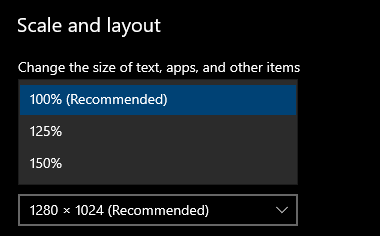
do you mean this setting ?

- Free trading apps
- Over 8,000 signals for copying
- Economic news for exploring financial markets
You agree to website policy and terms of use
how come the dpi reading is not changing even if i change screen resolutions ?
im getting 96 at 1280x1024 and 96 down to 800x600
thanks
Client Terminal Properties - Environment State - Constants, Enumerations and Structures - MQL5 Reference - Reference on algorithmic/automated trading language for MetaTrader 5