Any questions from a PROFI to a SUPER PROFI - 1. - page 36

You are missing trading opportunities:
- Free trading apps
- Over 8,000 signals for copying
- Economic news for exploring financial markets
Registration
Log in
You agree to website policy and terms of use
If you do not have an account, please register
ZS: I can't find a ready-made NS by searching and googling, the .dll with FANN works pretty well, but I'd like it without the .dll
Do you have any idea what you want? To port normally written OOP code to underdeveloped NS? I think no one will do it. All the more so, it will be faster through a dll.
Ask for it on 5, they already stuttered there.
Comrades, came across an indicator that calls itself, here is part of the code (the indicator itself is in the trailer):
The tester does not manage to call it correctly using iCustom() from the Expert Advisor. This is what we get:
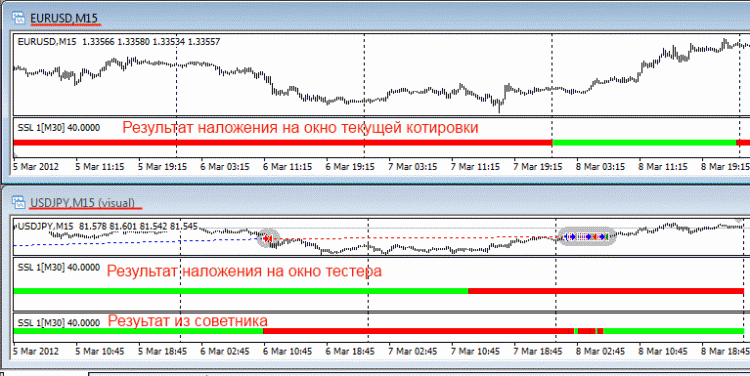
iCustom() of it in the Expert Advisor looks like this:
It displays correctly only if tester's TF is the same as the TF in EA's settings.
Can you advise how to correctly make its call so that it is displayed correctly regardless of the tester's TF?
Or it cannot be done due to peculiarities of the indicator code?
Read an article from Microsoft: http://technet.microsoft.com/ru-ru/library/dd630755(v=office.12).aspx
Here is a quote from it:
64-разрядные выпуски Windows Server могут выполнять адресацию 16 терабайт виртуальной памяти с помощью плоской модели адресации. Виртуальная память разделяется на равные части между виртуальными адресными пространствами для приложений и операционной системы. Увеличение адресного пространства виртуальной памяти в 64-разрядной среде может благоприятно сказаться даже на работе 32-разрядных приложений. Например, хотя 32-разрядное приложение по-прежнему ограничено 4 ГБ виртуальной памяти, ему больше не требуется разделять это пространство с операционной системой. В результате возникает фактическое расширение виртуальной памяти.
It turns out that MT4 can address to 4GB of memory under 64-bit OS?
Can't check it with myself. There's nowhere to put that much memory.
Hello
Question about sockets.
... There is a task from SCADA system running VB (ancient) to send data to socket. I tried to implement it directly from Vb by means of API, but there is one problem
If connection to the socket fails VB is waiting for reply and slows down some time (this is critical)
I wanted to try to create single thread from VB, but it turned out that VB doesn't understand AddressOf.
How can I explain VB to wait for response from remote socket for example 1 sec like TTL for ping'a (remote socket on local)?
Tried another way: on C++ bilder wrote a console application to send to socket.
Tried running it works.
Then I tried to create standalone process from VB. The Runtime runs but won't send any data.
I've started to debug using cout<< <<endl;
I see that when I invoke the exe manually, WsaStartUp works with 0 and connect to 0, send returns number of data transferred
But when I start with VB, WsaStartUp works for 0 and connect for -1, send respectively for 10038.
I don't know what's wrong.
Here is the code from VB
Public Declare Function socket Lib "WSOCK32.DLL" (ByVal af As Long, ByVal s_type As Long, ByVal protocol As Long) As Long Public Declare Function send Lib "WSOCK32.DLL" (ByVal s As Long, buf As Any, ByVal buflen As Long, ByVal Flags As Long) As Long Public Declare Function connect Lib "wsock32" (ByVal socket As Long, addr As sockaddr, ByVal namelen As Long) As Long Public Declare Function closesocket Lib "WSOCK32.DLL" (ByVal s As Long) As Long Public Declare Function inet_addr Lib "wsock32" (ByVal cp As String) As Long Public Declare Function htons Lib "ws2_32.dll" (ByVal hostshort As Long) As Integer Public Declare Function WSAStartup Lib "ws2_32.dll" (ByVal wVR As Long, lpWSAD As WSA_Data) As Long Public Declare Function WSACleanUp Lib "wsock32" Alias "WSACleanup" () As Long Type sockaddr sin_family As Integer sin_port As Integer sin_addr As Long sin_zero As String * 8 End Type Public Const WSADESCRIPTION_LEN = 257 Public Const WSASYS_STATUS_LEN = 129 Public Const WINSOCK_VERSION = 1 Public Type WSA_Data wVersion As Integer wHighVersion As Integer szDescription As String * WSADESCRIPTION_LEN szSystemStatus As String * WSASYS_STATUS_LEN iMaxSockets As Integer iMaxUdpDg As Integer lpVendorInfo As Long End Type '=================================================================== Const INFINITE = &HFFFF Const STARTF_USESHOWWINDOW = &H1 Public Const SW_NORMAL = 1 Private Type PROCESS_INFORMATION hProcess As Long hThread As Long dwProcessId As Long dwThreadId As Long End Type Private Type STARTUPINFO cb As Long lpReserved As String lpDesktop As String lpTitle As String dwX As Long dwY As Long dwXSize As Long dwYSize As Long dwXCountChars As Long dwYCountChars As Long dwFillAttribute As Long dwFlags As Long wShowWindow As Integer cbReserved2 As Integer lpReserved2 As Byte hStdInput As Long hStdOutput As Long hStdError As Long End Type Private Type SECURITY_ATTRIBUTES nLength As Long lpSecurityDescriptor As Long bInheritHandle As Long End Type Public Const NORMAL_PRIORITY_CLASS = &H20 Private Declare Function CreateProcess Lib "kernel32" Alias "CreateProcessA" (ByVal lpApplicationName As _ String, ByVal lpCommandLine As String, lpProcessAttributes As SECURITY_ATTRIBUTES, _ lpThreadAttributes As SECURITY_ATTRIBUTES, ByVal bInheritHandles As Long, ByVal dwCreationFlags _ As Long, lpEnvironment As Any, ByVal lpCurrentDriectory As String, lpStartupInfo As STARTUPINFO, _ lpProcessInformation As PROCESS_INFORMATION) As Boolean Private Declare Function GetLastError Lib "kernel32" () As Long Public Function SuperShell(ByVal App As String, ByVal commandline) As Integer Const CREATE_NO_WINDOW = &H8000000 Dim startProc As Boolean Dim pclass As Long Dim sinfo As STARTUPINFO Dim pinfo As PROCESS_INFORMATION 'Not used, but needed Dim sec1 As SECURITY_ATTRIBUTES Dim sec2 As SECURITY_ATTRIBUTES 'Set the structure size sec1.nLength = Len(sec1) sec2.nLength = Len(sec2) 'sinfo.cb = Len(sinfo) 'Set the flags 'sinfo.dwFlags = STARTF_USESHOWWINDOW 'Set the window's startup position 'sinfo.wShowWindow = start_size 'Set the priority class 'pclass = Priority_Class 'Start the program CREATE_NO_WINDOW startProc = CreateProcess("e:\\project1.exe", commandline, sec1, sec2, False, 0, 0&, "e:\", sinfo, pinfo) End FunctionHello
Why is this history file not showing up on the chart in MT?
There is a need to know the size of the passed text information, in a DLL. Let's say, in MKL5 this is done by sizeof().
Would it be correct to do it in MKL4 via StringLen()? How would it be correct?
p.s. interested in sending third parameter here:http://msdn.microsoft.com/en-us/library/aa365747(v=vs.85).aspx
There is a need to know the size of the passed text information, in a DLL. Let's say, in MKL5 this is done by sizeof().
Would it be correct to do it in MKL4 via StringLen()? How would it be correct?
p.s. interested in sending third parameter here:http://msdn.microsoft.com/en-us/library/aa365747(v=vs.85).aspx