Toolbars & Status Bar Not Appearing on MT4 Desktop Open??
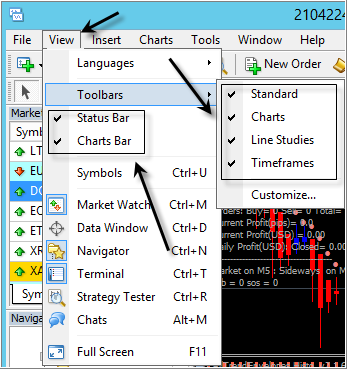
... or -
Forum on trading, automated trading systems and testing trading strategies
Alain Verleyen, 2017.10.21 18:25
I had similar problem and solve it this way :
- Terminal started.
- File menu->Open Data Folder
- Double click on "Config" to open the folder.
- Close the MT5 terminal.
- Delete the file Terminal.ini
- Restart your Terminal, problem should be fixed (you could have to set your toolbars/windows as you like the first time).
15music: Toolbars & Status Bar Not Appearing on MT4 Desktop Open?
If you had used this you would have found:
Toolbars disappear - MQL4 programming forum #1 (2011)
Lost of my tools bars - MT5 - General - MQL5 programming forum (2017)
Bingo!!! It is working correctly, thank you Gents
am not seeing the trade, history, news icons
212017016 #: am not seeing the trade, history, news icons
If someone experiences issues with the MetaTrader interface (toolbars, windows or panels disappearing), the solution is to close the terminal, delete the Terminal.ini file located in the config folder of the Data Folder, and then restart the terminal.
This forces the interface to reset to default and usually resolves the problem.
This has already been discussed earlier in this thread. Generally, you should read before posting.

You are missing trading opportunities:
- Free trading apps
- Over 8,000 signals for copying
- Economic news for exploring financial markets
Registration
Log in
You agree to website policy and terms of use
If you do not have an account, please register
Toolbars & Status Bar Not Appearing on MT4 Desktop Open?
Using a PC and Windows 10, on closing then reopening MT4 from the desktop shortcut the Toolbars & Status Bar are Not Appearing on MT4 Desktop Open??
Any assistance would be much appreciated, thank you .